<?xml version="1.0" encoding="utf-8"?>
<feed xmlns="http://www.w3.org/2005/Atom">
  <author>
    <name>Jason</name>
  </author>
  <generator uri="https://hexo.io/">Hexo</generator>
  <id>https://blog.xujiayao.com/</id>
  <link href="https://blog.xujiayao.com/" rel="alternate"/>
  <link href="https://blog.xujiayao.com/atom.xml" rel="self"/>
  <rights>All rights reserved 2026, Jason</rights>
  <subtitle>没有个性，如何签名？</subtitle>
  <title>Xujiayao's Blog</title>
  <updated>2026-01-19T13:40:50.410Z</updated>
  <entry>
    <author>
      <name>Jason</name>
    </author>
    <category term="日常" scheme="https://blog.xujiayao.com/categories/%E6%97%A5%E5%B8%B8/"/>
    <category term="年度报告" scheme="https://blog.xujiayao.com/tags/%E5%B9%B4%E5%BA%A6%E6%8A%A5%E5%91%8A/"/>
    <category term="2024" scheme="https://blog.xujiayao.com/tags/2024/"/>
    <category term="2025" scheme="https://blog.xujiayao.com/tags/2025/"/>
    <content>
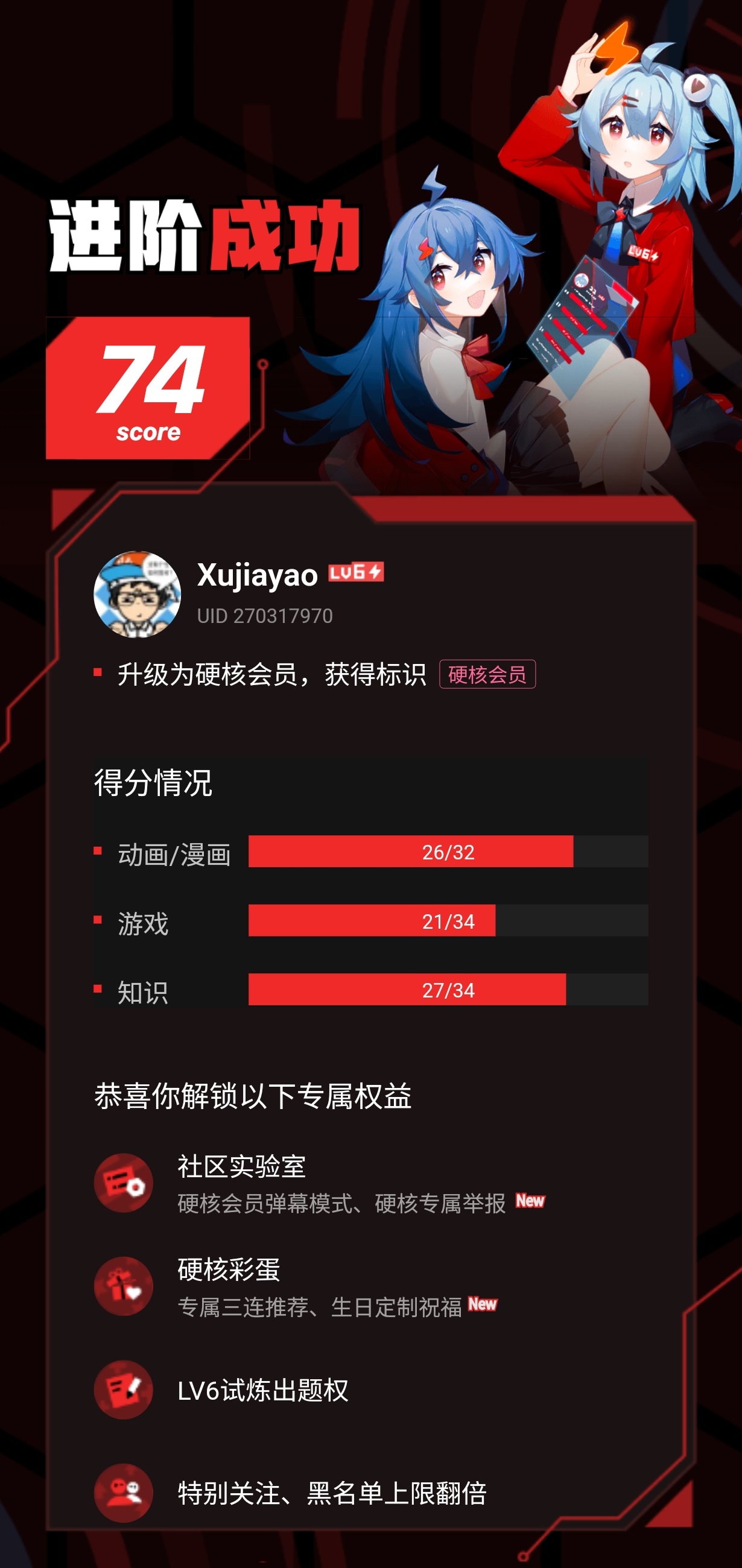
      <![CDATA[<link rel="stylesheet" class="aplayer-secondary-style-marker" href="\assets\css\APlayer.min.css"><script src="\assets\js\APlayer.min.js" class="aplayer-secondary-script-marker"></script><script>var meting_api='https://api.injahow.cn/meting/?server=:server&type=:type&id=:id&r=:r'</script><script class="meting-secondary-script-marker" src="\assets\js\Meting.min.js"></script><p>丸辣~ 现在博客变成一年一篇文章了（＞人＜；）</p><p>争取 2026 年写至少两篇 ╰(￣ω￣ｏ)</p><blockquote><p><font color='red'><b>本文包含大量图片（共 254 张），加载需消耗较多流量（约 490 MiB）。<br>若你正在使用按流量计费的连接，请注意数据使用情况。</b></font></p></blockquote><blockquote><p><font color='green'><b>有一些图片或在滚动页面时渲染失败。可尝试刷新页面以查看。</b></font></p></blockquote><h2 id="前言"><a href="#前言" class="headerlink" title="前言"></a>前言</h2><figure class="highlight yaml"><table><tr><td class="gutter"><pre><span class="line">1</span><br></pre></td><td class="code"><pre><span class="line"><span class="attr">date:</span> <span class="number">2025-01-08 15:57:56</span></span><br></pre></td></tr></table></figure><p>看上面的这行代码。这篇文章其实是今年年初新建文件夹的。</p><p>去年年底我其实已经截好了所有年度报告的图片，准备像 2020 年和 2023 年那样写「基于年度报告的 『年度报告』」。但是不知道为啥是拖延症犯了还是怎么的，这件事就一直放在我的 TODO 清单，但却没有碰过。相当于我今年对着这项 TODO 看了一整年，却一直装作没看见 (*￣3￣)╭</p><p><img src="/file/posts/a0dc9421/01.png" alt="01.png"></p><p>所以想着，去年截了那么多图却不发实在有点可惜，干脆今年就把去年的也一并发了吧ヾ(≧▽≦*)o</p><p>先从 2024 年开始，然后再 2025 年吧！各 APP 年度报告的展示顺序是按其名称的字母顺序，而截图就是按用户的观看次序。</p><p>在写这段前言之前，我已经准备好了所有的截图，所以先提前说一下这次的年度报告数量会特别夸张，比之前那两篇要多很多很多（花了我大约 18 小时来整理。。。）</p><p>也因为截图数量庞大，所以我这次不会详细讲解 &#x2F; 介绍所有的截图，只会选取我认为比较重要的~</p><hr><h2 id="2024-年"><a href="#2024-年" class="headerlink" title="2024 年"></a>2024 年</h2><p>一共 7 项。</p><h3 id="B站-年度报告"><a href="#B站-年度报告" class="headerlink" title="B站 - 年度报告"></a>B站 - 年度报告</h3><p><code>04</code><br>可以看到我越来越喜欢看跟车有关的视频及游戏直播（绝地求生、雀魂麻将）</p><p><code>05</code><br>这个应该是因为我当时在制作「基于十年榜的」车载音乐 U 盘（2024&#x2F;9&#x2F;12 开始制作），需要记录每一首歌的信息，所以就看了很多遍（？）</p><p><code>06</code><br>这一整年几乎没有看番。原本以为考完试放松之后就会大量地看，但是一想到看番就要顺带写一篇博客文章就懒癌犯了（</p><p><code>09</code><br>开始把 B站 当作音乐网站 &#x2F; 软件了hhhh</p><p><code>11</code><br>居然有 212&#x2F;365 天在饭点看坤儿直播 ╰(￣ω￣ｏ) 没想到百分比会这么高诶</p><p><code>13</code><br>我这个人是几乎不投币的。投了的有至少 70% 是不小心点到的（非常讨厌那种视频里的三连小窗），剩下的才是真心喜欢的，或者是认为 UP 主投了大量精力ヾ(•ω•`)o</p><p><code>15</code><br>应该是这一年开始的不定期直播，部分直播内容有投直播回放~ 欢迎大家关注我，啥直播内容都有 ╰(￣ω￣ｏ)</p><blockquote><p>点击图片可放大查看~</p></blockquote><div class="gallery-container" data-type="data" data-button="" data-limit="10" data-first="10">    <div class="gallery-items">[{"url":"/file/posts/a0dc9421/2024/Bilibili/01.png","alt":"01.png","title":""},{"url":"/file/posts/a0dc9421/2024/Bilibili/02.png","alt":"02.png","title":""},{"url":"/file/posts/a0dc9421/2024/Bilibili/03.png","alt":"03.png","title":""},{"url":"/file/posts/a0dc9421/2024/Bilibili/04.png","alt":"04.png","title":""},{"url":"/file/posts/a0dc9421/2024/Bilibili/05.png","alt":"05.png","title":""},{"url":"/file/posts/a0dc9421/2024/Bilibili/06.png","alt":"06.png","title":""},{"url":"/file/posts/a0dc9421/2024/Bilibili/07.png","alt":"07.png","title":""},{"url":"/file/posts/a0dc9421/2024/Bilibili/08.png","alt":"08.png","title":""},{"url":"/file/posts/a0dc9421/2024/Bilibili/09.png","alt":"09.png","title":""},{"url":"/file/posts/a0dc9421/2024/Bilibili/10.png","alt":"10.png","title":""},{"url":"/file/posts/a0dc9421/2024/Bilibili/11.png","alt":"11.png","title":""},{"url":"/file/posts/a0dc9421/2024/Bilibili/12.png","alt":"12.png","title":""},{"url":"/file/posts/a0dc9421/2024/Bilibili/13.png","alt":"13.png","title":""},{"url":"/file/posts/a0dc9421/2024/Bilibili/14.png","alt":"14.png","title":""},{"url":"/file/posts/a0dc9421/2024/Bilibili/15.png","alt":"15.png","title":""},{"url":"/file/posts/a0dc9421/2024/Bilibili/16.png","alt":"16.png","title":""},{"url":"/file/posts/a0dc9421/2024/Bilibili/17.png","alt":"17.png","title":""}]</div>  </div><h3 id="B站-年度音乐报告"><a href="#B站-年度音乐报告" class="headerlink" title="B站 - 年度音乐报告"></a>B站 - 年度音乐报告</h3><p>一般来说「看」音乐都是点进去一个播放列表，就会开始一个接一个地播放了。我通常是挂到后台当听歌软件用，所以确实看得比较多。</p><blockquote><p>点击图片可放大查看~</p></blockquote><div class="gallery-container" data-type="data" data-button="" data-limit="10" data-first="10">    <div class="gallery-items">[{"url":"/file/posts/a0dc9421/2024/BilibiliAudio/01.png","alt":"01.png","title":""},{"url":"/file/posts/a0dc9421/2024/BilibiliAudio/02.png","alt":"02.png","title":""},{"url":"/file/posts/a0dc9421/2024/BilibiliAudio/03.png","alt":"03.png","title":""},{"url":"/file/posts/a0dc9421/2024/BilibiliAudio/04.png","alt":"04.png","title":""},{"url":"/file/posts/a0dc9421/2024/BilibiliAudio/05.png","alt":"05.png","title":""},{"url":"/file/posts/a0dc9421/2024/BilibiliAudio/06.png","alt":"06.png","title":""},{"url":"/file/posts/a0dc9421/2024/BilibiliAudio/07.png","alt":"07.png","title":""},{"url":"/file/posts/a0dc9421/2024/BilibiliAudio/08.png","alt":"08.png","title":""}]</div>  </div><h3 id="多邻国"><a href="#多邻国" class="headerlink" title="多邻国"></a>多邻国</h3><p>没记错的话我是在 2024 年 9 月 30 日凌晨入坑的多邻国。</p><p>用多邻国主要是学习日语，而英语是拿来刷排行榜的（太简单了，直接跳到「每日巩固练习」也照样三秒一题hhh）</p><blockquote><p>点击图片可放大查看~</p></blockquote><div class="gallery-container" data-type="data" data-button="" data-limit="10" data-first="10">    <div class="gallery-items">[{"url":"/file/posts/a0dc9421/2024/Duolingo/01.png","alt":"01.png","title":""},{"url":"/file/posts/a0dc9421/2024/Duolingo/02.png","alt":"02.png","title":""},{"url":"/file/posts/a0dc9421/2024/Duolingo/03.png","alt":"03.png","title":""},{"url":"/file/posts/a0dc9421/2024/Duolingo/04.png","alt":"04.png","title":""},{"url":"/file/posts/a0dc9421/2024/Duolingo/05.png","alt":"05.png","title":""},{"url":"/file/posts/a0dc9421/2024/Duolingo/06.png","alt":"06.png","title":""},{"url":"/file/posts/a0dc9421/2024/Duolingo/07.png","alt":"07.png","title":""},{"url":"/file/posts/a0dc9421/2024/Duolingo/08.png","alt":"08.png","title":""},{"url":"/file/posts/a0dc9421/2024/Duolingo/09.png","alt":"09.png","title":""},{"url":"/file/posts/a0dc9421/2024/Duolingo/10.png","alt":"10.png","title":""}]</div>  </div><h3 id="雀魂麻将"><a href="#雀魂麻将" class="headerlink" title="雀魂麻将"></a>雀魂麻将</h3><p>2024 年二月份去 <a href="https://pedropo.com/">@Pedro</a> 家玩的时候，第一次真正学习了麻将的基础知识和香港清章麻雀的玩法。后来就在网上自学，顺便了解了雀魂这款游戏（结果就上瘾了）</p><p>线下打就是打港麻，线上打就是打日麻 ヾ(≧▽≦*)o</p><p>2024 年 6 月花 600 软妹买了大洋化学 SMART 套装 + 门风盘 + JUNK MAT。线下也能打日麻啦！！！</p><p>不过基本还是拿这副麻将来打港麻。日麻还是太偏向专业性和竞技性了，周围没有几个人会打 o(TヘTo)</p><p>看到这的各位线下友友们（<del>此术语来自 <a href="https://space.bilibili.com/8366990">-欣小萌-</a></del>），如果会打麻将的话，快来找我约起呀 ヾ(≧▽≦*)o</p><p><img src="/file/posts/a0dc9421/2024/MahjongSoul/00.jpg" alt="00.jpg"></p><blockquote><p>点击图片可放大查看~</p></blockquote><div class="gallery-container" data-type="data" data-button="" data-limit="10" data-first="10">    <div class="gallery-items">[{"url":"/file/posts/a0dc9421/2024/MahjongSoul/01.png","alt":"01.png","title":""},{"url":"/file/posts/a0dc9421/2024/MahjongSoul/02.png","alt":"02.png","title":""},{"url":"/file/posts/a0dc9421/2024/MahjongSoul/03.png","alt":"03.png","title":""},{"url":"/file/posts/a0dc9421/2024/MahjongSoul/04.png","alt":"04.png","title":""},{"url":"/file/posts/a0dc9421/2024/MahjongSoul/05.png","alt":"05.png","title":""},{"url":"/file/posts/a0dc9421/2024/MahjongSoul/06.png","alt":"06.png","title":""},{"url":"/file/posts/a0dc9421/2024/MahjongSoul/07.png","alt":"07.png","title":""},{"url":"/file/posts/a0dc9421/2024/MahjongSoul/08.png","alt":"08.png","title":""},{"url":"/file/posts/a0dc9421/2024/MahjongSoul/09.png","alt":"09.png","title":""},{"url":"/file/posts/a0dc9421/2024/MahjongSoul/10.png","alt":"10.png","title":""},{"url":"/file/posts/a0dc9421/2024/MahjongSoul/11.png","alt":"11.png","title":""},{"url":"/file/posts/a0dc9421/2024/MahjongSoul/12.png","alt":"12.png","title":""},{"url":"/file/posts/a0dc9421/2024/MahjongSoul/13.png","alt":"13.png","title":""}]</div>  </div><h3 id="QQ"><a href="#QQ" class="headerlink" title="QQ"></a>QQ</h3><p>有了之前 2023 年度报告过期无法查看的教训，这次 QQ 年度报告我是早早就截好了图2333</p><p>照样是几乎没有在使用的状态，仅有的几条聊天消息也是极具目的性的聊天。打入冷宫，可以抬走厚葬了 ╮(╯-╰)╭</p><blockquote><p>点击图片可放大查看~</p></blockquote><div class="gallery-container" data-type="data" data-button="" data-limit="10" data-first="10">    <div class="gallery-items">[{"url":"/file/posts/a0dc9421/2024/QQ/01.png","alt":"01.png","title":""},{"url":"/file/posts/a0dc9421/2024/QQ/02.png","alt":"02.png","title":""},{"url":"/file/posts/a0dc9421/2024/QQ/03.png","alt":"03.png","title":""},{"url":"/file/posts/a0dc9421/2024/QQ/04.png","alt":"04.png","title":""},{"url":"/file/posts/a0dc9421/2024/QQ/05.jpg","alt":"05.jpg","title":""}]</div>  </div><h3 id="QQ音乐"><a href="#QQ音乐" class="headerlink" title="QQ音乐"></a>QQ音乐</h3><p><code>02</code><br>可以看到我的听歌偏好从这一年开始逐渐转向国语</p><p><code>03</code><br>我个人是没觉得〈圣诞星〉难听，但倒也不会听很多遍</p><p><code>04</code><br>是《212》专辑里的歌哦！后面 <code>06</code> 有提到！</p><p><code>05</code><br>看来听再多国语歌也撼动不了 ZUN 东方原曲的地位hhh</p><p><code>06</code><br>《212》这个专辑是真的顶，超级好听！！nameless 的声线很赞！！当然 とあ 的作曲、作词、编曲也是真神级别的！！</p><p><code>07</code><br>看来国语只是歌曲数目比较多，真正循环得多的还得是日语</p><p><code>08</code><br>这首更是经典，発熱巫女～ず 的东方同人音乐，配上 陽花 的声线，又是一首封神歌曲！！</p><blockquote><p>点击图片可放大查看~</p></blockquote><div class="gallery-container" data-type="data" data-button="" data-limit="10" data-first="10">    <div class="gallery-items">[{"url":"/file/posts/a0dc9421/2024/QQMusic/01.png","alt":"01.png","title":""},{"url":"/file/posts/a0dc9421/2024/QQMusic/02.png","alt":"02.png","title":""},{"url":"/file/posts/a0dc9421/2024/QQMusic/03.png","alt":"03.png","title":""},{"url":"/file/posts/a0dc9421/2024/QQMusic/04.png","alt":"04.png","title":""},{"url":"/file/posts/a0dc9421/2024/QQMusic/05.png","alt":"05.png","title":""},{"url":"/file/posts/a0dc9421/2024/QQMusic/06.png","alt":"06.png","title":""},{"url":"/file/posts/a0dc9421/2024/QQMusic/07.png","alt":"07.png","title":""},{"url":"/file/posts/a0dc9421/2024/QQMusic/08.png","alt":"08.png","title":""},{"url":"/file/posts/a0dc9421/2024/QQMusic/09.png","alt":"09.png","title":""},{"url":"/file/posts/a0dc9421/2024/QQMusic/10.png","alt":"10.png","title":""},{"url":"/file/posts/a0dc9421/2024/QQMusic/11.png","alt":"11.png","title":""},{"url":"/file/posts/a0dc9421/2024/QQMusic/12.png","alt":"12.png","title":""},{"url":"/file/posts/a0dc9421/2024/QQMusic/13.png","alt":"13.png","title":""},{"url":"/file/posts/a0dc9421/2024/QQMusic/14.png","alt":"14.png","title":""}]</div>  </div><h3 id="Steam"><a href="#Steam" class="headerlink" title="Steam"></a>Steam</h3><p>我表姐年中（应该是 6 月）送了我 PXN V99 方向盘模拟器 + 支架，所以可以看到我后半年玩了比较长时间的 欧卡2 和 尘埃拉力赛2.0。</p><p>而 尘埃拉力赛2.0 我最初是玩的盗版，所以其实有大量的游玩时间没有算进去，10 月才趁打折入正 ╮(╯-╰)╭</p><p>雀魂玩的量也是极为恐怖的。这里单单用 Steam 在电脑上玩就 59 小时了，算上手机、平板上玩的时长，参考雀魂年度报告的 1314 局记录，绝对有超过 500 小时（要知道我是 2 月才刚入坑的）（o´・ェ・｀o）</p><blockquote><p>点击图片可放大查看~</p></blockquote><div class="gallery-container" data-type="data" data-button="" data-limit="10" data-first="10">    <div class="gallery-items">[{"url":"/file/posts/a0dc9421/2024/Steam/01.png","alt":"01.png","title":""},{"url":"/file/posts/a0dc9421/2024/Steam/02.png","alt":"02.png","title":""},{"url":"/file/posts/a0dc9421/2024/Steam/03.png","alt":"03.png","title":""},{"url":"/file/posts/a0dc9421/2024/Steam/04.png","alt":"04.png","title":""},{"url":"/file/posts/a0dc9421/2024/Steam/05.png","alt":"05.png","title":""},{"url":"/file/posts/a0dc9421/2024/Steam/06.png","alt":"06.png","title":""},{"url":"/file/posts/a0dc9421/2024/Steam/07.png","alt":"07.png","title":""},{"url":"/file/posts/a0dc9421/2024/Steam/08.png","alt":"08.png","title":""},{"url":"/file/posts/a0dc9421/2024/Steam/09.png","alt":"09.png","title":""},{"url":"/file/posts/a0dc9421/2024/Steam/10.png","alt":"10.png","title":""}]</div>  </div><hr><h2 id="2025-年"><a href="#2025-年" class="headerlink" title="2025 年"></a>2025 年</h2><p>一共 19 项。现在知道为什么工作量如此大了吧 (￣_￣|||)</p><h3 id="支付宝"><a href="#支付宝" class="headerlink" title="支付宝"></a>支付宝</h3><p>支付宝消费确实比较少，基本上一直都在用微信支付。</p><p>忘了是去年还是今年，反正内地的银行卡我是这两年刚办。支付宝的服务基本上都是跟银行账户挂钩的，所以对比微信支付，需要用到支付宝的场景还是要少不少的。微信直接好友间转账、收红包，进入「零钱」就好了嘛。不过我这两个月已经在积累转出银行账户里免手续费的「提现免费券」了，毕竟放「零钱」里没有任何利息。</p><blockquote><p>点击图片可放大查看~</p></blockquote><div class="gallery-container" data-type="data" data-button="" data-limit="10" data-first="10">    <div class="gallery-items">[{"url":"/file/posts/a0dc9421/2025/Alipay/01.png","alt":"01.png","title":""},{"url":"/file/posts/a0dc9421/2025/Alipay/02.png","alt":"02.png","title":""},{"url":"/file/posts/a0dc9421/2025/Alipay/03.png","alt":"03.png","title":""},{"url":"/file/posts/a0dc9421/2025/Alipay/04.png","alt":"04.png","title":""},{"url":"/file/posts/a0dc9421/2025/Alipay/05.png","alt":"05.png","title":""},{"url":"/file/posts/a0dc9421/2025/Alipay/06.png","alt":"06.png","title":""}]</div>  </div><h3 id="AlipayHK"><a href="#AlipayHK" class="headerlink" title="AlipayHK"></a>AlipayHK</h3><p>AlipayHK 我以前还是经常用的。后来我寻思我都早就有银行账户了，为什么不去办信用卡和借记卡呢？所以后续我都是直接用 Google Pay 支付，就直接绕过 AlipayHK 啦~</p><p>此外我有很多张卡嘛，每张卡（当然是免年费的咯）都对应不同品类的消费。每次消费选择对应的卡，可以最大化信用卡返现√</p><p>「Café de Coral Group Ltd」其实就是「大家乐」餐厅。可以说我是 大快活 和 大家乐 的常驻客户了，每个月至少都要去个 10 次吧（笑</p><p>周围的朋友，不论是香港还是内地的，几乎全部都很讨厌 大家乐，我还认识些吃这家店能吃到干呕的。。。不是很懂的说（我吃着津津有味 ╮(╯-╰)╭</p><p>去日本的时候我还没办这些银行卡，所以就还是用的 AlipayHK 来应急。现在肯定是直接刷借记卡咯（汇丰的借记卡比信用卡更适合在外地消费使用）</p><blockquote><p>点击图片可放大查看~</p></blockquote><div class="gallery-container" data-type="data" data-button="" data-limit="10" data-first="10">    <div class="gallery-items">[{"url":"/file/posts/a0dc9421/2025/AlipayHK/01.png","alt":"01.png","title":""},{"url":"/file/posts/a0dc9421/2025/AlipayHK/02.png","alt":"02.png","title":""},{"url":"/file/posts/a0dc9421/2025/AlipayHK/03.png","alt":"03.png","title":""},{"url":"/file/posts/a0dc9421/2025/AlipayHK/04.png","alt":"04.png","title":""},{"url":"/file/posts/a0dc9421/2025/AlipayHK/05.png","alt":"05.png","title":""},{"url":"/file/posts/a0dc9421/2025/AlipayHK/06.png","alt":"06.png","title":""},{"url":"/file/posts/a0dc9421/2025/AlipayHK/07.png","alt":"07.png","title":""},{"url":"/file/posts/a0dc9421/2025/AlipayHK/08.png","alt":"08.png","title":""}]</div>  </div><h3 id="地图软件"><a href="#地图软件" class="headerlink" title="地图软件"></a>地图软件</h3><p>我是 4 月 1 号愚人节拿到的 C1 驾照。后面就天天开车出去溜达。没开车以前我是只有安装 百度地图 的，后面才新装的 高德地图。所以今年我是两款软件混用的，就放一起说吧ヾ(•ω•`)o</p><p>暑假实习的时候每天上班来回都要开 30 公里的车，算是对沿路了如指掌了。所以我就在每天换着导航软件开，就觉得 百度地图 的「车道级导航」不是太灵敏，而且容易显示到错误的车道（仅管 百度地图 才是首发「车道级导航」的软件）。</p><p>有看我上面讲解 2024 年度报告的各位应该都知道了，我在去年就开始用模拟器玩 欧卡2，所以我的车技在考驾照前就已经相当了得了（<del>绝对没有自夸的意思</del>）。驾校我去也只是随便到处练练和研究，教练都不用管我hhh (。・∀・)ノ</p><p>我家里人对我的水平也是非常认可，全部需要开车的场景都是交给我来开。交通事故集锦看太多了，早已养成了防御型驾驶，能够对道路上的环境实时分析并提前预判，所以开的车是「稳而不慢」。我爸妈都经常自嘲说他们的车技都快要退化了哈哈哈。目前开了得有接近 10000 公里了，无事故无剐蹭ヾ(≧▽≦*)o</p><p>高德的加油功能还挺不错的，比加油站官方的油价要便宜超级多的！开到外地没油卡的时候，我都会开 高德地图 来搜索附近支持 高德加油 的加油站，再去。接近用油卡的价格了，大约 9 折到 95 折的样子！</p><h4 id="高德地图"><a href="#高德地图" class="headerlink" title="高德地图"></a>高德地图</h4><blockquote><p>点击图片可放大查看~</p></blockquote><div class="gallery-container" data-type="data" data-button="" data-limit="10" data-first="10">    <div class="gallery-items">[{"url":"/file/posts/a0dc9421/2025/Amap/01.png","alt":"01.png","title":""},{"url":"/file/posts/a0dc9421/2025/Amap/02.png","alt":"02.png","title":""},{"url":"/file/posts/a0dc9421/2025/Amap/03.png","alt":"03.png","title":""},{"url":"/file/posts/a0dc9421/2025/Amap/04.png","alt":"04.png","title":""},{"url":"/file/posts/a0dc9421/2025/Amap/05.png","alt":"05.png","title":""},{"url":"/file/posts/a0dc9421/2025/Amap/06.png","alt":"06.png","title":""},{"url":"/file/posts/a0dc9421/2025/Amap/07.png","alt":"07.png","title":""},{"url":"/file/posts/a0dc9421/2025/Amap/08.png","alt":"08.png","title":""},{"url":"/file/posts/a0dc9421/2025/Amap/09.png","alt":"09.png","title":""},{"url":"/file/posts/a0dc9421/2025/Amap/10.png","alt":"10.png","title":""},{"url":"/file/posts/a0dc9421/2025/Amap/11.png","alt":"11.png","title":""},{"url":"/file/posts/a0dc9421/2025/Amap/12.png","alt":"12.png","title":""},{"url":"/file/posts/a0dc9421/2025/Amap/13.png","alt":"13.png","title":""},{"url":"/file/posts/a0dc9421/2025/Amap/14.png","alt":"14.png","title":""},{"url":"/file/posts/a0dc9421/2025/Amap/15.png","alt":"15.png","title":""}]</div>  </div><h4 id="百度地图"><a href="#百度地图" class="headerlink" title="百度地图"></a>百度地图</h4><blockquote><p>点击图片可放大查看~</p></blockquote><div class="gallery-container" data-type="data" data-button="" data-limit="10" data-first="10">    <div class="gallery-items">[{"url":"/file/posts/a0dc9421/2025/BaiduMaps/01.png","alt":"01.png","title":""},{"url":"/file/posts/a0dc9421/2025/BaiduMaps/02.png","alt":"02.png","title":""},{"url":"/file/posts/a0dc9421/2025/BaiduMaps/03.png","alt":"03.png","title":""},{"url":"/file/posts/a0dc9421/2025/BaiduMaps/04.png","alt":"04.png","title":""},{"url":"/file/posts/a0dc9421/2025/BaiduMaps/05.png","alt":"05.png","title":""},{"url":"/file/posts/a0dc9421/2025/BaiduMaps/06.png","alt":"06.png","title":""},{"url":"/file/posts/a0dc9421/2025/BaiduMaps/07.png","alt":"07.png","title":""},{"url":"/file/posts/a0dc9421/2025/BaiduMaps/08.png","alt":"08.png","title":""},{"url":"/file/posts/a0dc9421/2025/BaiduMaps/09.png","alt":"09.png","title":""}]</div>  </div><h3 id="B站-年度报告-1"><a href="#B站-年度报告-1" class="headerlink" title="B站 - 年度报告"></a>B站 - 年度报告</h3><p>12 月 25 号那天一打开 B站 就弹出来下面这张图（替代平时的广告或 2233 娘），只有三秒的反应时间。。。还好我眼疾手快按了个截图快捷键，不然这张截图也不会出现在这里了ヾ(≧▽≦*)o</p><p><img src="/file/posts/a0dc9421/2025/Bilibili/00.jpg" alt="00.jpg"></p><p>今年的 B站 硬核会员试炼 分数明显要比之前高hhh，毕竟 AI 已经用得出神入化了 ヾ(•ω•`)o</p><p>不过这两年用下来，感觉硬核会员的权益完全用不上，所以 2026 年就不打算续啦 ╮(╯-╰)╭</p><p><img src="/file/posts/a0dc9421/2025/Bilibili/00.png" alt="00.png"></p><p><code>03</code><br>牛油果大虾沙拉、一米八的坤儿、粒小哩这三位都是看直播的，而 JLRS-LeoFM 则是后台播音乐。极客湾能上榜我是万万没想到的，云飞平时直播我也没看啊，就没事看看切片诶（⊙ｏ⊙）</p><p><code>06</code><br>其实我 2024 年是不咋关注 AI 这方面的。DeepSeek-R1 发布之前，我也就只有用过 Poe 上的 ChatGPT 来做些简单的任务。后来 DeepSeek-R1 刚刚发布的时候，我同学发消息告诉我这回事，还记得当时主要提到的是它的算数能力很强，结果我还没有多大反应hhh</p><p>后来一用，简直封神！然后就彻底迷上了 AI 这方面的内容。现在我还有每天在 B站 收看「AI 早报」的习惯呢 ╰(￣ω￣ｏ)</p><p>目前的话日常聊天和文字图片类聊天我是使用 <a href="https://yuanbao.tencent.com/">腾讯元宝</a> 的 DeepSeek-V3.2 Thinking，而编程方面我则是使用 <a href="https://github.com/copilot">GitHub Copilot</a>，学生有 Copilot Pro 权限。我里面各种模型都用，主要用 Gemini 3 Pro。</p><p><code>08</code><br>今天发生啥了？？？这时长简直离谱（⊙ｏ⊙）</p><p><code>09</code><br>我发现助眠类视频对我一点作用都没有。听助眠视频虽然有舒服的感觉，但是完全入不了眠，一关掉就入睡了。。。</p><p><code>12</code><br>这个视频大概是凌晨 5 点左右看的，当时看得感动死了，另外还认识了 Autumn Leaf 这首歌（＞人＜；）</p><p><code>19</code><br>啊？为啥我还能成为两位用户的年度挚爱？？？</p><p>最后一张图的「年度感谢视频」，是以下「年度喜爱」UP 主（按显示的顺序，从左到右）：</p><ol><li><a href="https://space.bilibili.com/25876945">极客湾Geekerwan</a></li><li><a href="https://space.bilibili.com/367877">笔吧评测室</a></li><li><a href="https://space.bilibili.com/229733301">音乐私藏馆</a></li><li><a href="https://space.bilibili.com/37780021">四川柯基菌</a></li><li><a href="https://space.bilibili.com/540564177">Jason-老湿</a></li><li><a href="https://space.bilibili.com/19738891">一米八的坤儿</a></li></ol><blockquote><p>点击图片可放大查看~</p></blockquote><div class="gallery-container" data-type="data" data-button="" data-limit="10" data-first="10">    <div class="gallery-items">[{"url":"/file/posts/a0dc9421/2025/Bilibili/01.png","alt":"01.png","title":""},{"url":"/file/posts/a0dc9421/2025/Bilibili/02.png","alt":"02.png","title":""},{"url":"/file/posts/a0dc9421/2025/Bilibili/03.png","alt":"03.png","title":""},{"url":"/file/posts/a0dc9421/2025/Bilibili/04.png","alt":"04.png","title":""},{"url":"/file/posts/a0dc9421/2025/Bilibili/05.png","alt":"05.png","title":""},{"url":"/file/posts/a0dc9421/2025/Bilibili/06.png","alt":"06.png","title":""},{"url":"/file/posts/a0dc9421/2025/Bilibili/07.png","alt":"07.png","title":""},{"url":"/file/posts/a0dc9421/2025/Bilibili/08.png","alt":"08.png","title":""},{"url":"/file/posts/a0dc9421/2025/Bilibili/09.png","alt":"09.png","title":""},{"url":"/file/posts/a0dc9421/2025/Bilibili/10.png","alt":"10.png","title":""},{"url":"/file/posts/a0dc9421/2025/Bilibili/11.png","alt":"11.png","title":""},{"url":"/file/posts/a0dc9421/2025/Bilibili/12.png","alt":"12.png","title":""},{"url":"/file/posts/a0dc9421/2025/Bilibili/13.png","alt":"13.png","title":""},{"url":"/file/posts/a0dc9421/2025/Bilibili/14.png","alt":"14.png","title":""},{"url":"/file/posts/a0dc9421/2025/Bilibili/15.png","alt":"15.png","title":""},{"url":"/file/posts/a0dc9421/2025/Bilibili/16.png","alt":"16.png","title":""},{"url":"/file/posts/a0dc9421/2025/Bilibili/17.png","alt":"17.png","title":""},{"url":"/file/posts/a0dc9421/2025/Bilibili/18.png","alt":"18.png","title":""},{"url":"/file/posts/a0dc9421/2025/Bilibili/19.png","alt":"19.png","title":""}]</div>  </div><h3 id="B站-年度音乐报告-1"><a href="#B站-年度音乐报告-1" class="headerlink" title="B站 - 年度音乐报告"></a>B站 - 年度音乐报告</h3><p>音乐这部分好像没有什么特别想说的，总之就是如果首页有的话一般就会点进去，放后台让它随机播放了 ╰(￣ω￣ｏ)</p><blockquote><p>点击图片可放大查看~</p></blockquote><div class="gallery-container" data-type="data" data-button="" data-limit="10" data-first="10">    <div class="gallery-items">[{"url":"/file/posts/a0dc9421/2025/BilibiliAudio/01.png","alt":"01.png","title":""},{"url":"/file/posts/a0dc9421/2025/BilibiliAudio/02.png","alt":"02.png","title":""},{"url":"/file/posts/a0dc9421/2025/BilibiliAudio/03.png","alt":"03.png","title":""},{"url":"/file/posts/a0dc9421/2025/BilibiliAudio/04.png","alt":"04.png","title":""},{"url":"/file/posts/a0dc9421/2025/BilibiliAudio/05.png","alt":"05.png","title":""},{"url":"/file/posts/a0dc9421/2025/BilibiliAudio/06.png","alt":"06.png","title":""},{"url":"/file/posts/a0dc9421/2025/BilibiliAudio/07.png","alt":"07.png","title":""},{"url":"/file/posts/a0dc9421/2025/BilibiliAudio/08.png","alt":"08.png","title":""},{"url":"/file/posts/a0dc9421/2025/BilibiliAudio/09.png","alt":"09.png","title":""},{"url":"/file/posts/a0dc9421/2025/BilibiliAudio/10.png","alt":"10.png","title":""}]</div>  </div><h3 id="B站-时光储蓄罐"><a href="#B站-时光储蓄罐" class="headerlink" title="B站 - 时光储蓄罐"></a>B站 - 时光储蓄罐</h3><p><code>02</code><br>这里值得一提的是「天文学」这块，主要代表性观看的有 <a href="https://space.bilibili.com/357515451">Linvo说宇宙</a> 和 <a href="https://space.bilibili.com/436642180">司文的不思議世界</a>。</p><p><code>04</code><br>吐槽一下内地的驾考：科目三太死板了。路线这么多条，每一条路线、每一条道路该走的车道都要死记硬背。。。害我挂了三次才过 (￣_￣|||)</p><p>不过嘛，「过爱看」ヾ(≧▽≦*)o</p><p><code>06</code><br>现在越来越少 UP 主做实况类视频了。四川柯基菌 的 MC 实况是我少有的能坚持下来看的且今年还有在做的 MC 实况主了。不过看他最近的视频，好像也逐渐对 MC 实况失去了耐心。永远都是第一期看的人多，随后播放量会呈 <code>y = e^(-x)</code> 型下降，导致实况主入不敷出 (￣_￣|||)</p><blockquote><p>点击图片可放大查看~</p></blockquote><div class="gallery-container" data-type="data" data-button="" data-limit="10" data-first="10">    <div class="gallery-items">[{"url":"/file/posts/a0dc9421/2025/BilibiliTimeBank/01.png","alt":"01.png","title":""},{"url":"/file/posts/a0dc9421/2025/BilibiliTimeBank/02.png","alt":"02.png","title":""},{"url":"/file/posts/a0dc9421/2025/BilibiliTimeBank/03.png","alt":"03.png","title":""},{"url":"/file/posts/a0dc9421/2025/BilibiliTimeBank/04.png","alt":"04.png","title":""},{"url":"/file/posts/a0dc9421/2025/BilibiliTimeBank/05.png","alt":"05.png","title":""},{"url":"/file/posts/a0dc9421/2025/BilibiliTimeBank/06.png","alt":"06.png","title":""},{"url":"/file/posts/a0dc9421/2025/BilibiliTimeBank/07.png","alt":"07.png","title":""},{"url":"/file/posts/a0dc9421/2025/BilibiliTimeBank/08.png","alt":"08.png","title":""},{"url":"/file/posts/a0dc9421/2025/BilibiliTimeBank/09.png","alt":"09.png","title":""}]</div>  </div><h3 id="大众点评"><a href="#大众点评" class="headerlink" title="大众点评"></a>大众点评</h3><p>在内地消费还真必须得学会用 大众点评，价格比扫码单点要便宜不少。</p><p>不过有一些特定的餐厅（比如麦当劳）用淘宝下单甚至还能再便宜一档 \(￣︶￣*\))</p><p>暑假实习的时候还学会了另一招：</p><p>那会正是淘宝和京东在外卖区大战的时候，所以各家外卖叠完券之后都很便宜，比 大众点评 还要再便宜。去餐厅堂食，点好外卖后，打电话给骑手让他不用来，同时告诉店员我的座位，然后把我的订单改成使用堂食的方式上菜即可~ 这样操作之后上菜是用的堂食餐具，不是在餐厅里吃外卖打包盒哦！ ╰(￣ω￣ｏ)</p><blockquote><p>点击图片可放大查看~</p></blockquote><div class="gallery-container" data-type="data" data-button="" data-limit="10" data-first="10">    <div class="gallery-items">[{"url":"/file/posts/a0dc9421/2025/Dianping/01.png","alt":"01.png","title":""},{"url":"/file/posts/a0dc9421/2025/Dianping/02.png","alt":"02.png","title":""},{"url":"/file/posts/a0dc9421/2025/Dianping/03.png","alt":"03.png","title":""},{"url":"/file/posts/a0dc9421/2025/Dianping/04.png","alt":"04.png","title":""},{"url":"/file/posts/a0dc9421/2025/Dianping/05.png","alt":"05.png","title":""},{"url":"/file/posts/a0dc9421/2025/Dianping/06.png","alt":"06.png","title":""},{"url":"/file/posts/a0dc9421/2025/Dianping/07.png","alt":"07.png","title":""},{"url":"/file/posts/a0dc9421/2025/Dianping/08.png","alt":"08.png","title":""},{"url":"/file/posts/a0dc9421/2025/Dianping/09.png","alt":"09.png","title":""}]</div>  </div><h3 id="Discord"><a href="#Discord" class="headerlink" title="Discord"></a>Discord</h3><p><code>01</code><br>2024 年 7 月我给我写的 <a href="https://github.com/Xujiayao/Discord-MC-Chat">Discord-MC-Chat</a> 模组设立了公开的 Discord 服务器。有很多人进来提问，所以发出的消息量还是蛮多的。</p><p><code>03</code><br>至于那几个小时的语音，则主要是在做 <a href="https://wys.cuhk.edu.hk/creative-social-responsibility-and-sustainable-development/">GEYS1010</a> 的小组项目。</p><p><code>07</code><br>别看 Discord 年度报告里说我玩得最多的游戏是 Minecraft，其实 Minecraft 才是真正玩得最少的那款。打开 MC 主要是编写 Discord-MC-Chat 的时候在测试模组功能，实际上根本没有实际在游玩 ╮(╯-╰)╭</p><blockquote><p>点击图片可放大查看~</p></blockquote><div class="gallery-container" data-type="data" data-button="" data-limit="10" data-first="10">    <div class="gallery-items">[{"url":"/file/posts/a0dc9421/2025/Discord/01.png","alt":"01.png","title":""},{"url":"/file/posts/a0dc9421/2025/Discord/02.png","alt":"02.png","title":""},{"url":"/file/posts/a0dc9421/2025/Discord/03.png","alt":"03.png","title":""},{"url":"/file/posts/a0dc9421/2025/Discord/04.png","alt":"04.png","title":""},{"url":"/file/posts/a0dc9421/2025/Discord/05.png","alt":"05.png","title":""},{"url":"/file/posts/a0dc9421/2025/Discord/06.png","alt":"06.png","title":""},{"url":"/file/posts/a0dc9421/2025/Discord/07.png","alt":"07.png","title":""},{"url":"/file/posts/a0dc9421/2025/Discord/08.png","alt":"08.png","title":""},{"url":"/file/posts/a0dc9421/2025/Discord/09.png","alt":"09.png","title":""},{"url":"/file/posts/a0dc9421/2025/Discord/10.png","alt":"10.png","title":""}]</div>  </div><h3 id="多邻国-1"><a href="#多邻国-1" class="headerlink" title="多邻国"></a>多邻国</h3><p>钻石锦标赛胜出纪念ヾ(•ω•`)o</p><p><img src="/file/posts/a0dc9421/2025/Duolingo/00.png" alt="00.png"></p><p>365 天连胜纪念ヾ(•ω•`)o</p><p><img src="/file/posts/a0dc9421/2025/Duolingo/365.png" alt="365.png"></p><p>刚开始玩多邻国还是很勤的。在钻石锦标赛胜出几周后，我开始觉得玩多邻国冲排行榜没有什么意义，于是后期就转为每天只做最低任务保持连胜，再也没有冲过排名，也就再也没有上过钻石排行榜。</p><p><code>02</code><br>多邻国的年度报告数据有问题诶，我的英语分数才是 130（多邻国的英语对我来说还是太简单了，直接跳级到最后。期待一波 130-160 的学习内容）</p><p>而日语分数才 32，因为 30-59 的学习内容是年底刚出的。争取今年学到封顶 60 分，就又可以玩每日巩固练习了ヾ(^▽^*)))</p><blockquote><p>点击图片可放大查看~</p></blockquote><div class="gallery-container" data-type="data" data-button="" data-limit="10" data-first="10">    <div class="gallery-items">[{"url":"/file/posts/a0dc9421/2025/Duolingo/01.png","alt":"01.png","title":""},{"url":"/file/posts/a0dc9421/2025/Duolingo/02.png","alt":"02.png","title":""},{"url":"/file/posts/a0dc9421/2025/Duolingo/03.png","alt":"03.png","title":""},{"url":"/file/posts/a0dc9421/2025/Duolingo/04.png","alt":"04.png","title":""},{"url":"/file/posts/a0dc9421/2025/Duolingo/05.png","alt":"05.png","title":""},{"url":"/file/posts/a0dc9421/2025/Duolingo/06.png","alt":"06.png","title":""},{"url":"/file/posts/a0dc9421/2025/Duolingo/07.png","alt":"07.png","title":""},{"url":"/file/posts/a0dc9421/2025/Duolingo/08.png","alt":"08.png","title":""},{"url":"/file/posts/a0dc9421/2025/Duolingo/09.png","alt":"09.png","title":""}]</div>  </div><h3 id="闲鱼"><a href="#闲鱼" class="headerlink" title="闲鱼"></a>闲鱼</h3><p>早就听闻 闲鱼 的大名，今年为了买华为的企业级 AP 下载来用了（这玩意一手货要贵至少 3 倍，所以肯定得买二手）</p><p>我家是从来不买二手货的，对二手的印象一般。</p><p>我以前唯一一次买的二手货也只有当时在淘宝买的 RTX 3080 Ti 显卡。购买过程非常不爽，卖家甚至发错货，幸好后来安全下车，似乎买到的是无修非矿的「真 · 个人自用显卡」ヾ(•ω•`)o</p><p>截至这篇文章发布，我的个人自用旧电脑还在闲鱼上挂着。<a href="https://h5.m.goofish.com/item?id=979282914671">链接就放在这里</a>，有兴趣的可以去看看（＞人＜；）</p><blockquote><p>点击图片可放大查看~</p></blockquote><div class="gallery-container" data-type="data" data-button="" data-limit="10" data-first="10">    <div class="gallery-items">[{"url":"/file/posts/a0dc9421/2025/Goofish/01.png","alt":"01.png","title":""},{"url":"/file/posts/a0dc9421/2025/Goofish/02.png","alt":"02.png","title":""},{"url":"/file/posts/a0dc9421/2025/Goofish/03.png","alt":"03.png","title":""},{"url":"/file/posts/a0dc9421/2025/Goofish/04.png","alt":"04.png","title":""},{"url":"/file/posts/a0dc9421/2025/Goofish/05.png","alt":"05.png","title":""}]</div>  </div><h3 id="雀魂麻将-1"><a href="#雀魂麻将-1" class="headerlink" title="雀魂麻将"></a>雀魂麻将</h3><p>去年是四索和四饼，今年是六索和三饼。。。大家胡中张的概率好像确实要大一些诶（⊙ｏ⊙）</p><p>目前段位是四麻——杰二（2025&#x2F;5&#x2F;2 升至此段），三麻——豪一（2025&#x2F;3&#x2F;22 升至此段）。</p><p>不太喜欢要排名的游戏，所以今年升到这两个段后就几乎完全没有玩段位场了，基本都是泡在活动场。</p><p>闲着没事干就看几位混天 UP 主的直播，坚守科学麻将，看看什么时候感觉自己技术可以了再冲下一个段位 ╰(￣ω￣ｏ)</p><blockquote><p>点击图片可放大查看~</p></blockquote><div class="gallery-container" data-type="data" data-button="" data-limit="10" data-first="10">    <div class="gallery-items">[{"url":"/file/posts/a0dc9421/2025/MahjongSoul/01.png","alt":"01.png","title":""},{"url":"/file/posts/a0dc9421/2025/MahjongSoul/02.png","alt":"02.png","title":""},{"url":"/file/posts/a0dc9421/2025/MahjongSoul/03.png","alt":"03.png","title":""},{"url":"/file/posts/a0dc9421/2025/MahjongSoul/04.png","alt":"04.png","title":""},{"url":"/file/posts/a0dc9421/2025/MahjongSoul/05.png","alt":"05.png","title":""},{"url":"/file/posts/a0dc9421/2025/MahjongSoul/06.png","alt":"06.png","title":""},{"url":"/file/posts/a0dc9421/2025/MahjongSoul/07.png","alt":"07.png","title":""},{"url":"/file/posts/a0dc9421/2025/MahjongSoul/08.png","alt":"08.png","title":""},{"url":"/file/posts/a0dc9421/2025/MahjongSoul/09.png","alt":"09.png","title":""},{"url":"/file/posts/a0dc9421/2025/MahjongSoul/10.png","alt":"10.png","title":""}]</div>  </div><h3 id="MBTI"><a href="#MBTI" class="headerlink" title="MBTI"></a>MBTI</h3><p>我测 MBTI 测出的结果似乎除了内向是 70-80% 外，其它四项都很靠近中间值（50%）。所以隔了接近两个月后，测出来的结果与前次有所不同。</p><p>这里我把两次测试的结果都放上来ヾ(•ω•`)o</p><h4 id="2025-11-06-INTP-T"><a href="#2025-11-06-INTP-T" class="headerlink" title="2025-11-06 INTP-T"></a>2025-11-06 INTP-T</h4><p>当时做完测试，把结果发给我的中学同学 Bosco 后，他发给我这个视频：<br><a href="https://www.youtube.com/watch?v=0pc65KnVHl8">【INTP专场】为什么INTP是最聪明的人格之一？他们为什么看起来很冷漠装逼？什么样的人能吸引他们 - YouTube</a></p><p>我当时看完被惊到了，整个视频的分析异常精准，狠狠戳中了我当时的心理状态（内耗；跟朋友一样很想要谈一个女朋友（A0）；交流了很多心得）。尤其是他分析家庭状况是如何使我养成「喜欢思考，但却不喜欢回应」的人格这方面，完全命中，我的第一反应是被吓到，然后是感觉被狠狠地打击了 &lt;(＿　＿)&gt;</p><p>还好这只是短暂的 emo，后面就不再管这些事了哈哈哈（＞人＜；）</p><blockquote><p>点击图片可放大查看~</p></blockquote><div class="gallery-container" data-type="data" data-button="" data-limit="10" data-first="10">    <div class="gallery-items">[{"url":"/file/posts/a0dc9421/2025/MBTI/20251106/01.jpg","alt":"01.jpg","title":""},{"url":"/file/posts/a0dc9421/2025/MBTI/20251106/02.jpg","alt":"02.jpg","title":""},{"url":"/file/posts/a0dc9421/2025/MBTI/20251106/03.jpg","alt":"03.jpg","title":""},{"url":"/file/posts/a0dc9421/2025/MBTI/20251106/04.jpg","alt":"04.jpg","title":""},{"url":"/file/posts/a0dc9421/2025/MBTI/20251106/05.jpg","alt":"05.jpg","title":""},{"url":"/file/posts/a0dc9421/2025/MBTI/20251106/06.jpg","alt":"06.jpg","title":""},{"url":"/file/posts/a0dc9421/2025/MBTI/20251106/07.jpg","alt":"07.jpg","title":""}]</div>  </div><h4 id="2025-12-31-INTJ-A"><a href="#2025-12-31-INTJ-A" class="headerlink" title="2025-12-31 INTJ-A"></a>2025-12-31 INTJ-A</h4><p>有些较细微（我也不确定这算不算细微）的区别，导致最终结果不同。过几个月再测测看 ╰(￣ω￣ｏ)</p><blockquote><p>点击图片可放大查看~</p></blockquote><div class="gallery-container" data-type="data" data-button="" data-limit="10" data-first="10">    <div class="gallery-items">[{"url":"/file/posts/a0dc9421/2025/MBTI/20251231/01.png","alt":"01.png","title":""},{"url":"/file/posts/a0dc9421/2025/MBTI/20251231/02.png","alt":"02.png","title":""},{"url":"/file/posts/a0dc9421/2025/MBTI/20251231/03.png","alt":"03.png","title":""},{"url":"/file/posts/a0dc9421/2025/MBTI/20251231/04.png","alt":"04.png","title":""},{"url":"/file/posts/a0dc9421/2025/MBTI/20251231/05.png","alt":"05.png","title":""}]</div>  </div><h3 id="QQ-1"><a href="#QQ-1" class="headerlink" title="QQ"></a>QQ</h3><p>今年 QQ 好像没有出年度报告诶？！</p><p>我在 QQ 里和 Google 都没搜到相关的链接的说。难道这软件真的凉了？ ╮(╯-╰)╭</p><h3 id="QQ音乐-1"><a href="#QQ音乐-1" class="headerlink" title="QQ音乐"></a>QQ音乐</h3><p><code>01</code><br>还记得 2014 年我的 QQ音乐「我喜欢」歌单里只有 56 首歌。现在已经飙升到 2500 首歌了（＞人＜；）</p><p><code>05</code><br>听歌喜好今年大改了。去年还全是日语，今年就只剩下个 上海爱丽丝幻乐团（东方纯音乐，严谨来说也不算是日语），其它全是国语喽（＞人＜；）</p><p><code>15</code><br>前面 B站 年度报告介绍过 Autumn Leaf 这首歌，在这又出现啦~ 强推大家去听一听哦 \(￣︶￣*\))</p><p><code>20</code><br>古巨基的〈劲歌金曲X〉系列是真的不戳，很适合 卡拉OK 的最后一分钟点上一首，这样就能白嫖大约 15 分钟的免费 K 歌时长2333</p><blockquote><p>点击图片可放大查看~</p></blockquote><div class="gallery-container" data-type="data" data-button="" data-limit="10" data-first="10">    <div class="gallery-items">[{"url":"/file/posts/a0dc9421/2025/QQMusic/01.png","alt":"01.png","title":""},{"url":"/file/posts/a0dc9421/2025/QQMusic/02.png","alt":"02.png","title":""},{"url":"/file/posts/a0dc9421/2025/QQMusic/03.png","alt":"03.png","title":""},{"url":"/file/posts/a0dc9421/2025/QQMusic/04.png","alt":"04.png","title":""},{"url":"/file/posts/a0dc9421/2025/QQMusic/05.png","alt":"05.png","title":""},{"url":"/file/posts/a0dc9421/2025/QQMusic/06.png","alt":"06.png","title":""},{"url":"/file/posts/a0dc9421/2025/QQMusic/07.png","alt":"07.png","title":""},{"url":"/file/posts/a0dc9421/2025/QQMusic/08.png","alt":"08.png","title":""},{"url":"/file/posts/a0dc9421/2025/QQMusic/09.png","alt":"09.png","title":""},{"url":"/file/posts/a0dc9421/2025/QQMusic/10.png","alt":"10.png","title":""},{"url":"/file/posts/a0dc9421/2025/QQMusic/11.png","alt":"11.png","title":""},{"url":"/file/posts/a0dc9421/2025/QQMusic/12.png","alt":"12.png","title":""},{"url":"/file/posts/a0dc9421/2025/QQMusic/13.png","alt":"13.png","title":""},{"url":"/file/posts/a0dc9421/2025/QQMusic/14.png","alt":"14.png","title":""},{"url":"/file/posts/a0dc9421/2025/QQMusic/15.png","alt":"15.png","title":""},{"url":"/file/posts/a0dc9421/2025/QQMusic/16.png","alt":"16.png","title":""},{"url":"/file/posts/a0dc9421/2025/QQMusic/17.png","alt":"17.png","title":""},{"url":"/file/posts/a0dc9421/2025/QQMusic/18.png","alt":"18.png","title":""},{"url":"/file/posts/a0dc9421/2025/QQMusic/19.png","alt":"19.png","title":""},{"url":"/file/posts/a0dc9421/2025/QQMusic/20.png","alt":"20.png","title":""},{"url":"/file/posts/a0dc9421/2025/QQMusic/21.png","alt":"21.png","title":""},{"url":"/file/posts/a0dc9421/2025/QQMusic/22.png","alt":"22.png","title":""},{"url":"/file/posts/a0dc9421/2025/QQMusic/23.png","alt":"23.png","title":""}]</div>  </div><h3 id="Steam-1"><a href="#Steam-1" class="headerlink" title="Steam"></a>Steam</h3><p><code>06</code><br>其它好像没啥好讲的，就这页要重点吐槽：看看我一月到五月的 Steam 游玩时长，再对比九月到十二月的。。。看来我上半年 Term GPA 只有 3.300&#x2F;4.000，而下半年能升回 3.556&#x2F;4.000 的原因找到了 ヽ(*。&gt;Д&lt;)o゜</p><blockquote><p>点击图片可放大查看~</p></blockquote><div class="gallery-container" data-type="data" data-button="" data-limit="10" data-first="10">    <div class="gallery-items">[{"url":"/file/posts/a0dc9421/2025/Steam/01.png","alt":"01.png","title":""},{"url":"/file/posts/a0dc9421/2025/Steam/02.png","alt":"02.png","title":""},{"url":"/file/posts/a0dc9421/2025/Steam/03.png","alt":"03.png","title":""},{"url":"/file/posts/a0dc9421/2025/Steam/04.png","alt":"04.png","title":""},{"url":"/file/posts/a0dc9421/2025/Steam/05.png","alt":"05.png","title":""},{"url":"/file/posts/a0dc9421/2025/Steam/06.png","alt":"06.png","title":""},{"url":"/file/posts/a0dc9421/2025/Steam/07.png","alt":"07.png","title":""},{"url":"/file/posts/a0dc9421/2025/Steam/08.png","alt":"08.png","title":""},{"url":"/file/posts/a0dc9421/2025/Steam/09.png","alt":"09.png","title":""},{"url":"/file/posts/a0dc9421/2025/Steam/10.png","alt":"10.png","title":""}]</div>  </div><h3 id="淘宝"><a href="#淘宝" class="headerlink" title="淘宝"></a>淘宝</h3><p><code>03</code><br>那会买了三块致态 TiPlus7100 硬盘（一块 1TB，两块 2TB），总共才 2295 元。现在再看，买同样的硬盘需要 4287 元。。。真是有够离谱的 ヾ(^▽^*)))</p><p><code>05</code><br>其实我今年有用过淘宝闪购，是用的小号点的ヾ(•ω•`)o</p><blockquote><p>点击图片可放大查看~</p></blockquote><div class="gallery-container" data-type="data" data-button="" data-limit="10" data-first="10">    <div class="gallery-items">[{"url":"/file/posts/a0dc9421/2025/Taobao/01.png","alt":"01.png","title":""},{"url":"/file/posts/a0dc9421/2025/Taobao/02.png","alt":"02.png","title":""},{"url":"/file/posts/a0dc9421/2025/Taobao/03.png","alt":"03.png","title":""},{"url":"/file/posts/a0dc9421/2025/Taobao/04.png","alt":"04.png","title":""},{"url":"/file/posts/a0dc9421/2025/Taobao/05.png","alt":"05.png","title":""},{"url":"/file/posts/a0dc9421/2025/Taobao/06.png","alt":"06.png","title":""},{"url":"/file/posts/a0dc9421/2025/Taobao/07.png","alt":"07.png","title":""},{"url":"/file/posts/a0dc9421/2025/Taobao/08.png","alt":"08.png","title":""}]</div>  </div><h3 id="YouTube"><a href="#YouTube" class="headerlink" title="YouTube"></a>YouTube</h3><p>YouTube 官方在 12 月 2 号发布了 <a href="https://blog.youtube/news-and-events/youtube-recap-2025/">YouTube Recap</a>。</p><p>我当时还点开看完了来着，结果现在似乎看不了了。。。可惜当时没有截图（＞人＜；）</p><h3 id="小米运动健康"><a href="#小米运动健康" class="headerlink" title="小米运动健康"></a>小米运动健康</h3><p>最开始是用 小米手环3，后来换 小米手环6，今年换 小米手环10。所以也算是小米手环的忠实用户了ヾ(•ω•`)o</p><p>之前用的 APP 叫 Zepp Life，换到 小米手环10 才改用的 小米运动健康 APP，所以头几页的数据都不全。不过我看最后一页说的步数有 200 多万，这个就应该是合并 Zepp Life 所导入的数据后统计而来的。</p><blockquote><p>点击图片可放大查看~</p></blockquote><div class="gallery-container" data-type="data" data-button="" data-limit="10" data-first="10">    <div class="gallery-items">[{"url":"/file/posts/a0dc9421/2025/XiaomiWearable/01.png","alt":"01.png","title":""},{"url":"/file/posts/a0dc9421/2025/XiaomiWearable/02.png","alt":"02.png","title":""},{"url":"/file/posts/a0dc9421/2025/XiaomiWearable/03.png","alt":"03.png","title":""},{"url":"/file/posts/a0dc9421/2025/XiaomiWearable/04.png","alt":"04.png","title":""},{"url":"/file/posts/a0dc9421/2025/XiaomiWearable/05.png","alt":"05.png","title":""},{"url":"/file/posts/a0dc9421/2025/XiaomiWearable/06.png","alt":"06.png","title":""},{"url":"/file/posts/a0dc9421/2025/XiaomiWearable/07.png","alt":"07.png","title":""},{"url":"/file/posts/a0dc9421/2025/XiaomiWearable/08.png","alt":"08.png","title":""},{"url":"/file/posts/a0dc9421/2025/XiaomiWearable/09.png","alt":"09.png","title":""},{"url":"/file/posts/a0dc9421/2025/XiaomiWearable/10.png","alt":"10.png","title":""}]</div>  </div><hr><h2 id="工具"><a href="#工具" class="headerlink" title="工具"></a>工具</h2><p>Python 最适合拿来干什么呢？当然是拿来写小工具咯！</p><p>不需要编译，实时解释，非常方便拿来写点临时小工具。加上现在有 AI 加成，直接把需求告诉 AI 就好，干活老快了ヾ(•ω•`)o</p><p>记录一下我这次使用的 DeepSeek-V3.2 Thinking 帮忙写的 <code>png_auto_rename.py</code> 工具，方便我在以后整理年度报告截图时使用：</p><details class="toggle" ><summary class="toggle-button" style="">代码较长，为您收藏</summary><div class="toggle-content"><figure class="highlight python"><table><tr><td class="gutter"><pre><span class="line">1</span><br><span class="line">2</span><br><span class="line">3</span><br><span class="line">4</span><br><span class="line">5</span><br><span class="line">6</span><br><span class="line">7</span><br><span class="line">8</span><br><span class="line">9</span><br><span class="line">10</span><br><span class="line">11</span><br><span class="line">12</span><br><span class="line">13</span><br><span class="line">14</span><br><span class="line">15</span><br><span class="line">16</span><br><span class="line">17</span><br><span class="line">18</span><br><span class="line">19</span><br><span class="line">20</span><br><span class="line">21</span><br><span class="line">22</span><br><span class="line">23</span><br><span class="line">24</span><br><span class="line">25</span><br><span class="line">26</span><br><span class="line">27</span><br><span class="line">28</span><br><span class="line">29</span><br><span class="line">30</span><br><span class="line">31</span><br><span class="line">32</span><br><span class="line">33</span><br><span class="line">34</span><br><span class="line">35</span><br><span class="line">36</span><br><span class="line">37</span><br><span class="line">38</span><br><span class="line">39</span><br><span class="line">40</span><br><span class="line">41</span><br><span class="line">42</span><br><span class="line">43</span><br><span class="line">44</span><br><span class="line">45</span><br><span class="line">46</span><br><span class="line">47</span><br><span class="line">48</span><br><span class="line">49</span><br><span class="line">50</span><br><span class="line">51</span><br><span class="line">52</span><br><span class="line">53</span><br><span class="line">54</span><br><span class="line">55</span><br><span class="line">56</span><br><span class="line">57</span><br><span class="line">58</span><br><span class="line">59</span><br><span class="line">60</span><br><span class="line">61</span><br><span class="line">62</span><br><span class="line">63</span><br><span class="line">64</span><br><span class="line">65</span><br><span class="line">66</span><br><span class="line">67</span><br><span class="line">68</span><br><span class="line">69</span><br><span class="line">70</span><br><span class="line">71</span><br><span class="line">72</span><br><span class="line">73</span><br><span class="line">74</span><br><span class="line">75</span><br><span class="line">76</span><br><span class="line">77</span><br><span class="line">78</span><br><span class="line">79</span><br><span class="line">80</span><br><span class="line">81</span><br><span class="line">82</span><br><span class="line">83</span><br><span class="line">84</span><br><span class="line">85</span><br><span class="line">86</span><br><span class="line">87</span><br><span class="line">88</span><br><span class="line">89</span><br><span class="line">90</span><br><span class="line">91</span><br><span class="line">92</span><br><span class="line">93</span><br><span class="line">94</span><br><span class="line">95</span><br><span class="line">96</span><br><span class="line">97</span><br><span class="line">98</span><br><span class="line">99</span><br><span class="line">100</span><br><span class="line">101</span><br></pre></td><td class="code"><pre><span class="line"><span class="keyword">import</span> os</span><br><span class="line"><span class="keyword">import</span> sys</span><br><span class="line"></span><br><span class="line"><span class="keyword">def</span> <span class="title function_">rename_images_in_folder</span>(<span class="params">folder_path</span>):</span><br><span class="line">    <span class="string">&quot;&quot;&quot;</span></span><br><span class="line"><span class="string">    将文件夹中的PNG图片按顺序重命名为01.png, 02.png, ...</span></span><br><span class="line"><span class="string">    确保至少两位数（如01, 02, ..., 10, 11, ...）</span></span><br><span class="line"><span class="string">    &quot;&quot;&quot;</span></span><br><span class="line">    <span class="keyword">try</span>:</span><br><span class="line">        <span class="comment"># 切换到指定文件夹</span></span><br><span class="line">        os.chdir(folder_path)</span><br><span class="line">        </span><br><span class="line">        <span class="comment"># 获取所有PNG文件并按名称排序</span></span><br><span class="line">        png_files = [f <span class="keyword">for</span> f <span class="keyword">in</span> os.listdir(<span class="string">&#x27;.&#x27;</span>) <span class="keyword">if</span> f.lower().endswith(<span class="string">&#x27;.png&#x27;</span>)]</span><br><span class="line">        png_files.sort()  <span class="comment"># 按A-Z顺序排序</span></span><br><span class="line">        </span><br><span class="line">        <span class="keyword">if</span> <span class="keyword">not</span> png_files:</span><br><span class="line">            <span class="built_in">print</span>(<span class="string">&quot;文件夹中没有PNG图片文件！&quot;</span>)</span><br><span class="line">            <span class="keyword">return</span></span><br><span class="line">        </span><br><span class="line">        <span class="built_in">print</span>(<span class="string">f&quot;找到 <span class="subst">&#123;<span class="built_in">len</span>(png_files)&#125;</span> 个PNG文件，准备重命名...&quot;</span>)</span><br><span class="line">        </span><br><span class="line">        <span class="comment"># 计算需要的数字位数，确保至少有2位数</span></span><br><span class="line">        total_files = <span class="built_in">len</span>(png_files)</span><br><span class="line">        digits = <span class="built_in">max</span>(<span class="number">2</span>, <span class="built_in">len</span>(<span class="built_in">str</span>(total_files)))  <span class="comment"># 确保至少有2位数字</span></span><br><span class="line">        </span><br><span class="line">        <span class="comment"># 先记录原始文件名和目标文件名的映射关系</span></span><br><span class="line">        rename_plan = []</span><br><span class="line">        <span class="keyword">for</span> i, filename <span class="keyword">in</span> <span class="built_in">enumerate</span>(png_files, <span class="number">1</span>):</span><br><span class="line">            <span class="comment"># 生成新的文件名，确保至少两位数，如 01.png, 02.png, ..., 10.png, ...</span></span><br><span class="line">            new_name = <span class="string">f&quot;<span class="subst">&#123;i:<span class="number">0</span>&#123;digits&#125;</span>d&#125;.png&quot;</span></span><br><span class="line">            rename_plan.append((filename, new_name))</span><br><span class="line">        </span><br><span class="line">        <span class="comment"># 显示重命名计划</span></span><br><span class="line">        <span class="built_in">print</span>(<span class="string">&quot;\n重命名计划：&quot;</span>)</span><br><span class="line">        <span class="keyword">for</span> old_name, new_name <span class="keyword">in</span> rename_plan:</span><br><span class="line">            <span class="built_in">print</span>(<span class="string">f&quot;  <span class="subst">&#123;old_name&#125;</span> -&gt; <span class="subst">&#123;new_name&#125;</span>&quot;</span>)</span><br><span class="line">        </span><br><span class="line">        <span class="comment"># 询问用户确认</span></span><br><span class="line">        response = <span class="built_in">input</span>(<span class="string">&quot;\n是否确认执行重命名？(y/n): &quot;</span>).lower()</span><br><span class="line">        <span class="keyword">if</span> response != <span class="string">&#x27;y&#x27;</span>:</span><br><span class="line">            <span class="built_in">print</span>(<span class="string">&quot;操作已取消。&quot;</span>)</span><br><span class="line">            <span class="keyword">return</span></span><br><span class="line">        </span><br><span class="line">        <span class="comment"># 执行重命名</span></span><br><span class="line">        <span class="built_in">print</span>(<span class="string">&quot;\n开始重命名...&quot;</span>)</span><br><span class="line">        renamed_count = <span class="number">0</span></span><br><span class="line">        </span><br><span class="line">        <span class="keyword">for</span> old_name, new_name <span class="keyword">in</span> rename_plan:</span><br><span class="line">            <span class="comment"># 检查新旧文件名是否相同</span></span><br><span class="line">            <span class="keyword">if</span> old_name == new_name:</span><br><span class="line">                <span class="built_in">print</span>(<span class="string">f&quot;  - 跳过: <span class="subst">&#123;old_name&#125;</span> 已使用目标名称&quot;</span>)</span><br><span class="line">                <span class="keyword">continue</span></span><br><span class="line">                </span><br><span class="line">            <span class="comment"># 如果目标文件名已存在，先添加临时后缀避免冲突</span></span><br><span class="line">            <span class="keyword">if</span> os.path.exists(new_name):</span><br><span class="line">                temp_name = <span class="string">f&quot;temp_<span class="subst">&#123;new_name&#125;</span>&quot;</span></span><br><span class="line">                os.rename(old_name, temp_name)</span><br><span class="line">                <span class="comment"># 如果原始文件被重命名为临时文件，需要更新old_name</span></span><br><span class="line">                old_name = temp_name</span><br><span class="line">            </span><br><span class="line">            <span class="comment"># 执行重命名</span></span><br><span class="line">            os.rename(old_name, new_name)</span><br><span class="line">            renamed_count += <span class="number">1</span></span><br><span class="line">            <span class="built_in">print</span>(<span class="string">f&quot;  ✓ <span class="subst">&#123;old_name&#125;</span> -&gt; <span class="subst">&#123;new_name&#125;</span>&quot;</span>)</span><br><span class="line">        </span><br><span class="line">        <span class="built_in">print</span>(<span class="string">f&quot;\n完成！成功重命名了 <span class="subst">&#123;renamed_count&#125;</span> 个文件。&quot;</span>)</span><br><span class="line">        </span><br><span class="line">    <span class="keyword">except</span> FileNotFoundError:</span><br><span class="line">        <span class="built_in">print</span>(<span class="string">f&quot;错误：找不到文件夹 &#x27;<span class="subst">&#123;folder_path&#125;</span>&#x27;&quot;</span>)</span><br><span class="line">    <span class="keyword">except</span> PermissionError:</span><br><span class="line">        <span class="built_in">print</span>(<span class="string">&quot;错误：没有权限访问此文件夹。&quot;</span>)</span><br><span class="line">    <span class="keyword">except</span> Exception <span class="keyword">as</span> e:</span><br><span class="line">        <span class="built_in">print</span>(<span class="string">f&quot;发生错误：<span class="subst">&#123;e&#125;</span>&quot;</span>)</span><br><span class="line"></span><br><span class="line"><span class="keyword">def</span> <span class="title function_">wait_for_key</span>():</span><br><span class="line">    <span class="string">&quot;&quot;&quot;等待用户按任意键继续&quot;&quot;&quot;</span></span><br><span class="line">    <span class="keyword">if</span> os.name == <span class="string">&#x27;nt&#x27;</span>:  <span class="comment"># Windows系统</span></span><br><span class="line">        os.system(<span class="string">&#x27;pause&#x27;</span>)</span><br><span class="line">    <span class="keyword">else</span>:  <span class="comment"># Linux/Mac系统</span></span><br><span class="line">        <span class="built_in">input</span>(<span class="string">&quot;请按任意键继续...&quot;</span>)</span><br><span class="line"></span><br><span class="line"><span class="keyword">if</span> __name__ == <span class="string">&quot;__main__&quot;</span>:</span><br><span class="line">    <span class="comment"># 使用方法说明</span></span><br><span class="line">    <span class="built_in">print</span>(<span class="string">&quot;PNG图片批量重命名工具&quot;</span>)</span><br><span class="line">    <span class="built_in">print</span>(<span class="string">&quot;=&quot;</span> * <span class="number">40</span>)</span><br><span class="line">    </span><br><span class="line">    <span class="keyword">if</span> <span class="built_in">len</span>(sys.argv) &gt; <span class="number">1</span>:</span><br><span class="line">        <span class="comment"># 从命令行参数获取文件夹路径</span></span><br><span class="line">        folder_path = sys.argv[<span class="number">1</span>]</span><br><span class="line">    <span class="keyword">else</span>:</span><br><span class="line">        <span class="comment"># 如果没有提供参数，使用当前文件夹</span></span><br><span class="line">        folder_path = <span class="built_in">input</span>(<span class="string">&quot;请输入包含PNG图片的文件夹路径（直接回车使用当前文件夹）: &quot;</span>).strip()</span><br><span class="line">        <span class="keyword">if</span> <span class="keyword">not</span> folder_path:</span><br><span class="line">            folder_path = <span class="string">&quot;.&quot;</span></span><br><span class="line">    </span><br><span class="line">    <span class="comment"># 调用重命名函数</span></span><br><span class="line">    rename_images_in_folder(folder_path)</span><br><span class="line">    </span><br><span class="line">    <span class="comment"># 等待用户按任意键继续</span></span><br><span class="line">    wait_for_key()</span><br></pre></td></tr></table></figure></div></details><p>至于图片批量裁剪，我就用的 <a href="https://github.com/hiroi-sora/Umi-CUT">Umi-CUT</a> 开源工具。这里安利给大家 \(￣︶￣*\))</p><hr><h2 id="有关「标点符号」的话题"><a href="#有关「标点符号」的话题" class="headerlink" title="有关「标点符号」的话题"></a>有关「标点符号」的话题</h2><p>细心的人一路读下来可能会发现，我的标点符号（如「『引号』」、《书名号》、〈篇名号〉）的使用习惯不符合简体中文的用法。</p><p>主要还是因为我从小到大都在香港接受教育。尽管现在写字、阅读时更喜欢较为好写、简洁的简体字，但繁体字才是我更熟悉的「母字」。因此，在书面文章中使用繁体中文地区的标点写法可以说是很自然的。</p><p>其实在博客里我一直都是在使用「『』」这种引号形式。今年在写大学文章习作时被中文老师纠正后，才逐渐倾向于使用学术上更通用的写法。在简体中文中，引号多用 “ ”；而在繁体中文书面语中，则多用「」——香港、台湾都是使用这一套的哦~</p><h2 id="后记"><a href="#后记" class="headerlink" title="后记"></a>后记</h2><blockquote><p>「希望」的笔顿了顿，墨迹在纸上晕开一小片温柔的影子。</p></blockquote><p>那就给你，也给读到这里的每个人，一份认真的祝福吧。</p><p>过去的一年，无论平淡或精彩，收获或遗憾，谢谢你愿意停留在这里，翻阅我这本由数据和生活片段装订成的「年度之书」。更谢谢你在字里行间，陪我回顾了一场漫长的、关于自我的展览。</p><p>新的一年，祝你通关的游戏都有好结局，单曲循环的歌永不听腻，想学的语言都变得亲切。祝你关注的 UP 主准时更新，路上的绿灯比红灯多，拆开的每一件快递都恰好是想要的惊喜。</p><p>也祝你的「年度报告」里，藏满自己热爱的证据。祝你的生活，不必总是「报告」，而能常常「沉浸」。</p><p>新年快乐。我们，2026 年的「报告」里再见。</p><blockquote><p>到时可要见到至少两篇哦！这可是你自己说的 (。・∀・)ノ</p></blockquote><div style="text-align: right">—— 后记由 DeepSeek-V3.2 生成（<strike>AI 真好用</strike>）</div>]]>
    </content>
    <id>https://blog.xujiayao.com/posts/a0dc9421/</id>
    <link href="https://blog.xujiayao.com/posts/a0dc9421/"/>
    <published>2025-12-30T07:03:32.000Z</published>
    <summary>丸辣~ 现在博客变成一年一篇文章了（＞人＜；）</summary>
    <title>新年快乐！迟来的 2024 及 2025 年度报告</title>
    <updated>2026-01-19T13:40:50.410Z</updated>
  </entry>
  <entry>
    <author>
      <name>Jason</name>
    </author>
    <category term="科普" scheme="https://blog.xujiayao.com/categories/%E7%A7%91%E6%99%AE/"/>
    <category term="锂电池" scheme="https://blog.xujiayao.com/categories/%E7%A7%91%E6%99%AE/%E9%94%82%E7%94%B5%E6%B1%A0/"/>
    <category term="锂电池" scheme="https://blog.xujiayao.com/tags/%E9%94%82%E7%94%B5%E6%B1%A0/"/>
    <category term="电池寿命" scheme="https://blog.xujiayao.com/tags/%E7%94%B5%E6%B1%A0%E5%AF%BF%E5%91%BD/"/>
    <content>
      <![CDATA[<link rel="stylesheet" class="aplayer-secondary-style-marker" href="\assets\css\APlayer.min.css"><script src="\assets\js\APlayer.min.js" class="aplayer-secondary-script-marker"></script><script>var meting_api='https://api.injahow.cn/meting/?server=:server&type=:type&id=:id&r=:r'</script><script class="meting-secondary-script-marker" src="\assets\js\Meting.min.js"></script><p>本文旨在让大家知晓正确使用锂电池的方法，适用于一切锂电池设备。</p><blockquote><p><strong>注意，本文为转载！</strong></p><p>躺床上刷手机的时候刷到了这篇文章，感觉很干货就搬上来啦~ ヾ(•ω•`)o</p><p>下面的文案是从 <a href="https://qianling.pw/">千灵</a> 复制的喔！我在原文的基础上做了一些修改~</p><p>原文作者：千灵夙赋<br>原文链接：<a href="https://qianling.pw/battery/">https://qianling.pw/battery/</a><br>原文发表于：2021-02-21<br>原文更新于：2022-12-16</p><p>原文采用 <a href="https://creativecommons.org/licenses/by-nc-sa/4.0/">CC BY-NC-SA 4.0</a> 许可协议。转载请注明出处！</p></blockquote><p><strong>本文旨在让大家知晓正确使用锂电池的方法，适用于一切锂电池设备，如手机、手环、手表、平板电脑、笔记本电脑、电动车、电动汽车、电纸书……</strong></p><h2 id="前言"><a href="#前言" class="headerlink" title="前言"></a>前言</h2><p>现阶段，电子设备更换频率越来越低，而电池是所有部件中最易老化的，很容易因「短板效应」降低整体性能，因而知晓减缓电池老化的方法很有必要。</p><p>若希望在三年内设备照常使用、无拆无修，一年后出门无需携带充电宝，请仔细阅读本文，约 8000 字。</p><p>如时间有限，阅读结论即可。</p><h2 id="结论"><a href="#结论" class="headerlink" title="结论"></a>结论</h2><p>全文结论概述如下：</p><ul><li><strong>最佳工作温度：</strong><br>0℃~35℃，忌低温或高温；</li><li><strong>最佳电量区间：</strong><br>25%~75%，日常使用的推荐电量，外出前再充至满电即可；</li><li><strong>电池损耗因素：</strong><br>温度、充放电倍率、荷电状态、放电深度、循环次数；</li><li><strong>指数循环损耗：</strong><br>充电至 80％ 电量后循环损耗以指数级递增；</li><li><strong>避免长期满电：</strong><br>长期满电量使用的总损耗量高于正常充放电使用的总损耗量；</li><li><strong>建议边充边用：</strong><br>边充边用可减少电池「循环老化」，只要不过热便对电池寿命无影响，当电量超过 75% 时，建议停止充电；</li><li><strong>不会过充过放：</strong><br>锂电池设备均内置电池管理系统，无过充过放隐患；</li><li><strong>长期存放条件：</strong><br>电量约 50% 时关机置于阴凉干燥处，每六月续充至 50% 一次；</li><li>iPhone 可开启「设置-电池-电池健康-优化电池充电」，大部分厂商均有相关功能；</li><li>Android 可使用「Accu​Battery」或「Advanced Charging Controller」设置充电阈值；</li><li>笔记本电脑建议设置 50% 充电阈值，大部分厂商均有电源管理程序可供设置。</li></ul><h2 id="锂电池"><a href="#锂电池" class="headerlink" title="锂电池"></a>锂电池</h2><p>锂电池：金属锂电池（如纽扣电池）、锂离子电池（通常所说的锂电池）。</p><ul><li><strong>金属锂电池：</strong><br>也称一次锂电池，锂元素以金属形态存在于电池中，一旦电能耗尽便不能再用，无法充电；</li><li><strong>锂离子电池：</strong><br>也称二次锂电池，可以充放电，包括液态锂离子电池、聚合物锂离子电池，锂元素以锂离子（通常是锂盐）形态存在于电池中。</li></ul><p>锂电池中的正极为锂化合物，负极为石墨。充电时，在电场作用下，锂离子（Li-ion）嵌入到负极的石墨碳层微孔，存储能量；放电时，电解液发生反应，带电荷的锂离子从负极脱嵌流向正极，使其处于富锂状态，这个过程形成电流供电。</p><p>锂离子待在正极更稳定，当电池一直处于满电状态，大量锂离子插入负极石墨，处于不稳定载体上，锂离子更容易脱落游离在电解液中，使电池容量降低。</p><p><strong>因而锂电池适合浅循环使用，部分充放电优于完整充放电，以 50% 电量为基准收窄充放电区间，可显著延长电池寿命。</strong></p><p>现阶段，手机电池一般为聚合物锂离子电池（主要为钴酸锂），本文简称「电池」。</p><h2 id="电池寿命"><a href="#电池寿命" class="headerlink" title="电池寿命"></a>电池寿命</h2><p>电池寿命包括「循环寿命」和「日历寿命」。</p><p>电池寿命减少即电池容量缩小。</p><p>温度恒定时，衰减速度主要与循环次数、电池处于高电压区间的时间成正比。</p><h3 id="循环寿命"><a href="#循环寿命" class="headerlink" title="循环寿命"></a>循环寿命</h3><p>循环寿命（Cycle Life）：</p><p>电池在一定的充放电制度（如放电电流、放电环境温度、放电截止电压等）下，电池容量衰减到某一规定值（通常是额定容量的 80%）前，电池能经受的充电与放电循环次数，影响因素有放电深度（DoD, Depth of Discharge）、荷电状态（SoC，State of Charge）、充放电倍率（C-rate）、循环次数（Number of Cycles）、温度。</p><p>锂离子电池寿命一般可达几百次充放电循环，这是在连续深度充放电的条件下测得的。一般认为锂电池从 4.2V 放电至 2.8V 的放电深度为 100%，而手机的工作电压范围一般是 4.2V~3.4V，即便用到自动关机，也做不到深度放电，所以在日常使用的情况下，锂离子电池的循环寿命其实相当长。</p><h3 id="日历寿命"><a href="#日历寿命" class="headerlink" title="日历寿命"></a>日历寿命</h3><p>日历寿命（Calendar Life）：</p><p>电池在某状态下存储至寿命终止时所需的时间，影响因素有荷电状态（锂离子在负极石墨中储存的多少）、温度、存放时间。锂电池负极石墨会随时间出现晶格塌陷，影响电池寿命。即使不充放电而搁置，容量也会在一段时间后大幅衰减，一般为五年。</p><p>如让设备直接使用外接电源，锂电池不参与充放电，就可免除循环老化，只有日历老化（Calendar Aging）。</p><p>电池在高温和高 SoC 下，电极&#x2F;电解液界面稳定性将降低，副反应增多：正极金属离子溶解、析氧、电解液分解、负极表面 SEI 膜（用于分隔电极材料和电解液）增厚，将导致电池性能衰减，从宏观上表现为容量减少和内阻增加，从而降低了电池寿命。</p><p>在 25℃ 环境下，电量剩余 40% 的电池存放一年后，容量损失 4%，电量为 100% 的电池存放一年后，容量损失 20%；</p><p>在 40℃ 环境下，电量剩余 40% 的电池存放一年后，容量损失 15%，电量为 100% 的电池存放一年后，容量损失 35%。</p><p><img src="/file/posts/3cd53ed7/1.webp" alt="Estimated recoverable capacity when storing Li-ion for one year at various temperatures"></p><p>试将「满电量日历老化」与「循环老化」对比：假设循环次数达 500 次时，电池保持初始容量的 80%；温度为 25℃；若每日放电深度为 100%，则一年为 365 次循环，即使再加入日历老化损失量 4%，也未达满电量下存放一年时日历老化的衰减幅度，且在后文所说的 25%~75% 区间内放电时，循环次数还可倍增。</p><h2 id="损耗因素"><a href="#损耗因素" class="headerlink" title="损耗因素"></a>损耗因素</h2><ul><li><strong>循环次数：</strong><br>一次循环指一次满充与一次满放，随着电池循环次数的增加，电池性能和寿命将逐渐衰减；循环次数≠充电次数。</li><li><strong>放电深度：</strong><br>电池放电量与电池额定容量的百分比。DoD&#x3D;100% 电池没电，DoD&#x3D;0% 电池满电；放电深度越低越好，每天几次小幅度充放电以保持在 25%~75% 范围，比一次性用完再充满电更好，浅放电的循环寿命优于深放电，参见下图。</li><li><strong>荷电状态：</strong><br>剩余容量与满电容量的比值，即俗称的电量。SoC&#x3D;0% 电池没电，SoC&#x3D;100% 电池满电；电量与电压正相关，电量越高，电压越高；电压较低时，日历老化与循环老化均会延缓；在同样放电深度下，低电量（电压）区间内充放电，寿命要优于高电量（电压）区间；电池长期处于高 SoC 状态，将加快锂离子析出，活性锂离子减少，电池容量降低，长期处于低 SoC 状态，将加快负极 SEI 膜消耗，引起负极铜箔溶解，形成铜枝晶，电池衰减加快。</li><li><strong>充放电倍率：</strong><br>充放电时电流大小与电池额定容量的比率，反映电池充放电速度；如充电电流在一小时内充满电池，则充电倍率平均为 1C；如充电电流在三十分钟内充满电池，则充电倍率平均为 2C；1C 以上快速充电时会降低电池使用寿命；放电倍率一般极温和，无需担心。</li><li><strong>温度：</strong><br>高温下，电解液及活性物质活性较大，电池内部有副反应及电解液分解，容量损失加剧，还可能因副反应产生气体而胀气；低温下，电解液粘度变大，锂离子传导速度变慢，造成外电路电子迁移速度不匹配，电池出现严重极化，充放电容量急剧降低，尤其当低温充电时，电池容易析锂，在负极表面形成锂枝晶，导致电池临界温度大幅降低，增加热失控风险。</li></ul><p><img src="/file/posts/3cd53ed7/2.webp" alt="Cycle life as a function of depth of discharge"></p><h2 id="非线性循环损耗"><a href="#非线性循环损耗" class="headerlink" title="非线性循环损耗"></a>非线性循环损耗</h2><p>下图为动态应力测试（DST）结果，反映各充放电区间下锂离子电池循环的容量损失：</p><p><img src="/file/posts/3cd53ed7/3.webp" alt="Capacity loss as a function of charge and discharge bandwidth"></p><p>经计算可得出，充放电位于 25%~75% 区间内最佳。</p><p>下图为 一加7 Pro 使用 Accu​Battery 得到的循环损耗曲线：</p><p><img src="/file/posts/3cd53ed7/4.webp" alt="4.webp"></p><p>大致趋势：充电至 80％ 电量后循环损耗以指数级递增。</p><p>损耗情况依具体设备参数而变化，可用 Accu​Battery 统计大量充放电数据得出。</p><p>下面是收集到的几个个例：</p><blockquote><p>0%~80% 消耗 0.25 周期<br>80%~100% 消耗 0.75 周期</p></blockquote><blockquote><p>30%~80% 消耗 0.2 周期<br>80%~90% 消耗 0.2 周期<br>90%~100% 消耗 0.5 周期</p></blockquote><blockquote><p>37％~80% 消耗 0.2 周期<br>80％~100% 消耗 0.74 周期</p></blockquote><p>从 0% 充至 100% 再用光，对循环寿命没有额外伤害，只正常消耗了 1 个循环周期；<br>从 0% 充至 80% 再用光，并非消耗了 0.8 个循环周期，而只消耗了 0.25 个循环周期。</p><p>结论：</p><ul><li>循环损耗非线性递增；</li><li>循环深度越大，充电截止电压越高，循环损耗越大，循环寿命越短；</li><li>降低循环深度将大大延长循环寿命，若维持电池充放电在 25%~75% 间循环，可延长约 34 倍的循环寿命。</li></ul><h2 id="电池健康"><a href="#电池健康" class="headerlink" title="电池健康"></a>电池健康</h2><p>iOS 的「电池健康」（SOH, State of Health）仅反映估算出的循环老化，不含日历老化，非真实电池寿命，是否更换电池应根据设备实际使用体验而定，其心理意义更大（该掏钱换电池&#x2F;手机了），无需过分看重。</p><p>极端情况：设备一直接入充电器，持续受日历老化，无循环老化，电池健康永为 100%，但实际寿命已因长期高压导致的过度日历老化而降低。</p><p>由于出厂时电池实际容量一定高于额定容量，而电池健康最大显示数值无法超过 100%，故新买的 iPhone 前几个月内可能将一直显示 100% 不变。</p><h2 id="充电阶段"><a href="#充电阶段" class="headerlink" title="充电阶段"></a>充电阶段</h2><p>充电就是电池从低电压到高电压的过程。</p><ul><li><strong>涓流充电（Trickle Charge）：</strong><br>电池过放时出现的恒定小电流充电阶段，电池电压在 0V~2V 时，先恢复性充电，防止电流过高损坏电池；</li><li><strong>预充电（Pre-Charge）：</strong><br>电池电压在 2V~3V 时，未达到内核启动电压，以略高于涓流充电的恒定小电流预充，防止电流过高损坏电池；</li><li><strong>恒流充电（CC, Constant Current Charge）：</strong><br>电池电压升至 3V 以上时，内核及传感器已启动，以恒定电流快速充电；</li><li><strong>恒压充电（CV, Constant Voltage Charge）：</strong><br>电池电压达到充电截止电压时，因为不能超过该截止电压，所以充电电流会逐渐减小，而电池电压维持在充电截止电压不再升高；</li><li><strong>充电截止（Charge Termination）：</strong><br>当电池电压达到充电截止电压，且充电电流为 0，代表电池已充满电。</li></ul><p>注：恒压充电阶段末期，充电电流越来越小直至接近 0 时，充满最后一格电所用时间极长，或许花费几十分钟，只充进了 0.5%，意义不大。因此，常规定充电截止电流，当充电电流下降至截止水平后停止充电，系统 UI 显示电量为 100%。</p><h2 id="使用温度"><a href="#使用温度" class="headerlink" title="使用温度"></a>使用温度</h2><ul><li>充电工作温度：0℃~45℃；</li><li>放电工作温度：-20℃~45℃；</li><li>最佳工作温度：0℃~35℃；</li><li>高温比低温伤害更大，避免高于 35℃ 使用；</li><li>低温下，电池容量将临时降低，温度正常后恢复；</li><li>0℃ 以下勿充电，否则会发生析锂，永久损失容量；</li><li>无线充电时注意电池温度;</li><li>过热时取下保护壳。</li></ul><h2 id="电量"><a href="#电量" class="headerlink" title="电量"></a>电量</h2><p>电池 SoC 无法直接测量，只能估算获得。</p><p>一般采用库仑计数法，也称安时积分法，通过电池电流读数对使用时间的积分来计算 SoC 值。</p><p>由于库仑计数法只单纯从外部记录进出电池的电量，忽略了电池内部状态的变化，同时受限于电池电流测量精度，SoC 计算误差会不断累积，需要定期不断校准，每一次满充满放，系统都会根据实际电池的电量判断是否要更新实际可用总电量，从而清除历史误差。</p><h2 id="电压"><a href="#电压" class="headerlink" title="电压"></a>电压</h2><p>额定电压：也称标称电压，电气设备长时间正常工作时的最佳电压，此时设备中的各部件都工作在最佳状态，性能较稳定，寿命相对较长。</p><p>锂电池的额定电压是指维持放电时间最长的那段电压。</p><p>例：额定电压为 3.7V 的锂离子电池，充满电电压在 4.2V，放完电电压在 3.0V；放电时，电压在 4.2V→3.7V 与 3.7V→3.0V 区间内下降极快，惟有在 3.7V 左右的放电时间是最长的，几乎占 ¾ 的时间，所以额定电压标为 3.7V。</p><p>一般来说，额定电压为 3.7V，充电截止电压为 4.2V；额定电压为 3.8V，充电截止电压为 4.35V；额定电压为 3.85V，充电截止电压为 4.4V。</p><p>标准锂离子电池：电压范围 2.8V~4.2V，额定电压 3.7V，电压低于 2.8V 或高于 4.2V 有损坏风险。</p><p>手机电池大多是高压电池，厂商为提高设备续航能力，常会设置较高的充电截止电压。目前，iPhone 电池一般 4.35V 满电，Android 电池一般 4.4V 满电，放电截止电压一般为 3.4V~3.5V；高充电截止电压可以提供更大的电池容量，但电池也将因高电压而加快「日历老化」。</p><h2 id="过充过放保护"><a href="#过充过放保护" class="headerlink" title="过充过放保护"></a>过充过放保护</h2><p>100% SoC 和 0% SoC 是人为定义的。</p><p>出厂时，电池会设定「充电截止电压」和「放电截止电压」。</p><p>以小电流充电至充电截止电压代表电池充满，SoC&#x3D;100%；以小电流放电至放电截止电压代表电池没电，SoC&#x3D;0%。</p><p>这两个电压是根据电池的安全、寿命、容量与用电器的工作电压、电流范围综合决定的。</p><p>SoC&#x3D;100% 时不代表电池不能再充了，SoC&#x3D;0% 时也不意味着电池里一点电都没有了。</p><p>因此电池容量被限制为不能完全使用，只能使用部分区间，如 SoC 实际为 5% 时电量为 0%，SoC 实际为 95% 时电量为 100%，在这个电量区间内，电池管理系统（BMS, Battery Management System）执行的是浅充浅放策略，因此，实际使用中的放电深度较低，不会过充过放。</p><p>假设手机电池参数为额定容量 3000mAh、额定电压 3.85V、充电截止电压 4.4V；手机内部充电管理参数则为放电截止电压 3.4V、充电截止电压 4.11V。</p><p>这两项截止电压是结合实际测试获得的最佳参数，用于保证电池安全工作。</p><ul><li>应对过充，电源管理芯片会降低最后阶段的充电速度，随着电压越来越高，充电电流逐步减小直至达到 4.4V 后停止充电；</li><li>应对过放，放电至 3.4V 左右时电源管理芯片将强行关机，即 SoC&#x3D;0% 时仍留有 3.4V~3.5V 电压以保证手机元件下次照常启动，未达到会伤害锂电池的 2.8V 电压，所以即使电量用尽也不会伤害电池。</li></ul><h2 id="边充边用"><a href="#边充边用" class="headerlink" title="边充边用"></a>边充边用</h2><p>充电由电池管理系统控制，先给手机元器件供电，剩余电量再分给电池充电，因此边充边用时电池充电速度会减慢，当电量充满时电池中断充电，待电池缓慢自放电很长时间后，电压略微下降些许，方重新开始小电流充电至满电状态。</p><p>边充边用优先使用的是充电器电源，电池只在执行耗费资源的任务时供电，因而可以减少电池循环次数，只要避免过热及电量充满导致「日历老化」增加即可起到缓解电池老化的效果。</p><p>由于电池无法同时充放电，故不会有「充电器→电池→元器件」的情况出现，实际情况为「充电器→元器件+充电器→电池」；电池可能在充电时中断充电协同供电，依情况而定：</p><ul><li>执行一般任务时，机身内所有元器件都通过电源管理芯片（PMIC, Power Management IC）向充电接口取电，电池处于正常充电状态，满电后电池中断电源供电；</li><li>执行耗费资源的任务时，充电器的输入功率无法满足机身内所有元器件消耗的电功率，如通过电脑 USB 接口、Apple 5W 充电器充电，此时手机将从充电接口和电池中同时取电，导致虽在充电状态，但电池电量越来越低，虽如此，只要发热不严重，依然比电池单独供电损耗小。</li></ul><p>发热情况：</p><ul><li>电量未满：电池充电发热+元器件做功发热；</li><li>电量已满：元器件做功发热。</li></ul><h2 id="整晚充电"><a href="#整晚充电" class="headerlink" title="整晚充电"></a>整晚充电</h2><p>若习惯整晚充电，iPhone 建议开启「设置-电池-电池健康-优化电池充电」，其他厂商亦有相关功能。</p><p>当系统学习到用户使用习惯后，在手机整晚连接电源的情况下，系统将先给电池充到 80%，当次日清晨用户拔下电源之前才涓流充电将电池充满；若作息不规律，系统无法习得用户使用习惯，此功能也不会影响正常充电。</p><p>如此便减少了电池处于高压满电状态的时间，能够有效延长电池使用寿命。</p><h2 id="长期满电使用"><a href="#长期满电使用" class="headerlink" title="长期满电使用"></a>长期满电使用</h2><p>当电池满电时电压最高，空电时电压最低。</p><p>长期满电使用虽减少了电池循环次数，但满电量时存在过度「日历老化」，因满电后电池充电已由电池管理系统中断，手机消耗电量由充电器提供，电池不参与放电，长期处于高电压状态，将加快锂离子析出，使电极间传输介质减少，电池容量损失，寿命降低。</p><p>所以，应尽量减少电池处于满电量高电压状态的时间，充满电后不拔掉电源，电池会一直保持高电压状态，加快容量损失速度，尤其在室温较高时。</p><p>如果在 40%~50% 电量时，电池中断充电，元器件由充电器供电，理论上处于最佳电压水平，电池损害最小。</p><p>Android 可使用「Accu​Battery」或「Advanced Charging Controller」设置充电阈值；</p><p>笔记本电脑可使用厂商提供的电源管理程序：</p><ul><li>华硕：ASUS Battery Health Charging &#x2F; MyASUS</li><li>联想：联想电脑管家 &#x2F; Lenovo Vantage</li><li>华为：华为电脑管家</li><li>…</li></ul><p>设定充电阈值后，建议每半个月循环一次电池电量，例：断开电源适配器，由 50%（充电阈值）电量放电至 10% 电量后充电至 100% 电量，再连接电源适配器使用。</p><p>iPad、iPhone XS、iPhone XS Max、iPhone XR 及以后版本的设备具备充电管理功能：</p><blockquote><p>有时 iPad 或 iPhone 会长时间连接到电源，例如用于展示或销售点系统，或放在充电推车中。iPad 和 iPhone 采用可充电锂离子电池，可在电池的使用寿命期间反复充电和放电。如果电池长时间处于满电量状态，电池健康会受到影响。</p><p>装有 iOS 11.3 或更高版本的 iPad，以及装有 iOS 12 或更高版本的 iPhone XS、iPhone XS Max 或 iPhone XR 提供了有助于保持电池健康的充电管理功能，这项功能会监控这些设备是不是在上述充电状况下使用，并根据需要降低电池最大容量。电池指示器会根据调节后的最大容量显示电量百分比。当 iPad 或 iPhone 不再长时间连接到电源，并且情况和电池健康都允许的状况下，电池最大容量将恢复到调节前的水平。</p></blockquote><h2 id="充电器"><a href="#充电器" class="headerlink" title="充电器"></a>充电器</h2><p>手机与充电器间有握手协议（保证电源和手机安全），握手成功后才会开始充电。握手时先检测端口供电电压，如电压不正常则握手失败，无法充电；如电压正常则继续检测通讯端口电压，根据电压来分配充电电流。</p><p>手机充电电压和充电电流由内部电源管理芯片根据温度和使用情况决定，充电器只能被动适应手机需要。</p><p>若手机不支持快充，即使使用大功率充电器充电，也只有普通输出功率。</p><p>符合国标的充电器均可混用，仅充电快慢有区别，无安全隐患，不影响电池寿命。</p><p>使用充电宝、电脑 USB 接口等电源充电，仅存在供电电流较小、充电慢问题，对电池寿命没有损害，小充电电流反而更呵护电池。</p><h2 id="iOS-省电设置"><a href="#iOS-省电设置" class="headerlink" title="iOS 省电设置"></a>iOS 省电设置</h2><ul><li>关闭「后台 App 刷新」</li><li>关闭不必要的「通知权限」</li><li>关闭不必要的「定位权限」</li><li>关闭「Siri 与搜索」</li><li>关闭「隐私-Apple 广告」、「隐私-分析与改进」</li><li>关闭「隐私-跟踪」、「隐私-定位服务-重要地点」</li><li>关闭「隐私-定位服务-系统服务」全部服务</li></ul><h2 id="iOS-设置充电阈值提醒"><a href="#iOS-设置充电阈值提醒" class="headerlink" title="iOS 设置充电阈值提醒"></a>iOS 设置充电阈值提醒</h2><ol><li>打开「快捷指令」</li><li>点击「自动化」</li><li>点击右上角「＋」</li><li>点击「创建个人自动化」</li><li>滑至底部，选择「电池电量」</li><li>滑动圆点至欲设置的充电阈值</li><li>选择「等于 n% 时」</li><li>点击「下一步」</li><li>在搜索框中输入「播放声音」并选择</li><li>再次在搜索框中输入「播放声音」并选择</li><li>在搜索框中输入「使设备振动」并选择</li><li>再次在搜索框中输入「使设备振动」并选择</li><li>点击「下一步」</li><li>关闭「运行前询问」</li><li>点击「完成」</li></ol><h2 id="存放"><a href="#存放" class="headerlink" title="存放"></a>存放</h2><p>室温下，锂离子电池每月自放电率约为 1~2%。</p><p>温度越高，自放电率越高；<br>荷电量越高，自放电率越高。</p><p>长期存放时，应：</p><ul><li>设备充电量应为 50% 左右，勿充满或放空；</li><li>关闭设备电源，避免额外电池损耗；</li><li>将设备置于阴凉干燥环境中，温度低于 32℃，最佳储存温度为 0℃；</li><li>每隔六个月为设备充至 50% 电量。</li></ul><h2 id="结语"><a href="#结语" class="headerlink" title="结语"></a>结语</h2><p>电池的损耗因素十分复杂，本文仅作参考，具体情况应根据使用习惯及使用需求灵活决定，在家偶尔使用时可保持 50% 左右的中电量状态，出门前再将电量充满。</p><p>您应像下例这样具体问题具体分析：</p><p>如果您常玩游戏，就应主要关注温度的影响，高温是游戏时电池损耗因素中的主要矛盾，与之相比，高电量、循环次数等则成了次要矛盾。</p><p>由于电压越高，电流越小、内阻越小，所以高电量时电池发热量要比低电量时小，此时更适合游戏，还可采取去除保护壳、增设散热背夹等辅助手段。</p><p>如本文有误，敬请批评、指正。</p><details class="toggle" ><summary class="toggle-button" style="">参考资料</summary><div class="toggle-content"><ul><li><a href="https://accubattery.zendesk.com/hc/en-us/articles/210224725-Charging-research-and-methodology">https://accubattery.zendesk.com/hc/en-us/articles/210224725-Charging-research-and-methodology</a></li><li><a href="https://batteryuniversity.com/learn/article/how_to_prolong_lithium_based_batteries">https://batteryuniversity.com/learn/article/how_to_prolong_lithium_based_batteries</a></li><li><a href="http://news.eeworld.com.cn/mp/EEWorld/a98914.jspx">http://news.eeworld.com.cn/mp/EEWorld/a98914.jspx</a></li><li><a href="https://support.apple.com/zh-cn/HT208710">https://support.apple.com/zh-cn/HT208710</a></li><li><a href="https://sspai.com/post/55393">https://sspai.com/post/55393</a></li><li><a href="https://zhuanlan.zhihu.com/p/34218071">https://zhuanlan.zhihu.com/p/34218071</a></li><li><a href="https://zhuanlan.zhihu.com/p/343722455">https://zhuanlan.zhihu.com/p/343722455</a></li><li><a href="https://www.zhihu.com/question/383200389">https://www.zhihu.com/question/383200389</a></li><li><a href="https://www.zhihu.com/question/27972095/answer/40223688">https://www.zhihu.com/question/27972095/answer/40223688</a></li><li><a href="https://www.zhihu.com/question/327001875/answer/710270301">https://www.zhihu.com/question/327001875/answer/710270301</a></li><li><a href="https://www.zhihu.com/question/22382912/answer/359190440">https://www.zhihu.com/question/22382912/answer/359190440</a></li><li><a href="https://www.coolapk.com/feed/17312315?shareKey=MjFjMDE4MzA2MDY5NjAzOWE3NTY">https://www.coolapk.com/feed/17312315?shareKey=MjFjMDE4MzA2MDY5NjAzOWE3NTY</a></li></ul></div></details>]]>
    </content>
    <id>https://blog.xujiayao.com/posts/3cd53ed7/</id>
    <link href="https://blog.xujiayao.com/posts/3cd53ed7/"/>
    <published>2024-12-30T12:39:40.000Z</published>
    <summary>本文旨在让大家知晓正确使用锂电池的方法，适用于一切锂电池设备。</summary>
    <title>锂电池寿命影响因素探究及原理分析</title>
    <updated>2026-01-14T15:36:03.259Z</updated>
  </entry>
  <entry>
    <author>
      <name>Jason</name>
    </author>
    <category term="日常" scheme="https://blog.xujiayao.com/categories/%E6%97%A5%E5%B8%B8/"/>
    <category term="网络" scheme="https://blog.xujiayao.com/tags/%E7%BD%91%E7%BB%9C/"/>
    <category term="新域名" scheme="https://blog.xujiayao.com/tags/%E6%96%B0%E5%9F%9F%E5%90%8D/"/>
    <category term="年度报告" scheme="https://blog.xujiayao.com/tags/%E5%B9%B4%E5%BA%A6%E6%8A%A5%E5%91%8A/"/>
    <category term="2023" scheme="https://blog.xujiayao.com/tags/2023/"/>
    <content>
      <![CDATA[<link rel="stylesheet" class="aplayer-secondary-style-marker" href="\assets\css\APlayer.min.css"><script src="\assets\js\APlayer.min.js" class="aplayer-secondary-script-marker"></script><script>var meting_api='https://api.injahow.cn/meting/?server=:server&type=:type&id=:id&r=:r'</script><script class="meting-secondary-script-marker" src="\assets\js\Meting.min.js"></script><p>终于把 .com 域名抢到手啦！祝大家新年快乐喔！</p><blockquote><blockquote><p><del>咳咳，好像拖太久了。。</del></p><p><del>先占个位，不然还以为我 2023 年一整年没打算写过文章</del> (¬‿¬)</p><p><del>绝对 2 月 1 号前肝完这篇</del> (*&#x2F;ω＼*)</p></blockquote><p>结果还是 2 月 2 号才开始写，2 月 3 号写完 (*&#x2F;ω＼*)</p><p>这篇文章是真的于 2023 年 12 月 30 日新建文件的吶 ヾ(•ω•`)o <del>（是为了掩饰自己 2023 年空了整年没写新文章的事实）</del></p><hr><p>至于为什么说好 2 月 1 号结果又拖了嘛。。。</p><p>2024 年 1 月 30 号下午突然来了兴致，复工我在 LazyCraft 私服里遗留下来的「LC 服原最长烂尾工程」——主世界「256x256 哔哩哔哩像素画」（烂尾进度 2&#x2F;4 大区块） ╮(╯▽╰)╭<br>历时 4 年，终于宣布工程于 2024 年 2 月 2 号晚上 10 点圆满完工！！！！！</p><p>清晰度爆表有没有！！！<br>原图应该是 B站 搜索界面的「无结果」附带图，时间太久了我也不太确定 ╰(￣ω￣ｏ)<br>原意是指服务器的全物品因为经常没有物资储备而被我取名「全无品」 (～￣▽￣)～<br>选择建 256x256 是因为原图就是 249x191 大小，<del>所以是因为当初懒得缩小图片所以导致烂尾（？）</del> bushi</p><p>这种大工程可绝对要给大家欣赏一下：</p><p><img src="/file/posts/3854745b/01.png" alt="01.png"></p><p><img src="/file/posts/3854745b/02.png" alt="02.png"></p><p>至于五重塔通往像素画的烂尾铁路嘛。。因不可抗力因素（新建刷冰机切断原定路线），宣布停止建造好了 ╮(╯▽╰)╭<br><del>（其实就是懒）</del></p></blockquote><h2 id="新域名"><a href="#新域名" class="headerlink" title="新域名"></a>新域名</h2><p>还记得 2021 年买了 <code>xujiayao.top</code> 这个域名吗？忘记的可以先到 <a href="/posts/29edace0/">这里</a> 看看 ヾ(•ω•`)o</p><blockquote><blockquote><p>至于后缀嘛。。对比了下 .top 和 .com 后缀的价格，一个 26 块，一个 69 块。。。其他的全是要么不喜欢要么太贵，果断选择 top 后缀 (～￣▽￣)～</p></blockquote><blockquote><p>现在看觉得 top 后缀比 com 后缀顺眼多了，还挺特别的哈哈哈哈ヾ(≧▽≦*)o</p></blockquote><p>哦对，用 Xujiayao 当昵称还有另一个问题，这不就是「许家窑遗址」的拼音嘛 (￣_￣|||)</p><p>然而现在我几乎所有账号都是叫 Xujiayao 了，大部分账号的昵称以后还不能改，就很麻烦 ╮(╯▽╰)╭</p></blockquote><p>这些其实是假话喔！ ╮(╯▽╰)╭</p><p>不买 <code>xujiayao.com</code> 其实是因为这个域名当时被人在阿里云注册了。当时访问 <a href="https://xujiayao.com/">https://xujiayao.com</a> 是会跳转到域名提供商的出售网站 &gt;_&lt;</p><p>大概就是写着类似 &quot;This domain is for sale!&quot; 的句子，推荐购买的原因也是因为「许家窑遗址」 o((&gt;ω&lt; ))o</p><p>最离谱的是，它居然估价 1 万多软妹币。。。</p><p>去年底偶然在阿里云检查自己的 .top 域名的名称服务器的时候打开了 WHOIS，结果居然被我及时发现到 <code>xujiayao.com</code> 域名已经到期仍没续费 (¬‿¬)</p><p>苦等 30 天赎回期后阿里云开放给大众抢注，我就立马抢注啦 ╰(*°▽°*)╯</p><p><del>幸好没有人跟我抢，不然真不知道最终得花多少钱才能到手</del> ╰(￣ω￣ｏ)</p><p>最后花了 154 块软妹币搞定的。。比买普通 .com 域名贵了一倍 (￣<em>￣|||)<br>（现在的 .com 域名已经涨价到首年 78 块，续费 85 块了） (￣</em>￣|||)</p><p>不过也比原本估价的 1 万多软妹币好多啦（<del>安慰自己</del> (～o￣3￣)～</p><hr><p>刚换 .com 域名的时候总感觉新域名不顺眼，输入域名地址的时候老习惯打成 <code>xujiayao.top</code> (￣_￣|||)</p><p>不过现在已经好啦 ヾ(≧▽≦*)o</p><hr><p>这次最大的升级还得属我的新自定义邮箱 <code>i@xujiayao.com</code> ^0^</p><p>还在用 <code>xujiayao.top</code> 的时候就曾经试过用 CloudFlare 创建自定义邮箱。</p><p>当时其实是成功了的，但是在测试邮件送达评分的时候发现 <code>.top</code> 这种不够正规的域名会被扣分，所以后面就撤了（〃｀ 3′〃）</p><p>这回也还是用的 CloudFlare 实现接收，所有地址全部转发到 Gmail 收件箱<br>发送则是用的 Brevo（原名 Sendinblue），经过简单设置就能使用 SMTP 或者直接在 Gmail 发邮件。挺好用的说！！</p><p>另外怕有人发错邮件到 <code>i@xujiayao.top</code>（<del>因为连我自己都试过</del>），所以也给 .top 弄了转发到 Gmail 收件箱 ╰(￣ω￣ｏ)</p><hr><p>哦对了，<code>xujiayao.top</code> 还是会一直续费的，只保留了几个重要的 DNS 做 .com 跳转 （〃｀ 3′〃）</p><h2 id="年度报告"><a href="#年度报告" class="headerlink" title="年度报告"></a>年度报告</h2><p>话说回来，超奇怪的呐，我不知道为啥我 2021 和 2022 年没有写年度报告的文章诶 (⊙o⊙)？</p><p>好像没啥特别想说的（<del>或者是原本创建文件的时候想说，但是现在忘了当时自己想啥了</del>），就还是照惯例放些平台的年度报告吧 ╮(╯▽╰)╭</p><h3 id="QQ音乐年度听歌报告"><a href="#QQ音乐年度听歌报告" class="headerlink" title="QQ音乐年度听歌报告"></a>QQ音乐年度听歌报告</h3><p>今年对比前几年的听歌歌曲数量会多上一些，主要是因为今年 QQ音乐 推出了「免费模式」，只要看完 15 秒广告视频或等待 3 秒后点击广告链接就能听 30-40 分钟的 VIP 歌曲 (¬‿¬)</p><p>白嫖党狂喜！！ ╰(*°▽°*)╯</p><p>所以今年听了很多 VIP 歌曲喔 ╰(￣ω￣ｏ)</p><p>哈哈哈哈听得最多的居然还是上海爱丽丝幻乐团，不愧是时间长 + 纯音乐 (*￣3￣)╭</p><p>周杰伦的歌我其实一直都有在听 &#x2F; 听过喔（大概几十首），只是说因为有了「免费模式」所以才加入「我喜欢」歌单的 ╮(╯▽╰)╭</p><p>不知道为啥这次听最多的歌会是《アップルティーの味（苹果茶的味道）》 2333<br>可能是某一段时间一直在歌单开头的位置所以顺序播放的时候经常播到（？）</p><p>也是因为有了「免费模式」，所以今年的年度报告能看到不少中文歌的身影<br>（因为大部分都要 VIP 才能播）╮(╯▽╰)╭</p><p>至于那些什么什么人格的，我倒是没研究过，从来没玩过这种东西 (⊙o⊙)？</p><p>本来想着有了「免费模式」之后年度报告有可能塞点中文歌曲，不会再被日文歌曲霸占，结果还是撼动不了 J-Pop 的位置 ヾ(≧▽≦*)o</p><p>今年开始经常会玩 maimai (AstroDX)，所以可以看到不少 maimai 的歌曲！！<br>玩得比较久的 Phigros 也还是有一直在玩喔！(。・∀・)ノ</p><p>倒数第四张图片可以看到我这几年以来音乐口味的改变 ヾ(•ω•`)o</p><p>2020 年以前主要是听电音，比如 Alan Walker、TheFatRat 和 Marshmello (。・ω・。)<br>2020 年就开始喜欢听日本的歌咯，尤其是东方的，比如 Stack、3L、幽闭星光 和 凋叶棕 ╰(*°▽°*)╯</p><p>后面居然抽到了《永夜のパレード（永夜的游行）》 ヾ(≧▽≦*)o<br>还记得发现这首歌的那天（2020 年 6 月中旬）单曲循环了 8 个小时，还发了个朋友圈 φ(*￣0￣)</p><blockquote><p>点击图片可放大查看~</p></blockquote><div class="gallery-container" data-type="data" data-button="" data-limit="10" data-first="10">    <div class="gallery-items">[{"url":"/file/posts/3854745b/QQMusic/y01.png","alt":"y01.png","title":""},{"url":"/file/posts/3854745b/QQMusic/y02.png","alt":"y02.png","title":""},{"url":"/file/posts/3854745b/QQMusic/y03.png","alt":"y03.png","title":""},{"url":"/file/posts/3854745b/QQMusic/y04.png","alt":"y04.png","title":""},{"url":"/file/posts/3854745b/QQMusic/y05.png","alt":"y05.png","title":""},{"url":"/file/posts/3854745b/QQMusic/y06.png","alt":"y06.png","title":""},{"url":"/file/posts/3854745b/QQMusic/y07.png","alt":"y07.png","title":""},{"url":"/file/posts/3854745b/QQMusic/y08.png","alt":"y08.png","title":""},{"url":"/file/posts/3854745b/QQMusic/y09.png","alt":"y09.png","title":""},{"url":"/file/posts/3854745b/QQMusic/y10.png","alt":"y10.png","title":""},{"url":"/file/posts/3854745b/QQMusic/y11.png","alt":"y11.png","title":""},{"url":"/file/posts/3854745b/QQMusic/y12.png","alt":"y12.png","title":""},{"url":"/file/posts/3854745b/QQMusic/y13.png","alt":"y13.png","title":""},{"url":"/file/posts/3854745b/QQMusic/y14.png","alt":"y14.png","title":""},{"url":"/file/posts/3854745b/QQMusic/y15.png","alt":"y15.png","title":""},{"url":"/file/posts/3854745b/QQMusic/y16.png","alt":"y16.png","title":""},{"url":"/file/posts/3854745b/QQMusic/y17.jpg","alt":"y17.jpg","title":""}]</div>  </div><h3 id="B站年度报告"><a href="#B站年度报告" class="headerlink" title="B站年度报告"></a>B站年度报告</h3><p>今年在 B站 最大的成就莫属升级到 Lv6+「硬核会员」！！</p><p>终极白嫖党，自 2017 年 12 月 25 号正式创建账号后（在此之前一直没创建账号来用），历时七年零五天，不发视频、很少投币、没充过大会员，终于在 2023 年 12 月 30 日升级到 Lv6！！ ヾ(≧▽≦*)o</p><p>最后一个币还专门选了个有意义的视频，《Letter Song》——致 10 年前，与 10 年后的我 ╰(￣ω￣ｏ)</p><p>当时我还截了图 2333</p><blockquote><p>点击图片可放大查看~</p></blockquote><div class="gallery-container" data-type="data" data-button="" data-limit="10" data-first="10">    <div class="gallery-items">[{"url":"/file/posts/3854745b/03.png","alt":"03.png","title":""},{"url":"/file/posts/3854745b/04.png","alt":"04.png","title":""},{"url":"/file/posts/3854745b/05.jpg","alt":"05.jpg","title":""}]</div>  </div><p>升到六级的当天就立马开始尝试「硬核会员试炼考试」，相比入站答题考试难度简直翻了十倍。。。</p><p>100 题做了我 1 小时 54 分钟，距离限时只剩 6 分钟，还只对了 74 题。。。不过还是通过了（好险） ヾ(•ω•`)o</p><p>主要是这玩意没得用搜索引擎搜答案。不像入站答题考试，全部题目都是自己人（硬核会员）出题，平均下来一题只有 1 分钟的时间给你上百科研究，我能拿 74&#x2F;100 这么高分已经很神奇了 ╮(╯▽╰)╭</p><p><img src="/file/posts/3854745b/06.png" alt="06.png"></p><p>今年看 B站 的频率要比前几年少了很多，主要是因为有 YouTube 和 Instagram 分散时间 (。・ω・。)</p><p>涉猎的视频范畴应该是跟前几年差不多来着 \(￣︶￣*\))</p><p>那个观看最多次的视频是因为我当时就在给我电脑的 5950X 超频 ヾ(•ω•`)o</p><p>用 PBO2 超频之后单核性能和多核性能都有可观的提升！但是对于打游戏来说好像不是很友好。。运行 GTA5 线下会遇到大量卡顿，不过线上模式似乎还好（试过调整 CPPC，没有用） (￣_￣|||)<br>除 GTA5 外，其它游戏都没有问题来着。。超奇怪的<br>有知道的或许可以在评论那告诉一下 (⊙o⊙)？</p><p>好期待 GTA6！！</p><p>写博客时再次打开年度报告来截图的第一眼还在疑惑「悲伤小肥皂」到底是谁，搜索了下才发现是早铃 2333<br>她发了一堆直播切片，所以看得多吧（？）</p><p>B站表情包什么的。。到现在都没用过，不聊 ╮(╯▽╰)╭</p><blockquote><p>2020 年度报告：</p><p>上半年经常在吃中午饭的时候看 <a href="https://live.bilibili.com/650">一米八的坤儿</a> 直播绝地求生，老下饭了2333</p></blockquote><p>网页版年度报告居然不显示直播有关的内容。。 o((&gt;ω&lt; ))o<br>看 一米八的坤儿 的直播下饭的习惯一直还在喔！ 2333</p><p>年度报告视频链接：<a href="https://www.bilibili.com/video/BV1AC4y1i7Y2/">《2023人物小传 · Xujiayao》</a></p><blockquote><p>点击图片可放大查看~</p></blockquote><div class="gallery-container" data-type="data" data-button="" data-limit="10" data-first="10">    <div class="gallery-items">[{"url":"/file/posts/3854745b/Bilibili/b01.png","alt":"b01.png","title":""},{"url":"/file/posts/3854745b/Bilibili/b02.png","alt":"b02.png","title":""},{"url":"/file/posts/3854745b/Bilibili/b03.png","alt":"b03.png","title":""},{"url":"/file/posts/3854745b/Bilibili/b04.png","alt":"b04.png","title":""},{"url":"/file/posts/3854745b/Bilibili/b05.png","alt":"b05.png","title":""},{"url":"/file/posts/3854745b/Bilibili/b06.png","alt":"b06.png","title":""},{"url":"/file/posts/3854745b/Bilibili/b07.png","alt":"b07.png","title":""},{"url":"/file/posts/3854745b/Bilibili/b08.png","alt":"b08.png","title":""}]</div>  </div><h3 id="STEAM-年度回顾"><a href="#STEAM-年度回顾" class="headerlink" title="STEAM 年度回顾"></a>STEAM 年度回顾</h3><p>不愧是桌宠类游戏。。直接占了我 81% 的游戏时间可还行 ヾ(•ω•`)o<br>不过话说回来《虚拟桌宠模拟器》热度来得快，退得也快（摊手<br>有一段时间几乎全部 Steam 好友都在玩这款游戏，后来一个都不剩 ╮(╯▽╰)╭</p><p><del>以下让我诠释一下什么叫做终极白嫖党</del> ╰(￣ω￣ｏ)</p><p>除了 Beat Saber 是自己买的（<del>但 VR 也是借的 2333</del>）以外，其它游戏都是免费的，或者是别人送的或借来的 (。・ω・。)</p><p>在此感谢：</p><ul><li>3091732836 (CUA7031) 送的 Euro Truck Simulator 2（迟来的公开感谢，应该是 2022 年初送的） q(≧▽≦q)</li><li>Ptoughneigh (BlissfulAlloy79) 借的整个游戏库 q(≧▽≦q)<ul><li>Rebel Inc: Escalation</li><li>Clustertruck</li></ul></li><li>Agent677 借的整个游戏库（是为了能够跟上述的账号主人联机） q(≧▽≦q)<ul><li>Rebel Inc: Escalation</li></ul></li></ul><p>2023 年底到 2024 年初这段时间又重拾了 TruckersMP (Euro Truck Simulator 2) 多人联机，最近玩了很长时间来着。明年的年度报告应该就能看到了！！</p><p>可惜玩 Grand Theft Auto V（Epic 白嫖的）、Minecraft 和各类电脑端或手机端的音乐游戏（这些不是 Steam 游戏）的时间没法算进 Steam 年度报告，不然要占掉一大比例 ╮(╯▽╰)╭</p><blockquote><p>点击图片可放大查看~</p></blockquote><div class="gallery-container" data-type="data" data-button="" data-limit="10" data-first="10">    <div class="gallery-items">[{"url":"/file/posts/3854745b/Steam/s01.png","alt":"s01.png","title":""},{"url":"/file/posts/3854745b/Steam/s02.png","alt":"s02.png","title":""},{"url":"/file/posts/3854745b/Steam/s03.png","alt":"s03.png","title":""},{"url":"/file/posts/3854745b/Steam/s04.png","alt":"s04.png","title":""},{"url":"/file/posts/3854745b/Steam/s05.png","alt":"s05.png","title":""},{"url":"/file/posts/3854745b/Steam/s06.png","alt":"s06.png","title":""},{"url":"/file/posts/3854745b/Steam/s07.png","alt":"s07.png","title":""}]</div>  </div><h3 id="QQ年度报告"><a href="#QQ年度报告" class="headerlink" title="QQ年度报告"></a>QQ年度报告</h3><p>啊这。。太可惜了。。</p><p>我是知道有 QQ年度报告 的存在的，结果太晚点进去看，显示「活动已经结束啦~」，看不到了 (￣_￣|||)</p><p>以后绝对不会再拖这么久才写年度报告文章了 (～o￣3￣)～</p>]]>
    </content>
    <id>https://blog.xujiayao.com/posts/3854745b/</id>
    <link href="https://blog.xujiayao.com/posts/3854745b/"/>
    <published>2023-12-30T14:56:24.000Z</published>
    <summary>终于把 .com 域名抢到手啦！祝大家新年快乐喔！</summary>
    <title>换新域名啦！2023 年度报告</title>
    <updated>2026-01-14T15:36:03.258Z</updated>
  </entry>
  <entry>
    <author>
      <name>Jason</name>
    </author>
    <category term="教程" scheme="https://blog.xujiayao.com/categories/%E6%95%99%E7%A8%8B/"/>
    <category term="Windows" scheme="https://blog.xujiayao.com/categories/%E6%95%99%E7%A8%8B/Windows/"/>
    <category term="文件服务器" scheme="https://blog.xujiayao.com/tags/%E6%96%87%E4%BB%B6%E6%9C%8D%E5%8A%A1%E5%99%A8/"/>
    <category term="SFTP" scheme="https://blog.xujiayao.com/tags/SFTP/"/>
    <content>
      <![CDATA[<link rel="stylesheet" class="aplayer-secondary-style-marker" href="\assets\css\APlayer.min.css"><script src="\assets\js\APlayer.min.js" class="aplayer-secondary-script-marker"></script><script>var meting_api='https://api.injahow.cn/meting/?server=:server&type=:type&id=:id&r=:r'</script><script class="meting-secondary-script-marker" src="\assets\js\Meting.min.js"></script><p>如何在 Windows 平台下搭建 SFTP 文件服务器，这篇文章能够告诉你！</p><blockquote><p>本文参考了 <a href="https://blog.miniasp.com/post/2021/12/11/How-to-setup-OpenSSH-Server-in-Windows">The Will Will Web</a> 和 <a href="https://docs.microsoft.com/zh-cn/windows-server/administration/openssh/openssh_install_firstuse">Microsoft Docs</a> 上的文章喔！</p></blockquote><p>SFTP，即 SSH 文件传输协议 (SSH File Transfer Protocol)，是<strong>提供文件访问、传输和管理功能的网络传输协议。</strong></p><p>SSH 是<strong>目前广泛采用的安全登录协议</strong>，SFTP 就是用 SSH 封装过的 FTP 协议。这相当于经过加密的 FTP 协议，功能与 FTP 一样，区别在于 SFTP 传输数据是<strong>经过加密的，安全性高很多。</strong></p><p>我这里用的是 OpenSSH Server 服务。开始！</p><h2 id="安装-OpenSSH"><a href="#安装-OpenSSH" class="headerlink" title="安装 OpenSSH"></a>安装 OpenSSH</h2><h3 id="Windows-版本"><a href="#Windows-版本" class="headerlink" title="Windows 版本"></a>Windows 版本</h3><p><strong>以下步骤需要配合 Windows 10 或以上的版本使用</strong>，还在用 Windows 10 以下的版本的用户需要先更新到 Windows 10 或以上的版本喔！</p><blockquote><p><del>都 2022 年了，让我看看是谁还没升 Windows 10 或以上的版本</del> ←_←</p></blockquote><h3 id="安装-OpenSSH-1"><a href="#安装-OpenSSH-1" class="headerlink" title="安装 OpenSSH"></a>安装 OpenSSH</h3><p>先确认一下是否可以用 PowerShell 直接安装 OpenSSH。</p><p>以管理员身份运行 Windows Terminal（Windows 11 自带这款软件，旧版系统没有这个的话就以管理员身份运行 PowerShell），运行以下命令：</p><figure class="highlight powershell"><table><tr><td class="gutter"><pre><span class="line">1</span><br></pre></td><td class="code"><pre><span class="line"><span class="built_in">Get-WindowsCapability</span> <span class="literal">-Online</span> | <span class="built_in">Where-Object</span> Name <span class="operator">-like</span> <span class="string">&#x27;OpenSSH*&#x27;</span></span><br></pre></td></tr></table></figure><p>确保返回的是两个结果就行啦。</p><p><code>State</code> 显示 <code>Installed</code> 就代表已经安装。如果还没安装，输出应该如下：</p><p><img src="/file/posts/6e913454/01.png" alt="01.png"></p><p>根据需要（<code>State</code> 的状态）安装 OpenSSH 客户端和服务端，可能需要几分钟：</p><p>安装客户端：</p><figure class="highlight powershell"><table><tr><td class="gutter"><pre><span class="line">1</span><br></pre></td><td class="code"><pre><span class="line"><span class="built_in">Add-WindowsCapability</span> <span class="literal">-Online</span> <span class="literal">-Name</span> OpenSSH.Client~~~~<span class="number">0.0</span>.<span class="number">1.0</span></span><br></pre></td></tr></table></figure><p>安装服务端：</p><figure class="highlight powershell"><table><tr><td class="gutter"><pre><span class="line">1</span><br></pre></td><td class="code"><pre><span class="line"><span class="built_in">Add-WindowsCapability</span> <span class="literal">-Online</span> <span class="literal">-Name</span> OpenSSH.Server~~~~<span class="number">0.0</span>.<span class="number">1.0</span></span><br></pre></td></tr></table></figure><p><img src="/file/posts/6e913454/02.png" alt="02.png"></p><p>现在再运行一开始的命令，输出应该如下：</p><figure class="highlight powershell"><table><tr><td class="gutter"><pre><span class="line">1</span><br></pre></td><td class="code"><pre><span class="line"><span class="built_in">Get-WindowsCapability</span> <span class="literal">-Online</span> | <span class="built_in">Where-Object</span> Name <span class="operator">-like</span> <span class="string">&#x27;OpenSSH*&#x27;</span></span><br></pre></td></tr></table></figure><p><img src="/file/posts/6e913454/03.png" alt="03.png"></p><h3 id="启动-OpenSSH-Server-服务"><a href="#启动-OpenSSH-Server-服务" class="headerlink" title="启动 OpenSSH Server 服务"></a>启动 OpenSSH Server 服务</h3><p>运行以下命令，启动服务：</p><figure class="highlight powershell"><table><tr><td class="gutter"><pre><span class="line">1</span><br></pre></td><td class="code"><pre><span class="line"><span class="built_in">Start-Service</span> sshd</span><br></pre></td></tr></table></figure><p>让服务在开机时自动启动，不然每次重启后都要运行上面的命令，很麻烦：</p><figure class="highlight powershell"><table><tr><td class="gutter"><pre><span class="line">1</span><br></pre></td><td class="code"><pre><span class="line"><span class="built_in">Set-Service</span> <span class="literal">-Name</span> sshd <span class="literal">-StartupType</span> <span class="string">&#x27;Automatic&#x27;</span></span><br></pre></td></tr></table></figure><p>检查防火墙规则是否已经设置：</p><figure class="highlight powershell"><table><tr><td class="gutter"><pre><span class="line">1</span><br></pre></td><td class="code"><pre><span class="line"><span class="built_in">Get-NetFirewallRule</span> <span class="literal">-Name</span> <span class="string">&quot;OpenSSH-Server-In-TCP&quot;</span></span><br></pre></td></tr></table></figure><p>输出应该如下：</p><p><img src="/file/posts/6e913454/04.png" alt="04.png"></p><p>如果没有输出或者报错的话，就运行以下命令：</p><figure class="highlight powershell"><table><tr><td class="gutter"><pre><span class="line">1</span><br></pre></td><td class="code"><pre><span class="line"><span class="built_in">New-NetFirewallRule</span> <span class="literal">-Name</span> <span class="string">&#x27;OpenSSH-Server-In-TCP&#x27;</span> <span class="literal">-DisplayName</span> <span class="string">&#x27;OpenSSH Server (sshd)&#x27;</span> <span class="literal">-Enabled</span> True <span class="literal">-Direction</span> Inbound <span class="literal">-Protocol</span> TCP <span class="literal">-Action</span> Allow <span class="literal">-LocalPort</span> <span class="number">22</span></span><br></pre></td></tr></table></figure><p>修改注册表，将默认壳层 (Shell) 设为 PowerShell，以备不时之需：</p><figure class="highlight powershell"><table><tr><td class="gutter"><pre><span class="line">1</span><br></pre></td><td class="code"><pre><span class="line"><span class="built_in">New-ItemProperty</span> <span class="literal">-Path</span> <span class="string">&quot;HKLM:\SOFTWARE\OpenSSH&quot;</span> <span class="literal">-Name</span> DefaultShell <span class="literal">-Value</span> <span class="string">&quot;C:\Windows\System32\WindowsPowerShell\v1.0\powershell.exe&quot;</span> <span class="literal">-PropertyType</span> String <span class="literal">-Force</span></span><br></pre></td></tr></table></figure><p><img src="/file/posts/6e913454/05.png" alt="05.png"></p><p><strong>到这里就已经安装好并启动 OpenSSH 服务啦 √</strong></p><h2 id="配置账户"><a href="#配置账户" class="headerlink" title="配置账户"></a>配置账户</h2><h3 id="创建账户"><a href="#创建账户" class="headerlink" title="创建账户"></a>创建账户</h3><p>Windows 版本的 OpenSSH Server 只接受 <code>password</code>（密码）和 <code>publickey</code>（公钥）这两种身份验证方式，默认使用密码进行身份验证。</p><p>使用公钥进行身份认证更安全，但是配置麻烦，因此本教程不包含。这里只探讨密码方法。</p><blockquote><p><font color='red'><strong>如果文件服务器完全只有自己在用，那直接使用 Windows 的登录账户名作为用户名，登录密码作为密码登录即可。不需要做下面的步骤，可以直接跳转到下一个部分。</strong></p><hr><p><strong>但请注意：Windows 登录无密码则无法登录，而不是 SFTP 也无密码。这种情况跟着下面的步骤做就行。</strong></p><p><strong>需要做多账户进行文件夹访问权限分配和控制？这种情况也是，跟着下面的步骤做就行。</strong></font></p></blockquote><p>我们先创建一个账户，这里账户名取 <code>fileuser</code>，随便你。杀毒软件可能会报警，点击忽略或允许即可。</p><p>过程中需要设置账户的密码，也就是到时候登录 SFTP 时的密码。密码需要重复输入两次。作为安全预防措施，密码在输入过程中不会显示。</p><figure class="highlight powershell"><table><tr><td class="gutter"><pre><span class="line">1</span><br></pre></td><td class="code"><pre><span class="line">net user fileuser * /ADD</span><br></pre></td></tr></table></figure><p>要创建多账户来进行文件夹访问权限分配和控制的话，只需重复运行命令，替换命令中的账户名即可。</p><p><img src="/file/posts/6e913454/06.png" alt="06.png"></p><blockquote><p>不知道要设置什么密码？<a href="https://www.random.org/strings/">随机字符串生成器</a> 能帮到你！</p><p>像下图这样设置参数，点击 <code>Get Strings</code> 按钮，挑一个喜欢的就好啦！不过要记得记下来！</p><p><img src="/file/posts/6e913454/07.png" alt="07.png"></p></blockquote><h3 id="测试"><a href="#测试" class="headerlink" title="测试"></a>测试</h3><p>使用以下命令登录 <code>fileuser</code> 账户（或刚刚自定义的账户）：</p><figure class="highlight powershell"><table><tr><td class="gutter"><pre><span class="line">1</span><br></pre></td><td class="code"><pre><span class="line">ssh fileuser@localhost</span><br></pre></td></tr></table></figure><p>如果是首次使用 SSH 连接本机，运行后应该会收到以下提示未知主机，输入 <code>yes</code> 后回车即可确认继续连接：</p><p><img src="/file/posts/6e913454/08.png" alt="08.png"></p><p>连接成功长这个样子，系统会在首次登录时自动创建 <code>C:/Users/fileuser</code> 用户配置文件（夹）。输入 <code>exit</code> 后回车即可退出：</p><p><img src="/file/posts/6e913454/09.png" alt="09.png"></p><h3 id="设置参数"><a href="#设置参数" class="headerlink" title="设置参数"></a>设置参数</h3><p>OpenSSH Server 的配置文件为 <code>%ProgramData%/ssh/sshd_config</code> 文件。运行以下命令即可打开该文件：</p><figure class="highlight powershell"><table><tr><td class="gutter"><pre><span class="line">1</span><br></pre></td><td class="code"><pre><span class="line"><span class="built_in">start</span> <span class="variable">$env:ProgramData</span>\ssh\sshd_config</span><br></pre></td></tr></table></figure><p>在文件最下方添加以下几行即可：</p><figure class="highlight plaintext"><table><tr><td class="gutter"><pre><span class="line">1</span><br><span class="line">2</span><br><span class="line">3</span><br><span class="line">4</span><br></pre></td><td class="code"><pre><span class="line">Match User fileuser</span><br><span class="line">  AllowTcpForwarding no</span><br><span class="line">  ChrootDirectory F:/</span><br><span class="line">  ForceCommand internal-sftp -R</span><br></pre></td></tr></table></figure><blockquote><p><code>Match User fileuser</code> 代表以下参数只对 <code>fileuser</code> 账户生效。</p><p><code>AllowTcpForwarding no</code> 参数为禁用端口转发，不知道是啥的话就保持 <code>no</code>。</p><p><code>ChrootDirectory F:/</code> 参数即 <code>Change root directory</code>，是用来更改 root (&#x2F;) 根目录的位置。用户通过 SFTP 登录时限制只能访问特定目录下（和子目录下）的文件。通过 SFTP 登录时，是无法访问目录之外的任何文件的。<br>我自己是暂时在用 F 盘做文件服务器专用盘，也可以替换成其它目录。例如：<code>C:/Files</code>、<code>D:/</code>、<code>E:/FileServer/fileuser</code>。<br>不需要做任何访问限制（全部盘都能访问）的话就可以删掉这行。</p><p><img src="/file/posts/6e913454/10.png" alt="10.png"></p><p><code>ForceCommand internal-sftp -R</code> 参数限制该用户只能使用 SFTP 访问文件，无法登录 SSH 运行其它命令。<br>设置 <code>internal-sftp</code> 后再使用 <code>ssh fileuser@localhost</code> 连接的话会关闭连接，必须使用 <code>sftp fileuser@localhost</code> 连接。跟在后面的 <code>-R</code> 为启用只读模式。<br>需要远程运行命令的就要删掉这行了。</p><p><img src="/file/posts/6e913454/11.png" alt="11.png"></p><p><img src="/file/posts/6e913454/12.png" alt="12.png"></p></blockquote><blockquote><p>想要设置多个账户的话，继续添加即可。例如：</p><figure class="highlight diff"><table><tr><td class="gutter"><pre><span class="line">1</span><br><span class="line">2</span><br><span class="line">3</span><br><span class="line">4</span><br><span class="line">5</span><br><span class="line">6</span><br><span class="line">7</span><br></pre></td><td class="code"><pre><span class="line">Match User fileuser</span><br><span class="line">  AllowTcpForwarding no</span><br><span class="line">  ChrootDirectory F:/</span><br><span class="line">  ForceCommand internal-sftp -R</span><br><span class="line"><span class="addition">+</span></span><br><span class="line"><span class="addition">+ Match User fileadmin</span></span><br><span class="line"><span class="addition">+   AllowTcpForwarding no</span></span><br></pre></td></tr></table></figure></blockquote><blockquote><p>在系统设置账户页更改账户类型成管理员即可访问所有文件。</p><p><img src="/file/posts/6e913454/13.png" alt="13.png"></p></blockquote><p>保存文件后运行以下命令重启 OpenSSH Server 服务即可：</p><figure class="highlight powershell"><table><tr><td class="gutter"><pre><span class="line">1</span><br></pre></td><td class="code"><pre><span class="line"><span class="built_in">Restart-Service</span> sshd</span><br></pre></td></tr></table></figure><p><strong>到这里就已经配置好 SFTP 文件服务器啦 √</strong></p><h2 id="访问-SFTP-文件服务器"><a href="#访问-SFTP-文件服务器" class="headerlink" title="访问 SFTP 文件服务器"></a>访问 SFTP 文件服务器</h2><p><strong>先在本机测试一下。</strong></p><p><strong>这里只探讨拥有图形用户界面的客户端软件。</strong></p><p>使用桌面端跨平台且免费的 <a href="https://filezilla-project.org/">FileZilla</a> 演示，支持 Windows、macOS 和 Linux 系统，是大多数用户的首选。</p><p>移动端也有很多选择。安卓端我推荐 Cx File Explorer，良心无广告完全免费，还超级好用。配置方法与桌面端相似，就不单独讲啦。</p><hr><p>打开 FileZilla Client 软件，菜单栏点击 <code>文件 -&gt; 站点管理器</code> 进入站点管理器：</p><p><img src="/file/posts/6e913454/14.png" alt="14.png"></p><p>点击 <code>新站点</code> 按钮创建新站点。参考下图填写资料后，直接点击 <code>连接</code> 按钮即可：</p><p><img src="/file/posts/6e913454/15.png" alt="15.png"></p><p>软件界面特别直观，自己摸索就好了。双击文件即可下载到本地或上传到服务器，右键可查看更多操作。</p><p>这里放一张演示图，从服务器下载 <code>/JASON/音乐/Alstroemeria Records (六出花) - Bad Apple!!.mp3</code> 到本地，存放在 <code>C:/Users/Xujiayao/Desktop/Test Folder/</code> 文件夹：（单击图片即可放大）</p><p><img src="/file/posts/6e913454/16.png" alt="16.png"></p><p><strong>恭喜！你已经学会使用 SFTP 文件服务器啦 √</strong></p><h3 id="内网访问文件服务器"><a href="#内网访问文件服务器" class="headerlink" title="内网访问文件服务器"></a>内网访问文件服务器</h3><p>运行以下命令获取服务器的内网 IPv4 地址（192.168.XXX.XXX），登录 SFTP 时将 <code>localhost</code> 替换为该地址即可访问：</p><p><img src="/file/posts/6e913454/17.png" alt="17.png"></p><p><strong>恭喜！你已经学会从内网访问文件服务器啦 √</strong></p><h3 id="外网访问文件服务器"><a href="#外网访问文件服务器" class="headerlink" title="外网访问文件服务器"></a>外网访问文件服务器</h3><p>现在只有内网范围内的机子能够访问服务器，以下两种方法可使外网的机子也能够访问服务器：</p><ol><li>使用公网 IP</li><li>使用内网端口穿透工具，解决没有公网 IP 的难题。这里推荐我正在使用的 <a href="https://www.natfrp.com/">Sakura Frp VIP</a>。创建一个 TCP 隧道，映射目标为 <code>127.0.0.1</code>，端口 <code>22</code> 即可。</li></ol><p>参考下图（<code>-P XXXXX</code> 为端口）：</p><p><img src="/file/posts/6e913454/18.png" alt="18.png"></p><p><img src="/file/posts/6e913454/19.png" alt="19.png"></p><p>具体方法篇幅太长，这里就不讲啦。可以自行 Google 搜索教程。</p><p><strong>恭喜！你已经学会从外网访问文件服务器啦 √</strong></p><h2 id="更多"><a href="#更多" class="headerlink" title="更多"></a>更多</h2><h3 id="删除账户"><a href="#删除账户" class="headerlink" title="删除账户"></a>删除账户</h3><p>创建了多余的账户？不需要用文件服务器了？可以在系统设置删除账户和数据。</p><blockquote><p><font color='red'><strong><code>C:/Users/fileuser</code> 文件夹中所有文件都将被删除！记得打开文件夹查看是否有重要文件，有的话要记得提前移走！</strong></font></p></blockquote><p><img src="/file/posts/6e913454/20.png" alt="20.png"></p><p>在设置删除完可能还有残留。重启系统后可手动前往 <code>C:/Users/fileuser</code> 文件夹所在位置完全删除文件夹。</p><p><strong>到这里就已经删除好账户啦 √</strong></p><h3 id="卸载-OpenSSH"><a href="#卸载-OpenSSH" class="headerlink" title="卸载 OpenSSH"></a>卸载 OpenSSH</h3><p>不需要用文件服务器了？运行以下命令即可卸载 OpenSSH 组件。</p><p>停止服务：</p><figure class="highlight powershell"><table><tr><td class="gutter"><pre><span class="line">1</span><br></pre></td><td class="code"><pre><span class="line"><span class="built_in">Stop-Service</span> sshd</span><br></pre></td></tr></table></figure><p>卸载客户端：</p><figure class="highlight powershell"><table><tr><td class="gutter"><pre><span class="line">1</span><br></pre></td><td class="code"><pre><span class="line"><span class="built_in">Remove-WindowsCapability</span> <span class="literal">-Online</span> <span class="literal">-Name</span> OpenSSH.Client~~~~<span class="number">0.0</span>.<span class="number">1.0</span></span><br></pre></td></tr></table></figure><p>卸载服务端：</p><figure class="highlight powershell"><table><tr><td class="gutter"><pre><span class="line">1</span><br></pre></td><td class="code"><pre><span class="line"><span class="built_in">Remove-WindowsCapability</span> <span class="literal">-Online</span> <span class="literal">-Name</span> OpenSSH.Server~~~~<span class="number">0.0</span>.<span class="number">1.0</span></span><br></pre></td></tr></table></figure><p><strong>到这里就已经卸载好 OpenSSH 组件啦 √</strong></p><hr><p><strong>教程结束！</strong></p><p><strong>有问题可以直接联系我或者是发表评论，我可以帮你看看 \(￣︶￣*\))</strong></p>]]>
    </content>
    <id>https://blog.xujiayao.com/posts/6e913454/</id>
    <link href="https://blog.xujiayao.com/posts/6e913454/"/>
    <published>2022-07-29T02:37:57.000Z</published>
    <summary>如何在 Windows 平台下搭建 SFTP 文件服务器，这篇文章能够告诉你！</summary>
    <title>在 Windows 平台下搭建 SFTP 文件服务器</title>
    <updated>2026-01-14T15:36:03.257Z</updated>
  </entry>
  <entry>
    <author>
      <name>Jason</name>
    </author>
    <category term="项目" scheme="https://blog.xujiayao.com/categories/%E9%A1%B9%E7%9B%AE/"/>
    <category term="Java" scheme="https://blog.xujiayao.com/tags/Java/"/>
    <category term="Minecraft" scheme="https://blog.xujiayao.com/tags/Minecraft/"/>
    <content>
      <![CDATA[<link rel="stylesheet" class="aplayer-secondary-style-marker" href="\assets\css\APlayer.min.css"><script src="\assets\js\APlayer.min.js" class="aplayer-secondary-script-marker"></script><script>var meting_api='https://api.injahow.cn/meting/?server=:server&type=:type&id=:id&r=:r'</script><script class="meting-secondary-script-marker" src="\assets\js\Meting.min.js"></script><p>Discord-MC-Chat has been updated to 2.7.0 - 2025&#x2F;11&#x2F;6!<br>Discord-MC-Chat 已经更新到 2.7.0 - 2025&#x2F;11&#x2F;6 啦！</p><blockquote><p>This article was updated on November 6, 2025. The content is updated for the latest release version. ヾ(≧▽≦*)o<br>本文更新于 2025 年 11 月 6 日，文章的内容针对最新发行版本更新ヾ(≧▽≦*)o</p></blockquote><img width=128 src="https://cdn.jsdelivr.net/gh/Xujiayao/Discord-MC-Chat@master/wrapper/src/main/resources/assets/discord-mc-chat/icon.png"><h2 id="Discord-MC-Chat"><a href="#Discord-MC-Chat" class="headerlink" title="Discord-MC-Chat"></a>Discord-MC-Chat</h2><img class="inline-img" src="https://img.shields.io/github/license/xujiayao/Discord-MC-Chat?logo=github" style="height:20px" /><img class="inline-img" src="https://img.shields.io/github/v/release/xujiayao/Discord-MC-Chat?logo=github" style="height:20px" /><img class="inline-img" src="https://data.jsdelivr.com/v1/package/gh/Xujiayao/MCDiscordChat/badge?style=rounded" style="height:20px" /><img class="inline-img" src="https://data.jsdelivr.com/v1/package/gh/Xujiayao/MC-Discord-Chat/badge?style=rounded" style="height:20px" /><img class="inline-img" src="https://data.jsdelivr.com/v1/package/gh/Xujiayao/Discord-MC-Chat/badge?style=rounded" style="height:20px" /><img class="inline-img" src="https://img.shields.io/github/downloads/xujiayao/Discord-MC-Chat/total?logo=github" style="height:20px" /><img class="inline-img" src="https://img.shields.io/modrinth/dt/discord-mc-chat?label=modrinth%20downloads" style="height:20px" /><img class="inline-img" src="https://cf.way2muchnoise.eu/full_548539_downloads.svg" style="height:20px" /><img class="inline-img" src="https://cf.way2muchnoise.eu/versions/548539.svg" style="height:20px" /><p>Discord-MC-Chat (DMCC), formerly known as MC-Discord-Chat and MCDiscordChat (MCDC), is a practical and powerful Fabric and Quilt Minecraft &lt;&gt; Discord chat bridge inspired by BRForgers&#x2F;DisFabric</p><div class="tabs"><div class="nav-tabs"><button type="button" class="tab">中文</button><button type="button" class="tab active">English</button></div><div class="tab-contents"><div class="tab-item-content"><p>DMCC Discord 服务器现已公开！通过以下链接加入：<a href="https://discord.gg/kbXkV6k2XU">https://discord.gg/kbXkV6k2XU</a></p><h2 id="简介"><a href="#简介" class="headerlink" title="简介"></a>简介</h2><p><a href="https://github.com/Xujiayao/Discord-MC-Chat">Discord-MC-Chat</a> (DMCC)，前身为 MC-Discord-Chat 和 MCDiscordChat (MCDC)，一个实用且功能强大的 Fabric 和 Quilt Minecraft &lt;&gt; Discord 跨服聊天工具，灵感来自 BRForgers&#x2F;DisFabric。</p><p><img src="https://cdn.jsdelivr.net/gh/Xujiayao/BlogSource@master/source/file/posts/4ba0a17a/0001.png" alt="0001.png"></p><p><img src="https://cdn.jsdelivr.net/gh/Xujiayao/BlogSource@master/source/file/posts/4ba0a17a/001.png" alt="001.png"></p><h2 id="下载"><a href="#下载" class="headerlink" title="下载"></a>下载</h2><p>所有发行版均可以在以下站点下载：</p><ul><li><a href="https://modrinth.com/mod/discord-mc-chat/versions">Modrinth</a></li><li><a href="https://www.curseforge.com/minecraft/mc-mods/discord-mc-chat/files">CurseForge</a></li><li><a href="https://github.com/Xujiayao/Discord-MC-Chat/releases">GitHub</a></li></ul><p>你可以在 <a href="https://github.com/Xujiayao/Discord-MC-Chat/actions">GitHub Actions</a> 找到最新的构建 JAR 文件。</p><h2 id="帮助"><a href="#帮助" class="headerlink" title="帮助"></a>帮助</h2><p>如果有 bug 或建议，或者有什么不懂的，可以 <a href="https://github.com/Xujiayao/Discord-MC-Chat/issues/new/choose">提交 issue</a>。</p><p>DMCC Discord 服务器现已公开！通过以下链接加入：<a href="https://discord.gg/kbXkV6k2XU">https://discord.gg/kbXkV6k2XU</a></p><h2 id="贡献"><a href="#贡献" class="headerlink" title="贡献"></a>贡献</h2><p><strong>欢迎你为 DMCC 做出贡献！</strong></p><p>如果你有兴趣为 DMCC 做出贡献，你可以在 GitHub 上提交拉取请求。</p><p>对于代码贡献，构建文件位于 <code>/build/</code> 文件夹中。</p><p>对于翻译贡献，语言文件位于 <code>/wrapper/src/main/resources/lang/</code> 文件夹中。复制 <code>en_us.json</code> 并将新的文件重命名为你的语言代码以开始翻译。请为整个文件中所有键提供翻译。</p><h2 id="功能特色"><a href="#功能特色" class="headerlink" title="功能特色"></a>功能特色</h2><ul><li>全面的多语言支持</li><li>支持多服务器模式（在同一个 Discord 服务器中运行多个装有 DMCC 的 Minecraft 服务器）</li><li>Minecraft &lt;&gt; Discord 跨服聊天<ul><li>支持禁用 Discord 和游戏内聊天广播</li><li>支持使用 Discord 频道主题功能显示服务器状态</li><li>支持使用语音频道显示服务器状态和玩家数量</li><li>支持使用机器人 Discord 在线状态显示服务器状态</li><li>支持使用机器人 Discord 活动状态显示服务器玩家数</li><li>支持 Discord Webhook 功能<ul><li>动态创建 DMCC Webhook</li><li>可自定义 Webhook 玩家头像 API，兼容用于实时皮肤更换的模组和插件</li><li>可禁用 Webhook，使用机器人自身发送聊天消息</li></ul></li><li>支持游戏内 Markdown 解析</li><li>支持游戏内高亮和使用默认 Unicode 和服务器自定义表情符号</li><li>支持游戏内高亮贴纸</li><li>支持游戏内高亮和提及 (@)<ul><li>可自定义允许游戏内提及 (@) 的范围</li><li>支持禁用游戏内提及 (@)</li></ul></li><li>支持游戏内高亮和打开超链接和 GIF</li><li>支持禁用所有解析</li><li>支持游戏内显示 Discord 用户身份组颜色</li><li>支持游戏内显示回复的消息</li><li>支持限制 Discord 消息的换行次数</li><li>可广播玩家指令执行<ul><li>执行指令的玩家也可以看到自己执行的指令</li><li>可排除执行特定指令的广播（支持正则表达式）</li></ul></li><li>支持广播使用 &#x2F;tellraw 和 &#x2F;say 命令发送的消息</li><li>可将所有控制台日志消息发送到 Discord</li></ul></li><li>可使用 Discord 命令<ul><li>可使用 Discord 管理可执行 DMCC 命令的频道</li><li>当有人执行 DMCC 命令时通知游戏内玩家</li><li>&#x2F;console 命令支持 Minecraft 命令自动补全</li><li>普通命令<ul><li>&#x2F;help                    | 获取可用命令列表</li><li>&#x2F;info                    | 查询服务器运行状态</li><li>&#x2F;stats &lt;type&gt; &lt;name&gt; | 查询该统计信息的排行榜</li><li>&#x2F;update                  | 检查更新</li></ul></li><li>管理员命令<ul><li>&#x2F;console &lt;command&gt;     | 在服务器控制台中执行命令（仅限管理员）</li><li>&#x2F;log &lt;file&gt;            | 获取指定的服务器日志（仅限管理员）</li><li>&#x2F;reload                  | 重新加载 Discord-MC-Chat 配置文件（仅限管理员）</li><li>&#x2F;stop                    | 停止服务器（仅限管理员）</li></ul></li><li>可调整权限的命令<ul><li>&#x2F;whitelist &lt;player&gt;    | 添加玩家至服务器白名单</li></ul></li></ul></li><li>可使用 Minecraft 命令<ul><li>仅限管理员的命令仅对 4 级管理员可用</li><li>普通命令<ul><li>&#x2F;dmcc help                    | 获取可用命令列表</li><li>&#x2F;dmcc info                    | 查询服务器运行状态</li><li>&#x2F;dmcc stats &lt;type&gt; &lt;name&gt; | 查询该统计信息的排行榜</li><li>&#x2F;dmcc update                  | 检查更新</li></ul></li><li>管理员命令<ul><li>&#x2F;dmcc reload                  | 重新加载 Discord-MC-Chat 配置文件（仅限管理员）</li></ul></li><li>可调整权限的命令<ul><li>&#x2F;dmcc whitelist &lt;player&gt;    | 添加玩家至服务器白名单</li></ul></li></ul></li><li>可完全自定义所有消息格式<ul><li>可禁用向 Discord 频道发送特定服务器消息</li><li>游戏内<ul><li>来自 Discord 的聊天消息</li><li>来自 Discord 的回复消息</li><li>来自其它 DMCC 服务器的消息</li></ul></li><li>Discord<ul><li>在服务器启动时</li><li>在服务器关闭时</li><li>在玩家加入服务器时</li><li>在玩家离开服务器时</li><li>在玩家达成进度 &#x2F; 达成目标 &#x2F; 完成挑战时<ul><li>多语言支持</li><li>支持显示进度 &#x2F; 挑战 &#x2F; 目标的描述</li></ul></li><li>在玩家死亡时<ul><li>多语言支持</li></ul></li><li>在服务器 MSPT 高于预警值时</li></ul></li></ul></li><li>可使用管理员名单配置用户使用特殊命令的权限</li><li>支持配置文件热重载<ul><li>每次加载配置文件时进行备份</li></ul></li><li>定期检查更新<ul><li>通过检查服务器 Minecraft 版本兼容性来准确推送 DMCC 版本更新</li><li>可自定义更新通知频道</li><li>可禁用检查更新</li></ul></li><li>当用户将 JAR 作为应用程序运行而不是 Minecraft 模组时进行提示</li></ul><p>目前可用的语言：</p><table><thead><tr><th>代码</th><th>语言</th></tr></thead><tbody><tr><td><code>de_de</code></td><td>Deutsch (Deutschland)</td></tr><tr><td><code>en_us</code></td><td>English (US)</td></tr><tr><td><code>es_es</code></td><td>Español (España)</td></tr><tr><td><code>fr_fr</code></td><td>Français (France)</td></tr><tr><td><code>it_it</code></td><td>Italiano (Italia)</td></tr><tr><td><code>ja_jp</code></td><td>日本語（日本）</td></tr><tr><td><code>ko_kr</code></td><td>한국어（대한민국）</td></tr><tr><td><code>no_no</code></td><td>Norsk Bokmål (Norge)</td></tr><tr><td><code>pl_pl</code></td><td>Polski (Polska)</td></tr><tr><td><code>pt_br</code></td><td>Português (Brasil)</td></tr><tr><td><code>ru_ru</code></td><td>Русский (Россия)</td></tr><tr><td><code>tr_tr</code></td><td>Türkçe (Türkiye)</td></tr><tr><td><code>zh_cn</code></td><td>简体中文（中国大陆）</td></tr><tr><td><code>zh_hk</code></td><td>繁體中文（香港特別行政區）</td></tr><tr><td><code>zh_tw</code></td><td>繁體中文（台灣）</td></tr></tbody></table><h2 id="贡献者"><a href="#贡献者" class="headerlink" title="贡献者"></a>贡献者</h2><p><a href="https://github.com/Xujiayao/Discord-MC-Chat/graphs/contributors"><img src="https://contrib.rocks/image?repo=Xujiayao/Discord-MC-Chat" alt="Contributors"></a></p><h2 id="星标历史"><a href="#星标历史" class="headerlink" title="星标历史"></a>星标历史</h2><p><a href="https://starchart.cc/Xujiayao/Discord-MC-Chat"><img src="https://starchart.cc/Xujiayao/Discord-MC-Chat.svg" alt="Stargazers over time"></a></p><h2 id="许可证"><a href="#许可证" class="headerlink" title="许可证"></a>许可证</h2><p>本项目采用 <a href="https://github.com/Xujiayao/Discord-MC-Chat/blob/master/LICENSE">MIT 许可证</a> 进行授权。</p><p>作为例外，<code>src/main/java/com/xujiayao/discord_mc_chat/utils/MarkdownParser.java</code> 文件于 2020 年 12 月 31 日从 BRForgers&#x2F;DisFabric 获取，采用 Mozilla 公共许可证 2.0 (MPL-2.0) 进行授权。</p><blockquote><p><code>src/main/java/com/xujiayao/discord_mc_chat/utils/MarkdownParser.java</code> 文件的更多详情：</p><p>作者：allanf181 (Allan Fernando)</p><p>链接到原始来源：<br><a href="https://github.com/BRForgers/DisFabric/blob/e0c7601405ee1b3f1de3c3168bc4ddd520501565/src/main/java/br/com/brforgers/mods/disfabric/utils/MarkdownParser.java">https://github.com/BRForgers/DisFabric/blob/e0c7601405ee1b3f1de3c3168bc4ddd520501565/src/main/java/br/com/brforgers/mods/disfabric/utils/MarkdownParser.java</a></p><p>链接到许可证：<br><a href="https://github.com/BRForgers/DisFabric/blob/e0c7601405ee1b3f1de3c3168bc4ddd520501565/LICENSE">https://github.com/BRForgers/DisFabric/blob/e0c7601405ee1b3f1de3c3168bc4ddd520501565/LICENSE</a></p><p>请注意，新创建的 BRForgers&#x2F;DisFabric-and-DisForge 项目中使用的 &quot;Don&#39;t Be a Jerk&quot; 许可证与旧项目 BRForgers&#x2F;DisFabric 是分开的。</p><ul><li>项目名称和许可证的任何近期变更都不会追溯影响到之前特定时刻（即 2020 年 12 月 31 日）所获取的代码的许可条款。</li><li>从 BRForgers&#x2F;DisFabric 获取的任何文件仍仅受 MPL-2.0 许可证条款的约束。</li></ul><p>链接到 &quot;Don&#39;t Be a Jerk&quot; 许可证：<br><a href="https://github.com/BRForgers/DisFabric-and-DisForge/blob/d1468a6c9b50ba24a250ec370cf645d58dccdfd1/LICENSE.md">https://github.com/BRForgers/DisFabric-and-DisForge/blob/d1468a6c9b50ba24a250ec370cf645d58dccdfd1/LICENSE.md</a></p></blockquote><h2 id="文档"><a href="#文档" class="headerlink" title="文档"></a>文档</h2><h3 id="依赖"><a href="#依赖" class="headerlink" title="依赖"></a>依赖</h3><p>Discord-MC-Chat 最新版本（2.7.0）支持以下 Minecraft 服务器版本：</p><ul><li>Minecraft 1.21.x<ul><li>1.21.10</li><li>1.21.9</li><li>1.21.8</li><li>1.21.7</li><li>1.21.6</li><li>1.21.5</li><li>1.21.4</li><li>1.21.3</li><li>1.21.2</li><li>1.21.1</li><li>1.21</li></ul></li><li>Minecraft 1.20.x<ul><li>1.20.6</li><li>1.20.5</li><li>1.20.4</li><li>1.20.3</li><li>1.20.2</li><li>1.20.1</li><li>1.20</li></ul></li><li>Minecraft 1.19.x<ul><li>1.19.4</li><li>1.19.3</li><li>1.19.2</li><li>1.19.1</li><li>1.19</li></ul></li><li>Minecraft 1.18.x<ul><li>1.18.2</li><li>1.18.1</li><li>1.18</li></ul></li><li>Minecraft 1.17.x<ul><li>1.17.1</li><li>1.17</li></ul></li><li>Minecraft 1.16.x<ul><li>1.16.5</li><li>1.16.4</li></ul></li><li>Minecraft 1.15.x<ul><li>1.15.2</li></ul></li><li>Minecraft 1.14.x<ul><li>1.14.4</li></ul></li></ul><p>Discord-MC-Chat 最新版本依赖以下运行环境：</p><table><thead><tr><th>Fabric</th><th>Quilt</th></tr></thead><tbody><tr><td>Minecraft 服务端 1.14.4+</td><td>Minecraft 服务端 1.14.4+</td></tr><tr><td>Java &gt;&#x3D;21</td><td>Java &gt;&#x3D;21</td></tr><tr><td>Fabric Loader &gt;&#x3D;0.16.10</td><td>Quilt Loader</td></tr><tr><td>Fabric API</td><td>Quilted Fabric API (QFAPI) and Quilt Standard Libraries (QSL)</td></tr></tbody></table><hr><h3 id="安装"><a href="#安装" class="headerlink" title="安装"></a>安装</h3><p>前往 <a href="https://modrinth.com/mod/discord-mc-chat/versions">Modrinth Versions</a>。使用筛选功能找到对应自己的 Minecraft 服务器版本及模组加载器的最新 Discord-MC-Chat 发行版（通常为最新发行版）。</p><p>单击下载按钮下载该版本后缀名为 <code>.jar</code> 的文件。</p><p><img src="/file/posts/4ba0a17a/01.png" alt="01.png"></p><p><img src="/file/posts/4ba0a17a/02.png" alt="02.png"></p><p>将下载下来的文件移动到 Minecraft 服务器的 <code>mods</code> 文件夹即可。</p><p><img src="/file/posts/4ba0a17a/07.png" alt="07.png"></p><h3 id="配置-Discord-机器人"><a href="#配置-Discord-机器人" class="headerlink" title="配置 Discord 机器人"></a>配置 Discord 机器人</h3><p>前往 Discord Developer Portal 的 <a href="https://discord.com/developers/applications">Applications 页面</a>，然后点击右上角的 <code>New Application</code> 按钮创建新应用。</p><p><img src="/file/posts/4ba0a17a/08.png" alt="08.png"></p><p>给应用命名，然后点击 <code>Create</code> 按钮创建。</p><blockquote><p>推荐命名为 <code>DMCC</code>。</p><p>如果要在多个 Minecraft 服务器运行 Discord-MC-Chat，推荐命名为 <code>[服务器名] DMCC</code>。<br>举例：<code>[SMP] DMCC</code>、<code>[CMP] DMCC</code></p><p>没有格式限制。</p></blockquote><p><img src="/file/posts/4ba0a17a/09.png" alt="09.png"></p><p>可以改一下应用的头像和描述，其余资料无需修改。</p><p>点击 <code>Copy</code> 按钮复制应用 ID，保存以便稍后使用。</p><p><img src="/file/posts/4ba0a17a/10.png" alt="10.png"></p><p>转到 <code>Bot</code> 选项卡，修改机器人的头像和用户名。先点击 <code>Reset Token</code> 按钮重置机器人令牌，然后点击 <code>Copy</code> 按钮复制机器人令牌，保存以便稍后使用。</p><blockquote><p>推荐命名为 <code>DMCC Bot</code>。</p><p>如果要在多个 Minecraft 服务器运行 Discord-MC-Chat，推荐命名为 <code>[服务器名] DMCC Bot</code>。<br>举例：<code>[SMP] DMCC Bot</code>、<code>[CMP] DMCC Bot</code></p><p>没有格式限制。</p></blockquote><p><img src="/file/posts/4ba0a17a/11.png" alt="11.png"></p><p>设置 <code>Authorization Flow</code> 和 <code>Privileged Gateway Intents</code>，参考下图：</p><p><img src="/file/posts/4ba0a17a/12.png" alt="12.png"></p><p>至此，机器人创建完成，但它实际上不在任何服务器中。</p><p>在下方文本框粘贴早前所复制的应用 ID，然后点击 <code>邀请</code> 按钮，将自动生成邀请链接并前往 Discord 的邀请页面。</p><p><input type="text" id="application_id_chi"></p><p><input type="submit" value="邀请" id="invite_button_chi"></p><script type="text/javascript">document.getElementById("invite_button_chi").addEventListener("click", () => {    const application_id = document.getElementById("application_id_chi").value;    window.open("https://discord.com/oauth2/authorize?permissions=538102800&integration_type=0&scope=bot+applications.commands&client_id=" + application_id, '_blank').focus();});</script><p>如果你不放心自动化生成的邀请链接，你也可以阅读以下被折叠的内容以手动生成。</p><details class="toggle" ><summary class="toggle-button" style="">手动生成邀请链接</summary><div class="toggle-content"><p>转到 <code>OAuth2</code> 选项卡，在 <code>URL Generator</code> 跟随以下截图勾选复选框。</p><p>检查 <code>GENERATED URL</code> 生成的邀请链接是否与下图相符（<code>permissions=538102800</code> 和 <code>scope=bot+applications.commands</code>）。确认无误后，点击右侧的 <code>Copy</code> 按钮复制链接，并将复制的链接粘贴到浏览器新标签页中。</p><blockquote><p>以下图片已经过时。还需勾选 <code>Voice Permissions</code> 中的 <code>Connect</code>。</p></blockquote><p><img src="/file/posts/4ba0a17a/13.png" alt="13.png"></p></div></details><p>选择要邀请机器人进入的 Discord 服务器，然后点击 <code>Continue</code>，进入下一页面后直接点击 <code>Authorize</code> 按钮。</p><blockquote><p>邀请机器人需要拥有该服务器的 <code>管理服务器 / Manage Server</code> 权限。</p></blockquote><p><img src="/file/posts/4ba0a17a/14.png" alt="14.png"></p><p><img src="/file/posts/4ba0a17a/15.png" alt="15.png"></p><p>至此，机器人配置完毕。</p><h3 id="首次启动"><a href="#首次启动" class="headerlink" title="首次启动"></a>首次启动</h3><p>安装 Discord-MC-Chat 后首次启动服务器会出现以下报错，并会在 <code>config</code> 文件夹生成一个名为 <code>discord-mc-chat.json</code> 的文件。在再次启动服务器前编辑 <code>discord-mc-chat.json</code> 以配置 Discord-MC-Chat。</p><blockquote><p>你必须在再次启动服务器前编辑 <code>discord-mc-chat.json</code> 以配置 Discord-MC-Chat，否则服务器将无法正常启动！</p></blockquote><p><img src="/file/posts/4ba0a17a/16.png" alt="16.png"></p><p><img src="/file/posts/4ba0a17a/17.png" alt="17.png"></p><h3 id="配置-Discord-MC-Chat"><a href="#配置-Discord-MC-Chat" class="headerlink" title="配置 Discord-MC-Chat"></a>配置 Discord-MC-Chat</h3><p>打开 <code>discord-mc-chat.json</code>，配置以下变量后即可使用 Discord-MC-Chat。</p><blockquote><p><strong>Generic 通用</strong></p></blockquote><ol><li><p><strong><code>【必选】</code> language</strong><br>示例 &#x2F; 默认值：<code>en_us</code><br>说明：Discord-MC-Chat 使用的语言<br>目前可用的语言：<strong>（欢迎你贡献翻译！）</strong><br>贡献：<a href="https://github.com/Xujiayao/Discord-MC-Chat/blob/master/README_CN.md#%E8%B4%A1%E7%8C%AE">https://github.com/Xujiayao/Discord-MC-Chat/blob/master/README_CN.md#%E8%B4%A1%E7%8C%AE</a></p><table><thead><tr><th>代码</th><th>语言</th></tr></thead><tbody><tr><td><code>de_de</code></td><td>Deutsch (Deutschland)</td></tr><tr><td><code>en_us</code></td><td>English (US)</td></tr><tr><td><code>es_es</code></td><td>Español (España)</td></tr><tr><td><code>fr_fr</code></td><td>Français (France)</td></tr><tr><td><code>it_it</code></td><td>Italiano (Italia)</td></tr><tr><td><code>ko_kr</code></td><td>한국어（대한민국）</td></tr><tr><td><code>no_no</code></td><td>Norsk Bokmål (Norge)</td></tr><tr><td><code>pl_pl</code></td><td>Polski (Polska)</td></tr><tr><td><code>pt_br</code></td><td>Português (Brasil)</td></tr><tr><td><code>ru_ru</code></td><td>Русский (Россия)</td></tr><tr><td><code>tr_tr</code></td><td>Türkçe (Türkiye)</td></tr><tr><td><code>zh_cn</code></td><td>简体中文（中国大陆）</td></tr><tr><td><code>zh_hk</code></td><td>繁體中文（香港特別行政區）</td></tr><tr><td><code>zh_tw</code></td><td>繁體中文（台灣）</td></tr></tbody></table></li><li><p><strong><code>【必选】</code> botToken</strong><br>示例 &#x2F; 默认值：<code>xxxxxx.xxx.xxxxxx</code><br>说明：Discord 机器人令牌</p></li><li><p><strong><code>【必选】</code> showServerStatusInBotStatus</strong><br>示例 &#x2F; 默认值：<code>true</code><br>说明：是否使用机器人 Discord 在线状态中显示服务器状态</p><table><thead><tr><th align="left">服务器状态</th><th align="left">在线状态</th></tr></thead><tbody><tr><td align="left">启动中（约 10 秒）</td><td align="left">请勿打扰</td></tr><tr><td align="left">无在线玩家</td><td align="left">闲置</td></tr><tr><td align="left">有在线玩家</td><td align="left">在线</td></tr><tr><td align="left">停止中（约 10 秒）</td><td align="left">请勿打扰</td></tr></tbody></table></li><li><p><code>【可选】</code> botPlayingActivity &#x2F; botListeningActivity<br>示例 &#x2F; 默认值：<code>botPlayingActivity: Minecraft (%onlinePlayerCount%/%maxPlayerCount%)</code><br>说明：设置机器人活动状态（二选一）（留空则禁用此功能）</p></li><li><p><strong><code>【必选】</code> useWebhook</strong><br>示例 &#x2F; 默认值：<code>true</code><br>说明：是否启用 Webhook 功能（禁用则使用机器人自身发送聊天消息）</p></li><li><p><strong><code>【必选】</code> channelId</strong><br>示例 &#x2F; 默认值：<code>123456</code><br>说明：Discord 频道 ID（右键频道即可复制 ID，需要在 Discord 设置中开启开发者模式）</p></li><li><p><code>【可选】</code> consoleLogChannelId<br>示例 &#x2F; 默认值：<code>654321</code><br>说明：广播控制台日志的 Discord 频道 ID（留空则禁用此功能）（获取 ID 的方法相同）</p></li><li><p><code>【可选】</code> updateNotificationChannelId<br>示例 &#x2F; 默认值：<code>456789</code><br>说明：自定义用于发送更新通知的 Discord 频道 ID（留空则禁用此功能）（获取 ID 的方法相同）</p></li><li><p><code>【可选】</code> serverStatusVoiceChannelId<br>示例 &#x2F; 默认值：<code>987654</code><br>说明：自定义用于显示服务器状态的 Discord 语音频道 ID（留空则禁用此功能）（获取 ID 的方法相同）</p></li><li><p><code>【可选】</code> playerCountVoiceChannelId<br>示例 &#x2F; 默认值：<code>765432</code><br>说明：自定义用于显示玩家数量的 Discord 语音频道 ID（留空则禁用此功能）（获取 ID 的方法相同）</p></li><li><p><strong><code>【必选】</code> avatarApi</strong><br>示例 &#x2F; 默认值：2D 头像可使用 <code>https://mc-heads.net/avatar/{player_uuid}.png</code> &#x2F; 3D 头像可使用 <code>https://visage.surgeplay.com/bust/{player_uuid}.png</code><br>说明：自定义 Webhook 玩家头像 API 链接</p><table><thead><tr><th align="left">Player 参数</th><th align="left">头像获取方式</th></tr></thead><tbody><tr><td align="left"><code>{player_uuid}</code></td><td align="left">使用玩家 UUID</td></tr><tr><td align="left"><code>{player_name}</code></td><td align="left">使用玩家显示昵称</td></tr><tr><td align="left"><code>{player_textures}</code></td><td align="left">兼容用于实时皮肤更换的模组和插件，如 Geyser、Fabric Tailor、SkinsRestorer 等</td></tr></tbody></table></li><li><p><strong><code>【必选】</code> broadcastPlayerCommandExecution</strong><br>示例 &#x2F; 默认值：<code>true</code><br>说明：是否广播 Minecraft 玩家指令执行</p></li><li><p><strong><code>【必选】</code> broadcastSlashCommandExecution</strong><br>示例 &#x2F; 默认值：<code>true</code><br>说明：是否广播 Discord 斜线命令执行</p></li><li><p><strong><code>【必选】</code> announceServerStartStop</strong><br>示例 &#x2F; 默认值：<code>true</code><br>说明：是否广播服务器启动和关闭</p></li><li><p><strong><code>【必选】</code> announcePlayerJoinLeave</strong><br>示例 &#x2F; 默认值：<code>true</code><br>说明：是否广播玩家加入和离开服务器</p></li><li><p><strong><code>【必选】</code> announceDeathMessages</strong><br>示例 &#x2F; 默认值：<code>true</code><br>说明：是否广播玩家死亡消息</p></li><li><p><strong><code>【必选】</code> announceAdvancements</strong><br>示例 &#x2F; 默认值：<code>true</code><br>说明：是否广播玩家达成进度 &#x2F; 达成目标 &#x2F; 完成挑战</p></li><li><p><strong><code>【必选】</code> broadcastChatMessages</strong><br>示例 &#x2F; 默认值：<code>true</code><br>说明：是否广播 Discord 和游戏内聊天</p></li><li><p><strong><code>【必选】</code> formatChatMessages</strong><br>示例 &#x2F; 默认值：<code>true</code><br>说明：是否格式化游戏内聊天消息</p></li><li><p><strong><code>【必选】</code> broadcastTellRawMessages</strong><br>示例 &#x2F; 默认值：<code>true</code><br>说明：是否转发通过 <code>/tellraw @a</code> 命令发送的聊天消息</p></li><li><p><code>【可选】</code> allowedMentions<br>示例 &#x2F; 默认值：<code>[&quot;everyone&quot;, &quot;users&quot;, &quot;roles&quot;]</code><br>说明：自定义允许游戏内提及 (@) 的范围（清空列表即为禁止所有游戏内提及）</p></li><li><p><strong><code>【必选】</code> useServerNickname</strong><br>示例 &#x2F; 默认值：<code>true</code><br>说明：是否显示 Discord 服务器昵称</p></li><li><p><code>【可选】</code> discordNewlineLimit<br>示例 &#x2F; 默认值：<code>3</code><br>说明：自定义 Discord 消息换行次数限制（所有超出限制的换行将全部替换为单个 <code>...</code>）</p></li><li><p><strong><code>【必选】</code> announceHighMspt</strong><br>示例 &#x2F; 默认值：<code>true</code><br>说明：是否在服务器 MSPT 高于预警值时发出通知</p></li><li><p><code>【可选】</code> msptCheckInterval<br>示例 &#x2F; 默认值：<code>5000</code><br>说明：自定义 MSPT 检查间隔</p></li><li><p><code>【可选】</code> msptLimit<br>示例 &#x2F; 默认值：<code>50</code><br>说明：服务器 MSPT 预警值</p></li><li><p><strong><code>【必选】</code> whitelistRequiresAdmin</strong><br>示例 &#x2F; 默认值：<code>true</code><br>说明：是否将 DMCC &#x2F;whitelist 命令的使用权限设置为仅限管理员</p></li><li><p><strong><code>【必选】</code> notifyUpdates</strong><br>示例 &#x2F; 默认值：<code>true</code><br>说明：是否发送更新通知</p></li><li><p><strong><code>【必选】</code> mentionAdminsForUpdates</strong><br>示例 &#x2F; 默认值：<code>true</code><br>说明：是否在发送更新通知时提及 Discord-MC-Chat 管理员</p></li><li><p><strong><code>【必选】</code> updateChannelTopic</strong><br>示例 &#x2F; 默认值：<code>true</code><br>说明：是否使用 Discord 频道主题功能显示服务器状态</p></li><li><p><code>【可选】</code> channelTopicUpdateInterval<br>示例 &#x2F; 默认值：<code>600000</code><br>说明：自定义 Discord 频道主题更新服务器状态的间隔</p></li><li><p><strong><code>【必选】</code> shutdownImmediately</strong><br>示例 &#x2F; 默认值：<code>false</code><br>说明：是否在关闭服务器时等待速率限制重置</p></li><li><p><code>【可选】</code> excludedCommands<br>示例 &#x2F; 默认值：<code>[&quot;\\/msg (?!@a)(.*)&quot;, &quot;\\/tell (?!@a)(.*)&quot;, &quot;\\/tellraw (?!@a)(.*)&quot;, &quot;\\/w (?!@a)(.*)&quot;, &quot;\\/teammsg (.*)&quot;, &quot;\\/tm (.*)&quot;, &quot;\\/login (.*)&quot;, &quot;\\/l (.*)&quot;, &quot;\\/register (.*)&quot;, &quot;\\/reg (.*)&quot;, &quot;\\/account (.*)&quot;, &quot;\\/auth (.*)&quot;]</code><br>说明：Discord-MC-Chat 指令排除列表（正则表达式），不处理和发送指定指令（可多于一个）。你可以访问 <a href="https://regexr.com/8gh90">https://regexr.com/8gh90</a> 进行正则表达式测试并添加你自己的命令。</p></li><li><p><strong><code>【必选】</code> adminsIds</strong><br>示例 &#x2F; 默认值：<code>[&quot;456789&quot;, &quot;987654&quot;]</code><br>说明：Discord-MC-Chat 管理员 ID 列表（支持用户 ID 和用户组 ID），拥有使用特殊命令的权限（可多于一个）</p></li></ol><blockquote><p><strong>MultiServer 多服务器</strong></p></blockquote><ol><li><p><strong><code>【必选】</code> enable</strong><br>示例 &#x2F; 默认值：<code>false</code><br>说明：是否启用多服务器模式（在一个 Discord 频道中使用多于一个 Discord-MC-Chat）</p></li><li><p><code>【可选】</code> host<br>示例 &#x2F; 默认值：<code>127.0.0.1</code><br>说明：多服务器通信使用的主机（如果你不知道这是什么，使用默认设置即可）</p></li><li><p><code>【可选】</code> port<br>示例 &#x2F; 默认值：<code>5000</code><br>说明：多服务器通信使用的端口（如果你不知道这是什么，使用默认设置即可）</p></li><li><p><code>【可选】</code> name<br>示例 &#x2F; 默认值：<code>SMP</code><br>说明：使用多服务器模式时显示的 Minecraft 服务器名称</p></li><li><p><code>【可选】</code> botIds<br>示例 &#x2F; 默认值：<code>[&quot;123456789&quot;]</code><br>说明：所有 Discord-MC-Chat 机器人的 ID（右键机器人即可复制 ID，需要在 Discord 设置中开启开发者模式）</p></li></ol><blockquote><p><strong>CustomMessage 自定义消息格式</strong></p><p>将选项留空以使用默认值，填写其中任何一个以使用自定义值。</p><p><strong>默认语言文件位于 <a href="https://github.com/Xujiayao/Discord-MC-Chat/tree/master/wrapper/src/main/resources/lang"><code>/wrapper/src/main/resources/lang/</code> 文件夹</a> 中。你可以访问该文件夹以获取默认值，并参考默认值及以下说明来自定义消息格式。</strong></p><p><strong>注意：</strong></p><ul><li><strong>以 <code>unformatted</code> 开头的选项必须清除所有格式</strong></li><li><strong>以 <code>formatted</code> 开头的选项必须为 JSON 格式</strong></li><li><strong>其余选项为 Markdown 格式</strong></li></ul></blockquote><ol><li><p><code>unformattedResponseMessage</code> &#x2F; <code>formattedResponseMessage</code><br>说明：在发送回复聊天消息时使用</p><table><thead><tr><th>可用占位符</th><th>说明</th></tr></thead><tbody><tr><td><code>%server%</code></td><td>消息来源（<code>Discord</code>）</td></tr><tr><td><code>%name%</code></td><td>Discord 用户名或服务器昵称 &#x2F; Discord Webhook 用户名</td></tr><tr><td><code>%roleName%</code></td><td>用户身份组名称</td></tr><tr><td><code>%roleColor%</code></td><td>用户身份组颜色（仅限 <code>formattedResponseMessage</code>）</td></tr><tr><td><code>%message%</code></td><td>发送的消息</td></tr></tbody></table></li><li><p><code>unformattedChatMessage</code> &#x2F; <code>formattedChatMessage</code><br>说明：在发送聊天消息时使用</p><table><thead><tr><th>可用占位符</th><th>说明</th></tr></thead><tbody><tr><td><code>%server%</code></td><td>消息来源（<code>Discord</code> 或 Minecraft 服务器名）</td></tr><tr><td><code>%name%</code></td><td>Discord 用户名或服务器昵称 &#x2F; Minecraft 玩家昵称</td></tr><tr><td><code>%roleName%</code></td><td>用户身份组名称（仅限 Discord 来源）</td></tr><tr><td><code>%roleColor%</code></td><td>用户身份组颜色（仅限 Discord 来源 + <code>formattedChatMessage</code>）</td></tr><tr><td><code>%message%</code></td><td>发送的消息</td></tr></tbody></table></li><li><p><code>unformattedOtherMessage</code> &#x2F; <code>formattedOtherMessage</code><br>说明：在发送其它消息时使用</p><table><thead><tr><th>可用占位符</th><th>说明</th></tr></thead><tbody><tr><td><code>%server%</code></td><td>消息来源（<code>Discord</code> 或 Minecraft 服务器名）</td></tr><tr><td><code>%message%</code></td><td>发送的消息</td></tr></tbody></table></li><li><p><code>unformattedCommandNotice</code> &#x2F; <code>formattedCommandNotice</code><br>说明：在发送执行命令通知时使用</p><table><thead><tr><th>可用占位符</th><th>说明</th></tr></thead><tbody><tr><td><code>%name%</code></td><td>Discord 用户名或服务器昵称</td></tr><tr><td><code>%roleName%</code></td><td>用户身份组名称</td></tr><tr><td><code>%roleColor%</code></td><td>用户身份组颜色（仅限 <code>formattedCommandNotice</code>）</td></tr><tr><td><code>%command%</code></td><td>执行的命令</td></tr></tbody></table></li><li><p><code>messageWithoutWebhook</code> &#x2F; <code>messageWithoutWebhookForMultiServer</code><br>说明：在禁用 Webhook 发送消息时使用</p><table><thead><tr><th>可用占位符</th><th>说明</th></tr></thead><tbody><tr><td><code>%server%</code></td><td>Minecraft 服务器名（启用多服务器模式时适用）</td></tr><tr><td><code>%name%</code></td><td>Minecraft 玩家昵称</td></tr><tr><td><code>%message%</code></td><td>发送的消息</td></tr></tbody></table></li><li><p><code>serverStarted</code> &#x2F; <code>serverStopped</code><br>说明：在服务器启动 &#x2F; 关闭时使用</p><table><thead><tr><th>可用占位符</th><th>说明</th></tr></thead><tbody><tr><td>N&#x2F;A</td><td>N&#x2F;A</td></tr></tbody></table></li><li><p><code>joinServer</code> &#x2F; <code>leftServer</code><br>说明：在玩家加入 &#x2F; 离开服务器时使用</p><table><thead><tr><th>可用占位符</th><th>说明</th></tr></thead><tbody><tr><td><code>%playerName%</code></td><td>玩家昵称</td></tr></tbody></table></li><li><p><code>deathMessage</code><br>说明：在玩家死亡时使用</p><table><thead><tr><th>可用占位符</th><th>说明</th></tr></thead><tbody><tr><td><code>%deathMessage%</code></td><td>死亡消息</td></tr><tr><td><code>%playerName%</code></td><td>玩家昵称</td></tr></tbody></table></li><li><p><code>advancementTask</code> &#x2F; <code>advancementGoal</code> &#x2F; <code>advancementChallenge</code><br>说明：在玩家达成进度 &#x2F; 达成目标 &#x2F; 完成挑战时使用</p><table><thead><tr><th>可用占位符</th><th>说明</th></tr></thead><tbody><tr><td><code>%playerName%</code></td><td>玩家昵称</td></tr><tr><td><code>%advancement%</code></td><td>进度 &#x2F; 目标 &#x2F; 挑战名称</td></tr><tr><td><code>%description%</code></td><td>进度 &#x2F; 目标 &#x2F; 挑战描述</td></tr></tbody></table></li><li><p><code>highMspt</code><br>说明：在服务器 MSPT 高于预警值时使用</p><table><thead><tr><th>可用占位符</th><th>说明</th></tr></thead><tbody><tr><td><code>%mspt%</code></td><td>当前服务器 MSPT</td></tr><tr><td><code>%msptLimit%</code></td><td>MSPT 预警值</td></tr></tbody></table></li><li><p><code>offlineChannelTopic</code><br>说明：在服务器关闭时使用</p><table><thead><tr><th>可用占位符</th><th>说明</th></tr></thead><tbody><tr><td><code>%lastUpdateTime%</code></td><td>最后更新时间</td></tr></tbody></table></li><li><p><code>onlineChannelTopic</code><br>说明：在服务器启动后按 <code>generic.channelUpdateInterval</code> 设置的间隔使用</p><table><thead><tr><th>可用占位符</th><th>说明</th></tr></thead><tbody><tr><td><code>%onlinePlayerCount%</code></td><td>服务器在线玩家数量</td></tr><tr><td><code>%maxPlayerCount%</code></td><td>服务器玩家数量限制</td></tr><tr><td><code>%uniquePlayerCount%</code></td><td>服务器玩家总数</td></tr><tr><td><code>%serverStartedTime%</code></td><td>服务器启动时间</td></tr><tr><td><code>%lastUpdateTime%</code></td><td>最后更新时间</td></tr><tr><td><code>%nextUpdateTime%</code></td><td>下一次更新时间</td></tr></tbody></table></li><li><p><code>onlineChannelTopicForMultiServer</code><br>说明：在服务器启动后按 <code>generic.channelUpdateInterval</code> 设置的间隔使用（启用多服务器模式时适用）</p><table><thead><tr><th>可用占位符</th><th>说明</th></tr></thead><tbody><tr><td><code>%onlinePlayerCount%</code></td><td>服务器在线玩家数量</td></tr><tr><td><code>%maxPlayerCount%</code></td><td>服务器玩家数量限制</td></tr><tr><td><code>%uniquePlayerCount%</code></td><td>服务器玩家总数</td></tr><tr><td><code>%onlineServerCount%</code></td><td>在线服务器数量</td></tr><tr><td><code>%onlineServerList%</code></td><td>在线服务器列表</td></tr><tr><td><code>%serverStartedTime%</code></td><td>服务器启动时间</td></tr><tr><td><code>%lastUpdateTime%</code></td><td>最后更新时间</td></tr><tr><td><code>%nextUpdateTime%</code></td><td>下一次更新时间</td></tr></tbody></table></li><li><p><code>onlineServerStatusVoiceChannelNameForMultiServer</code><br>说明：在服务器启动后按 <code>generic.channelUpdateInterval</code> 设置的间隔使用（启用多服务器模式时适用）</p><table><thead><tr><th>可用占位符</th><th>说明</th></tr></thead><tbody><tr><td><code>%onlineServerCount%</code></td><td>在线服务器数量</td></tr></tbody></table></li><li><p><code>onlinePlayerCountVoiceChannelName</code><br>说明：在服务器启动后按 <code>generic.channelUpdateInterval</code> 设置的间隔使用</p><table><thead><tr><th>可用占位符</th><th>说明</th></tr></thead><tbody><tr><td><code>%onlinePlayerCount%</code></td><td>服务器在线玩家数量</td></tr><tr><td><code>%maxPlayerCount%</code></td><td>服务器玩家数量限制</td></tr></tbody></table></li></ol><blockquote><p><strong>latestVersion &amp; latestCheckTime</strong></p><p>不要修改。修改了也不会停止检查更新。</p></blockquote></div><div class="tab-item-content active"><p>DMCC Discord Server is now public! Join now through: <a href="https://discord.gg/kbXkV6k2XU">https://discord.gg/kbXkV6k2XU</a></p><h2 id="Introduction"><a href="#Introduction" class="headerlink" title="Introduction"></a>Introduction</h2><p><a href="https://github.com/Xujiayao/Discord-MC-Chat">Discord-MC-Chat</a> (DMCC), formerly known as MC-Discord-Chat and MCDiscordChat (MCDC), is a practical and powerful Fabric and Quilt Minecraft &lt;&gt; Discord chat bridge inspired by BRForgers&#x2F;DisFabric.</p><p><img src="https://cdn.jsdelivr.net/gh/Xujiayao/BlogSource@master/source/file/posts/4ba0a17a/0001.png" alt="0001.png"></p><p><img src="https://cdn.jsdelivr.net/gh/Xujiayao/BlogSource@master/source/file/posts/4ba0a17a/001.png" alt="001.png"></p><h2 id="Download"><a href="#Download" class="headerlink" title="Download"></a>Download</h2><p>All releases can be downloaded at the following sites:</p><ul><li><a href="https://modrinth.com/mod/discord-mc-chat/versions">Modrinth</a></li><li><a href="https://www.curseforge.com/minecraft/mc-mods/discord-mc-chat/files">CurseForge</a></li><li><a href="https://github.com/Xujiayao/Discord-MC-Chat/releases">GitHub</a></li></ul><p>You can find the latest build JAR files at <a href="https://github.com/Xujiayao/Discord-MC-Chat/actions">GitHub Actions</a>.</p><h2 id="Support"><a href="#Support" class="headerlink" title="Support"></a>Support</h2><p>If there is a bug or suggestion, or something you don&#39;t understand, you can <a href="https://github.com/Xujiayao/Discord-MC-Chat/issues/new/choose">submit an issue</a> on GitHub.</p><p>DMCC Discord Server is now public! Join now through: <a href="https://discord.gg/kbXkV6k2XU">https://discord.gg/kbXkV6k2XU</a></p><h2 id="Contributing"><a href="#Contributing" class="headerlink" title="Contributing"></a>Contributing</h2><p><strong>You are welcome to contribute to DMCC!</strong></p><p>If you are interested in contributing to DMCC, you can submit a pull request on GitHub.</p><p>For code contributions, the build file is located in the <code>/build/</code> folder.</p><p>For translation contributions, language files are located in the <code>/wrapper/src/main/resources/lang/</code> folder. Copy <code>en_us.json</code> and rename the new one to your language code to get started. Please provide translations for the entire file for all keys.</p><h2 id="Features"><a href="#Features" class="headerlink" title="Features"></a>Features</h2><ul><li>Full multi-language support</li><li>Support multi-server mode (running more than one Minecraft server with DMCC in the same Discord guild)</li><li>Minecraft &lt;&gt; Discord cross server chat<ul><li>Support disabling Discord and in-game chat broadcasts</li><li>Support displaying server status using Discord channel topic feature</li><li>Support displaying server status and player count using voice channels</li><li>Support displaying server status in bot&#39;s Discord online status</li><li>Support displaying server player count in bot&#39;s Discord activity status</li><li>Support Discord Webhook feature<ul><li>Dynamic-created DMCC Webhook</li><li>Customizable Webhook Avatar API that is compatible with mods and plugins for real-time skin changes</li><li>Use the bot itself to send chat messages when Webhook is disabled</li></ul></li><li>Support in-game Markdown parsing</li><li>Support highlighting and using default Unicode and server custom emoji in-game</li><li>Support highlighting stickers in-game</li><li>Support highlighting and mentions (@) in-game<ul><li>Customizable scope of allowed mentions (@) in-game</li><li>Support disabling mentions (@) in-game</li></ul></li><li>Support highlighting and opening hyperlinks and GIFs in-game</li><li>Support disabling all parsing</li><li>Support in-game display of Discord user role colour</li><li>Support in-game display of response messages</li><li>Support limiting the number of newlines for Discord messages</li><li>Broadcast player command execution<ul><li>Players who execute commands can also see the commands themselves</li><li>Exclude broadcasts for execution of specific commands (support regular expression)</li></ul></li><li>Support broadcasting messages sent using &#x2F;tellraw and &#x2F;say command</li><li>Send all console log messages to Discord</li></ul></li><li>Discord Commands available<ul><li>Use Discord to manage channels that can execute DMCC commands</li><li>Notify in-game players when someone executes an DMCC command</li><li>&#x2F;console command supports Minecraft command auto-completion</li><li>Normal Commands<ul><li>&#x2F;help                    | Get a list of available commands</li><li>&#x2F;info                    | Query server running status</li><li>&#x2F;stats &lt;type&gt; &lt;name&gt; | Query the scoreboard of a statistic</li><li>&#x2F;update                  | Check for update</li></ul></li><li>Admin Commands<ul><li>&#x2F;console &lt;command&gt;     | Execute a command in the server console (admin only)</li><li>&#x2F;log &lt;file&gt;            | Get the specified server log (admin only)</li><li>&#x2F;reload                  | Reload Discord-MC-Chat config file (admin only)</li><li>&#x2F;stop                    | Stop the server (admin only)</li></ul></li><li>Commands with Adjustable Permissions<ul><li>&#x2F;whitelist &lt;player&gt;    | Add a player to the server whitelist</li></ul></li></ul></li><li>Minecraft Commands available<ul><li>Admin-only commands require a level 4 operator at minimum</li><li>Normal Commands<ul><li>&#x2F;dmcc help                    | Get a list of available commands</li><li>&#x2F;dmcc info                    | Query server running status</li><li>&#x2F;dmcc stats &lt;type&gt; &lt;name&gt; | Query the scoreboard of a statistic</li><li>&#x2F;dmcc update                  | Check for update</li></ul></li><li>Admin Commands<ul><li>&#x2F;dmcc reload                  | Reload Discord-MC-Chat config file (admin only)</li></ul></li><li>Commands with Adjustable Permissions<ul><li>&#x2F;dmcc whitelist &lt;player&gt;    | Add a player to the server whitelist</li></ul></li></ul></li><li>Fully customizable message format<ul><li>Sending specific server messages to Discord can be disabled</li><li>In-game<ul><li>Chat messages from Discord</li><li>Response messages from Discord</li><li>Messages from other DMCC servers</li></ul></li><li>Discord<ul><li>Server started</li><li>Server stopped</li><li>Player joined server</li><li>Player left server</li><li>Player reached a progress &#x2F; achieved a goal &#x2F; completed a challenge<ul><li>Multilingual support</li><li>Support displaying descriptions for task&#x2F;challenge&#x2F;goal messages</li></ul></li><li>Player died<ul><li>Multilingual support</li></ul></li><li>Server MSPT is higher than a certain value</li></ul></li></ul></li><li>Use admin list to configure user permissions to use special commands</li><li>Support Hot Reloading of the config file<ul><li>Backup every time the config file is loaded</li></ul></li><li>Check for updates regularly<ul><li>Push DMCC version updates accurately by checking server Minecraft version compatibility</li><li>Customizable update notification channel</li><li>Check for updates can be disabled</li></ul></li><li>Prompt when the user runs the JAR as an application instead of a Minecraft mod</li></ul><p>Languages currently available:</p><table><thead><tr><th>Code</th><th>Language</th></tr></thead><tbody><tr><td><code>de_de</code></td><td>Deutsch (Deutschland)</td></tr><tr><td><code>en_us</code></td><td>English (US)</td></tr><tr><td><code>es_es</code></td><td>Español (España)</td></tr><tr><td><code>fr_fr</code></td><td>Français (France)</td></tr><tr><td><code>it_it</code></td><td>Italiano (Italia)</td></tr><tr><td><code>ja_jp</code></td><td>日本語（日本）</td></tr><tr><td><code>ko_kr</code></td><td>한국어（대한민국）</td></tr><tr><td><code>no_no</code></td><td>Norsk Bokmål (Norge)</td></tr><tr><td><code>pl_pl</code></td><td>Polski (Polska)</td></tr><tr><td><code>pt_br</code></td><td>Português (Brasil)</td></tr><tr><td><code>ru_ru</code></td><td>Русский (Россия)</td></tr><tr><td><code>tr_tr</code></td><td>Türkçe (Türkiye)</td></tr><tr><td><code>zh_cn</code></td><td>简体中文（中国大陆）</td></tr><tr><td><code>zh_hk</code></td><td>繁體中文（香港特別行政區）</td></tr><tr><td><code>zh_tw</code></td><td>繁體中文（台灣）</td></tr></tbody></table><h2 id="Contributors"><a href="#Contributors" class="headerlink" title="Contributors"></a>Contributors</h2><p><a href="https://github.com/Xujiayao/Discord-MC-Chat/graphs/contributors"><img src="https://contrib.rocks/image?repo=Xujiayao/Discord-MC-Chat" alt="Contributors"></a></p><h2 id="Stargazers-over-time"><a href="#Stargazers-over-time" class="headerlink" title="Stargazers over time"></a>Stargazers over time</h2><p><a href="https://starchart.cc/Xujiayao/Discord-MC-Chat"><img src="https://starchart.cc/Xujiayao/Discord-MC-Chat.svg" alt="Stargazers over time"></a></p><h2 id="License"><a href="#License" class="headerlink" title="License"></a>License</h2><p>This project is licensed under the <a href="https://github.com/Xujiayao/Discord-MC-Chat/blob/master/LICENSE">MIT license</a>.</p><p>Exceptionally, the <code>src/main/java/com/xujiayao/discord_mc_chat/utils/MarkdownParser.java</code> file was obtained from BRForgers&#x2F;DisFabric on December 31, 2020, licensed under the Mozilla Public License 2.0 (MPL-2.0).</p><blockquote><p>More details of the <code>src/main/java/com/xujiayao/discord_mc_chat/utils/MarkdownParser.java</code> file:</p><p>Author: allanf181 (Allan Fernando)</p><p>Link to the original source:<br><a href="https://github.com/BRForgers/DisFabric/blob/e0c7601405ee1b3f1de3c3168bc4ddd520501565/src/main/java/br/com/brforgers/mods/disfabric/utils/MarkdownParser.java">https://github.com/BRForgers/DisFabric/blob/e0c7601405ee1b3f1de3c3168bc4ddd520501565/src/main/java/br/com/brforgers/mods/disfabric/utils/MarkdownParser.java</a></p><p>Link to the license:<br><a href="https://github.com/BRForgers/DisFabric/blob/e0c7601405ee1b3f1de3c3168bc4ddd520501565/LICENSE">https://github.com/BRForgers/DisFabric/blob/e0c7601405ee1b3f1de3c3168bc4ddd520501565/LICENSE</a></p><p>Note that the &quot;Don&#39;t Be a Jerk&quot; license used in the newly created project BRForgers&#x2F;DisFabric-and-DisForge is separate from the old project BRForgers&#x2F;DisFabric.</p><ul><li>Any recent changes in the project name and license do not retroactively affect the license terms of the code obtained at a specific moment before, that is, December 31, 2020.</li><li>Any files obtained from BRForgers&#x2F;DisFabric continue to be subject to the terms of the MPL-2.0 license only.</li></ul><p>Link to the &quot;Don&#39;t Be a Jerk&quot; license:<br><a href="https://github.com/BRForgers/DisFabric-and-DisForge/blob/d1468a6c9b50ba24a250ec370cf645d58dccdfd1/LICENSE.md">https://github.com/BRForgers/DisFabric-and-DisForge/blob/d1468a6c9b50ba24a250ec370cf645d58dccdfd1/LICENSE.md</a></p></blockquote><h2 id="Docs"><a href="#Docs" class="headerlink" title="Docs"></a>Docs</h2><h3 id="Dependencies"><a href="#Dependencies" class="headerlink" title="Dependencies"></a>Dependencies</h3><p>The latest version of Discord-MC-Chat (2.7.0) supports the following Minecraft server versions:</p><ul><li>Minecraft 1.21.x<ul><li>1.21.10</li><li>1.21.9</li><li>1.21.8</li><li>1.21.7</li><li>1.21.6</li><li>1.21.5</li><li>1.21.4</li><li>1.21.3</li><li>1.21.2</li><li>1.21.1</li><li>1.21</li></ul></li><li>Minecraft 1.20.x<ul><li>1.20.6</li><li>1.20.5</li><li>1.20.4</li><li>1.20.3</li><li>1.20.2</li><li>1.20.1</li><li>1.20</li></ul></li><li>Minecraft 1.19.x<ul><li>1.19.4</li><li>1.19.3</li><li>1.19.2</li><li>1.19.1</li><li>1.19</li></ul></li><li>Minecraft 1.18.x<ul><li>1.18.2</li><li>1.18.1</li><li>1.18</li></ul></li><li>Minecraft 1.17.x<ul><li>1.17.1</li><li>1.17</li></ul></li><li>Minecraft 1.16.x<ul><li>1.16.5</li><li>1.16.4</li></ul></li><li>Minecraft 1.15.x<ul><li>1.15.2</li></ul></li><li>Minecraft 1.14.x<ul><li>1.14.4</li></ul></li></ul><p>The latest version of Discord-MC-Chat depends on the following environment:</p><table><thead><tr><th>Fabric</th><th>Quilt</th></tr></thead><tbody><tr><td>Minecraft Server 1.14.4+</td><td>Minecraft Server 1.14.4+</td></tr><tr><td>Java &gt;&#x3D;21</td><td>Java &gt;&#x3D;21</td></tr><tr><td>Fabric Loader &gt;&#x3D;0.16.10</td><td>Quilt Loader</td></tr><tr><td>Fabric API</td><td>Quilted Fabric API (QFAPI) and Quilt Standard Libraries (QSL)</td></tr></tbody></table><hr><h3 id="Installation"><a href="#Installation" class="headerlink" title="Installation"></a>Installation</h3><p>Go to <a href="https://modrinth.com/mod/discord-mc-chat/versions">Modrinth Versions</a>. Use the filtering feature to find the latest Discord-MC-Chat release that corresponds to your Minecraft server version and mod loader (it is usually the latest DMCC release).</p><p>Click the download button to download the file with the <code>.jar</code> extension.</p><p><img src="/file/posts/4ba0a17a/01.png" alt="01.png"></p><p><img src="/file/posts/4ba0a17a/02.png" alt="02.png"></p><p>Move the downloaded file to the <code>mods</code> folder of your Minecraft server.</p><p><img src="/file/posts/4ba0a17a/07.png" alt="07.png"></p><h3 id="Configure-Discord-Bot"><a href="#Configure-Discord-Bot" class="headerlink" title="Configure Discord Bot"></a>Configure Discord Bot</h3><p>Go to the <a href="https://discord.com/developers/applications">Applications page</a> of the Discord Developer Portal, then click the <code>New Application</code> button in the top right corner to create a new application.</p><p><img src="/file/posts/4ba0a17a/08.png" alt="08.png"></p><p>Name the application, then click the <code>Create</code> button.</p><blockquote><p>It is recommended to name it <code>DMCC</code>.</p><p>If you want to run Discord-MC-Chat on multiple Minecraft servers, it is recommended to name it <code>[Server Name] DMCC</code>.<br>Example: <code>[SMP] DMCC</code>, <code>[CMP] DMCC</code></p><p>There are no format restrictions.</p></blockquote><p><img src="/file/posts/4ba0a17a/09.png" alt="09.png"></p><p>You can change the application&#39;s avatar and description. The rest of the information does not need to be modified.</p><p>Click the <code>Copy</code> button to copy the application ID. Save it for later use.</p><p><img src="/file/posts/4ba0a17a/10.png" alt="10.png"></p><p>Go to the <code>Bot</code> tab to modify the bot&#39;s avatar and username. Click the <code>Reset Token</code> button to reset the bot token, then click the <code>Copy</code> button to copy the bot token . Save it for later use.</p><blockquote><p>It is recommended to name it <code>DMCC Bot</code>.</p><p>If you want to run Discord-MC-Chat on multiple Minecraft servers, it is recommended to name it <code>[Server Name] DMCC Bot</code>.<br>Example: <code>[SMP] DMCC Bot</code>, <code>[CMP] DMCC Bot</code></p><p>There are no format restrictions.</p></blockquote><p><img src="/file/posts/4ba0a17a/11.png" alt="11.png"></p><p>Set the <code>Authorization Flow</code> and <code>Privileged Gateway Intents</code>, referring to the image below:</p><p><img src="/file/posts/4ba0a17a/12.png" alt="12.png"></p><p>At this point, the bot has been created, but it is not actually in any server.</p><p>Paste the previously copied application ID into the text box below, then click the <code>Invite</code> button, which will automatically generate an invite link and take you to the Discord invite page.</p><p><input type="text" id="application_id_eng"></p><p><input type="submit" value="Invite" id="invite_button_eng"></p><script type="text/javascript">document.getElementById("invite_button_eng").addEventListener("click", () => {    const application_id = document.getElementById("application_id_eng").value;    window.open("https://discord.com/oauth2/authorize?permissions=538102800&integration_type=0&scope=bot+applications.commands&client_id=" + application_id, '_blank').focus();});</script><p>If you are concerned about the automatically generated invite link, you can also read the following collapsed content to generate it manually.</p><details class="toggle" ><summary class="toggle-button" style="">Manually Generating Invite Link</summary><div class="toggle-content"><p>Go to the <code>OAuth2</code> tab. At the <code>URL Generator</code>, follow the screenshot below to check the checkboxes.</p><p>Check if the invite link generated at <code>GENERATED URL</code> matches the image below (<code>permissions=538102800</code> and <code>scope=bot+applications.commands</code>). Once confirmed, click the <code>Copy</code> button on the right to copy the link, and paste the copied link into a new tab in your browser.</p><blockquote><p>The image below is outdated. You also need to check <code>Connect</code> in the <code>Voice Permissions</code> section.</p></blockquote><p><img src="/file/posts/4ba0a17a/13.png" alt="13.png"></p></div></details><p>Select the Discord server you want to invite the bot to, then click <code>Continue</code>. On the next page, simply click the <code>Authorize</code> button.</p><blockquote><p>Inviting the bot requires you to have the <code>Manage Server</code> permission for that server.</p></blockquote><p><img src="/file/posts/4ba0a17a/14.png" alt="14.png"></p><p><img src="/file/posts/4ba0a17a/15.png" alt="15.png"></p><p>At this point, the bot configuration is complete.</p><h3 id="First-Start"><a href="#First-Start" class="headerlink" title="First Start"></a>First Start</h3><p>After installing Discord-MC-Chat, the first startup of the server will display the following error, and a file named <code>discord-mc-chat.json</code> will be generated in the <code>config</code> folder. Edit <code>discord-mc-chat.json</code> to configure Discord-MC-Chat before restarting the server.</p><blockquote><p>You must edit <code>discord-mc-chat.json</code> to configure Discord-MC-Chat before restarting the server! Otherwise, the server will not start properly!</p></blockquote><p><img src="/file/posts/4ba0a17a/16.png" alt="16.png"></p><p><img src="/file/posts/4ba0a17a/17.png" alt="17.png"></p><h3 id="Configure-Discord-MC-Chat"><a href="#Configure-Discord-MC-Chat" class="headerlink" title="Configure Discord-MC-Chat"></a>Configure Discord-MC-Chat</h3><p>Open <code>discord-mc-chat.json</code> and set the following variables to use Discord-MC-Chat.</p><blockquote><p><strong>Generic</strong></p></blockquote><ol><li><p><strong><code>[Required]</code> language</strong><br>Example &#x2F; Default value: <code>en_us</code><br>Description: The language Discord-MC-Chat uses<br>Languages currently available: <strong>(You are welcome to contribute translations!)</strong><br>Contributing: <a href="https://github.com/Xujiayao/Discord-MC-Chat#Contributing">https://github.com/Xujiayao/Discord-MC-Chat#Contributing</a></p><table><thead><tr><th>Code</th><th>Language</th></tr></thead><tbody><tr><td><code>de_de</code></td><td>Deutsch (Deutschland)</td></tr><tr><td><code>en_us</code></td><td>English (US)</td></tr><tr><td><code>es_es</code></td><td>Español (España)</td></tr><tr><td><code>fr_fr</code></td><td>Français (France)</td></tr><tr><td><code>it_it</code></td><td>Italiano (Italia)</td></tr><tr><td><code>ja_jp</code></td><td>日本語（日本）</td></tr><tr><td><code>ko_kr</code></td><td>한국어（대한민국）</td></tr><tr><td><code>no_no</code></td><td>Norsk Bokmål (Norge)</td></tr><tr><td><code>pl_pl</code></td><td>Polski (Polska)</td></tr><tr><td><code>pt_br</code></td><td>Português (Brasil)</td></tr><tr><td><code>ru_ru</code></td><td>Русский (Россия)</td></tr><tr><td><code>tr_tr</code></td><td>Türkçe (Türkiye)</td></tr><tr><td><code>zh_cn</code></td><td>简体中文（中国大陆）</td></tr><tr><td><code>zh_hk</code></td><td>繁體中文（香港特別行政區）</td></tr><tr><td><code>zh_tw</code></td><td>繁體中文（台灣）</td></tr></tbody></table></li><li><p><strong><code>[Required]</code> botToken</strong><br>Example &#x2F; Default value: <code>xxxxxx.xxx.xxxxxx</code><br>Description: Discord bot token</p></li><li><p><strong><code>[Required]</code> showServerStatusInBotStatus</strong><br>Example &#x2F; Default value: <code>true</code><br>Description: Whether to display server status in bot&#39;s Discord online status</p><table><thead><tr><th align="left">Server Status</th><th align="left">Bot Status</th></tr></thead><tbody><tr><td align="left">Starting (around 10 seconds)</td><td align="left">Do Not Disturb</td></tr><tr><td align="left">No players online</td><td align="left">Idle</td></tr><tr><td align="left">Have players online</td><td align="left">Online</td></tr><tr><td align="left">Stopping (around 0.5 seconds)</td><td align="left">Do Not Disturb</td></tr></tbody></table></li><li><p><code>[Optional]</code> botPlayingActivity &#x2F; botListeningActivity<br>Example &#x2F; Default value: <code>botPlayingActivity: Minecraft (%onlinePlayerCount%/%maxPlayerCount%)</code><br>Description: Set the bot activity status (choose one of two) (leave blank to disable this feature)</p></li><li><p><strong><code>[Required]</code> useWebhook</strong><br>Example &#x2F; Default value: <code>true</code><br>Description: Whether to enable the Webhook feature (disable to use the bot itself to send chat messages)</p></li><li><p><strong><code>[Required]</code> channelId</strong><br>Example &#x2F; Default value: <code>123456</code><br>Description: Discord Channel ID (right click the channel to copy the ID, you have to turn on developer mode in Discord settings)</p></li><li><p><code>[Optional]</code> consoleLogChannelId<br>Example &#x2F; Default value: <code>654321</code><br>Description: Discord Channel ID for console log broadcast (leave blank to disable this feature) (the method to get the ID is the same)</p></li><li><p><code>[Optional]</code> updateNotificationChannelId<br>Example &#x2F; Default value: <code>456789</code><br>Description: Discord Channel ID for custom update notification (leave blank to disable this feature) (the method to get the ID is the same)</p></li><li><p><code>[Optional]</code> serverStatusVoiceChannelId<br>Example &#x2F; Default value: <code>987654</code><br>Description: Discord Voice Channel ID for displaying server status (leave blank to disable this feature) (the method to get the ID is the same)</p></li><li><p><code>[Optional]</code> playerCountVoiceChannelId<br>Example &#x2F; Default value: <code>765432</code><br>Description: Discord Voice Channel ID for displaying player count (leave blank to disable this feature) (the method to get the ID is the same)</p></li><li><p><strong><code>[Required]</code> avatarApi</strong><br>Example &#x2F; Default value: 2D avatars may use <code>https://mc-heads.net/avatar/{player_uuid}.png</code> &#x2F; 3D avatars may use <code>https://visage.surgeplay.com/bust/{player_uuid}.png</code><br>Description: URL of the Player Avatar API for Webhook</p><table><thead><tr><th align="left">Player Parameter</th><th align="left">Avatar Retrieval Method</th></tr></thead><tbody><tr><td align="left"><code>{player_uuid}</code></td><td align="left">Uses the player UUID</td></tr><tr><td align="left"><code>{player_name}</code></td><td align="left">Uses the player display name</td></tr><tr><td align="left"><code>{player_textures}</code></td><td align="left">Compatible with mods and plugins for real-time skin changing, such as Geyser, Fabric Tailor, SkinsRestorer, etc.</td></tr></tbody></table></li><li><p><strong><code>[Required]</code> broadcastPlayerCommandExecution</strong><br>Example &#x2F; Default value: <code>true</code><br>Description: Whether to broadcast Minecraft player command execution</p></li><li><p><strong><code>[Required]</code> broadcastSlashCommandExecution</strong><br>Example &#x2F; Default value: <code>true</code><br>Description: Whether to broadcast Discord slash command execution</p></li><li><p><strong><code>[Required]</code> announceServerStartStop</strong><br>Example &#x2F; Default value: <code>true</code><br>Description: Whether to broadcast server start and stop</p></li><li><p><strong><code>[Required]</code> announcePlayerJoinLeave</strong><br>Example &#x2F; Default value: <code>true</code><br>Description: Whether to broadcast player join and leave the server</p></li><li><p><strong><code>[Required]</code> announceDeathMessages</strong><br>Example &#x2F; Default value: <code>true</code><br>Description: Whether to broadcast player death messages</p></li><li><p><strong><code>[Required]</code> announceAdvancements</strong><br>Example &#x2F; Default value: <code>true</code><br>Description: Whether to broadcast player reach a progress &#x2F; achieve a goal &#x2F; complete a challenge</p></li><li><p><strong><code>[Required]</code> broadcastChatMessages</strong><br>Example &#x2F; Default value: <code>true</code><br>Description: Whether to broadcast Discord and in-game chat</p></li><li><p><strong><code>[Required]</code> formatChatMessages</strong><br>Example &#x2F; Default value: <code>true</code><br>Description: Whether to format in-game chat messages</p></li><li><p><code>[Optional]</code> allowedMentions<br>Example &#x2F; Default value: <code>[&quot;everyone&quot;, &quot;users&quot;, &quot;roles&quot;]</code><br>Description: Customizable scope of allowed mentions (@) in-game (Clear the list to disallow all in-game mentions)</p></li><li><p><strong><code>[Required]</code> broadcastTellRawMessages</strong><br>Example &#x2F; Default value: <code>true</code><br>Description: Whether to forward chat messages sent via <code>/tellraw @a</code> command</p></li><li><p><strong><code>[Required]</code> useServerNickname</strong><br>Example &#x2F; Default value: <code>true</code><br>Description: Whether to display Discord server nickname</p></li><li><p><code>[Optional]</code> discordNewlineLimit<br>Example &#x2F; Default value: <code>3</code><br>Description: Customize the newline limit for Discord messages (all excess newlines will be replaced with a single <code>...</code>)</p></li><li><p><strong><code>[Required]</code> announceHighMspt</strong><br>Example &#x2F; Default value: <code>true</code><br>Description: Whether to announce when the server MSPT is higher than the MSPT Limit</p></li><li><p><code>[Optional]</code> msptCheckInterval<br>Example &#x2F; Default value: <code>5000</code><br>Description: Customize MSPT check interval</p></li><li><p><code>[Optional]</code> msptLimit<br>Example &#x2F; Default value: <code>50</code><br>Description: Server MSPT Limit</p></li><li><p><strong><code>[Required]</code> whitelistRequiresAdmin</strong><br>Example &#x2F; Default value: <code>true</code><br>Description: Whether to set the permissions of DMCC &#x2F;whitelist command to admin only</p></li><li><p><strong><code>[Required]</code> notifyUpdates</strong><br>Example &#x2F; Default value: <code>true</code><br>Description: Whether to send update notifications</p></li><li><p><strong><code>[Required]</code> mentionAdminsForUpdates</strong><br>Example &#x2F; Default value: <code>true</code><br>Description: Whether to mention (@) Discord-MC-Chat admins when sending update notifications</p></li><li><p><strong><code>[Required]</code> updateChannelTopic</strong><br>Example &#x2F; Default value: <code>true</code><br>Description: Whether to display server status using Discord channel topic feature</p></li><li><p><code>[Optional]</code> channelTopicUpdateInterval<br>Example &#x2F; Default value: <code>600000</code><br>Description: Customize update server status using Discord channel topic interval</p></li><li><p><strong><code>[Required]</code> shutdownImmediately</strong><br>Example &#x2F; Default value: <code>false</code><br>Description: Whether to wait for the rate limit to reset on shutdown</p></li><li><p><code>[Optional]</code> excludedCommands<br>Example &#x2F; Default value: <code>[&quot;\\/msg (?!@a)(.*)&quot;, &quot;\\/tell (?!@a)(.*)&quot;, &quot;\\/tellraw (?!@a)(.*)&quot;, &quot;\\/w (?!@a)(.*)&quot;, &quot;\\/teammsg (.*)&quot;, &quot;\\/tm (.*)&quot;, &quot;\\/login (.*)&quot;, &quot;\\/l (.*)&quot;, &quot;\\/register (.*)&quot;, &quot;\\/reg (.*)&quot;, &quot;\\/account (.*)&quot;, &quot;\\/auth (.*)&quot;]</code><br>Description: Discord-MC-Chat Command Exclusion List (regular expression), do not process and send specified commands (can be more than one). You may visit <a href="https://regexr.com/8gh90">https://regexr.com/8gh90</a> for a regex test and add your own commands.</p></li><li><p><strong><code>[Required]</code> adminsIds</strong><br>Example &#x2F; Default value: <code>[&quot;456789&quot;, &quot;987654&quot;]</code><br>Description: Discord-MC-Chat Admin ID List (Support User ID and Role ID), have permission to use special commands (can be more than one)</p></li></ol><blockquote><p><strong>MultiServer</strong></p></blockquote><ol><li><p><strong><code>[Required]</code> enable</strong><br>Example &#x2F; Default value: <code>false</code><br>Description: Whether to enable multi-server mode (using more than one Discord-MC-Chat in a Discord channel)</p></li><li><p><code>[Optional]</code> host<br>Example &#x2F; Default value: <code>127.0.0.1</code><br>Description: The host used for multi-server communication (if you don&#39;t know what this is, use the default settings)</p></li><li><p><code>[Optional]</code> port<br>Example &#x2F; Default value: <code>5000</code><br>Description: The port used for multi-server communication (if you don&#39;t know what this is, use the default settings)</p></li><li><p><code>[Optional]</code> name<br>Example &#x2F; Default value: <code>SMP</code><br>Description: Minecraft server name displayed when using multi-server mode</p></li><li><p><code>[Optional]</code> botIds<br>Example &#x2F; Default value: <code>[&quot;123456789&quot;]</code><br>Description: IDs of all Discord-MC-Chat bots (right click on the bot to copy the ID, you have to turn on developer mode in Discord settings)</p></li></ol><blockquote><p><strong>CustomMessage (custom message format)</strong></p><p>Leave the options blank to use the default values, and fill in any of them to use the custom values.</p><p><strong>The default language files are located in the <a href="https://github.com/Xujiayao/Discord-MC-Chat/tree/master/wrapper/src/main/resources/lang"><code>/wrapper/src/main/resources/lang/</code> folder</a>. You may access this folder to get the default values, then refer to the default values and the descriptions below to customize the message format.</strong></p><p><strong>Note:</strong></p><ul><li><strong>Options starting with <code>unformatted</code> must have all formatting removed</strong></li><li><strong>Options starting with <code>formatted</code> must be in JSON format</strong></li><li><strong>The remaining options are in Markdown format</strong></li></ul></blockquote><ol><li><p><code>unformattedResponseMessage</code> &#x2F; <code>formattedResponseMessage</code><br>Description: Used when sending replies to chat messages</p><table><thead><tr><th>Available Placeholders</th><th>Description</th></tr></thead><tbody><tr><td><code>%server%</code></td><td>Message source (<code>Discord</code>)</td></tr><tr><td><code>%name%</code></td><td>Discord username or server nickname &#x2F; Discord Webhook username</td></tr><tr><td><code>%roleName%</code></td><td>User role name</td></tr><tr><td><code>%roleColor%</code></td><td>User role color (<code>formattedResponseMessage</code> only)</td></tr><tr><td><code>%message%</code></td><td>Message sent</td></tr></tbody></table></li><li><p><code>unformattedChatMessage</code> &#x2F; <code>formattedChatMessage</code><br>Description: Used when sending chat messages</p><table><thead><tr><th>Available Placeholders</th><th>Description</th></tr></thead><tbody><tr><td><code>%server%</code></td><td>Message source (<code>Discord</code> or Minecraft server name)</td></tr><tr><td><code>%name%</code></td><td>Discord username or server nickname &#x2F; Minecraft player username</td></tr><tr><td><code>%roleName%</code></td><td>User role name (Discord source only)</td></tr><tr><td><code>%roleColor%</code></td><td>User role color (Discord source + <code>formattedChatMessage</code> only)</td></tr><tr><td><code>%message%</code></td><td>Message sent</td></tr></tbody></table></li><li><p><code>unformattedOtherMessage</code> &#x2F; <code>formattedOtherMessage</code><br>Description: Used when sending other messages</p><table><thead><tr><th>Available Placeholders</th><th>Description</th></tr></thead><tbody><tr><td><code>%server%</code></td><td>Message source (<code>Discord</code> or Minecraft server name)</td></tr><tr><td><code>%message%</code></td><td>Message sent</td></tr></tbody></table></li><li><p><code>unformattedCommandNotice</code> &#x2F; <code>formattedCommandNotice</code><br>Description: Used when sending command execution notifications</p><table><thead><tr><th>Available Placeholders</th><th>Description</th></tr></thead><tbody><tr><td><code>%name%</code></td><td>Discord username or server nickname</td></tr><tr><td><code>%roleName%</code></td><td>User role name</td></tr><tr><td><code>%roleColor%</code></td><td>User role color (<code>formattedCommandNotice</code> only)</td></tr><tr><td><code>%command%</code></td><td>Command executed</td></tr></tbody></table></li><li><p><code>messageWithoutWebhook</code> &#x2F; <code>messageWithoutWebhookForMultiServer</code><br>Description: Used when Webhook message sending is disabled</p><table><thead><tr><th>Available Placeholders</th><th>Description</th></tr></thead><tbody><tr><td><code>%server%</code></td><td>Minecraft server name (applicable when multi-server mode is enabled)</td></tr><tr><td><code>%name%</code></td><td>Minecraft player username</td></tr><tr><td><code>%message%</code></td><td>Message sent</td></tr></tbody></table></li><li><p><code>serverStarted</code> &#x2F; <code>serverStopped</code><br>Description: Used when server started &#x2F; stopped</p><table><thead><tr><th>Available Placeholders</th><th>Description</th></tr></thead><tbody><tr><td>N&#x2F;A</td><td>N&#x2F;A</td></tr></tbody></table></li><li><p><code>joinServer</code> &#x2F; <code>leftServer</code><br>Description: Used when players joined &#x2F; left the server</p><table><thead><tr><th>Available Placeholders</th><th>Description</th></tr></thead><tbody><tr><td><code>%playerName%</code></td><td>Player username</td></tr></tbody></table></li><li><p><code>deathMessage</code><br>Description: Used when players died</p><table><thead><tr><th>Available Placeholders</th><th>Description</th></tr></thead><tbody><tr><td><code>%deathMessage%</code></td><td>Death message</td></tr><tr><td><code>%playerName%</code></td><td>Player username</td></tr></tbody></table></li><li><p><code>advancementTask</code> &#x2F; <code>advancementGoal</code> &#x2F; <code>advancementChallenge</code><br>Description: Used when players reached a progress &#x2F; achieved a goal &#x2F; completed a challenge</p><table><thead><tr><th>Available Placeholders</th><th>Description</th></tr></thead><tbody><tr><td><code>%playerName%</code></td><td>Player username</td></tr><tr><td><code>%advancement%</code></td><td>Progress &#x2F; goal &#x2F; challenge name</td></tr><tr><td><code>%description%</code></td><td>Progress &#x2F; goal &#x2F; challenge description</td></tr></tbody></table></li><li><p><code>highMspt</code><br>Description: Used when the server MSPT is higher than the MSPT Limit</p><table><thead><tr><th>Available Placeholders</th><th>Description</th></tr></thead><tbody><tr><td><code>%mspt%</code></td><td>Current server MSPT</td></tr><tr><td><code>%msptLimit%</code></td><td>MSPT Limit</td></tr></tbody></table></li><li><p><code>offlineChannelTopic</code><br>Description: Used when server stopped</p><table><thead><tr><th>Available Placeholders</th><th>Description</th></tr></thead><tbody><tr><td><code>%lastUpdateTime%</code></td><td>Last update time</td></tr></tbody></table></li><li><p><code>onlineChannelTopic</code><br>Description: Used at the interval set by <code>generic.channelUpdateInterval</code> after server started</p><table><thead><tr><th>Available Placeholders</th><th>Description</th></tr></thead><tbody><tr><td><code>%onlinePlayerCount%</code></td><td>Number of online players on the server</td></tr><tr><td><code>%maxPlayerCount%</code></td><td>Limit on the number of players on the server</td></tr><tr><td><code>%uniquePlayerCount%</code></td><td>Number of unique players who have ever joined the server</td></tr><tr><td><code>%serverStartedTime%</code></td><td>Server started time</td></tr><tr><td><code>%lastUpdateTime%</code></td><td>Last update time</td></tr><tr><td><code>%nextUpdateTime%</code></td><td>Next update time</td></tr></tbody></table></li><li><p><code>onlineChannelTopicForMultiServer</code><br>Description: Used at the interval set by <code>generic.channelUpdateInterval</code> after server started (applicable when multi-server mode is enabled)</p><table><thead><tr><th>Available Placeholders</th><th>Description</th></tr></thead><tbody><tr><td><code>%onlinePlayerCount%</code></td><td>Number of online players on all servers</td></tr><tr><td><code>%maxPlayerCount%</code></td><td>Limit on the number of players on all servers</td></tr><tr><td><code>%uniquePlayerCount%</code></td><td>Number of unique players who have ever joined all servers</td></tr><tr><td><code>%onlineServerCount%</code></td><td>Number of online servers</td></tr><tr><td><code>%onlineServerList%</code></td><td>List of online servers</td></tr><tr><td><code>%serverStartedTime%</code></td><td>Server started time</td></tr><tr><td><code>%lastUpdateTime%</code></td><td>Last update time</td></tr><tr><td><code>%nextUpdateTime%</code></td><td>Next update time</td></tr></tbody></table></li><li><p><code>onlineServerStatusVoiceChannelNameForMultiServer</code><br>Description: Used at the interval set by <code>generic.channelUpdateInterval</code> after server started (applicable when multi-server mode is enabled)</p><table><thead><tr><th>Available Placeholders</th><th>Description</th></tr></thead><tbody><tr><td><code>%onlineServerCount%</code></td><td>Number of online servers</td></tr></tbody></table></li><li><p><code>onlinePlayerCountVoiceChannelName</code><br>Description: Used at the interval set by <code>generic.channelUpdateInterval</code> after server started</p><table><thead><tr><th>Available Placeholders</th><th>Description</th></tr></thead><tbody><tr><td><code>%onlinePlayerCount%</code></td><td>Number of online players on all servers</td></tr><tr><td><code>%maxPlayerCount%</code></td><td>Limit on the number of players on all servers</td></tr></tbody></table></li></ol><blockquote><p><strong>latestVersion &amp; latestCheckTime</strong></p><p>Do NOT modify. Modifying them doesn&#39;t stop checking for updates.</p></blockquote></div></div><div class="tab-to-top"><button type="button" aria-label="scroll to top"><i class="fas fa-arrow-up"></i></button></div></div><h3 id="FAQ"><a href="#FAQ" class="headerlink" title="FAQ"></a>FAQ</h3><h4 id="Java-version-requirements"><a href="#Java-version-requirements" class="headerlink" title="Java version requirements?"></a>Java version requirements?</h4><p>DMCC is developed using the latest Java LTS version, Java 21.</p><p>Since Java does not support upward compatibility, you need Java version 21 or later to run it.</p><p>However, Java maintains backward compatibility, so you can feel free to update to Java 21. Your other mods will not be affected.</p><h4 id="BlazeandCave-s-Advancements-Pack"><a href="#BlazeandCave-s-Advancements-Pack" class="headerlink" title="BlazeandCave&#39;s Advancements Pack"></a>BlazeandCave&#39;s Advancements Pack</h4><p>To fix BlazeandCave&#39;s advancements broadcasting, do the following steps:</p><ol><li>Run <code>/function blazeandcave:config</code> to open config menu</li><li>Go to &quot;Advancement Completion Message Settings&quot;</li><li>Go to &quot;Click to view preset options&quot;</li><li>Click &quot;Turn vanilla messages on&quot;</li></ol><h4 id="Is-there-a-video-tutorial-for-setting-up-the-Discord-bot"><a href="#Is-there-a-video-tutorial-for-setting-up-the-Discord-bot" class="headerlink" title="Is there a video tutorial for setting up the Discord bot?"></a>Is there a video tutorial for setting up the Discord bot?</h4><p>You may find this video created by Youtuber <code>@The Goose Soup</code> helpful:</p><p><a href="https://www.youtube.com/watch?v=O-55Qzmp-Rg">https://www.youtube.com/watch?v=O-55Qzmp-Rg</a></p><h4 id="I-cannot-understand-your-English-for-configuring-DMCC"><a href="#I-cannot-understand-your-English-for-configuring-DMCC" class="headerlink" title="I cannot understand your English for configuring DMCC!"></a>I cannot understand your English for configuring DMCC!</h4><p>You may find this older config created by Discord user <code>@ayreysoup</code> helpful. I fixed some error in the explanation.</p><blockquote><p>Do NOT copy this config and replace your config directly with it, as this configuration is not up to date!</p></blockquote><figure class="highlight json"><table><tr><td class="gutter"><pre><span class="line">1</span><br><span class="line">2</span><br><span class="line">3</span><br><span class="line">4</span><br><span class="line">5</span><br><span class="line">6</span><br><span class="line">7</span><br><span class="line">8</span><br><span class="line">9</span><br><span class="line">10</span><br><span class="line">11</span><br><span class="line">12</span><br><span class="line">13</span><br><span class="line">14</span><br><span class="line">15</span><br><span class="line">16</span><br><span class="line">17</span><br><span class="line">18</span><br><span class="line">19</span><br><span class="line">20</span><br><span class="line">21</span><br><span class="line">22</span><br><span class="line">23</span><br><span class="line">24</span><br><span class="line">25</span><br><span class="line">26</span><br><span class="line">27</span><br><span class="line">28</span><br><span class="line">29</span><br><span class="line">30</span><br><span class="line">31</span><br><span class="line">32</span><br><span class="line">33</span><br><span class="line">34</span><br><span class="line">35</span><br><span class="line">36</span><br><span class="line">37</span><br><span class="line">38</span><br><span class="line">39</span><br><span class="line">40</span><br><span class="line">41</span><br><span class="line">42</span><br><span class="line">43</span><br><span class="line">44</span><br><span class="line">45</span><br><span class="line">46</span><br><span class="line">47</span><br><span class="line">48</span><br><span class="line">49</span><br><span class="line">50</span><br><span class="line">51</span><br><span class="line">52</span><br><span class="line">53</span><br><span class="line">54</span><br><span class="line">55</span><br><span class="line">56</span><br><span class="line">57</span><br><span class="line">58</span><br><span class="line">59</span><br><span class="line">60</span><br></pre></td><td class="code"><pre><span class="line"><span class="punctuation">&#123;</span></span><br><span class="line">  <span class="attr">&quot;generic&quot;</span><span class="punctuation">:</span> <span class="punctuation">&#123;</span></span><br><span class="line">    <span class="attr">&quot;language&quot;</span><span class="punctuation">:</span> <span class="string">&quot;en_us&quot;</span><span class="punctuation">,</span> <span class="comment">// Language of the bot. Available languages are listed in the Docs.</span></span><br><span class="line">    <span class="attr">&quot;botToken&quot;</span><span class="punctuation">:</span> <span class="string">&quot;&quot;</span><span class="punctuation">,</span> <span class="comment">// Put your bot token here, and don&#x27;t share it with ANYONE ELSE.</span></span><br><span class="line">    <span class="attr">&quot;showServerStatusInBotStatus&quot;</span><span class="punctuation">:</span> <span class="literal"><span class="keyword">true</span></span><span class="punctuation">,</span> <span class="comment">// Shows the status of the server (listed below) in the bot&#x27;s status.</span></span><br><span class="line">    <span class="attr">&quot;botPlayingActivity&quot;</span><span class="punctuation">:</span> <span class="string">&quot;Minecraft (%onlinePlayerCount%/%maxPlayerCount%)&quot;</span><span class="punctuation">,</span> <span class="comment">// Sets the status of the game (it can dynamically change with server player count).</span></span><br><span class="line">    <span class="attr">&quot;botListeningActivity&quot;</span><span class="punctuation">:</span> <span class="string">&quot;&quot;</span><span class="punctuation">,</span> <span class="comment">// Only two available options: Playing, Listening. Use either one.</span></span><br><span class="line">    <span class="attr">&quot;useWebhook&quot;</span><span class="punctuation">:</span> <span class="literal"><span class="keyword">true</span></span><span class="punctuation">,</span> <span class="comment">// Sends Minecraft chat messages as a Discord Webhook in the Minecraft Messages Channel.</span></span><br><span class="line">    <span class="attr">&quot;channelId&quot;</span><span class="punctuation">:</span> <span class="string">&quot;&quot;</span><span class="punctuation">,</span> <span class="comment">// Used for Minecraft Messages through Discord and to Minecraft.</span></span><br><span class="line">    <span class="attr">&quot;consoleLogChannelId&quot;</span><span class="punctuation">:</span> <span class="string">&quot;&quot;</span><span class="punctuation">,</span> <span class="comment">// Channel to show the Minecraft console in Discord.</span></span><br><span class="line">    <span class="attr">&quot;updateNotificationChannelId&quot;</span><span class="punctuation">:</span> <span class="string">&quot;&quot;</span><span class="punctuation">,</span> <span class="comment">// Channel to send notifications whenever there&#x27;s a new update.</span></span><br><span class="line">    <span class="attr">&quot;useUuidInsteadOfName&quot;</span><span class="punctuation">:</span> <span class="literal"><span class="keyword">true</span></span><span class="punctuation">,</span> <span class="comment">// Used for Minecraft player heads when using the Webhook.</span></span><br><span class="line">    <span class="attr">&quot;avatarApi&quot;</span><span class="punctuation">:</span> <span class="string">&quot;https://mc-heads.net/avatar/%player%.png&quot;</span><span class="punctuation">,</span> <span class="comment">// Database to find the player heads.</span></span><br><span class="line">    <span class="attr">&quot;broadcastPlayerCommandExecution&quot;</span><span class="punctuation">:</span> <span class="literal"><span class="keyword">true</span></span><span class="punctuation">,</span> <span class="comment">// Shares commands sent by the player to Discord.</span></span><br><span class="line">    <span class="attr">&quot;broadcastSlashCommandExecution&quot;</span><span class="punctuation">:</span> <span class="literal"><span class="keyword">true</span></span><span class="punctuation">,</span> <span class="comment">// Shares commands sent by the Discord command user to Minecraft.</span></span><br><span class="line">    <span class="attr">&quot;announceServerStartStop&quot;</span><span class="punctuation">:</span> <span class="literal"><span class="keyword">true</span></span><span class="punctuation">,</span> <span class="comment">// Sends &quot;Server started!&quot; in the Minecraft Messages channel.</span></span><br><span class="line">    <span class="attr">&quot;announcePlayerJoinLeave&quot;</span><span class="punctuation">:</span> <span class="literal"><span class="keyword">true</span></span><span class="punctuation">,</span> <span class="comment">// Sends &quot;Server stopped!&quot; in the Minecraft Messages channel.</span></span><br><span class="line">    <span class="attr">&quot;announceDeathMessages&quot;</span><span class="punctuation">:</span> <span class="literal"><span class="keyword">true</span></span><span class="punctuation">,</span> <span class="comment">// Sends &quot;[Player] Died by [blank]&quot; in the Minecraft Messages channel.</span></span><br><span class="line">    <span class="attr">&quot;announceAdvancements&quot;</span><span class="punctuation">:</span> <span class="literal"><span class="keyword">true</span></span><span class="punctuation">,</span> <span class="comment">// Sends &quot;[Player] Achieved [blank]&quot; in the Minecraft Messages channel.</span></span><br><span class="line">    <span class="attr">&quot;broadcastChatMessages&quot;</span><span class="punctuation">:</span> <span class="literal"><span class="keyword">true</span></span><span class="punctuation">,</span> <span class="comment">// Lets messages from Minecraft and Discord be shared in the Minecraft chat and in the Minecraft Messages channel.</span></span><br><span class="line">    <span class="attr">&quot;formatChatMessages&quot;</span><span class="punctuation">:</span> <span class="literal"><span class="keyword">true</span></span><span class="punctuation">,</span> <span class="comment">// Styles the Minecraft chat message sent by a user in the game.</span></span><br><span class="line">    <span class="attr">&quot;allowedMentions&quot;</span><span class="punctuation">:</span> <span class="punctuation">[</span></span><br><span class="line">      <span class="string">&quot;everyone&quot;</span><span class="punctuation">,</span></span><br><span class="line">      <span class="string">&quot;users&quot;</span><span class="punctuation">,</span></span><br><span class="line">      <span class="string">&quot;roles&quot;</span></span><br><span class="line">    <span class="punctuation">]</span><span class="punctuation">,</span></span><br><span class="line">    <span class="attr">&quot;useServerNickname&quot;</span><span class="punctuation">:</span> <span class="literal"><span class="keyword">true</span></span><span class="punctuation">,</span> <span class="comment">// Used to display the member&#x27;s Discord nickname in the Minecraft chat instead of the username.</span></span><br><span class="line">    <span class="attr">&quot;discordNewlineLimit&quot;</span><span class="punctuation">:</span> <span class="number">3</span><span class="punctuation">,</span></span><br><span class="line">    <span class="attr">&quot;announceHighMspt&quot;</span><span class="punctuation">:</span> <span class="literal"><span class="keyword">true</span></span><span class="punctuation">,</span></span><br><span class="line">    <span class="attr">&quot;msptCheckInterval&quot;</span><span class="punctuation">:</span> <span class="number">5000</span><span class="punctuation">,</span></span><br><span class="line">    <span class="attr">&quot;msptLimit&quot;</span><span class="punctuation">:</span> <span class="number">50</span><span class="punctuation">,</span></span><br><span class="line">    <span class="attr">&quot;whitelistRequiresAdmin&quot;</span><span class="punctuation">:</span> <span class="literal"><span class="keyword">true</span></span><span class="punctuation">,</span></span><br><span class="line">    <span class="attr">&quot;notifyUpdates&quot;</span><span class="punctuation">:</span> <span class="literal"><span class="keyword">true</span></span><span class="punctuation">,</span> <span class="comment">// Announces a new update to the mod in Discord.</span></span><br><span class="line">    <span class="attr">&quot;mentionAdminsForUpdates&quot;</span><span class="punctuation">:</span> <span class="literal"><span class="keyword">true</span></span><span class="punctuation">,</span></span><br><span class="line">    <span class="attr">&quot;updateChannelTopic&quot;</span><span class="punctuation">:</span> <span class="literal"><span class="keyword">true</span></span><span class="punctuation">,</span></span><br><span class="line">    <span class="attr">&quot;channelTopicUpdateInterval&quot;</span><span class="punctuation">:</span> <span class="number">600000</span><span class="punctuation">,</span></span><br><span class="line">    <span class="attr">&quot;shutdownImmediately&quot;</span><span class="punctuation">:</span> <span class="literal"><span class="keyword">true</span></span><span class="punctuation">,</span></span><br><span class="line">    <span class="attr">&quot;excludedCommands&quot;</span><span class="punctuation">:</span> <span class="punctuation">[</span></span><br><span class="line">      <span class="string">&quot;\\/msg ([^@].*)&quot;</span><span class="punctuation">,</span></span><br><span class="line">      <span class="string">&quot;\\/tell ([^@].*)&quot;</span><span class="punctuation">,</span></span><br><span class="line">      <span class="string">&quot;\\/tellraw ([^@].*)&quot;</span><span class="punctuation">,</span></span><br><span class="line">      <span class="string">&quot;\\/w ([^@].*)&quot;</span><span class="punctuation">,</span></span><br><span class="line">      <span class="string">&quot;\\/teammsg (.*)&quot;</span><span class="punctuation">,</span></span><br><span class="line">      <span class="string">&quot;\\/tm (.*)&quot;</span></span><br><span class="line">    <span class="punctuation">]</span><span class="punctuation">,</span></span><br><span class="line">    <span class="attr">&quot;adminsIds&quot;</span><span class="punctuation">:</span> <span class="punctuation">[</span></span><br><span class="line">      <span class="string">&quot;&quot;</span>  <span class="comment">// Discord IDs for the admins in your server.</span></span><br><span class="line">    <span class="punctuation">]</span></span><br><span class="line">  <span class="punctuation">&#125;</span><span class="punctuation">,</span></span><br><span class="line">  <span class="attr">&quot;multiServer&quot;</span><span class="punctuation">:</span> <span class="punctuation">&#123;</span>  <span class="comment">// Used if you have multiple servers you want to connect through the chat mod.</span></span><br><span class="line">    <span class="attr">&quot;enable&quot;</span><span class="punctuation">:</span> <span class="literal"><span class="keyword">true</span></span><span class="punctuation">,</span></span><br><span class="line">    <span class="attr">&quot;host&quot;</span><span class="punctuation">:</span> <span class="string">&quot;127.0.0.1&quot;</span><span class="punctuation">,</span></span><br><span class="line">    <span class="attr">&quot;port&quot;</span><span class="punctuation">:</span> <span class="number">5000</span><span class="punctuation">,</span></span><br><span class="line">    <span class="attr">&quot;name&quot;</span><span class="punctuation">:</span> <span class="string">&quot;SMP&quot;</span><span class="punctuation">,</span></span><br><span class="line">    <span class="attr">&quot;botIds&quot;</span><span class="punctuation">:</span> <span class="punctuation">[</span></span><br><span class="line">      <span class="string">&quot;&quot;</span></span><br><span class="line">    <span class="punctuation">]</span></span><br><span class="line">  <span class="punctuation">&#125;</span><span class="punctuation">,</span></span><br><span class="line">  ... leave all items below default will do ...</span><br><span class="line"><span class="punctuation">&#125;</span></span><br></pre></td></tr></table></figure><h4 id="How-to-set-up-the-multi-server-function"><a href="#How-to-set-up-the-multi-server-function" class="headerlink" title="How to set up the multi-server function?"></a>How to set up the multi-server function?</h4><p><a href="#Configure-Discord-Bot">This step</a> covers the creation of the discord bot. Do it again but name the application and the bot after your second server.</p><p>Put the token for the second bot into the DMCC config of the second server, under <code>botToken</code>.</p><p>Go to the <code>multiServer</code> section of the config, and put the bot ID from for both bots in botIds, just like what you have done for the <code>adminIds</code> list. Note that the <code>name</code> must be different.</p><h2 id="Changelog-更新日志"><a href="#Changelog-更新日志" class="headerlink" title="Changelog 更新日志"></a>Changelog 更新日志</h2><h3 id="2-7-0-2025-11-6"><a href="#2-7-0-2025-11-6" class="headerlink" title="2.7.0 - 2025&#x2F;11&#x2F;6"></a>2.7.0 - 2025&#x2F;11&#x2F;6</h3><blockquote><h4 id="Discord-MC-Chat-2-7-0-for-Minecraft-1-14-4-2025-11-6"><a href="#Discord-MC-Chat-2-7-0-for-Minecraft-1-14-4-2025-11-6" class="headerlink" title="Discord-MC-Chat 2.7.0 for Minecraft 1.14.4+ - 2025&#x2F;11&#x2F;6"></a>Discord-MC-Chat 2.7.0 for Minecraft 1.14.4+ - 2025&#x2F;11&#x2F;6</h4><p>To use the new voice channel features, please grant your Discord bot the &quot;Connect&quot; permission in the &quot;Voice Channel Permissions&quot; section at your Discord server&#39;s &quot;Roles&quot; menu.</p><p>DMCC v3 is currently in active development! The first BETA is expected to be released in a few months.</p><p>DMCC Discord Server is now public! Join now through: <a href="https://discord.gg/kbXkV6k2XU">https://discord.gg/kbXkV6k2XU</a></p><p>如需使用语音频道相关新功能，请在 Discord 服务器设置的 “身份组” 菜单中，为机器人身份组赋予 “语音频道权限” 下的 “连接” 权限。</p><p>DMCC v3 目前正在积极开发中！预计还有几个月便会发布第一个测试版。</p><p>DMCC Discord 服务器现已公开！通过以下链接加入：<a href="https://discord.gg/kbXkV6k2XU">https://discord.gg/kbXkV6k2XU</a></p><h4 id="New-Features-新特性"><a href="#New-Features-新特性" class="headerlink" title="New Features 新特性"></a>New Features 新特性</h4><ul><li><p>Support displaying server status and player count using voice channels (#248 and #301)<br>支持使用语音频道显示服务器状态和玩家数量</p></li><li><p>Able to disable forwarding of chat messages sent via <code>/tellraw @a</code> command<br>可禁用转发通过 <code>/tellraw @a</code> 命令发送的聊天消息</p></li></ul><h4 id="Changes-更改"><a href="#Changes-更改" class="headerlink" title="Changes 更改"></a>Changes 更改</h4><p>N&#x2F;A</p><h4 id="Removed-移除"><a href="#Removed-移除" class="headerlink" title="Removed 移除"></a>Removed 移除</h4><p>N&#x2F;A</p><h4 id="Contributors-贡献者"><a href="#Contributors-贡献者" class="headerlink" title="Contributors 贡献者"></a>Contributors 贡献者</h4><ul><li>@Xujiayao</li><li>@ok-coder1</li></ul><h4 id="Detailed-Information-详细信息"><a href="#Detailed-Information-详细信息" class="headerlink" title="Detailed Information 详细信息"></a>Detailed Information 详细信息</h4><p><a href="https://github.com/Xujiayao/Discord-MC-Chat/compare/2.6.0...2.7.0">https://github.com/Xujiayao/Discord-MC-Chat/compare/2.6.0...2.7.0</a></p></blockquote><details class="toggle" ><summary class="toggle-button" style="">旧版本 Older Versions</summary><div class="toggle-content"><h3 id="2-6-0-2025-10-1"><a href="#2-6-0-2025-10-1" class="headerlink" title="2.6.0 - 2025&#x2F;10&#x2F;1"></a>2.6.0 - 2025&#x2F;10&#x2F;1</h3><blockquote><h4 id="Discord-MC-Chat-2-6-0-for-Minecraft-1-14-4-2025-10-1"><a href="#Discord-MC-Chat-2-6-0-for-Minecraft-1-14-4-2025-10-1" class="headerlink" title="Discord-MC-Chat 2.6.0 for Minecraft 1.14.4+ - 2025&#x2F;10&#x2F;1"></a>Discord-MC-Chat 2.6.0 for Minecraft 1.14.4+ - 2025&#x2F;10&#x2F;1</h4><p>DMCC v3 is currently in active development! The first BETA is expected to be released in a few months.</p><p>DMCC Discord Server is now public! Join now through: <a href="https://discord.gg/kbXkV6k2XU">https://discord.gg/kbXkV6k2XU</a></p><p>DMCC v3 目前正在积极开发中！预计还有几个月便会发布第一个测试版。</p><p>DMCC Discord 服务器现已公开！通过以下链接加入：<a href="https://discord.gg/kbXkV6k2XU">https://discord.gg/kbXkV6k2XU</a></p><h4 id="New-Features-新特性"><a href="#New-Features-新特性" class="headerlink" title="New Features 新特性"></a>New Features 新特性</h4><ul><li><p>Ignore EasyAuth commands by default<br>默认忽略 EasyAuth 相关命令</p></li><li><p>Check if config has been modified, if not, continue prompting and stop server from running<br>检查配置文件是否被修改，如果没有，继续提示并阻止服务器运行</p></li><li><p>Support parsing selectors in messages sent by tellraw command<br>转发 tellraw 命令发送的消息时支持解析选择器</p></li><li><p>Turkish translation (#291)<br>土耳其语翻译</p></li><li><p>Compatible with Minecraft 1.21.9<br>兼容 Minecraft 1.21.9</p></li></ul><h4 id="Changes-更改"><a href="#Changes-更改" class="headerlink" title="Changes 更改"></a>Changes 更改</h4><ul><li><p>Add string-expected hints to all empty lists in the config file<br>为配置文件中所有空列表添加预期为字符串的提示</p></li><li><p>Change excludedCommands list to only exclude <code>@a</code> selector<br>命令排除列表改为只排除 <code>@a</code> 选择器</p></li></ul><h4 id="Removed-移除"><a href="#Removed-移除" class="headerlink" title="Removed 移除"></a>Removed 移除</h4><p>N&#x2F;A</p><h4 id="Contributors-贡献者"><a href="#Contributors-贡献者" class="headerlink" title="Contributors 贡献者"></a>Contributors 贡献者</h4><ul><li>@Xujiayao</li><li>@hhhhh-ckr</li></ul><h4 id="Detailed-Information-详细信息"><a href="#Detailed-Information-详细信息" class="headerlink" title="Detailed Information 详细信息"></a>Detailed Information 详细信息</h4><p><a href="https://github.com/Xujiayao/Discord-MC-Chat/compare/2.5.0...2.6.0">https://github.com/Xujiayao/Discord-MC-Chat/compare/2.5.0...2.6.0</a></p></blockquote><h3 id="2-5-0-2025-6-21"><a href="#2-5-0-2025-6-21" class="headerlink" title="2.5.0 - 2025&#x2F;6&#x2F;21"></a>2.5.0 - 2025&#x2F;6&#x2F;21</h3><blockquote><h4 id="Discord-MC-Chat-2-5-0-for-Minecraft-1-14-4-2025-6-21"><a href="#Discord-MC-Chat-2-5-0-for-Minecraft-1-14-4-2025-6-21" class="headerlink" title="Discord-MC-Chat 2.5.0 for Minecraft 1.14.4+ - 2025&#x2F;6&#x2F;21"></a>Discord-MC-Chat 2.5.0 for Minecraft 1.14.4+ - 2025&#x2F;6&#x2F;21</h4><p>DMCC Discord Server is now public! Join now through: <a href="https://discord.gg/kbXkV6k2XU">https://discord.gg/kbXkV6k2XU</a></p><p>DMCC Discord 服务器现已公开！通过以下链接加入：<a href="https://discord.gg/kbXkV6k2XU">https://discord.gg/kbXkV6k2XU</a></p><h4 id="New-Features-新特性-1"><a href="#New-Features-新特性-1" class="headerlink" title="New Features 新特性"></a>New Features 新特性</h4><ul><li><p>Japanese translation (#271)<br>日语翻译</p></li><li><p>Compatible with Minecraft 1.21.6<br>兼容 Minecraft 1.21.6</p></li></ul><h4 id="Changes-更改-1"><a href="#Changes-更改-1" class="headerlink" title="Changes 更改"></a>Changes 更改</h4><ul><li>Fix escaping when formatChatMessages is disabled (#274)<br>修复当 formatChatMessages 被禁用时的转义问题</li></ul><h4 id="Removed-移除-1"><a href="#Removed-移除-1" class="headerlink" title="Removed 移除"></a>Removed 移除</h4><p>N&#x2F;A</p><h4 id="Contributors-贡献者-1"><a href="#Contributors-贡献者-1" class="headerlink" title="Contributors 贡献者"></a>Contributors 贡献者</h4><ul><li>@Xujiayao</li><li>@rainfallseason</li><li>@Technocality</li></ul><h4 id="Detailed-Information-详细信息-1"><a href="#Detailed-Information-详细信息-1" class="headerlink" title="Detailed Information 详细信息"></a>Detailed Information 详细信息</h4><p><a href="https://github.com/Xujiayao/Discord-MC-Chat/compare/2.4.1...2.5.0">https://github.com/Xujiayao/Discord-MC-Chat/compare/2.4.1...2.5.0</a></p></blockquote><h3 id="2-4-1-2025-3-26"><a href="#2-4-1-2025-3-26" class="headerlink" title="2.4.1 - 2025&#x2F;3&#x2F;26"></a>2.4.1 - 2025&#x2F;3&#x2F;26</h3><blockquote><h4 id="Discord-MC-Chat-2-4-1-for-Minecraft-1-14-4-2025-3-26"><a href="#Discord-MC-Chat-2-4-1-for-Minecraft-1-14-4-2025-3-26" class="headerlink" title="Discord-MC-Chat 2.4.1 for Minecraft 1.14.4+ - 2025&#x2F;3&#x2F;26"></a>Discord-MC-Chat 2.4.1 for Minecraft 1.14.4+ - 2025&#x2F;3&#x2F;26</h4><p>DMCC Discord Server is now public! Join now through: <a href="https://discord.gg/kbXkV6k2XU">https://discord.gg/kbXkV6k2XU</a></p><p>DMCC Discord 服务器现已公开！通过以下链接加入：<a href="https://discord.gg/kbXkV6k2XU">https://discord.gg/kbXkV6k2XU</a></p><h4 id="New-Features-新特性-2"><a href="#New-Features-新特性-2" class="headerlink" title="New Features 新特性"></a>New Features 新特性</h4><ul><li>Compatible with Minecraft 1.21.5 (#270)<br>兼容 Minecraft 1.21.5</li></ul><h4 id="Changes-更改-2"><a href="#Changes-更改-2" class="headerlink" title="Changes 更改"></a>Changes 更改</h4><p>N&#x2F;A</p><h4 id="Removed-移除-2"><a href="#Removed-移除-2" class="headerlink" title="Removed 移除"></a>Removed 移除</h4><ul><li>Removed a toggle switch in the config file that was deprecated in release 2.4.0<br>移除了配置文件中的一个在 2.4.0 版本中已弃用的切换开关</li></ul><h4 id="Contributors-贡献者-2"><a href="#Contributors-贡献者-2" class="headerlink" title="Contributors 贡献者"></a>Contributors 贡献者</h4><ul><li>@Xujiayao</li></ul><h4 id="Detailed-Information-详细信息-2"><a href="#Detailed-Information-详细信息-2" class="headerlink" title="Detailed Information 详细信息"></a>Detailed Information 详细信息</h4><p><a href="https://github.com/Xujiayao/Discord-MC-Chat/compare/2.4.0...2.4.1">https://github.com/Xujiayao/Discord-MC-Chat/compare/2.4.0...2.4.1</a></p></blockquote><h3 id="2-4-0-2025-1-4"><a href="#2-4-0-2025-1-4" class="headerlink" title="2.4.0 - 2025&#x2F;1&#x2F;4"></a>2.4.0 - 2025&#x2F;1&#x2F;4</h3><blockquote><h4 id="Discord-MC-Chat-2-4-0-for-Minecraft-1-14-4-2025-1-4"><a href="#Discord-MC-Chat-2-4-0-for-Minecraft-1-14-4-2025-1-4" class="headerlink" title="Discord-MC-Chat 2.4.0 for Minecraft 1.14.4+ - 2025&#x2F;1&#x2F;4"></a>Discord-MC-Chat 2.4.0 for Minecraft 1.14.4+ - 2025&#x2F;1&#x2F;4</h4><p>DMCC Discord Server is now public! Join now through: <a href="https://discord.gg/kbXkV6k2XU">https://discord.gg/kbXkV6k2XU</a></p><p>New features that involve modifying the config file have been released in this version. Please read the docs to reconfigure <code>generic.avatarApi</code> and <code>generic.excludedCommands</code>!</p><p>DMCC Discord 服务器现已公开！通过以下链接加入：<a href="https://discord.gg/kbXkV6k2XU">https://discord.gg/kbXkV6k2XU</a></p><p>本版本发布了涉及修改配置文件的新功能。请阅读文档以重新配置 <code>generic.avatarApi</code> 和 <code>generic.excludedCommands</code>！</p><h4 id="New-Features-新特性-3"><a href="#New-Features-新特性-3" class="headerlink" title="New Features 新特性"></a>New Features 新特性</h4><ul><li><p>Compatible with all mods and plugins that use the <code>textures</code> field in <code>GameProfile</code> for real-time skin changes (#222 and #228)<br>兼容所有使用 GameProfile 中的 textures 项进行实时皮肤更换的模组和插件</p></li><li><p>Prompt when the user runs the JAR as an application instead of a Minecraft mod<br>当用户将 JAR 作为应用程序运行而不是 Minecraft 模组时进行提示</p></li></ul><h4 id="Changes-更改-3"><a href="#Changes-更改-3" class="headerlink" title="Changes 更改"></a>Changes 更改</h4><ul><li>The <code>excludedCommands</code> list now only supports regular expressions (#247)<br><code>excludedCommands</code> 列表现在仅支持正则表达式</li></ul><h4 id="Removed-移除-3"><a href="#Removed-移除-3" class="headerlink" title="Removed 移除"></a>Removed 移除</h4><p>N&#x2F;A</p><h4 id="Contributors-贡献者-3"><a href="#Contributors-贡献者-3" class="headerlink" title="Contributors 贡献者"></a>Contributors 贡献者</h4><ul><li>@Xujiayao</li></ul><h4 id="Detailed-Information-详细信息-3"><a href="#Detailed-Information-详细信息-3" class="headerlink" title="Detailed Information 详细信息"></a>Detailed Information 详细信息</h4><p><a href="https://github.com/Xujiayao/Discord-MC-Chat/compare/2.3.5...2.4.0">https://github.com/Xujiayao/Discord-MC-Chat/compare/2.3.5...2.4.0</a></p></blockquote><h3 id="2-3-5-2024-10-29"><a href="#2-3-5-2024-10-29" class="headerlink" title="2.3.5 - 2024&#x2F;10&#x2F;29"></a>2.3.5 - 2024&#x2F;10&#x2F;29</h3><blockquote><h4 id="Discord-MC-Chat-2-3-5-for-Minecraft-1-14-4-2024-10-29"><a href="#Discord-MC-Chat-2-3-5-for-Minecraft-1-14-4-2024-10-29" class="headerlink" title="Discord-MC-Chat 2.3.5 for Minecraft 1.14.4+ - 2024&#x2F;10&#x2F;29"></a>Discord-MC-Chat 2.3.5 for Minecraft 1.14.4+ - 2024&#x2F;10&#x2F;29</h4><p>DMCC Discord Server is now public! Join now through: <a href="https://discord.gg/kbXkV6k2XU">https://discord.gg/kbXkV6k2XU</a></p><p>DMCC now supports switching to Brazilian Portuguese. Note that DMCC no longer releases Active and Compat versions separately.</p><p>As this is a minor release, new features that involve modifying the config file are not released in this version.</p><p>DMCC Discord 服务器现已公开！通过以下链接加入：<a href="https://discord.gg/kbXkV6k2XU">https://discord.gg/kbXkV6k2XU</a></p><p>DMCC 现在支持切换到巴西葡萄牙语。留意现在 DMCC 不再分开发布 Active 和 Compat 版本。</p><p>由于这是一个次要版本，涉及到修改配置文件的新功能暂时不会发布。</p><h4 id="New-Features-新特性-4"><a href="#New-Features-新特性-4" class="headerlink" title="New Features 新特性"></a>New Features 新特性</h4><ul><li><p>Brazilian Portuguese translation (#243)<br>巴西葡萄牙语翻译</p></li><li><p>Supports broadcasting messages sent using the &#x2F;tellraw command (#132 and #250)<br>支持广播使用 &#x2F;tellraw 命令发送的消息</p></li><li><p>Restore &#x2F;say command broadcast feature in versions 1.18.2 and below (#197)<br>恢复在 1.18.2 及更早版本中广播 &#x2F;say 命令的功能</p></li><li><p>Throws exception when Webhook fails to send (#249)<br>在 Webhook 发送失败时抛出异常</p></li><li><p>Compatible with Minecraft 1.21.2 and 1.21.3 (#258)<br>兼容 Minecraft 1.21.2 和 1.21.3 版本</p></li></ul><h4 id="Changes-更改-4"><a href="#Changes-更改-4" class="headerlink" title="Changes 更改"></a>Changes 更改</h4><ul><li><p>Changed the way DMCC handles the &#x2F;say command (#197)<br>更改 DMCC 处理 &#x2F;say 命令的方式</p></li><li><p>Webhook check only displays an error message when Guild permission is insufficient<br>Webhook 检查在 Guild 权限不足时仅显示错误消息</p></li><li><p>No longer release Active and Compat versions separately<br>不再分开发布 Active 和 Compat 版本</p></li></ul><h4 id="Removed-移除-4"><a href="#Removed-移除-4" class="headerlink" title="Removed 移除"></a>Removed 移除</h4><p>N&#x2F;A</p><h4 id="Contributors-贡献者-4"><a href="#Contributors-贡献者-4" class="headerlink" title="Contributors 贡献者"></a>Contributors 贡献者</h4><ul><li>@Xujiayao</li><li>@rodrigoaddor</li></ul><h4 id="Detailed-Information-详细信息-4"><a href="#Detailed-Information-详细信息-4" class="headerlink" title="Detailed Information 详细信息"></a>Detailed Information 详细信息</h4><p><a href="https://github.com/Xujiayao/Discord-MC-Chat/compare/2.3.4...2.3.5">https://github.com/Xujiayao/Discord-MC-Chat/compare/2.3.4...2.3.5</a></p></blockquote><h3 id="2-3-4-2024-7-11"><a href="#2-3-4-2024-7-11" class="headerlink" title="2.3.4 - 2024&#x2F;7&#x2F;11"></a>2.3.4 - 2024&#x2F;7&#x2F;11</h3><blockquote><h4 id="Discord-MC-Chat-2-3-4-for-Minecraft-1-19-4-2024-7-11"><a href="#Discord-MC-Chat-2-3-4-for-Minecraft-1-19-4-2024-7-11" class="headerlink" title="Discord-MC-Chat 2.3.4 for Minecraft 1.19.4+ - 2024&#x2F;7&#x2F;11"></a>Discord-MC-Chat 2.3.4 for Minecraft 1.19.4+ - 2024&#x2F;7&#x2F;11</h4><p>DMCC Discord Server is now public! Join now through: <a href="https://discord.gg/kbXkV6k2XU">https://discord.gg/kbXkV6k2XU</a></p><p>DMCC will support the <a href="https://placeholders.pb4.eu/">Placeholder API</a> in the next release.</p><p><code>botPlayingStatus</code> and <code>botListeningStatus</code> have been renamed to <code>botPlayingActivity</code> and <code>botListeningActivity</code>. Please modify them before restarting the server to avoid losing any existing changes.</p><p>In addition, the check for updates feature has been fixed. You will be able to receive update notifications for future new versions when using version 2.3.4.</p><p>DMCC Discord 服务器现已公开！通过以下链接加入：<a href="https://discord.gg/kbXkV6k2XU">https://discord.gg/kbXkV6k2XU</a></p><p>DMCC 将在下一个版本中支持 <a href="https://placeholders.pb4.eu/">Placeholder API</a>。</p><p><code>botPlayingStatus</code> 和 <code>botListeningStatus</code> 已被重命名为 <code>botPlayingActivity</code> 和 <code>botListeningActivity</code>。请在重新启动服务器之前进行修改，以免丢失现有的更改。</p><p>此外，检查更新的功能已经修复。在使用 2.3.4 版本时，你将能够接收到未来新版本的更新推送。</p><h4 id="New-Features-新特性-5"><a href="#New-Features-新特性-5" class="headerlink" title="New Features 新特性"></a>New Features 新特性</h4><ul><li>Add the ability to display server status in the bot&#39;s Discord online status (#95)<br>添加在机器人的 Discord 在线状态中显示服务器状态的功能</li></ul><h4 id="Changes-更改-5"><a href="#Changes-更改-5" class="headerlink" title="Changes 更改"></a>Changes 更改</h4><ul><li><p>Improved detection logic for dynamic-created DMCC Webhooks (#233)<br>改进 DMCC Webhook 动态创建的检测逻辑</p></li><li><p>Fix number of players in bot activity does not decrease when player leaves the game (#235)<br>修复机器人活动状态中的玩家数量在玩家离开游戏时不会减少</p></li><li><p>Fix DMCC update notifications never being sent (#231, #234 and #239)<br>修复 DMCC 更新通知从未发送</p></li><li><p>Fix exception when the world&#x2F;stats folder does not exist (#38)<br>修复 world&#x2F;stats 文件夹不存在时报错</p></li><li><p>No longer delays checking for updates by an hour (#52)<br>不再延迟一小时开始检查更新</p></li><li><p>Fix exception when &#x2F;stats command message exceeds 2000 characters (#212)<br>修复 &#x2F;stats 命令消息超过 2000 个字符时报错</p></li><li><p>Rename botPlayingStatus and botListeningStatus -&gt; botPlayingActivity and botListeningActivity (#95)<br>重命名 botPlayingStatus 和 botListeningStatus -&gt; botPlayingActivity 和 botListeningActivity</p></li></ul><h4 id="Removed-移除-5"><a href="#Removed-移除-5" class="headerlink" title="Removed 移除"></a>Removed 移除</h4><p>N&#x2F;A</p><h4 id="Contributors-贡献者-5"><a href="#Contributors-贡献者-5" class="headerlink" title="Contributors 贡献者"></a>Contributors 贡献者</h4><ul><li>@Xujiayao</li></ul><h4 id="Detailed-Information-详细信息-5"><a href="#Detailed-Information-详细信息-5" class="headerlink" title="Detailed Information 详细信息"></a>Detailed Information 详细信息</h4><p><a href="https://github.com/Xujiayao/Discord-MC-Chat/compare/2.3.3...2.3.4">https://github.com/Xujiayao/Discord-MC-Chat/compare/2.3.3...2.3.4</a></p></blockquote><h3 id="2-3-4-compat-2024-7-11"><a href="#2-3-4-compat-2024-7-11" class="headerlink" title="2.3.4-compat - 2024&#x2F;7&#x2F;11"></a>2.3.4-compat - 2024&#x2F;7&#x2F;11</h3><blockquote><h4 id="Discord-MC-Chat-2-3-4-compat-for-Minecraft-1-14-4-2024-7-11"><a href="#Discord-MC-Chat-2-3-4-compat-for-Minecraft-1-14-4-2024-7-11" class="headerlink" title="Discord-MC-Chat 2.3.4-compat for Minecraft 1.14.4+ - 2024&#x2F;7&#x2F;11"></a>Discord-MC-Chat 2.3.4-compat for Minecraft 1.14.4+ - 2024&#x2F;7&#x2F;11</h4><p>DMCC Discord Server is now public! Join now through: <a href="https://discord.gg/kbXkV6k2XU">https://discord.gg/kbXkV6k2XU</a></p><p>DMCC will support the <a href="https://placeholders.pb4.eu/">Placeholder API</a> in the next release.</p><p><code>botPlayingStatus</code> and <code>botListeningStatus</code> have been renamed to <code>botPlayingActivity</code> and <code>botListeningActivity</code>. Please modify them before restarting the server to avoid losing any existing changes.</p><p>In addition, the check for updates feature has been fixed. You will be able to receive update notifications for future new versions when using version 2.3.4.</p><p>DMCC Discord 服务器现已公开！通过以下链接加入：<a href="https://discord.gg/kbXkV6k2XU">https://discord.gg/kbXkV6k2XU</a></p><p>DMCC 将在下一个版本中支持 <a href="https://placeholders.pb4.eu/">Placeholder API</a>。</p><p><code>botPlayingStatus</code> 和 <code>botListeningStatus</code> 已被重命名为 <code>botPlayingActivity</code> 和 <code>botListeningActivity</code>。请在重新启动服务器之前进行修改，以免丢失现有的更改。</p><p>此外，检查更新的功能已经修复。在使用 2.3.4 版本时，你将能够接收到未来新版本的更新推送。</p><h4 id="New-Features-新特性-6"><a href="#New-Features-新特性-6" class="headerlink" title="New Features 新特性"></a>New Features 新特性</h4><ul><li>Add the ability to display server status in the bot&#39;s Discord online status (#95)<br>添加在机器人的 Discord 在线状态中显示服务器状态的功能</li></ul><h4 id="Changes-更改-6"><a href="#Changes-更改-6" class="headerlink" title="Changes 更改"></a>Changes 更改</h4><ul><li><p>Improved detection logic for dynamic-created DMCC Webhooks (#233)<br>改进 DMCC Webhook 动态创建的检测逻辑</p></li><li><p>Fix number of players in bot activity does not decrease when player leaves the game (#235)<br>修复机器人活动状态中的玩家数量在玩家离开游戏时不会减少</p></li><li><p>Fix DMCC update notifications never being sent (#231, #234 and #239)<br>修复 DMCC 更新通知从未发送</p></li><li><p>Fix exception when the world&#x2F;stats folder does not exist (#38)<br>修复 world&#x2F;stats 文件夹不存在时报错</p></li><li><p>No longer delays checking for updates by an hour (#52)<br>不再延迟一小时开始检查更新</p></li><li><p>Fix exception when &#x2F;stats command message exceeds 2000 characters (#212)<br>修复 &#x2F;stats 命令消息超过 2000 个字符时报错</p></li><li><p>Rename botPlayingStatus and botListeningStatus -&gt; botPlayingActivity and botListeningActivity (#95)<br>重命名 botPlayingStatus 和 botListeningStatus -&gt; botPlayingActivity 和 botListeningActivity</p></li></ul><h4 id="Removed-移除-6"><a href="#Removed-移除-6" class="headerlink" title="Removed 移除"></a>Removed 移除</h4><p>N&#x2F;A</p><h4 id="Contributors-贡献者-6"><a href="#Contributors-贡献者-6" class="headerlink" title="Contributors 贡献者"></a>Contributors 贡献者</h4><ul><li>@Xujiayao</li></ul><h4 id="Detailed-Information-详细信息-6"><a href="#Detailed-Information-详细信息-6" class="headerlink" title="Detailed Information 详细信息"></a>Detailed Information 详细信息</h4><p><a href="https://github.com/Xujiayao/Discord-MC-Chat/compare/2.3.3-compat...2.3.4-compat">https://github.com/Xujiayao/Discord-MC-Chat/compare/2.3.3-compat...2.3.4-compat</a></p></blockquote><h3 id="2-3-3-2024-6-15"><a href="#2-3-3-2024-6-15" class="headerlink" title="2.3.3 - 2024&#x2F;6&#x2F;15"></a>2.3.3 - 2024&#x2F;6&#x2F;15</h3><blockquote><h4 id="Discord-MC-Chat-2-3-3-for-Minecraft-1-19-4-2024-6-15"><a href="#Discord-MC-Chat-2-3-3-for-Minecraft-1-19-4-2024-6-15" class="headerlink" title="Discord-MC-Chat 2.3.3 for Minecraft 1.19.4+ - 2024&#x2F;6&#x2F;15"></a>Discord-MC-Chat 2.3.3 for Minecraft 1.19.4+ - 2024&#x2F;6&#x2F;15</h4><p>Starting from Minecraft 1.20.5 (Snapshot 24w14a), the game requires Java 21.</p><p>Therefore, in order to ensure compatibility with multiple versions, DMCC now requires Fabric Loader version &gt;&#x3D;0.15.10 and Java version &gt;&#x3D;21, regardless of whether the game version is later than Minecraft 1.20.5.</p><p>从 Minecraft 1.20.5（快照 24w14a）开始，游戏要求 Java 21。</p><p>因此，为了保证多版本兼容性，无论游戏版本是否晚于 Minecraft 1.20.5，DMCC 现在都要求 Fabric Loader 版本 &gt;&#x3D;0.15.10 且 Java 版本 &gt;&#x3D;21。</p><h4 id="New-Features-新特性-7"><a href="#New-Features-新特性-7" class="headerlink" title="New Features 新特性"></a>New Features 新特性</h4><ul><li><p>Italian translation (#229)<br>意大利语翻译</p></li><li><p>Spanish translation (#232)<br>西班牙语翻译</p></li><li><p>Compatible with version 1.21 (#237)<br>兼容 1.21 版本</p></li></ul><h4 id="Changes-更改-7"><a href="#Changes-更改-7" class="headerlink" title="Changes 更改"></a>Changes 更改</h4><ul><li>Fix special characters in emojis &#x2F; emotes not being escaped (#227)<br>修复表情中的特殊字符没有被转义</li></ul><h4 id="Removed-移除-7"><a href="#Removed-移除-7" class="headerlink" title="Removed 移除"></a>Removed 移除</h4><ul><li>Move 1.19.1 - 1.19.3 versions to Compat update channel<br>将 1.19.1 - 1.19.3 版本移至 Compat 更新通道</li></ul><h4 id="Contributors-贡献者-7"><a href="#Contributors-贡献者-7" class="headerlink" title="Contributors 贡献者"></a>Contributors 贡献者</h4><ul><li>@Xujiayao</li><li>@Lucadecastle</li><li>@BroxyZF</li></ul><h4 id="Detailed-Information-详细信息-7"><a href="#Detailed-Information-详细信息-7" class="headerlink" title="Detailed Information 详细信息"></a>Detailed Information 详细信息</h4><p><a href="https://github.com/Xujiayao/Discord-MC-Chat/compare/1.20.5-2.3.2...2.3.3">https://github.com/Xujiayao/Discord-MC-Chat/compare/1.20.5-2.3.2...2.3.3</a></p></blockquote><h3 id="2-3-3-compat-2024-6-15"><a href="#2-3-3-compat-2024-6-15" class="headerlink" title="2.3.3-compat - 2024&#x2F;6&#x2F;15"></a>2.3.3-compat - 2024&#x2F;6&#x2F;15</h3><blockquote><h4 id="Discord-MC-Chat-2-3-3-compat-for-Minecraft-1-14-4-2024-6-15"><a href="#Discord-MC-Chat-2-3-3-compat-for-Minecraft-1-14-4-2024-6-15" class="headerlink" title="Discord-MC-Chat 2.3.3-compat for Minecraft 1.14.4+ - 2024&#x2F;6&#x2F;15"></a>Discord-MC-Chat 2.3.3-compat for Minecraft 1.14.4+ - 2024&#x2F;6&#x2F;15</h4><p>Starting from Minecraft 1.20.5 (Snapshot 24w14a), the game requires Java 21.</p><p>Therefore, in order to ensure compatibility with multiple versions, DMCC now requires Fabric Loader version &gt;&#x3D;0.15.10 and Java version &gt;&#x3D;21, regardless of whether the game version is later than Minecraft 1.20.5.</p><p>从 Minecraft 1.20.5（快照 24w14a）开始，游戏要求 Java 21。</p><p>因此，为了保证多版本兼容性，无论游戏版本是否晚于 Minecraft 1.20.5，DMCC 现在都要求 Fabric Loader 版本 &gt;&#x3D;0.15.10 且 Java 版本 &gt;&#x3D;21。</p><h4 id="New-Features-新特性-8"><a href="#New-Features-新特性-8" class="headerlink" title="New Features 新特性"></a>New Features 新特性</h4><ul><li><p>Move 1.19.1 - 1.19.3 versions to Compat update channel<br>将 1.19.1 - 1.19.3 版本移至 Compat 更新通道</p></li><li><p>Italian translation (#229)<br>意大利语翻译</p></li><li><p>Spanish translation (#232)<br>西班牙语翻译</p></li></ul><h4 id="Changes-更改-8"><a href="#Changes-更改-8" class="headerlink" title="Changes 更改"></a>Changes 更改</h4><ul><li>Fix special characters in emojis &#x2F; emotes not being escaped (#227)<br>修复表情中的特殊字符没有被转义</li></ul><h4 id="Removed-移除-8"><a href="#Removed-移除-8" class="headerlink" title="Removed 移除"></a>Removed 移除</h4><p>N&#x2F;A</p><h4 id="Contributors-贡献者-8"><a href="#Contributors-贡献者-8" class="headerlink" title="Contributors 贡献者"></a>Contributors 贡献者</h4><ul><li>@Xujiayao</li><li>@Lucadecastle</li><li>@BroxyZF</li></ul><h4 id="Detailed-Information-详细信息-8"><a href="#Detailed-Information-详细信息-8" class="headerlink" title="Detailed Information 详细信息"></a>Detailed Information 详细信息</h4><p><a href="https://github.com/Xujiayao/Discord-MC-Chat/compare/2.3.2-compat...2.3.3-compat">https://github.com/Xujiayao/Discord-MC-Chat/compare/2.3.2-compat...2.3.3-compat</a></p></blockquote><h3 id="1-20-5-2-3-2-2024-4-24"><a href="#1-20-5-2-3-2-2024-4-24" class="headerlink" title="1.20.5-2.3.2 - 2024&#x2F;4&#x2F;24"></a>1.20.5-2.3.2 - 2024&#x2F;4&#x2F;24</h3><blockquote><h4 id="Discord-MC-Chat-1-20-5-2-3-2-for-Minecraft-1-20-5-2024-4-24"><a href="#Discord-MC-Chat-1-20-5-2-3-2-for-Minecraft-1-20-5-2024-4-24" class="headerlink" title="Discord-MC-Chat 1.20.5-2.3.2 for Minecraft 1.20.5 - 2024&#x2F;4&#x2F;24"></a>Discord-MC-Chat 1.20.5-2.3.2 for Minecraft 1.20.5 - 2024&#x2F;4&#x2F;24</h4><p>Starting from Minecraft 1.20.5 (Snapshot 24w14a), the game requires Java 21.</p><p>Therefore, in order to ensure compatibility with multiple versions, DMCC now requires Fabric Loader version &gt;&#x3D;0.15.10 and Java version &gt;&#x3D;21, regardless of whether the game version is later than Minecraft 1.20.5.</p><p>从 Minecraft 1.20.5（快照 24w14a）开始，游戏要求 Java 21。</p><p>因此，为了保证多版本兼容性，无论游戏版本是否晚于 Minecraft 1.20.5，DMCC 现在都要求 Fabric Loader 版本 &gt;&#x3D;0.15.10 且 Java 版本 &gt;&#x3D;21。</p><h4 id="New-Features-新特性-9"><a href="#New-Features-新特性-9" class="headerlink" title="New Features 新特性"></a>New Features 新特性</h4><ul><li>Compatible with version 1.20.5<br>兼容 1.20.5 版本</li></ul><h4 id="Changes-更改-9"><a href="#Changes-更改-9" class="headerlink" title="Changes 更改"></a>Changes 更改</h4><p>N&#x2F;A</p><h4 id="Removed-移除-9"><a href="#Removed-移除-9" class="headerlink" title="Removed 移除"></a>Removed 移除</h4><p>N&#x2F;A</p><h4 id="Contributors-贡献者-9"><a href="#Contributors-贡献者-9" class="headerlink" title="Contributors 贡献者"></a>Contributors 贡献者</h4><ul><li>@Xujiayao</li></ul><h4 id="Detailed-Information-详细信息-9"><a href="#Detailed-Information-详细信息-9" class="headerlink" title="Detailed Information 详细信息"></a>Detailed Information 详细信息</h4><p><a href="https://github.com/Xujiayao/Discord-MC-Chat/compare/2.3.2...1.20.5-2.3.2">https://github.com/Xujiayao/Discord-MC-Chat/compare/2.3.2...1.20.5-2.3.2</a></p></blockquote><h3 id="2-3-2-2024-3-17"><a href="#2-3-2-2024-3-17" class="headerlink" title="2.3.2 - 2024&#x2F;3&#x2F;17"></a>2.3.2 - 2024&#x2F;3&#x2F;17</h3><blockquote><h4 id="Discord-MC-Chat-2-3-2-for-Minecraft-1-19-1-2024-3-17"><a href="#Discord-MC-Chat-2-3-2-for-Minecraft-1-19-1-2024-3-17" class="headerlink" title="Discord-MC-Chat 2.3.2 for Minecraft 1.19.1+ - 2024&#x2F;3&#x2F;17"></a>Discord-MC-Chat 2.3.2 for Minecraft 1.19.1+ - 2024&#x2F;3&#x2F;17</h4><h4 id="New-Features-新特性-10"><a href="#New-Features-新特性-10" class="headerlink" title="New Features 新特性"></a>New Features 新特性</h4><p>N&#x2F;A</p><h4 id="Changes-更改-10"><a href="#Changes-更改-10" class="headerlink" title="Changes 更改"></a>Changes 更改</h4><ul><li>Fix server crashes due to player deaths caused by falling blocks and intentional game design (#223)<br>修复玩家因下落的方块和刻意的游戏设计而死亡导致服务器崩溃</li></ul><h4 id="Removed-移除-10"><a href="#Removed-移除-10" class="headerlink" title="Removed 移除"></a>Removed 移除</h4><p>N&#x2F;A</p><h4 id="Contributors-贡献者-10"><a href="#Contributors-贡献者-10" class="headerlink" title="Contributors 贡献者"></a>Contributors 贡献者</h4><ul><li>@Xujiayao</li></ul><h4 id="Detailed-Information-详细信息-10"><a href="#Detailed-Information-详细信息-10" class="headerlink" title="Detailed Information 详细信息"></a>Detailed Information 详细信息</h4><p><a href="https://github.com/Xujiayao/Discord-MC-Chat/compare/2.3.1...2.3.2">https://github.com/Xujiayao/Discord-MC-Chat/compare/2.3.1...2.3.2</a></p></blockquote><h3 id="2-3-2-compat-2024-3-17"><a href="#2-3-2-compat-2024-3-17" class="headerlink" title="2.3.2-compat - 2024&#x2F;3&#x2F;17"></a>2.3.2-compat - 2024&#x2F;3&#x2F;17</h3><blockquote><h4 id="Discord-MC-Chat-2-3-2-compat-for-Minecraft-1-14-4-2024-3-17"><a href="#Discord-MC-Chat-2-3-2-compat-for-Minecraft-1-14-4-2024-3-17" class="headerlink" title="Discord-MC-Chat 2.3.2-compat for Minecraft 1.14.4+ - 2024&#x2F;3&#x2F;17"></a>Discord-MC-Chat 2.3.2-compat for Minecraft 1.14.4+ - 2024&#x2F;3&#x2F;17</h4><h4 id="New-Features-新特性-11"><a href="#New-Features-新特性-11" class="headerlink" title="New Features 新特性"></a>New Features 新特性</h4><p>N&#x2F;A</p><h4 id="Changes-更改-11"><a href="#Changes-更改-11" class="headerlink" title="Changes 更改"></a>Changes 更改</h4><ul><li>Fix server crashes due to player deaths caused by falling blocks and intentional game design (#223)<br>修复玩家因下落的方块和刻意的游戏设计而死亡导致服务器崩溃</li></ul><h4 id="Removed-移除-11"><a href="#Removed-移除-11" class="headerlink" title="Removed 移除"></a>Removed 移除</h4><p>N&#x2F;A</p><h4 id="Contributors-贡献者-11"><a href="#Contributors-贡献者-11" class="headerlink" title="Contributors 贡献者"></a>Contributors 贡献者</h4><ul><li>@Xujiayao</li></ul><h4 id="Detailed-Information-详细信息-11"><a href="#Detailed-Information-详细信息-11" class="headerlink" title="Detailed Information 详细信息"></a>Detailed Information 详细信息</h4><p><a href="https://github.com/Xujiayao/Discord-MC-Chat/compare/2.3.1-compat...2.3.2-compat">https://github.com/Xujiayao/Discord-MC-Chat/compare/2.3.1-compat...2.3.2-compat</a></p></blockquote><h3 id="2-3-1-2024-2-17"><a href="#2-3-1-2024-2-17" class="headerlink" title="2.3.1 - 2024&#x2F;2&#x2F;17"></a>2.3.1 - 2024&#x2F;2&#x2F;17</h3><blockquote><h4 id="Discord-MC-Chat-2-3-1-for-Minecraft-1-19-1-2024-2-17"><a href="#Discord-MC-Chat-2-3-1-for-Minecraft-1-19-1-2024-2-17" class="headerlink" title="Discord-MC-Chat 2.3.1 for Minecraft 1.19.1+ - 2024&#x2F;2&#x2F;17"></a>Discord-MC-Chat 2.3.1 for Minecraft 1.19.1+ - 2024&#x2F;2&#x2F;17</h4><p>MC-Discord-Chat (MCDC) has been renamed to Discord-MC-Chat (DMCC).</p><p>Please rename the configuration file from <code>mcdiscordchat.json</code> to <code>discord-mc-chat.json</code> before starting the server.</p><p>MC-Discord-Chat (MCDC) 已更名为 Discord-MC-Chat (DMCC)。</p><p>请在启动服务器前将配置文件从 <code>mcdiscordchat.json</code> 重命名为 <code>discord-mc-chat.json</code>。</p><h4 id="New-Features-新特性-12"><a href="#New-Features-新特性-12" class="headerlink" title="New Features 新特性"></a>New Features 新特性</h4><p>N&#x2F;A</p><h4 id="Changes-更改-12"><a href="#Changes-更改-12" class="headerlink" title="Changes 更改"></a>Changes 更改</h4><ul><li>Fix commands are being broadcasted despite the config toggle being turned off (#219)<br>修复在关闭配置文件开关后仍广播游戏内指令</li></ul><h4 id="Removed-移除-12"><a href="#Removed-移除-12" class="headerlink" title="Removed 移除"></a>Removed 移除</h4><p>N&#x2F;A</p><h4 id="Contributors-贡献者-12"><a href="#Contributors-贡献者-12" class="headerlink" title="Contributors 贡献者"></a>Contributors 贡献者</h4><ul><li>@Xujiayao</li></ul><h4 id="Detailed-Information-详细信息-12"><a href="#Detailed-Information-详细信息-12" class="headerlink" title="Detailed Information 详细信息"></a>Detailed Information 详细信息</h4><p><a href="https://github.com/Xujiayao/Discord-MC-Chat/compare/2.3.0...2.3.1">https://github.com/Xujiayao/Discord-MC-Chat/compare/2.3.0...2.3.1</a></p></blockquote><h3 id="2-3-1-compat-2024-2-17"><a href="#2-3-1-compat-2024-2-17" class="headerlink" title="2.3.1-compat - 2024&#x2F;2&#x2F;17"></a>2.3.1-compat - 2024&#x2F;2&#x2F;17</h3><blockquote><h4 id="Discord-MC-Chat-2-3-1-compat-for-Minecraft-1-14-4-2024-2-17"><a href="#Discord-MC-Chat-2-3-1-compat-for-Minecraft-1-14-4-2024-2-17" class="headerlink" title="Discord-MC-Chat 2.3.1-compat for Minecraft 1.14.4+ - 2024&#x2F;2&#x2F;17"></a>Discord-MC-Chat 2.3.1-compat for Minecraft 1.14.4+ - 2024&#x2F;2&#x2F;17</h4><p>MC-Discord-Chat (MCDC) has been renamed to Discord-MC-Chat (DMCC).</p><p>Please rename the configuration file from <code>mcdiscordchat.json</code> to <code>discord-mc-chat.json</code> before starting the server.</p><p>MC-Discord-Chat (MCDC) 已更名为 Discord-MC-Chat (DMCC)。</p><p>请在启动服务器前将配置文件从 <code>mcdiscordchat.json</code> 重命名为 <code>discord-mc-chat.json</code>。</p><h4 id="New-Features-新特性-13"><a href="#New-Features-新特性-13" class="headerlink" title="New Features 新特性"></a>New Features 新特性</h4><p>N&#x2F;A</p><h4 id="Changes-更改-13"><a href="#Changes-更改-13" class="headerlink" title="Changes 更改"></a>Changes 更改</h4><ul><li>Fix commands are being broadcasted despite the config toggle being turned off (#219)<br>修复在关闭配置文件开关后仍广播游戏内指令</li></ul><h4 id="Removed-移除-13"><a href="#Removed-移除-13" class="headerlink" title="Removed 移除"></a>Removed 移除</h4><p>N&#x2F;A</p><h4 id="Contributors-贡献者-13"><a href="#Contributors-贡献者-13" class="headerlink" title="Contributors 贡献者"></a>Contributors 贡献者</h4><ul><li>@Xujiayao</li></ul><h4 id="Detailed-Information-详细信息-13"><a href="#Detailed-Information-详细信息-13" class="headerlink" title="Detailed Information 详细信息"></a>Detailed Information 详细信息</h4><p><a href="https://github.com/Xujiayao/Discord-MC-Chat/compare/2.3.0-compat...2.3.1-compat">https://github.com/Xujiayao/Discord-MC-Chat/compare/2.3.0-compat...2.3.1-compat</a></p></blockquote><h3 id="2-2-6-2024-1-19"><a href="#2-2-6-2024-1-19" class="headerlink" title="2.2.6 - 2024&#x2F;1&#x2F;19"></a>2.2.6 - 2024&#x2F;1&#x2F;19</h3><blockquote><h4 id="MC-Discord-Chat-2-2-6-for-Minecraft-1-19-1-2024-1-19"><a href="#MC-Discord-Chat-2-2-6-for-Minecraft-1-19-1-2024-1-19" class="headerlink" title="MC-Discord-Chat 2.2.6 for Minecraft 1.19.1+ - 2024&#x2F;1&#x2F;19"></a>MC-Discord-Chat 2.2.6 for Minecraft 1.19.1+ - 2024&#x2F;1&#x2F;19</h4><h4 id="New-Features-新特性-14"><a href="#New-Features-新特性-14" class="headerlink" title="New Features 新特性"></a>New Features 新特性</h4><p>N&#x2F;A</p><h4 id="Changes-更改-14"><a href="#Changes-更改-14" class="headerlink" title="Changes 更改"></a>Changes 更改</h4><ul><li><p>Fix messages are ignored if user IDs are put into the botIds list (#207)<br>修复将用户 ID 放入 botIds 列表时消息被忽略</p></li><li><p>Fix server becomes temporarily unresponsive when sending Webhook messages (#210)<br>修复服务器在发送 Webhook 消息时暂时无响应</p></li><li><p>Fix inconsistent player names used in MCDC messages to Discord (#208)<br>修复发送到 Discord 的 MCDC 消息中使用的玩家名称不一致</p></li></ul><h4 id="Removed-移除-14"><a href="#Removed-移除-14" class="headerlink" title="Removed 移除"></a>Removed 移除</h4><p>N&#x2F;A</p><h4 id="Contributors-贡献者-14"><a href="#Contributors-贡献者-14" class="headerlink" title="Contributors 贡献者"></a>Contributors 贡献者</h4><ul><li>@Xujiayao</li></ul><h4 id="Detailed-Information-详细信息-14"><a href="#Detailed-Information-详细信息-14" class="headerlink" title="Detailed Information 详细信息"></a>Detailed Information 详细信息</h4><p><a href="https://github.com/Xujiayao/MC-Discord-Chat/compare/2.2.5...2.2.6">https://github.com/Xujiayao/MC-Discord-Chat/compare/2.2.5...2.2.6</a></p></blockquote><h3 id="2-2-5-2023-12-16"><a href="#2-2-5-2023-12-16" class="headerlink" title="2.2.5 - 2023&#x2F;12&#x2F;16"></a>2.2.5 - 2023&#x2F;12&#x2F;16</h3><blockquote><h4 id="MC-Discord-Chat-2-2-5-for-Minecraft-1-19-1-2023-12-16"><a href="#MC-Discord-Chat-2-2-5-for-Minecraft-1-19-1-2023-12-16" class="headerlink" title="MC-Discord-Chat 2.2.5 for Minecraft 1.19.1+ - 2023&#x2F;12&#x2F;16"></a>MC-Discord-Chat 2.2.5 for Minecraft 1.19.1+ - 2023&#x2F;12&#x2F;16</h4><h4 id="New-Features-新特性-15"><a href="#New-Features-新特性-15" class="headerlink" title="New Features 新特性"></a>New Features 新特性</h4><ul><li>Compatible with version 1.19.1<br>兼容 1.19.1 版本</li></ul><h4 id="Changes-更改-15"><a href="#Changes-更改-15" class="headerlink" title="Changes 更改"></a>Changes 更改</h4><ul><li>Fix exception when Discord user role has no colour in version 1.20.4 (#204)<br>修复 1.20.4 版本 Discord 用户组没有颜色时报错</li></ul><h4 id="Removed-移除-15"><a href="#Removed-移除-15" class="headerlink" title="Removed 移除"></a>Removed 移除</h4><p>N&#x2F;A</p><h4 id="Contributors-贡献者-15"><a href="#Contributors-贡献者-15" class="headerlink" title="Contributors 贡献者"></a>Contributors 贡献者</h4><ul><li>@Xujiayao</li></ul><h4 id="Detailed-Information-详细信息-15"><a href="#Detailed-Information-详细信息-15" class="headerlink" title="Detailed Information 详细信息"></a>Detailed Information 详细信息</h4><p><a href="https://github.com/Xujiayao/MC-Discord-Chat/compare/2.2.4...2.2.5">https://github.com/Xujiayao/MC-Discord-Chat/compare/2.2.4...2.2.5</a></p></blockquote><h3 id="2-2-5-compat-2023-12-16"><a href="#2-2-5-compat-2023-12-16" class="headerlink" title="2.2.5-compat - 2023&#x2F;12&#x2F;16"></a>2.2.5-compat - 2023&#x2F;12&#x2F;16</h3><blockquote><h4 id="MC-Discord-Chat-2-2-5-compat-for-Minecraft-1-14-2023-12-16"><a href="#MC-Discord-Chat-2-2-5-compat-for-Minecraft-1-14-2023-12-16" class="headerlink" title="MC-Discord-Chat 2.2.5-compat for Minecraft 1.14+ - 2023&#x2F;12&#x2F;16"></a>MC-Discord-Chat 2.2.5-compat for Minecraft 1.14+ - 2023&#x2F;12&#x2F;16</h4><h4 id="New-Features-新特性-16"><a href="#New-Features-新特性-16" class="headerlink" title="New Features 新特性"></a>New Features 新特性</h4><ul><li>Compatible with version 1.19<br>兼容 1.19 版本</li></ul><h4 id="Changes-更改-16"><a href="#Changes-更改-16" class="headerlink" title="Changes 更改"></a>Changes 更改</h4><p>N&#x2F;A</p><h4 id="Removed-移除-16"><a href="#Removed-移除-16" class="headerlink" title="Removed 移除"></a>Removed 移除</h4><ul><li>Remove Minecraft console &lt;&gt; Discord chat bridge functionality due to compatibility issues (#197)<br>因兼容性问题移除 Minecraft 控制台 &lt;&gt; Discord 聊天桥接功能</li></ul><h4 id="Contributors-贡献者-16"><a href="#Contributors-贡献者-16" class="headerlink" title="Contributors 贡献者"></a>Contributors 贡献者</h4><ul><li>@Xujiayao</li></ul><h4 id="Detailed-Information-详细信息-16"><a href="#Detailed-Information-详细信息-16" class="headerlink" title="Detailed Information 详细信息"></a>Detailed Information 详细信息</h4><p>Since this is the initial release version of the Compat update channel, there is currently no release tag available for comparison.</p><p>这是 Compat 更新通道的首个发布版本，因此还没有可供比较的发行标签。</p></blockquote><h3 id="2-2-4-2023-12-9"><a href="#2-2-4-2023-12-9" class="headerlink" title="2.2.4 - 2023&#x2F;12&#x2F;9"></a>2.2.4 - 2023&#x2F;12&#x2F;9</h3><blockquote><h4 id="MC-Discord-Chat-2-2-4-for-Minecraft-1-19-2-2023-12-9"><a href="#MC-Discord-Chat-2-2-4-for-Minecraft-1-19-2-2023-12-9" class="headerlink" title="MC-Discord-Chat 2.2.4 for Minecraft 1.19.2+ - 2023&#x2F;12&#x2F;9"></a>MC-Discord-Chat 2.2.4 for Minecraft 1.19.2+ - 2023&#x2F;12&#x2F;9</h4><p>Starting from this version, MCDC will be split into two version update channels: &quot;Active&quot; and &quot;Compat (Compatibility)&quot;.</p><p>Minecraft versions in the Active channel will be released every time a new version of MCDC is released, while Minecraft versions in the Compat channel will only be released from time to time.</p><p>从此版本开始，MCDC 将分为两个版本更新通道：&quot;Active (活跃)&quot; 和 &quot;Compat (兼容)&quot;。</p><p>Active 通道中的 Minecraft 版本将在每次 MCDC 新版本发布时发布，而 Compat 通道中的 Minecraft 版本只会偶尔发布。</p><h4 id="New-Features-新特性-17"><a href="#New-Features-新特性-17" class="headerlink" title="New Features 新特性"></a>New Features 新特性</h4><ul><li><p>German translation (#200)<br>德语翻译</p></li><li><p>Compatible with versions 1.19.2, 1.19.3, 1.20.3 and 1.20.4 (#202)<br>兼容 1.19.2、1.19.3、1.20.3 和 1.20.4 版本</p></li></ul><h4 id="Changes-更改-17"><a href="#Changes-更改-17" class="headerlink" title="Changes 更改"></a>Changes 更改</h4><ul><li><p>Fix exception when a player joins the server in Minecraft versions below 1.19.4<br>修复使用 1.19.4 以下 Minecraft 版本时玩家加入服务器报错</p></li><li><p>Use an Emoji library that is under constant maintenance<br>使用有在持续维护的 Emoji 表情符号库</p></li></ul><h4 id="Removed-移除-17"><a href="#Removed-移除-17" class="headerlink" title="Removed 移除"></a>Removed 移除</h4><ul><li>Move 1.14.4, 1.15.2 and 1.16.4 - 1.18.2 versions to Compat update channel<br>将 1.14.4、1.15.2 和 1.16.4 - 1.18.2 版本移至 Compat 更新通道</li></ul><h4 id="Contributors-贡献者-17"><a href="#Contributors-贡献者-17" class="headerlink" title="Contributors 贡献者"></a>Contributors 贡献者</h4><ul><li>@Xujiayao</li><li>@Lesekater</li></ul><h4 id="Detailed-Information-详细信息-17"><a href="#Detailed-Information-详细信息-17" class="headerlink" title="Detailed Information 详细信息"></a>Detailed Information 详细信息</h4><p><a href="https://github.com/Xujiayao/MC-Discord-Chat/compare/2.2.3...2.2.4">https://github.com/Xujiayao/MC-Discord-Chat/compare/2.2.3...2.2.4</a></p></blockquote><h3 id="2-2-3-2023-10-28"><a href="#2-2-3-2023-10-28" class="headerlink" title="2.2.3 - 2023&#x2F;10&#x2F;28"></a>2.2.3 - 2023&#x2F;10&#x2F;28</h3><blockquote><h4 id="MC-Discord-Chat-2-2-3-for-Minecraft-1-14-2023-10-28"><a href="#MC-Discord-Chat-2-2-3-for-Minecraft-1-14-2023-10-28" class="headerlink" title="MC-Discord-Chat 2.2.3 for Minecraft 1.14+ - 2023&#x2F;10&#x2F;28"></a>MC-Discord-Chat 2.2.3 for Minecraft 1.14+ - 2023&#x2F;10&#x2F;28</h4><h4 id="New-Features-新特性-18"><a href="#New-Features-新特性-18" class="headerlink" title="New Features 新特性"></a>New Features 新特性</h4><ul><li><p>Chinese Traditional (Taiwan) translation (#191 and #196)<br>繁体中文（台湾）翻译</p></li><li><p>Send error messages in case of incorrect channel IDs or insufficient permissions (#192)<br>在频道 ID 不正确或权限不足时发送错误消息</p></li></ul><h4 id="Changes-更改-18"><a href="#Changes-更改-18" class="headerlink" title="Changes 更改"></a>Changes 更改</h4><ul><li><p>Correct Chinese language files<br>修正中文语言文件</p></li><li><p>Fix advancement message spamming (#193)<br>修复进度消息刷屏</p></li></ul><h4 id="Removed-移除-18"><a href="#Removed-移除-18" class="headerlink" title="Removed 移除"></a>Removed 移除</h4><p>N&#x2F;A</p><h4 id="Contributors-贡献者-18"><a href="#Contributors-贡献者-18" class="headerlink" title="Contributors 贡献者"></a>Contributors 贡献者</h4><ul><li>@Xujiayao</li><li>@jimchen5209</li><li>@notlin4</li></ul><h4 id="Detailed-Information-详细信息-18"><a href="#Detailed-Information-详细信息-18" class="headerlink" title="Detailed Information 详细信息"></a>Detailed Information 详细信息</h4><p><a href="https://github.com/Xujiayao/MC-Discord-Chat/compare/2.2.2...2.2.3">https://github.com/Xujiayao/MC-Discord-Chat/compare/2.2.2...2.2.3</a></p></blockquote><h3 id="2-2-2-2023-9-24"><a href="#2-2-2-2023-9-24" class="headerlink" title="2.2.2 - 2023&#x2F;9&#x2F;24"></a>2.2.2 - 2023&#x2F;9&#x2F;24</h3><blockquote><h4 id="MC-Discord-Chat-2-2-2-for-Minecraft-1-14-2023-9-24"><a href="#MC-Discord-Chat-2-2-2-for-Minecraft-1-14-2023-9-24" class="headerlink" title="MC-Discord-Chat 2.2.2 for Minecraft 1.14+ - 2023&#x2F;9&#x2F;24"></a>MC-Discord-Chat 2.2.2 for Minecraft 1.14+ - 2023&#x2F;9&#x2F;24</h4><p>MCDC now accurately pushes MCDC version updates by checking the compatibility of the server&#39;s Minecraft version.</p><p>This new feature ensures no more situations where an old MCDC with an old Minecraft version pushes a new MCDC version that doesn&#39;t support that particular Minecraft version.</p><p>MCDC 现在通过检查服务器 Minecraft 版本的兼容性来准确推送 MCDC 版本更新。</p><p>此新功能可确保不再出现旧 Minecraft 版本中安装的旧 MCDC 推送不支持该特定 Minecraft 版本的新 MCDC 版本的情况。</p><h4 id="New-Features-新特性-19"><a href="#New-Features-新特性-19" class="headerlink" title="New Features 新特性"></a>New Features 新特性</h4><ul><li><p>Compatible with version 1.20.2 (#189)<br>兼容 1.20.2 版本</p></li><li><p>Push MCDC version updates accurately by checking server Minecraft version compatibility<br>通过检查服务器 Minecraft 版本兼容性来准确推送 MCDC 版本更新</p></li></ul><h4 id="Changes-更改-19"><a href="#Changes-更改-19" class="headerlink" title="Changes 更改"></a>Changes 更改</h4><ul><li><p>Fix channel topic monitor not using the correct level name for getting stats information (#139)<br>修复频道主题监视器不使用正确的存档名称来获取统计信息</p></li><li><p>Optimize JAR file size<br>优化 JAR 文件大小</p></li><li><p>Force not to use cache to obtain player profile<br>强制不使用缓存来获取玩家资料</p></li></ul><h4 id="Removed-移除-19"><a href="#Removed-移除-19" class="headerlink" title="Removed 移除"></a>Removed 移除</h4><ul><li>No longer compatible with version 1.19.3<br>不再兼容 1.19.3 版本</li></ul><h4 id="Contributors-贡献者-19"><a href="#Contributors-贡献者-19" class="headerlink" title="Contributors 贡献者"></a>Contributors 贡献者</h4><ul><li>@Xujiayao</li></ul><h4 id="Detailed-Information-详细信息-19"><a href="#Detailed-Information-详细信息-19" class="headerlink" title="Detailed Information 详细信息"></a>Detailed Information 详细信息</h4><p><a href="https://github.com/Xujiayao/MC-Discord-Chat/compare/2.2.1...2.2.2">https://github.com/Xujiayao/MC-Discord-Chat/compare/2.2.1...2.2.2</a></p></blockquote><h3 id="2-2-1-2023-9-14"><a href="#2-2-1-2023-9-14" class="headerlink" title="2.2.1 - 2023&#x2F;9&#x2F;14"></a>2.2.1 - 2023&#x2F;9&#x2F;14</h3><blockquote><h4 id="MC-Discord-Chat-2-2-1-for-Minecraft-1-14-2023-9-14"><a href="#MC-Discord-Chat-2-2-1-for-Minecraft-1-14-2023-9-14" class="headerlink" title="MC-Discord-Chat 2.2.1 for Minecraft 1.14+ - 2023&#x2F;9&#x2F;14"></a>MC-Discord-Chat 2.2.1 for Minecraft 1.14+ - 2023&#x2F;9&#x2F;14</h4><p>MCDiscordChat has been renamed to MC-Discord-Chat.</p><p>The comprehensive list of supported Minecraft versions for each MCDC version is now available on Modrinth, CurseForge, and the MCDC Docs.</p><p>MCDiscordChat 已更名为 MC-Discord-Chat。</p><p>从现在开始，你可以在 Modrinth、CurseForge 和 MCDC 文档中找到每个 MCDC 版本所支持的 Minecraft 版本的全面列表。</p><h4 id="New-Features-新特性-20"><a href="#New-Features-新特性-20" class="headerlink" title="New Features 新特性"></a>New Features 新特性</h4><ul><li><p>Customizable messages when Webhook is disabled (#163)<br>可自定义禁用 Webhook 时发送的消息</p></li><li><p>Dynamically generate MCDC help messages (#167)<br>动态生成 MCDC 帮助消息</p></li><li><p>Adjustable permissions for the MCDC &#x2F;whitelist command (#167)<br>可调整 MCDC &#x2F;whitelist 命令的使用权限</p></li></ul><h4 id="Changes-更改-20"><a href="#Changes-更改-20" class="headerlink" title="Changes 更改"></a>Changes 更改</h4><ul><li><p>Fix Quilt compatibility issue (#164)<br>修复 Quilt 兼容性问题</p></li><li><p>Fix exception when players register before the server is fully started (#168)<br>修复玩家在服务器未完全启动前注册时报错</p></li><li><p>Fix chat messages not being sent when using multi-server mode<br>修复使用多服务器模式时没有发送聊天消息</p></li><li><p>Send MSPT warnings to main channel when console log channel is enabled (#171)<br>启用控制台日志频道时将 MSPT 警告发送到主频道</p></li><li><p>Fix console log messages may be too long (#174)<br>修复控制台日志消息有机会过长</p></li></ul><h4 id="Removed-移除-20"><a href="#Removed-移除-20" class="headerlink" title="Removed 移除"></a>Removed 移除</h4><p>N&#x2F;A</p><h4 id="Contributors-贡献者-20"><a href="#Contributors-贡献者-20" class="headerlink" title="Contributors 贡献者"></a>Contributors 贡献者</h4><ul><li>@Xujiayao</li><li>@aria1th</li></ul><h4 id="Detailed-Information-详细信息-20"><a href="#Detailed-Information-详细信息-20" class="headerlink" title="Detailed Information 详细信息"></a>Detailed Information 详细信息</h4><p><a href="https://github.com/Xujiayao/MC-Discord-Chat/compare/2.2.0...2.2.1">https://github.com/Xujiayao/MC-Discord-Chat/compare/2.2.0...2.2.1</a></p></blockquote><h3 id="2-2-0-2023-7-4"><a href="#2-2-0-2023-7-4" class="headerlink" title="2.2.0 - 2023&#x2F;7&#x2F;4"></a>2.2.0 - 2023&#x2F;7&#x2F;4</h3><blockquote><h4 id="MCDiscordChat-2-2-0-for-Minecraft-1-14-2023-7-4"><a href="#MCDiscordChat-2-2-0-for-Minecraft-1-14-2023-7-4" class="headerlink" title="MCDiscordChat 2.2.0 for Minecraft 1.14+ - 2023&#x2F;7&#x2F;4"></a>MCDiscordChat 2.2.0 for Minecraft 1.14+ - 2023&#x2F;7&#x2F;4</h4><p>This version requires additional permission from the Discord bot, &quot;Manage Webhooks&quot;, compared to the previous versions. Please replace the <code>APP_ID</code> of the second link below with your Application ID (get it by accessing the first link), and access it to authorize the new permission. If you do not trust the link below, you may create one by referring to the MCDC docs.</p><p>Regarding changes in the config file, this version dynamically creates MCDC Webhook and no longer requires manual creation when configuring MCDC, simplifying the steps of configuring MCDC and changing channels. Users not using Webhook may turn it off by setting the <code>useWebhook</code> option in the config file to <code>false</code>.</p><p>In addition, users may customize the range of allowed in-game mentions. Clearing the <code>allowed_mentions</code> list disallows all in-game mentions.</p><p><a href="https://discord.com/developers/applications">https://discord.com/developers/applications</a></p><p><a href="https://discord.com/api/oauth2/authorize?client_id=APP_ID&permissions=537054224&scope=bot%20applications.commands">https://discord.com/api/oauth2/authorize?client_id=APP_ID&amp;permissions=537054224&amp;scope=bot%20applications.commands</a></p><p>与旧版本相比，此版本需要 Discord 机器人「管理 Webhooks」的额外权限。请将下面第二个链接中的 <code>APP_ID</code> 替换为你的应用 ID（可通过访问第一个链接获取），并访问该链接以授权新权限。如果你不信任下面的链接，你也可以参考 MCDC 文档自行创建。</p><p>关于配置文件的变化，此版本动态创建 MCDC Webhook，配置 MCDC 时不再需要手动创建，简化了配置 MCDC 和更改频道的步骤。不使用 Webhook 的用户可将配置文件中的 <code>useWebhook</code> 选项设为 <code>false</code> 以禁用 Webhook。</p><p>此外，用户可以自定义允许游戏内提及的范围。清空 <code>allowed_mentions</code> 列表即为禁止所有游戏内提及。</p><h4 id="New-Features-新特性-21"><a href="#New-Features-新特性-21" class="headerlink" title="New Features 新特性"></a>New Features 新特性</h4><ul><li><p>Customizable scope of allowed mentions in-game (#131)<br>可自定义允许游戏内提及的范围</p></li><li><p>Add %nextUpdateTime% placeholder for channel topics (#134)<br>为频道主题添加 %nextUpdateTime% 占位符</p></li><li><p>Multilingual support for task&#x2F;challenge&#x2F;goal messages (#133)<br>进度 &#x2F; 挑战 &#x2F; 目标消息提供多语言支持</p></li><li><p>Support displaying descriptions for task&#x2F;challenge&#x2F;goal messages (#133)<br>支持显示进度 &#x2F; 挑战 &#x2F; 目标的描述</p></li><li><p>Support adding players to the server whitelist in Discord (#130)<br>支持在 Discord 将玩家添加至服务器白名单</p></li><li><p>Dynamic-created MCDC Webhook (#152)<br>动态创建 MCDC Webhook</p></li><li><p>Polish translation (#154)<br>波兰语翻译</p></li><li><p>Compatible with the new Discord username system (#158)<br>兼容新的 Discord 用户名系统</p></li><li><p>Cantonese translation (#159)<br>粤语翻译</p></li><li><p>Norwegian Bokmål translation (#161)<br>书面挪威语翻译</p></li></ul><h4 id="Changes-更改-21"><a href="#Changes-更改-21" class="headerlink" title="Changes 更改"></a>Changes 更改</h4><ul><li><p>Improve console log formatting (#140)<br>改良控制台日志格式</p></li><li><p>Fix exception when Discord user nickname contains double quotes (#145)<br>修复 Discord 用户昵称包含双引号时报错</p></li><li><p>MSPT monitoring delays msptCheckInterval milliseconds start (#134)<br>MSPT 监测延迟 msptCheckInterval 毫秒启动</p></li><li><p>Fix exception caused by console log message being too long (#149)<br>修复控制台日志消息过长导致报错</p></li><li><p>Fix incorrect text colour when customizing in-game messages (#156)<br>修复自定义游戏内消息时文本颜色错误</p></li><li><p>Newlines in Discord messages appear as new messages in-game (#155)<br>Discord 消息中的新行在游戏内显示为新消息</p></li><li><p>Optimize the effect of the discordNewlineLimit option<br>优化 discordNewlineLimit 选项的效果</p></li></ul><h4 id="Removed-移除-21"><a href="#Removed-移除-21" class="headerlink" title="Removed 移除"></a>Removed 移除</h4><p>N&#x2F;A</p><h4 id="Contributors-贡献者-21"><a href="#Contributors-贡献者-21" class="headerlink" title="Contributors 贡献者"></a>Contributors 贡献者</h4><ul><li>@Xujiayao</li><li>@BlissfulAlloy79</li><li>@Bocz3k</li><li>@Kire2oo2</li><li>@LofiTurtle</li></ul><h4 id="Detailed-Information-详细信息-21"><a href="#Detailed-Information-详细信息-21" class="headerlink" title="Detailed Information 详细信息"></a>Detailed Information 详细信息</h4><p><a href="https://github.com/Xujiayao/MCDiscordChat/compare/1.20-2.1.4...2.2.0">https://github.com/Xujiayao/MCDiscordChat/compare/1.20-2.1.4...2.2.0</a></p></blockquote><h3 id="1-20-2-1-4-2023-6-8"><a href="#1-20-2-1-4-2023-6-8" class="headerlink" title="1.20-2.1.4 - 2023&#x2F;6&#x2F;8"></a>1.20-2.1.4 - 2023&#x2F;6&#x2F;8</h3><blockquote><h4 id="MCDiscordChat-1-20-2-1-4-for-Minecraft-1-20-x-2023-6-8"><a href="#MCDiscordChat-1-20-2-1-4-for-Minecraft-1-20-x-2023-6-8" class="headerlink" title="MCDiscordChat 1.20-2.1.4 for Minecraft 1.20.x - 2023&#x2F;6&#x2F;8"></a>MCDiscordChat 1.20-2.1.4 for Minecraft 1.20.x - 2023&#x2F;6&#x2F;8</h4><p>Please use this release if you are using Minecraft 1.20.x.</p><p>Otherwise, use the general 2.1.4 release for older Minecraft versions, including 1.19.2 and 1.19.3.</p><p>如果您使用的是 Minecraft 1.20.x，请使用此版本。</p><p>否则，请使用适用于旧版 Minecraft 的通用 2.1.4 版本，包括 1.19.2 和 1.19.3。</p><h4 id="New-Features-新特性-22"><a href="#New-Features-新特性-22" class="headerlink" title="New Features 新特性"></a>New Features 新特性</h4><ul><li>Compatible with version 1.20.x<br>兼容 1.20.x 版本</li></ul><h4 id="Changes-更改-22"><a href="#Changes-更改-22" class="headerlink" title="Changes 更改"></a>Changes 更改</h4><p>N&#x2F;A</p><h4 id="Removed-移除-22"><a href="#Removed-移除-22" class="headerlink" title="Removed 移除"></a>Removed 移除</h4><ul><li>No longer compatible with versions 1.19.2 and 1.19.3<br>不再兼容 1.19.2 和 1.19.3 版本</li></ul><h4 id="Contributors-贡献者-22"><a href="#Contributors-贡献者-22" class="headerlink" title="Contributors 贡献者"></a>Contributors 贡献者</h4><ul><li>@Xujiayao</li></ul><h4 id="Detailed-Information-详细信息-22"><a href="#Detailed-Information-详细信息-22" class="headerlink" title="Detailed Information 详细信息"></a>Detailed Information 详细信息</h4><p><a href="https://github.com/Xujiayao/MCDiscordChat/compare/2.1.4...1.20-2.1.4">https://github.com/Xujiayao/MCDiscordChat/compare/2.1.4...1.20-2.1.4</a></p></blockquote><h3 id="2-1-4-2023-5-30"><a href="#2-1-4-2023-5-30" class="headerlink" title="2.1.4 - 2023&#x2F;5&#x2F;30"></a>2.1.4 - 2023&#x2F;5&#x2F;30</h3><blockquote><h4 id="MCDiscordChat-2-1-4-for-Minecraft-1-14-2023-5-30"><a href="#MCDiscordChat-2-1-4-for-Minecraft-1-14-2023-5-30" class="headerlink" title="MCDiscordChat 2.1.4 for Minecraft 1.14+ - 2023&#x2F;5&#x2F;30"></a>MCDiscordChat 2.1.4 for Minecraft 1.14+ - 2023&#x2F;5&#x2F;30</h4><p>This version still supports versions 1.19.2 and 1.19.3, which have been integrated into the same file.</p><p>此版本仍然支持 1.19.2 和 1.19.3 版本，已集成到同一个文件中。</p><h4 id="New-Features-新特性-23"><a href="#New-Features-新特性-23" class="headerlink" title="New Features 新特性"></a>New Features 新特性</h4><ul><li><p>Send chat messages sent by &#x2F;say command to Discord (#125)<br>发送 &#x2F;say 指令所发送的聊天消息至 Discord</p></li><li><p>Announce high MSPT at the console log channel when the console log feature is enabled (#125)<br>启用控制台日志功能时将 MSPT 警告发送到控制台日志频道</p></li><li><p>Add an option to flexibly choose whether to wait for the rate limit to reset (#129)<br>添加选项供灵活选择是否等待速率限制重置</p></li><li><p>Korean translation (#136)<br>韩语翻译</p></li><li><p>French translation (#137)<br>法语翻译</p></li></ul><h4 id="Changes-更改-23"><a href="#Changes-更改-23" class="headerlink" title="Changes 更改"></a>Changes 更改</h4><ul><li><p>Fix chat message validation failure when using excluded commands (#127)<br>修复使用已排除的指令时报错聊天记录验证失败</p></li><li><p>Optimize the logic of handling rate limit when stopping the server (#129)<br>优化停止服务器时处理速率限制的逻辑</p></li><li><p>Fix description of &#x2F;log <file> command out of date (#137)<br>修复 &#x2F;log <file> 命令的描述过时</p></li><li><p>Fix exception when a Discord user who does not have any role executes a command (#137)<br>修复没有任何用户组的 Discord 用户在执行命令时报错</p></li></ul><h4 id="Removed-移除-23"><a href="#Removed-移除-23" class="headerlink" title="Removed 移除"></a>Removed 移除</h4><p>N&#x2F;A</p><h4 id="Contributors-贡献者-23"><a href="#Contributors-贡献者-23" class="headerlink" title="Contributors 贡献者"></a>Contributors 贡献者</h4><ul><li>@Xujiayao</li><li>@Clem-Fern</li><li>@MeowOnLong</li><li>@Vocatis</li></ul><h4 id="Detailed-Information-详细信息-23"><a href="#Detailed-Information-详细信息-23" class="headerlink" title="Detailed Information 详细信息"></a>Detailed Information 详细信息</h4><p><a href="https://github.com/Xujiayao/MCDiscordChat/compare/2.1.3...2.1.4">https://github.com/Xujiayao/MCDiscordChat/compare/2.1.3...2.1.4</a></p></blockquote><h3 id="2-1-3-2023-3-16"><a href="#2-1-3-2023-3-16" class="headerlink" title="2.1.3 - 2023&#x2F;3&#x2F;16"></a>2.1.3 - 2023&#x2F;3&#x2F;16</h3><blockquote><h4 id="MCDiscordChat-2-1-3-for-Minecraft-1-14-2023-3-16"><a href="#MCDiscordChat-2-1-3-for-Minecraft-1-14-2023-3-16" class="headerlink" title="MCDiscordChat 2.1.3 for Minecraft 1.14+ - 2023&#x2F;3&#x2F;16"></a>MCDiscordChat 2.1.3 for Minecraft 1.14+ - 2023&#x2F;3&#x2F;16</h4><p>This version still supports versions 1.19.2 and 1.19.3, which have been integrated into the same file.</p><p>此版本仍然支持 1.19.2 和 1.19.3 版本，已集成到同一个文件中。</p><h4 id="New-Features-新特性-24"><a href="#New-Features-新特性-24" class="headerlink" title="New Features 新特性"></a>New Features 新特性</h4><ul><li><p>Support using %playerName% placeholder for custom death messages (#115)<br>自定义死亡消息支持 %playerName% 占位符</p></li><li><p>Compatible with version 1.19.4<br>兼容 1.19.4 版本</p></li></ul><h4 id="Changes-更改-24"><a href="#Changes-更改-24" class="headerlink" title="Changes 更改"></a>Changes 更改</h4><ul><li><p>Fix ru_ru lang causing player disconnections on death (#111)<br>修复 ru_ru 语言导致玩家死亡时报错</p></li><li><p>Fix modded death source causing player disconnections on death (#114)<br>修复来自模组的死亡源导致玩家死亡时报错</p></li><li><p>Fix exception when Discord message contains quotation marks (#119)<br>修复 Discord 消息包含引号时报错</p></li></ul><h4 id="Removed-移除-24"><a href="#Removed-移除-24" class="headerlink" title="Removed 移除"></a>Removed 移除</h4><p>N&#x2F;A</p><h4 id="Contributors-贡献者-24"><a href="#Contributors-贡献者-24" class="headerlink" title="Contributors 贡献者"></a>Contributors 贡献者</h4><ul><li>@Xujiayao</li></ul><h4 id="Detailed-Information-详细信息-24"><a href="#Detailed-Information-详细信息-24" class="headerlink" title="Detailed Information 详细信息"></a>Detailed Information 详细信息</h4><p><a href="https://github.com/Xujiayao/MCDiscordChat/compare/2.1.2...2.1.3">https://github.com/Xujiayao/MCDiscordChat/compare/2.1.2...2.1.3</a></p></blockquote><h3 id="2-1-2-2023-1-7"><a href="#2-1-2-2023-1-7" class="headerlink" title="2.1.2 - 2023&#x2F;1&#x2F;7"></a>2.1.2 - 2023&#x2F;1&#x2F;7</h3><blockquote><h4 id="MCDiscordChat-2-1-2-for-Minecraft-1-14-2023-1-7"><a href="#MCDiscordChat-2-1-2-for-Minecraft-1-14-2023-1-7" class="headerlink" title="MCDiscordChat 2.1.2 for Minecraft 1.14+ - 2023&#x2F;1&#x2F;7"></a>MCDiscordChat 2.1.2 for Minecraft 1.14+ - 2023&#x2F;1&#x2F;7</h4><p>The &#39;chat message validation failure&#39; issue in 1.19.3 has been fixed in this new version.<br>You may remove the &#39;no-chat-reports&#39; mod and set <code>formatChatMessages</code> back to <code>true</code> in MCDC config now.</p><p>1.19.3 中的 &quot;聊天消息验证失败&quot; 问题已在此新版本中修复。<br>你现在可以删除 &quot;no-chat-reports&quot; 模组并在 MCDC 配置中将 <code>formatChatMessages</code> 改回 <code>true</code>。</p><h4 id="New-Features-新特性-25"><a href="#New-Features-新特性-25" class="headerlink" title="New Features 新特性"></a>New Features 新特性</h4><ul><li><p>Re-add support for version 1.19.2 (#101)<br>重新添加对 1.19.2 版本的支持</p></li><li><p>Add option to disable Discord and in-game chat broadcasts (#103)<br>添加禁用 Discord 和游戏内聊天广播的选项</p></li></ul><h4 id="Changes-更改-25"><a href="#Changes-更改-25" class="headerlink" title="Changes 更改"></a>Changes 更改</h4><ul><li><p>Fix chat message validation failure (#100)<br>修复聊天记录验证失败报错</p></li><li><p>Fix in-game highlighted mentions not being escaped (#104)<br>修复游戏内高亮提及没有进行转义</p></li></ul><h4 id="Removed-移除-25"><a href="#Removed-移除-25" class="headerlink" title="Removed 移除"></a>Removed 移除</h4><p>N&#x2F;A</p><h4 id="Contributors-贡献者-25"><a href="#Contributors-贡献者-25" class="headerlink" title="Contributors 贡献者"></a>Contributors 贡献者</h4><ul><li>@Xujiayao</li></ul><h4 id="Detailed-Information-详细信息-25"><a href="#Detailed-Information-详细信息-25" class="headerlink" title="Detailed Information 详细信息"></a>Detailed Information 详细信息</h4><p><a href="https://github.com/Xujiayao/MCDiscordChat/compare/2.1.1...2.1.2">https://github.com/Xujiayao/MCDiscordChat/compare/2.1.1...2.1.2</a></p></blockquote><h3 id="2-1-1-2022-12-10"><a href="#2-1-1-2022-12-10" class="headerlink" title="2.1.1 - 2022&#x2F;12&#x2F;10"></a>2.1.1 - 2022&#x2F;12&#x2F;10</h3><blockquote><h4 id="MCDiscordChat-2-1-1-for-Minecraft-1-14-2022-12-10"><a href="#MCDiscordChat-2-1-1-for-Minecraft-1-14-2022-12-10" class="headerlink" title="MCDiscordChat 2.1.1 for Minecraft 1.14+ - 2022&#x2F;12&#x2F;10"></a>MCDiscordChat 2.1.1 for Minecraft 1.14+ - 2022&#x2F;12&#x2F;10</h4><h4 id="New-Features-新特性-26"><a href="#New-Features-新特性-26" class="headerlink" title="New Features 新特性"></a>New Features 新特性</h4><ul><li>Compatible with version 1.19.3<br>兼容 1.19.3 版本</li></ul><h4 id="Changes-更改-26"><a href="#Changes-更改-26" class="headerlink" title="Changes 更改"></a>Changes 更改</h4><ul><li>Fix crash on start due to MixinLanguage class injection failure (#96)<br>修复由于 MixinLanguage 类注入失败导致的启动崩溃</li></ul><h4 id="Removed-移除-26"><a href="#Removed-移除-26" class="headerlink" title="Removed 移除"></a>Removed 移除</h4><ul><li>No longer compatible with versions 1.19.1 and 1.19.2<br>不再兼容 1.19.1 和 1.19.2 版本</li></ul><h4 id="Contributors-贡献者-26"><a href="#Contributors-贡献者-26" class="headerlink" title="Contributors 贡献者"></a>Contributors 贡献者</h4><ul><li>@Xujiayao</li></ul><h4 id="Detailed-Information-详细信息-26"><a href="#Detailed-Information-详细信息-26" class="headerlink" title="Detailed Information 详细信息"></a>Detailed Information 详细信息</h4><p><a href="https://github.com/Xujiayao/MCDiscordChat/compare/2.1.0...2.1.1">https://github.com/Xujiayao/MCDiscordChat/compare/2.1.0...2.1.1</a></p></blockquote><h3 id="2-1-0-2022-11-7"><a href="#2-1-0-2022-11-7" class="headerlink" title="2.1.0 - 2022&#x2F;11&#x2F;7"></a>2.1.0 - 2022&#x2F;11&#x2F;7</h3><blockquote><h4 id="MCDiscordChat-2-1-0-for-Minecraft-1-14-2022-11-7"><a href="#MCDiscordChat-2-1-0-for-Minecraft-1-14-2022-11-7" class="headerlink" title="MCDiscordChat 2.1.0 for Minecraft 1.14+ - 2022&#x2F;11&#x2F;7"></a>MCDiscordChat 2.1.0 for Minecraft 1.14+ - 2022&#x2F;11&#x2F;7</h4><h4 id="New-Features-新特性-27"><a href="#New-Features-新特性-27" class="headerlink" title="New Features 新特性"></a>New Features 新特性</h4><ul><li><p>Russian translation (#94)<br>俄语翻译</p></li><li><p>Bot activity status supports displaying server player count (#90)<br>机器人活动状态支持显示服务器玩家数</p></li><li><p>Minecraft command auto-completion for Discord &#x2F;console command (#25)<br>Discord &#x2F;console 命令实现 Minecraft 命令自动补全</p></li></ul><h4 id="Changes-更改-27"><a href="#Changes-更改-27" class="headerlink" title="Changes 更改"></a>Changes 更改</h4><ul><li>Fix GSON Invalid escape sequence exception when escaping Markdown (#92)<br>修复转义 Markdown 时 GSON 解析报错</li></ul><h4 id="Removed-移除-27"><a href="#Removed-移除-27" class="headerlink" title="Removed 移除"></a>Removed 移除</h4><p>N&#x2F;A</p><h4 id="Contributors-贡献者-27"><a href="#Contributors-贡献者-27" class="headerlink" title="Contributors 贡献者"></a>Contributors 贡献者</h4><ul><li>@Xujiayao</li><li>@ZetThunder</li></ul><h4 id="Detailed-Information-详细信息-27"><a href="#Detailed-Information-详细信息-27" class="headerlink" title="Detailed Information 详细信息"></a>Detailed Information 详细信息</h4><p><a href="https://github.com/Xujiayao/MCDiscordChat/compare/2.0.0...2.1.0">https://github.com/Xujiayao/MCDiscordChat/compare/2.0.0...2.1.0</a></p></blockquote><h3 id="2-0-0-2022-10-8"><a href="#2-0-0-2022-10-8" class="headerlink" title="2.0.0 - 2022&#x2F;10&#x2F;8"></a>2.0.0 - 2022&#x2F;10&#x2F;8</h3><blockquote><h4 id="MCDiscordChat-2-0-0-for-Minecraft-1-14-2022-10-8"><a href="#MCDiscordChat-2-0-0-for-Minecraft-1-14-2022-10-8" class="headerlink" title="MCDiscordChat 2.0.0 for Minecraft 1.14+ - 2022&#x2F;10&#x2F;8"></a>MCDiscordChat 2.0.0 for Minecraft 1.14+ - 2022&#x2F;10&#x2F;8</h4><p>This is the first stable release of MCDC v2.</p><p>You are strongly recommended to update to this version if you are using any of the alpha or release candidate versions.</p><h4 id="New-Features-新特性-28"><a href="#New-Features-新特性-28" class="headerlink" title="New Features 新特性"></a>New Features 新特性</h4><ul><li><p>Add role support for admin checks (#88)<br>为管理员检查添加身份组支持</p></li><li><p>Add option to disable slash command broadcast (#89)<br>添加禁用斜线命令广播的选项</p></li><li><p>Check for updates can be disabled<br>可禁用检查更新</p></li></ul><h4 id="Changes-更改-28"><a href="#Changes-更改-28" class="headerlink" title="Changes 更改"></a>Changes 更改</h4><p>N&#x2F;A</p><h4 id="Removed-移除-28"><a href="#Removed-移除-28" class="headerlink" title="Removed 移除"></a>Removed 移除</h4><p>N&#x2F;A</p><h4 id="Contributors-贡献者-28"><a href="#Contributors-贡献者-28" class="headerlink" title="Contributors 贡献者"></a>Contributors 贡献者</h4><ul><li>@Xujiayao</li></ul><h4 id="Detailed-Information-详细信息-28"><a href="#Detailed-Information-详细信息-28" class="headerlink" title="Detailed Information 详细信息"></a>Detailed Information 详细信息</h4><p><a href="https://github.com/Xujiayao/MCDiscordChat/compare/2.0.0-rc.1...2.0.0">https://github.com/Xujiayao/MCDiscordChat/compare/2.0.0-rc.1...2.0.0</a></p></blockquote><h3 id="2-0-0-rc-1-2022-9-28"><a href="#2-0-0-rc-1-2022-9-28" class="headerlink" title="2.0.0-rc.1 - 2022&#x2F;9&#x2F;28"></a>2.0.0-rc.1 - 2022&#x2F;9&#x2F;28</h3><blockquote><h4 id="MCDiscordChat-2-0-0-rc-1-for-Minecraft-1-14-2022-9-28"><a href="#MCDiscordChat-2-0-0-rc-1-for-Minecraft-1-14-2022-9-28" class="headerlink" title="MCDiscordChat 2.0.0-rc.1 for Minecraft 1.14+ - 2022&#x2F;9&#x2F;28"></a>MCDiscordChat 2.0.0-rc.1 for Minecraft 1.14+ - 2022&#x2F;9&#x2F;28</h4><h4 id="New-Features-新特性-29"><a href="#New-Features-新特性-29" class="headerlink" title="New Features 新特性"></a>New Features 新特性</h4><ul><li>Add newline limit for Discord messages (#86)<br>为 Discord 消息添加换行次数限制</li></ul><h4 id="Changes-更改-29"><a href="#Changes-更改-29" class="headerlink" title="Changes 更改"></a>Changes 更改</h4><ul><li><p>Completely rewrite the parsing of mentions (@) (#87)<br>完全重写提及 (@) 的解析</p></li><li><p>Add appropriate spaces to Chinese death messages<br>中文的死亡消息添加适当空格</p></li></ul><h4 id="Removed-移除-29"><a href="#Removed-移除-29" class="headerlink" title="Removed 移除"></a>Removed 移除</h4><p>N&#x2F;A</p><h4 id="Contributors-贡献者-29"><a href="#Contributors-贡献者-29" class="headerlink" title="Contributors 贡献者"></a>Contributors 贡献者</h4><ul><li>@Xujiayao</li></ul><h4 id="Detailed-Information-详细信息-29"><a href="#Detailed-Information-详细信息-29" class="headerlink" title="Detailed Information 详细信息"></a>Detailed Information 详细信息</h4><p><a href="https://github.com/Xujiayao/MCDiscordChat/compare/2.0.0-alpha.10...2.0.0-rc.1">https://github.com/Xujiayao/MCDiscordChat/compare/2.0.0-alpha.10...2.0.0-rc.1</a></p></blockquote><h3 id="2-0-0-alpha-10-2022-9-4"><a href="#2-0-0-alpha-10-2022-9-4" class="headerlink" title="2.0.0-alpha.10 - 2022&#x2F;9&#x2F;4"></a>2.0.0-alpha.10 - 2022&#x2F;9&#x2F;4</h3><blockquote><h4 id="MCDiscordChat-2-0-0-alpha-10-for-Minecraft-1-14-2022-9-4"><a href="#MCDiscordChat-2-0-0-alpha-10-for-Minecraft-1-14-2022-9-4" class="headerlink" title="MCDiscordChat 2.0.0-alpha.10 for Minecraft 1.14+ - 2022&#x2F;9&#x2F;4"></a>MCDiscordChat 2.0.0-alpha.10 for Minecraft 1.14+ - 2022&#x2F;9&#x2F;4</h4><p><strong>Important notice:</strong></p><p>This update adds full multi-language support and therefore simplifies the config file.</p><p><strong>You should back up your config file before updating to this version!</strong></p><p>Use option <code>language</code> to set the language, and class <code>CustomMessage</code> to customize the messages.</p><p>Leave the options in class <code>CustomMessage</code> blank to use the default values, and fill in any of them to use the custom values.</p><hr><p>At the time of releasing this update, only two languages are available:</p><ol><li><code>en_us</code> - English (United States)</li><li><code>zh_cn</code> - Chinese (Simplified)</li></ol><p><strong>You are welcome to contribute translations!</strong></p><p>Contributing: <a href="https://github.com/Xujiayao/MCDiscordChat#Contributing">https://github.com/Xujiayao/MCDiscordChat#Contributing</a></p><hr><p><strong>重要通知：</strong></p><p>此更新添加了全面的多语言支持，因此简化了配置文件。</p><p><strong>你应该在更新到此版本之前备份你的配置文件！</strong></p><p>使用 <code>language</code> 选项设置语言，使用 <code>CustomMessage</code> 类自定义消息。</p><p>将 <code>CustomMessage</code> 类中的选项留空以使用默认值，填写其中任何一个以使用自定义值。</p><hr><p>在发布此更新时，只有两种语言可用：</p><ol><li><code>en_us</code> - 英语（美国）</li><li><code>zh_cn</code> - 中文（简体）</li></ol><p><strong>欢迎你贡献翻译！</strong></p><p>贡献：<a href="https://github.com/Xujiayao/MCDiscordChat/blob/master/README_CN.md#%E8%B4%A1%E7%8C%AE">https://github.com/Xujiayao/MCDiscordChat/blob/master/README_CN.md#%E8%B4%A1%E7%8C%AE</a></p><h4 id="New-Features-新特性-30"><a href="#New-Features-新特性-30" class="headerlink" title="New Features 新特性"></a>New Features 新特性</h4><ul><li><p>Full multi-language support (#83)<br>全面的多语言支持</p></li><li><p>Multi-language support for player death messages<br>玩家死亡消息实现多语言支持</p></li></ul><h4 id="Changes-更改-30"><a href="#Changes-更改-30" class="headerlink" title="Changes 更改"></a>Changes 更改</h4><ul><li>Disable cache when checking for updates<br>检查更新时禁止使用缓存</li></ul><h4 id="Removed-移除-30"><a href="#Removed-移除-30" class="headerlink" title="Removed 移除"></a>Removed 移除</h4><p>N&#x2F;A</p><h4 id="Contributors-贡献者-30"><a href="#Contributors-贡献者-30" class="headerlink" title="Contributors 贡献者"></a>Contributors 贡献者</h4><ul><li>@Xujiayao</li></ul><h4 id="Detailed-Information-详细信息-30"><a href="#Detailed-Information-详细信息-30" class="headerlink" title="Detailed Information 详细信息"></a>Detailed Information 详细信息</h4><p><a href="https://github.com/Xujiayao/MCDiscordChat/compare/2.0.0-alpha.9...2.0.0-alpha.10">https://github.com/Xujiayao/MCDiscordChat/compare/2.0.0-alpha.9...2.0.0-alpha.10</a></p></blockquote><h3 id="2-0-0-alpha-9-2022-8-10"><a href="#2-0-0-alpha-9-2022-8-10" class="headerlink" title="2.0.0-alpha.9 - 2022&#x2F;8&#x2F;10"></a>2.0.0-alpha.9 - 2022&#x2F;8&#x2F;10</h3><blockquote><h4 id="MCDiscordChat-2-0-0-alpha-9-for-Minecraft-1-14-2022-8-10"><a href="#MCDiscordChat-2-0-0-alpha-9-for-Minecraft-1-14-2022-8-10" class="headerlink" title="MCDiscordChat 2.0.0-alpha.9 for Minecraft 1.14+ - 2022&#x2F;8&#x2F;10"></a>MCDiscordChat 2.0.0-alpha.9 for Minecraft 1.14+ - 2022&#x2F;8&#x2F;10</h4><p><strong>Important notice:</strong></p><p>This update brings support for executing MCDC commands in-game and fixes update notifications not showing changelog when using the English language.</p><p>This version is released first because the next version will bring breaking changes. Users who do not update in time may not see the changelog and important notices, resulting in data loss.</p><p><strong>重要通知：</strong></p><p>此更新带来了在游戏中执行 MCDC 命令的支持，并修复了使用英文时更新通知不显示更新日志的问题。</p><p>这个版本首先发布是因为下一个版本会带来破坏性改动 (breaking changes)。没有及时更新的用户可能会因看不到更新日志和重要通知而导致数据丢失。</p><h4 id="New-Features-新特性-31"><a href="#New-Features-新特性-31" class="headerlink" title="New Features 新特性"></a>New Features 新特性</h4><ul><li>Execute MCDC commands in-game (#80)<br>在游戏中执行 MCDC 命令</li></ul><h4 id="Changes-更改-31"><a href="#Changes-更改-31" class="headerlink" title="Changes 更改"></a>Changes 更改</h4><ul><li><p>Format MSPT value with 2 decimal places (#79)<br>MSPT 值取两位小数</p></li><li><p>Fix update notifications not showing changelog when using the English language<br>修复使用英文时更新通知不显示更新日志</p></li></ul><h4 id="Removed-移除-31"><a href="#Removed-移除-31" class="headerlink" title="Removed 移除"></a>Removed 移除</h4><p>N&#x2F;A</p><h4 id="Contributors-贡献者-31"><a href="#Contributors-贡献者-31" class="headerlink" title="Contributors 贡献者"></a>Contributors 贡献者</h4><ul><li>@Xujiayao</li></ul><h4 id="Detailed-Information-详细信息-31"><a href="#Detailed-Information-详细信息-31" class="headerlink" title="Detailed Information 详细信息"></a>Detailed Information 详细信息</h4><p><a href="https://github.com/Xujiayao/MCDiscordChat/compare/2.0.0-alpha.8...2.0.0-alpha.9">https://github.com/Xujiayao/MCDiscordChat/compare/2.0.0-alpha.8...2.0.0-alpha.9</a></p></blockquote><h3 id="2-0-0-alpha-8-2022-8-6"><a href="#2-0-0-alpha-8-2022-8-6" class="headerlink" title="2.0.0-alpha.8 - 2022&#x2F;8&#x2F;6"></a>2.0.0-alpha.8 - 2022&#x2F;8&#x2F;6</h3><blockquote><h4 id="MCDiscordChat-2-0-0-alpha-8-for-Minecraft-1-14-2022-8-6"><a href="#MCDiscordChat-2-0-0-alpha-8-for-Minecraft-1-14-2022-8-6" class="headerlink" title="MCDiscordChat 2.0.0-alpha.8 for Minecraft 1.14+ - 2022&#x2F;8&#x2F;6"></a>MCDiscordChat 2.0.0-alpha.8 for Minecraft 1.14+ - 2022&#x2F;8&#x2F;6</h4><p><strong>Important notice:</strong></p><p>This update brings support for versions 1.19.1 and 1.19.2. However, due to Mojang&#39;s breaking changes to <code>ServerPlayNetworkHandler</code> and version 1.19.0 being out of date, version 1.19.0 is no longer supported in this update.</p><p>Therefore, if you are using 1.19.0, please update to 1.19.2 as soon as possible. If you have some mods that do not support 1.19.2 yet, please temporarily update to 1.19.1 first, and update to 1.19.2 after they support 1.19.2.</p><p><strong>重要通知：</strong></p><p>此更新带来了对 1.19.1 和 1.19.2 版本的支持。但由于 Mojang 对 <code>ServerPlayNetworkHandler</code> 的破坏性改动 (breaking changes) 再加上 1.19.0 已过时，本次更新不再支持 1.19.0 版本。</p><p>因此，如果你使用的是 1.19.0，请尽快更新到 1.19.2。如果你有一些模组尚未支持 1.19.2，请先暂时更新到 1.19.1，等支持 1.19.2 后再更新到 1.19.2。</p><h4 id="New-Features-新特性-32"><a href="#New-Features-新特性-32" class="headerlink" title="New Features 新特性"></a>New Features 新特性</h4><ul><li>Compatible with versions 1.19.1 and 1.19.2<br>兼容 1.19.1 和 1.19.2 版本</li></ul><h4 id="Changes-更改-32"><a href="#Changes-更改-32" class="headerlink" title="Changes 更改"></a>Changes 更改</h4><ul><li>Fix incomplete logic of check for updates function<br>修复检查更新的不完整逻辑</li></ul><h4 id="Removed-移除-32"><a href="#Removed-移除-32" class="headerlink" title="Removed 移除"></a>Removed 移除</h4><ul><li>No longer compatible with version 1.19<br>不再兼容 1.19 版本</li></ul><h4 id="Contributors-贡献者-32"><a href="#Contributors-贡献者-32" class="headerlink" title="Contributors 贡献者"></a>Contributors 贡献者</h4><ul><li>@Xujiayao</li></ul><h4 id="Detailed-Information-详细信息-32"><a href="#Detailed-Information-详细信息-32" class="headerlink" title="Detailed Information 详细信息"></a>Detailed Information 详细信息</h4><p><a href="https://github.com/Xujiayao/MCDiscordChat/compare/2.0.0-alpha.7...2.0.0-alpha.8">https://github.com/Xujiayao/MCDiscordChat/compare/2.0.0-alpha.7...2.0.0-alpha.8</a></p></blockquote><h3 id="2-0-0-alpha-7-2022-7-26"><a href="#2-0-0-alpha-7-2022-7-26" class="headerlink" title="2.0.0-alpha.7 - 2022&#x2F;7&#x2F;26"></a>2.0.0-alpha.7 - 2022&#x2F;7&#x2F;26</h3><blockquote><h4 id="MCDiscordChat-2-0-0-alpha-7-for-Minecraft-1-14-2022-7-26"><a href="#MCDiscordChat-2-0-0-alpha-7-for-Minecraft-1-14-2022-7-26" class="headerlink" title="MCDiscordChat 2.0.0-alpha.7 for Minecraft 1.14+ - 2022&#x2F;7&#x2F;26"></a>MCDiscordChat 2.0.0-alpha.7 for Minecraft 1.14+ - 2022&#x2F;7&#x2F;26</h4><h4 id="New-Features-新特性-33"><a href="#New-Features-新特性-33" class="headerlink" title="New Features 新特性"></a>New Features 新特性</h4><ul><li><p>Customizable update notification channel (#66)<br>可自定义更新通知频道</p></li><li><p>Add practical logs for multi-server feature<br>为多服务器功能添加实用日志</p></li><li><p>Sending specific server messages to Discord can be disabled (#70)<br>可禁用向 Discord 频道发送特定服务器消息</p></li><li><p>Send all console log messages to Discord console log channel (#72)<br>将所有控制台日志消息发送到 Discord 控制台日志频道</p></li><li><p>Add the ability for &#x2F;log command to specify the log file to send<br>添加 &#x2F;log 命令指定要发送的日志文件的功能</p></li></ul><h4 id="Changes-更改-33"><a href="#Changes-更改-33" class="headerlink" title="Changes 更改"></a>Changes 更改</h4><ul><li><p>Fix exclude option for broadcast command execution does not work (#64)<br>修复广播指令执行的排除选项不起作用</p></li><li><p>Fix NPE when someone sends a message before server fully starts (#68)<br>修复服务器完全启动前接收消息时的空指针异常</p></li></ul><h4 id="Removed-移除-33"><a href="#Removed-移除-33" class="headerlink" title="Removed 移除"></a>Removed 移除</h4><p>N&#x2F;A</p><h4 id="Contributors-贡献者-33"><a href="#Contributors-贡献者-33" class="headerlink" title="Contributors 贡献者"></a>Contributors 贡献者</h4><ul><li>@Xujiayao</li><li>@LofiTurtle</li></ul><h4 id="Detailed-Information-详细信息-33"><a href="#Detailed-Information-详细信息-33" class="headerlink" title="Detailed Information 详细信息"></a>Detailed Information 详细信息</h4><p><a href="https://github.com/Xujiayao/MCDiscordChat/compare/2.0.0-alpha.6...2.0.0-alpha.7">https://github.com/Xujiayao/MCDiscordChat/compare/2.0.0-alpha.6...2.0.0-alpha.7</a></p></blockquote><h3 id="2-0-0-alpha-6-2022-7-9"><a href="#2-0-0-alpha-6-2022-7-9" class="headerlink" title="2.0.0-alpha.6 - 2022&#x2F;7&#x2F;9"></a>2.0.0-alpha.6 - 2022&#x2F;7&#x2F;9</h3><blockquote><h4 id="MCDiscordChat-2-0-0-alpha-6-for-Minecraft-1-14-2022-7-9"><a href="#MCDiscordChat-2-0-0-alpha-6-for-Minecraft-1-14-2022-7-9" class="headerlink" title="MCDiscordChat 2.0.0-alpha.6 for Minecraft 1.14+ - 2022&#x2F;7&#x2F;9"></a>MCDiscordChat 2.0.0-alpha.6 for Minecraft 1.14+ - 2022&#x2F;7&#x2F;9</h4><h4 id="New-Features-新特性-34"><a href="#New-Features-新特性-34" class="headerlink" title="New Features 新特性"></a>New Features 新特性</h4><ul><li><p>Compatible with Quilt Mod Loader (#62)<br>兼容 Quilt 模组加载器</p></li><li><p>Integrate all versions (Minecraft 1.14-1.19+) into a single JAR file (#58)<br>将所有版本 (Minecraft 1.14-1.19+) 集成到一个 JAR 文件中</p></li><li><p>Notify in-game players when someone executes an MCDC command (#48)<br>当有人执行 MCDC 命令时通知游戏内玩家</p></li></ul><h4 id="Changes-更改-34"><a href="#Changes-更改-34" class="headerlink" title="Changes 更改"></a>Changes 更改</h4><ul><li><p>Fix SLF4J exception when running lower Minecraft versions<br>修复运行低 Minecraft 版本时的 SLF4J 异常</p></li><li><p>Optimize the way to implement custom advancement translation<br>优化实现翻译自定义进度的方式</p></li></ul><h4 id="Removed-移除-34"><a href="#Removed-移除-34" class="headerlink" title="Removed 移除"></a>Removed 移除</h4><p>N&#x2F;A</p><h4 id="Contributors-贡献者-34"><a href="#Contributors-贡献者-34" class="headerlink" title="Contributors 贡献者"></a>Contributors 贡献者</h4><ul><li>@Xujiayao</li></ul><h4 id="Detailed-Information-详细信息-34"><a href="#Detailed-Information-详细信息-34" class="headerlink" title="Detailed Information 详细信息"></a>Detailed Information 详细信息</h4><p><a href="https://github.com/Xujiayao/MCDiscordChat/compare/2.0.0-alpha.5...2.0.0-alpha.6">https://github.com/Xujiayao/MCDiscordChat/compare/2.0.0-alpha.5...2.0.0-alpha.6</a></p></blockquote><h3 id="2-0-0-alpha-5-2022-7-1"><a href="#2-0-0-alpha-5-2022-7-1" class="headerlink" title="2.0.0-alpha.5 - 2022&#x2F;7&#x2F;1"></a>2.0.0-alpha.5 - 2022&#x2F;7&#x2F;1</h3><blockquote><h4 id="MCDiscordChat-2-0-0-alpha-5-for-Minecraft-1-14-2022-7-1"><a href="#MCDiscordChat-2-0-0-alpha-5-for-Minecraft-1-14-2022-7-1" class="headerlink" title="MCDiscordChat 2.0.0-alpha.5 for Minecraft 1.14+ - 2022&#x2F;7&#x2F;1"></a>MCDiscordChat 2.0.0-alpha.5 for Minecraft 1.14+ - 2022&#x2F;7&#x2F;1</h4><h4 id="New-Features-新特性-35"><a href="#New-Features-新特性-35" class="headerlink" title="New Features 新特性"></a>New Features 新特性</h4><ul><li>All parsing can be disabled (#51)<br>可以禁用所有解析</li></ul><h4 id="Changes-更改-35"><a href="#Changes-更改-35" class="headerlink" title="Changes 更改"></a>Changes 更改</h4><ul><li><p>Fix Okio compatibility issue (#55)<br>修复 Okio 兼容性问题</p></li><li><p>Change the logic of check for updates function (#52)<br>更改检查更新功能的逻辑</p></li></ul><h4 id="Removed-移除-35"><a href="#Removed-移除-35" class="headerlink" title="Removed 移除"></a>Removed 移除</h4><p>N&#x2F;A</p><h4 id="Contributors-贡献者-35"><a href="#Contributors-贡献者-35" class="headerlink" title="Contributors 贡献者"></a>Contributors 贡献者</h4><ul><li>@Xujiayao</li></ul><h4 id="Detailed-Information-详细信息-35"><a href="#Detailed-Information-详细信息-35" class="headerlink" title="Detailed Information 详细信息"></a>Detailed Information 详细信息</h4><p><a href="https://github.com/Xujiayao/MCDiscordChat/compare/2.0.0-alpha.4...2.0.0-alpha.5">https://github.com/Xujiayao/MCDiscordChat/compare/2.0.0-alpha.4...2.0.0-alpha.5</a></p></blockquote><h3 id="2-0-0-alpha-4-2022-6-30"><a href="#2-0-0-alpha-4-2022-6-30" class="headerlink" title="2.0.0-alpha.4 - 2022&#x2F;6&#x2F;30"></a>2.0.0-alpha.4 - 2022&#x2F;6&#x2F;30</h3><blockquote><h4 id="MCDiscordChat-2-0-0-alpha-4-for-Minecraft-1-14-2022-6-30"><a href="#MCDiscordChat-2-0-0-alpha-4-for-Minecraft-1-14-2022-6-30" class="headerlink" title="MCDiscordChat 2.0.0-alpha.4 for Minecraft 1.14+ - 2022&#x2F;6&#x2F;30"></a>MCDiscordChat 2.0.0-alpha.4 for Minecraft 1.14+ - 2022&#x2F;6&#x2F;30</h4><h4 id="New-Features-新特性-36"><a href="#New-Features-新特性-36" class="headerlink" title="New Features 新特性"></a>New Features 新特性</h4><ul><li><p>Support all Fabric Minecraft versions (Minecraft 1.14+) (#39)<br>支持所有 Fabric 版本（Minecraft 1.14+）</p></li><li><p>Use Discord to manage channels that can execute MCDC commands (#44)<br>使用 Discord 管理可执行 MCDC 命令的频道</p></li><li><p>Add support for Stickers and GIFs (#49)<br>添加对贴纸和 GIF 的支持</p></li><li><p>Messages from bots or users can be excluded without enabling multi-server mode<br>不启用多服务器模式也可以排除其它机器人或者用户的消息</p></li><li><p>Unicode emoji parsing can be disabled (#50)<br>可以禁用 Unicode 表情符号解析</p></li></ul><h4 id="Changes-更改-36"><a href="#Changes-更改-36" class="headerlink" title="Changes 更改"></a>Changes 更改</h4><ul><li><p>Fix process not terminating when updateChannelTopic is enabled<br>修复启用更新频道主题功能时进程没有终止的问题</p></li><li><p>Fix custom advancements not translated (#35)<br>修复自定义进度不翻译的问题</p></li><li><p>Fix in-game hyperlink parsing error when sending URLs<br>修复发送网址时游戏内超链接解析错误的问题</p></li></ul><h4 id="Removed-移除-36"><a href="#Removed-移除-36" class="headerlink" title="Removed 移除"></a>Removed 移除</h4><p>N&#x2F;A</p><h4 id="Contributors-贡献者-36"><a href="#Contributors-贡献者-36" class="headerlink" title="Contributors 贡献者"></a>Contributors 贡献者</h4><ul><li>@Xujiayao</li><li>@svr333</li></ul><h4 id="Detailed-Information-详细信息-36"><a href="#Detailed-Information-详细信息-36" class="headerlink" title="Detailed Information 详细信息"></a>Detailed Information 详细信息</h4><p><a href="https://github.com/Xujiayao/MCDiscordChat/compare/2.0.0-alpha.3...2.0.0-alpha.4">https://github.com/Xujiayao/MCDiscordChat/compare/2.0.0-alpha.3...2.0.0-alpha.4</a></p></blockquote><h3 id="2-0-0-alpha-3-2022-6-10"><a href="#2-0-0-alpha-3-2022-6-10" class="headerlink" title="2.0.0-alpha.3 - 2022&#x2F;6&#x2F;10"></a>2.0.0-alpha.3 - 2022&#x2F;6&#x2F;10</h3><blockquote><h4 id="MCDiscordChat-2-0-0-alpha-3-for-Minecraft-1-17-x-1-18-x-1-19-x-2022-6-10"><a href="#MCDiscordChat-2-0-0-alpha-3-for-Minecraft-1-17-x-1-18-x-1-19-x-2022-6-10" class="headerlink" title="MCDiscordChat 2.0.0-alpha.3 for Minecraft 1.17.x&#x2F;1.18.x&#x2F;1.19.x - 2022&#x2F;6&#x2F;10"></a>MCDiscordChat 2.0.0-alpha.3 for Minecraft 1.17.x&#x2F;1.18.x&#x2F;1.19.x - 2022&#x2F;6&#x2F;10</h4><h4 id="New-Features-新特性-37"><a href="#New-Features-新特性-37" class="headerlink" title="New Features 新特性"></a>New Features 新特性</h4><ul><li><p>Version 1.19.x supported<br>支持 1.19.x 版本</p></li><li><p>Players who execute commands can also see the commands themselves<br>执行指令的玩家也可以看到自己执行的指令</p></li><li><p>Use the bot itself to send chat messages when Webhook URL is not filled (#36)<br>未填写 Webhook URL 时使用机器人自身发送聊天消息</p></li></ul><h4 id="Changes-更改-37"><a href="#Changes-更改-37" class="headerlink" title="Changes 更改"></a>Changes 更改</h4><p>N&#x2F;A</p><h4 id="Removed-移除-37"><a href="#Removed-移除-37" class="headerlink" title="Removed 移除"></a>Removed 移除</h4><ul><li><p>Version 1.16.x is no longer supported<br>不再支持 1.16.x 版本</p></li><li><p>Check for updates is no longer compatible with MCDC v1 versions<br>检查更新不再兼容 MCDC v1 版本</p></li></ul><h4 id="Contributors-贡献者-37"><a href="#Contributors-贡献者-37" class="headerlink" title="Contributors 贡献者"></a>Contributors 贡献者</h4><ul><li>@Xujiayao</li></ul><h4 id="Detailed-Information-详细信息-37"><a href="#Detailed-Information-详细信息-37" class="headerlink" title="Detailed Information 详细信息"></a>Detailed Information 详细信息</h4><p><a href="https://github.com/Xujiayao/MCDiscordChat/compare/2.0.0-alpha.2...2.0.0-alpha.3">https://github.com/Xujiayao/MCDiscordChat/compare/2.0.0-alpha.2...2.0.0-alpha.3</a></p></blockquote><h3 id="2-0-0-alpha-2-2022-5-14"><a href="#2-0-0-alpha-2-2022-5-14" class="headerlink" title="2.0.0-alpha.2 - 2022&#x2F;5&#x2F;14"></a>2.0.0-alpha.2 - 2022&#x2F;5&#x2F;14</h3><blockquote><h4 id="MCDiscordChat-2-0-0-alpha-2-for-Minecraft-1-16-x-1-17-x-1-18-x-2022-5-14"><a href="#MCDiscordChat-2-0-0-alpha-2-for-Minecraft-1-16-x-1-17-x-1-18-x-2022-5-14" class="headerlink" title="MCDiscordChat 2.0.0-alpha.2 for Minecraft 1.16.x&#x2F;1.17.x&#x2F;1.18.x - 2022&#x2F;5&#x2F;14"></a>MCDiscordChat 2.0.0-alpha.2 for Minecraft 1.16.x&#x2F;1.17.x&#x2F;1.18.x - 2022&#x2F;5&#x2F;14</h4><h4 id="⚠-Reminder-提醒"><a href="#⚠-Reminder-提醒" class="headerlink" title="⚠ Reminder 提醒"></a>⚠ Reminder 提醒</h4><p>This version has a significant change compared with previous versions. Please make sure to repeat the steps in the <a href="https://blog.xujiayao.top/posts/4ba0a17a/">MCDiscordChat Docs</a> and do not copy and paste anything directly from the old config file, as this may cause errors!</p><p>此版本与之前的版本相比有重大变化。请务必重复 <a href="https://blog.xujiayao.top/posts/4ba0a17a/">MCDiscordChat 文档</a> 中的步骤，并且不要直接从旧配置文件中复制和粘贴任何内容，因为这可能会导致错误！</p><h4 id="New-Features-新特性-38"><a href="#New-Features-新特性-38" class="headerlink" title="New Features 新特性"></a>New Features 新特性</h4><ul><li><p>Add switch to send notification of new updates to all admins (#22)<br>添加向所有管理员发送新更新的通知的开关</p></li><li><p>Add display of max player count to &#x2F;info command message<br>在 &#x2F;info 命令消息中添加玩家人数上限的显示</p></li><li><p>Add switch to modify in-game chat messages (#24)<br>添加修改游戏内聊天消息的开关</p></li><li><p>Add switch to display Discord server nickname in game<br>添加游戏内显示 Discord 服务器昵称的开关</p></li><li><p>Add the ability to display response messages in game<br>添加游戏内显示回复的消息的功能</p></li><li><p>Add the ability to fully customize all in-game messages (#28)<br>添加完全自定义所有游戏内消息的功能</p></li><li><p>Add the ability to update Discord channel topic (#19)<br>添加使用 Discord 频道主题功能显示服务器状态的功能</p></li><li><p>Add the ability to customize the interval of timers<br>添加自定义定时器间隔的功能</p></li><li><p>Add switch to disable @ mentions in game (#31)<br>添加游戏内禁用 @ 提及的开关</p></li><li><p>Add the ability to mention roles in game<br>添加游戏内提及身份组的功能</p></li><li><p>Add the ability to highlight and open hyperlinks in game<br>添加游戏内高亮和打开超链接的功能</p></li><li><p>Backup every time when loading the config file<br>每次加载配置文件时进行备份</p></li><li><p>Automatically check for updates every 6 hours<br>每 6 小时自动检查更新</p></li></ul><h4 id="Changes-更改-38"><a href="#Changes-更改-38" class="headerlink" title="Changes 更改"></a>Changes 更改</h4><ul><li><p>Modify GitHub issue templates<br>修改 GitHub 议题模板</p></li><li><p>Fix &#x2F;info message missing line breaks when at least two players are online (#26)<br>修复在多人在线时 &#x2F;info 命令信息缺少换行的问题</p></li><li><p>Rename some variables in the config file<br>重命名配置文件中的一些变量</p></li><li><p>Fix advancements does not send correctly (#30)<br>修复进度发送错误的问题</p></li><li><p>Allow processing of messages sent by bots (except webhooks) (#32)<br>允许处理机器人发送的消息（Webhook 除外）</p></li></ul><h4 id="Removed-移除-38"><a href="#Removed-移除-38" class="headerlink" title="Removed 移除"></a>Removed 移除</h4><ul><li><p>Disable submission of blank GitHub issues<br>禁止提交空白 GitHub 议题</p></li><li><p>Disable HTML escaping of the config file<br>禁用配置文件的 HTML 转义</p></li></ul><h4 id="Contributors-贡献者-38"><a href="#Contributors-贡献者-38" class="headerlink" title="Contributors 贡献者"></a>Contributors 贡献者</h4><ul><li>@Xujiayao</li></ul><h4 id="Detailed-Information-详细信息-38"><a href="#Detailed-Information-详细信息-38" class="headerlink" title="Detailed Information 详细信息"></a>Detailed Information 详细信息</h4><p><a href="https://github.com/Xujiayao/MCDiscordChat/compare/2.0.0-alpha.1...2.0.0-alpha.2">https://github.com/Xujiayao/MCDiscordChat/compare/2.0.0-alpha.1...2.0.0-alpha.2</a></p></blockquote><h3 id="2-0-0-alpha-1-2022-3-31"><a href="#2-0-0-alpha-1-2022-3-31" class="headerlink" title="2.0.0-alpha.1 - 2022&#x2F;3&#x2F;31"></a>2.0.0-alpha.1 - 2022&#x2F;3&#x2F;31</h3><blockquote><h4 id="🥳-Welcome-to-MCDC-v2"><a href="#🥳-Welcome-to-MCDC-v2" class="headerlink" title="🥳 Welcome to MCDC v2!"></a>🥳 Welcome to MCDC v2!</h4><h4 id="MCDiscordChat-2-0-0-alpha-1-for-Minecraft-1-16-x-1-17-x-1-18-x-2022-3-31"><a href="#MCDiscordChat-2-0-0-alpha-1-for-Minecraft-1-16-x-1-17-x-1-18-x-2022-3-31" class="headerlink" title="MCDiscordChat 2.0.0-alpha.1 for Minecraft 1.16.x&#x2F;1.17.x&#x2F;1.18.x - 2022&#x2F;3&#x2F;31"></a>MCDiscordChat 2.0.0-alpha.1 for Minecraft 1.16.x&#x2F;1.17.x&#x2F;1.18.x - 2022&#x2F;3&#x2F;31</h4><p>I highly recommend you update MCDC and take advantage of the new features! Bug reports or other suggestions are welcome!</p><p>MCDC is completely rewritten, so there may be some bugs. Please state the exact version you are using when reporting an issue.</p><p>我强烈推荐你更新 MCDC 并使用新功能！欢迎提交错误报告或其他建议！</p><p>MCDC 已完全重写，因此可能存在一些错误。请在报告问题时说明你使用的确切版本。</p><h4 id="⚠-Reminder-提醒-1"><a href="#⚠-Reminder-提醒-1" class="headerlink" title="⚠ Reminder 提醒"></a>⚠ Reminder 提醒</h4><p>This version has a significant change compared with previous versions. Please make sure to backup your old MCDC config file (mcdiscordchat.json), repeat the steps in the <a href="https://blog.xujiayao.top/posts/4ba0a17a/">MCDiscordChat Docs</a> and do not copy and paste anything directly from the old config file, as this may cause errors!</p><p>此版本与之前的版本相比有重大变化，请务必备份你的旧 MCDC 配置文件 (mcdiscordchat.json)，重复 <a href="https://blog.xujiayao.top/posts/4ba0a17a/">MCDiscordChat 文档</a> 中的步骤，并且不要直接从旧配置文件中复制和粘贴任何内容，因为这可能会导致错误！</p><h4 id="New-Features-新特性-39"><a href="#New-Features-新特性-39" class="headerlink" title="New Features 新特性"></a>New Features 新特性</h4><ul><li><p>Print the MCDC introduction when starting the server<br>启动服务器时打印 MCDC 介绍<br>@Xujiayao</p></li><li><p>Show changelog when a new version is available<br>新版本可用时显示更新日志<br>@Xujiayao</p></li><li><p>Add GitHub issue templates<br>添加 GitHub 议题模板<br>@Xujiayao</p></li><li><p>Unicode emoji (non-server custom emoji) can also be highlighted in-game<br>Unicode 表情符号（非服务器自定义表情符号）也可以在游戏中高亮显示<br>@Xujiayao</p></li><li><p>Bot activity status can be switched between &#39;playing&#39; and &#39;listening&#39;<br>机器人活动状态可以在「正在玩」和「正在听」之间切换<br>@Xujiayao</p></li><li><p>Server console and Discord console log channel can print chat messages from Discord<br>服务器控制台和 Discord 控制台日志频道可打印来自 Discord 的聊天消息<br>@Xujiayao</p></li><li><p>Use Discord Application (Slash) Command<br>使用 Discord 应用（斜杠）命令<br>@Xujiayao</p></li><li><p>Add &#x2F;log command to allow admins to get the latest server logs directly from Discord<br>添加 &#x2F;log 命令使管理员可直接从 Discord 获取最新的服务器日志<br>@Xujiayao</p></li></ul><h4 id="Changes-更改-39"><a href="#Changes-更改-39" class="headerlink" title="Changes 更改"></a>Changes 更改</h4><ul><li><p>Rewrite all files and optimize code and logic<br>重写所有文件并优化代码和逻辑<br>@Xujiayao</p></li><li><p>Modify the project description<br>修改项目描述<br>@Xujiayao</p></li><li><p>Change the implementation method of message cooldown<br>更改消息冷却的实现方式<br>@Xujiayao</p></li><li><p>Change the default format of Discord console log messages<br>更改 Discord 控制台日志消息的默认格式<br>@Xujiayao</p></li><li><p>Check for updates using temporary files for v1 compatibility<br>使用临时文件检查更新以兼容 v1 版本<br>@Xujiayao</p></li><li><p>Use JDA.shutdownNow() to resolve process hangs when stopping the server<br>使用 JDA.shutdownNow() 解决停止服务器时的进程挂起问题<br>@Xujiayao</p></li><li><p>Fix backslashes still exist when ignoring (escaping) Markdown formatting<br>修复忽略（转义）Markdown 格式时反斜杠仍然存在的问题<br>@Xujiayao</p></li><li><p>Modify the format of the MCDC help menu<br>修改 MCDC 帮助菜单的格式<br>@Xujiayao</p></li><li><p>Change the implementation method of multi-server<br>更改多服务器的实现方式<br>@Xujiayao</p></li></ul><h4 id="Removed-移除-39"><a href="#Removed-移除-39" class="headerlink" title="Removed 移除"></a>Removed 移除</h4><ul><li><p>Exception stack traces are no longer sent to the Discord channel<br>不再向 Discord 频道发送异常堆栈跟踪<br>@Xujiayao</p></li><li><p>Remove the function of modifying the admin list in Discord<br>移除在 Discord 修改管理员列表的功能<br>@Xujiayao</p></li><li><p>Remove the super admin list<br>移除超级管理员列表<br>@Xujiayao</p></li></ul><h4 id="Detailed-Information-详细信息-39"><a href="#Detailed-Information-详细信息-39" class="headerlink" title="Detailed Information 详细信息"></a>Detailed Information 详细信息</h4><p><a href="https://github.com/Xujiayao/MCDiscordChat/compare/1.12.1...2.0.0-alpha.1">https://github.com/Xujiayao/MCDiscordChat/compare/1.12.1...2.0.0-alpha.1</a></p></blockquote><h3 id="1-12-1-2022-3-5"><a href="#1-12-1-2022-3-5" class="headerlink" title="1.12.1 - 2022&#x2F;3&#x2F;5"></a>1.12.1 - 2022&#x2F;3&#x2F;5</h3><blockquote><p>MCDiscordChat 1.12.1 for Minecraft 1.17.x&#x2F;1.18.x - 2022&#x2F;3&#x2F;5</p><h4 id="新特性-New-Features"><a href="#新特性-New-Features" class="headerlink" title="新特性 New Features"></a>新特性 New Features</h4><p>N&#x2F;A</p><h4 id="更改-Changes"><a href="#更改-Changes" class="headerlink" title="更改 Changes"></a>更改 Changes</h4><ul><li>修复使用 1.18.2 时 Mixin 注入失败的问题<br>Fix Mixin injection failure when using 1.18.2<br>@Xujiayao (#16)</li></ul><h4 id="移除-Removed"><a href="#移除-Removed" class="headerlink" title="移除 Removed"></a>移除 Removed</h4><p>N&#x2F;A</p><h4 id="详细信息-Detailed-Information"><a href="#详细信息-Detailed-Information" class="headerlink" title="详细信息 Detailed Information"></a>详细信息 Detailed Information</h4><p><a href="https://github.com/Xujiayao/MCDiscordChat/compare/1.12.0...1.12.1">https://github.com/Xujiayao/MCDiscordChat/compare/1.12.0...1.12.1</a></p></blockquote><h3 id="1-12-0-2022-3-3"><a href="#1-12-0-2022-3-3" class="headerlink" title="1.12.0 - 2022&#x2F;3&#x2F;3"></a>1.12.0 - 2022&#x2F;3&#x2F;3</h3><blockquote><p>MCDiscordChat 1.12.0 for Minecraft 1.17.x&#x2F;1.18.x - 2022&#x2F;3&#x2F;3</p><p>从此版本开始，更新日志将重新设计并同时使用中英文编写。<br>Changelog will be redesigned and written in both Chinese and English starting from this version.</p><h4 id="新特性-New-Features-1"><a href="#新特性-New-Features-1" class="headerlink" title="新特性 New Features"></a>新特性 New Features</h4><ul><li><p>可自定义 Discord 机器人命令前缀<br>Customizable Discord bot command prefix<br>@Xujiayao (#13)</p></li><li><p>可广播服务器控制台日志<br>Broadcast server console log<br>@Xujiayao (#15)</p></li><li><p>使用 GitHub Actions<br>Use GitHub Actions<br>@Xujiayao</p></li></ul><h4 id="更改-Changes-1"><a href="#更改-Changes-1" class="headerlink" title="更改 Changes"></a>更改 Changes</h4><ul><li>使用 OkHttp<br>Use OkHttp<br>@Xujiayao</li></ul><h4 id="移除-Removed-1"><a href="#移除-Removed-1" class="headerlink" title="移除 Removed"></a>移除 Removed</h4><p>N&#x2F;A</p><h4 id="详细信息-Detailed-Information-1"><a href="#详细信息-Detailed-Information-1" class="headerlink" title="详细信息 Detailed Information"></a>详细信息 Detailed Information</h4><p><a href="https://github.com/Xujiayao/MCDiscordChat/compare/1.11.4...1.12.0">https://github.com/Xujiayao/MCDiscordChat/compare/1.11.4...1.12.0</a></p></blockquote><h3 id="1-11-4-2022-1-13"><a href="#1-11-4-2022-1-13" class="headerlink" title="1.11.4 - 2022&#x2F;1&#x2F;13"></a>1.11.4 - 2022&#x2F;1&#x2F;13</h3><blockquote><p>MCDiscordChat 1.11.4 for Minecraft 1.17.x&#x2F;1.18.x - 2022&#x2F;1&#x2F;13</p><p>更新日志：</p><ol><li>可自定义Webhook头像API</li><li>添加不处理指定指令的功能</li><li>优化Config顺序</li></ol></blockquote><h3 id="1-11-3-2021-12-28"><a href="#1-11-3-2021-12-28" class="headerlink" title="1.11.3 - 2021&#x2F;12&#x2F;28"></a>1.11.3 - 2021&#x2F;12&#x2F;28</h3><blockquote><p>MCDiscordChat 1.11.3 for Minecraft 1.17.x&#x2F;1.18.x - 2021&#x2F;12&#x2F;28</p><p>更新日志：</p><ol><li>删除&#x2F;shrug指令</li><li>添加MSPT监测功能</li></ol></blockquote><h3 id="1-11-2-2021-12-13"><a href="#1-11-2-2021-12-13" class="headerlink" title="1.11.2 - 2021&#x2F;12&#x2F;13"></a>1.11.2 - 2021&#x2F;12&#x2F;13</h3><blockquote><p>MCDiscordChat 1.11.2 for Minecraft 1.17.x&#x2F;1.18.x - 2021&#x2F;12&#x2F;13</p><p>更新日志：</p><ol><li>增加玩家指令执行广播开关</li><li>指令执行广播添加时间间隔限制</li><li>优化Config顺序</li></ol></blockquote><h3 id="1-11-1-2021-12-10"><a href="#1-11-1-2021-12-10" class="headerlink" title="1.11.1 - 2021&#x2F;12&#x2F;10"></a>1.11.1 - 2021&#x2F;12&#x2F;10</h3><blockquote><p>MCDiscordChat 1.11.1 for Minecraft 1.17.x&#x2F;1.18.x - 2021&#x2F;12&#x2F;10</p><p>更新日志：</p><ol><li>添加停止服务器功能</li><li>修复 !reload 没有修改机器人动态的问题</li><li>设置英文为默认语言</li></ol></blockquote><h3 id="1-11-0-2021-12-2"><a href="#1-11-0-2021-12-2" class="headerlink" title="1.11.0 - 2021&#x2F;12&#x2F;2"></a>1.11.0 - 2021&#x2F;12&#x2F;2</h3><blockquote><p>MCDiscordChat 1.11.0 for Minecraft 1.16.x&#x2F;1.17.x&#x2F;1.18.x - 2021&#x2F;12&#x2F;2</p><p>更新日志：</p><ol><li>更新到1.18</li><li>修改检查更新的判断逻辑</li><li>修复 !scoreboard 功能找不到玩家统计信息所在目录的问题</li></ol></blockquote><h3 id="1-10-10-2021-11-27"><a href="#1-10-10-2021-11-27" class="headerlink" title="1.10.10 - 2021&#x2F;11&#x2F;27"></a>1.10.10 - 2021&#x2F;11&#x2F;27</h3><blockquote><p>MCDiscordChat 1.10.10 for Minecraft 1.17.x - 2021&#x2F;11&#x2F;27</p><p>更新日志：</p><ol><li>解决mixins在检测到JAVA_17版本不兼容后闪退的问题</li></ol></blockquote><h3 id="1-10-9-2021-11-26"><a href="#1-10-9-2021-11-26" class="headerlink" title="1.10.9 - 2021&#x2F;11&#x2F;26"></a>1.10.9 - 2021&#x2F;11&#x2F;26</h3><blockquote><p>MCDiscordChat 1.10.9 for Minecraft 1.17.x - 2021&#x2F;11&#x2F;26</p><p>更新日志：</p><ol><li>支持在游戏内显示其他玩家执行的指令</li><li>修改更新提示中的下载链接</li></ol></blockquote><h3 id="1-10-8-2021-11-20"><a href="#1-10-8-2021-11-20" class="headerlink" title="1.10.8 - 2021&#x2F;11&#x2F;20"></a>1.10.8 - 2021&#x2F;11&#x2F;20</h3><blockquote><p>MCDiscordChat 1.10.8 for Minecraft 1.17.x - 2021&#x2F;11&#x2F;20</p><p>更新日志：</p><ol><li>支持在Discord显示玩家执行的指令</li></ol></blockquote><h3 id="1-10-7-2021-11-18"><a href="#1-10-7-2021-11-18" class="headerlink" title="1.10.7 - 2021&#x2F;11&#x2F;18"></a>1.10.7 - 2021&#x2F;11&#x2F;18</h3><blockquote><p>MCDiscordChat 1.10.7 for Minecraft 1.17.x - 2021&#x2F;11&#x2F;18</p><p>更新日志：</p><ol><li>Discord消息的用户名称显示其身份组的颜色</li></ol></blockquote><h3 id="1-10-6-2021-11-5"><a href="#1-10-6-2021-11-5" class="headerlink" title="1.10.6 - 2021&#x2F;11&#x2F;5"></a>1.10.6 - 2021&#x2F;11&#x2F;5</h3><blockquote><p>MCDiscordChat 1.10.6 for Minecraft 1.17.x - 2021&#x2F;11&#x2F;5</p><p>更新日志：</p><ol><li>添加手动检查更新功能</li><li>对消息中的附件进行分类显示</li></ol></blockquote><h3 id="1-10-5-2021-10-29"><a href="#1-10-5-2021-10-29" class="headerlink" title="1.10.5 - 2021&#x2F;10&#x2F;29"></a>1.10.5 - 2021&#x2F;10&#x2F;29</h3><blockquote><p>MCDiscordChat 1.10.5 for Minecraft 1.17.x - 2021&#x2F;10&#x2F;29</p><p>更新日志：</p><ol><li>支持在游戏内使用服务器表情符号</li></ol></blockquote><h3 id="1-10-4-2021-10-24"><a href="#1-10-4-2021-10-24" class="headerlink" title="1.10.4 - 2021&#x2F;10&#x2F;24"></a>1.10.4 - 2021&#x2F;10&#x2F;24</h3><blockquote><p>MCDiscordChat 1.10.4 for Minecraft 1.17.x - 2021&#x2F;10&#x2F;24</p><p>更新日志：</p><ol><li>修复无法正确显示默认Emoji的问题</li></ol></blockquote><h3 id="1-10-3-2021-9-26"><a href="#1-10-3-2021-9-26" class="headerlink" title="1.10.3 - 2021&#x2F;9&#x2F;26"></a>1.10.3 - 2021&#x2F;9&#x2F;26</h3><blockquote><p>MCDiscordChat 1.10.3 for Minecraft 1.17.x - 2021&#x2F;9&#x2F;26</p><p>更新日志：</p><ol><li>添加检查更新功能</li><li>异常堆栈发送至Discord</li></ol></blockquote><h3 id="1-10-2-2021-9-26"><a href="#1-10-2-2021-9-26" class="headerlink" title="1.10.2 - 2021&#x2F;9&#x2F;26"></a>1.10.2 - 2021&#x2F;9&#x2F;26</h3><blockquote><p>MCDiscordChat 1.10.2 for Minecraft 1.17.x - 2021&#x2F;9&#x2F;26</p><p>更新日志：</p><ol><li>添加玩家ping显示</li></ol></blockquote><h3 id="1-10-1-2021-9-25"><a href="#1-10-1-2021-9-25" class="headerlink" title="1.10.1 - 2021&#x2F;9&#x2F;25"></a>1.10.1 - 2021&#x2F;9&#x2F;25</h3><blockquote><p>MCDiscordChat 1.10.1 for Minecraft 1.17.x - 2021&#x2F;9&#x2F;25</p><ol><li>使用多服务器模式时处理其它MCDC Bot发送的广播消息</li></ol></blockquote><h3 id="1-10-0-2021-9-25"><a href="#1-10-0-2021-9-25" class="headerlink" title="1.10.0 - 2021&#x2F;9&#x2F;25"></a>1.10.0 - 2021&#x2F;9&#x2F;25</h3><blockquote><p>MCDiscordChat 1.10.0 for Minecraft 1.17.x - 2021&#x2F;9&#x2F;25</p><ol><li>实现MCDC同Discord频道多服务器运行</li></ol></blockquote><h3 id="1-9-3-2021-9-16"><a href="#1-9-3-2021-9-16" class="headerlink" title="1.9.3 - 2021&#x2F;9&#x2F;16"></a>1.9.3 - 2021&#x2F;9&#x2F;16</h3><blockquote><p>MCDiscordChat 1.9.3 for Minecraft 1.17.x - 2021&#x2F;9&#x2F;16</p><ol><li>统一使用 MCDC Bot</li></ol></blockquote><h3 id="1-9-2-2021-9-9"><a href="#1-9-2-2021-9-9" class="headerlink" title="1.9.2 - 2021&#x2F;9&#x2F;9"></a>1.9.2 - 2021&#x2F;9&#x2F;9</h3><blockquote><p>MCDiscordChat 1.9.2 for Minecraft 1.17.x - 2021&#x2F;9&#x2F;9</p><ol><li>修复中英文标点符号错误的问题</li></ol></blockquote><h3 id="1-9-1-2021-9-1"><a href="#1-9-1-2021-9-1" class="headerlink" title="1.9.1 - 2021&#x2F;9&#x2F;1"></a>1.9.1 - 2021&#x2F;9&#x2F;1</h3><blockquote><p>MCDiscordChat 1.9.1 for Minecraft 1.17.x - 2021&#x2F;9&#x2F;1</p><ol><li>修复语言反转的问题</li></ol></blockquote><h3 id="1-9-0-2021-9-1"><a href="#1-9-0-2021-9-1" class="headerlink" title="1.9.0 - 2021&#x2F;9&#x2F;1"></a>1.9.0 - 2021&#x2F;9&#x2F;1</h3><blockquote><p>MCDiscordChat 1.9.0 for Minecraft 1.17.x - 2021&#x2F;9&#x2F;1</p><ol><li>添加英文翻译，支持多语言</li></ol></blockquote><h3 id="1-8-0-2021-8-28"><a href="#1-8-0-2021-8-28" class="headerlink" title="1.8.0 - 2021&#x2F;8&#x2F;28"></a>1.8.0 - 2021&#x2F;8&#x2F;28</h3><blockquote><p>MCDiscordChat 1.8.0 for Minecraft 1.17.x - 2021&#x2F;8&#x2F;28</p><ol><li>优化代码</li><li>添加普通管理员名单管理命令</li><li>将管理员分成超级管理员和普通管理员两种角色</li></ol></blockquote><h3 id="1-7-0-2021-8-28"><a href="#1-7-0-2021-8-28" class="headerlink" title="1.7.0 - 2021&#x2F;8&#x2F;28"></a>1.7.0 - 2021&#x2F;8&#x2F;28</h3><blockquote><p>MCDiscordChat 1.7.0 for Minecraft 1.17.x - 2021&#x2F;8&#x2F;28</p><ol><li>优化代码</li><li>添加Config热重载命令</li><li>加载Config后会用已读取数据覆写配置文件，保证配置文件为最新格式</li></ol></blockquote><h3 id="1-6-0-2021-6-30"><a href="#1-6-0-2021-6-30" class="headerlink" title="1.6.0 - 2021&#x2F;6&#x2F;30"></a>1.6.0 - 2021&#x2F;6&#x2F;30</h3><blockquote><p>MCDiscordChat 1.6.0 for Minecraft 1.17.x - 2021&#x2F;6&#x2F;30</p><ol><li>更新到 1.17</li></ol></blockquote><h3 id="1-5-3-2021-6-13"><a href="#1-5-3-2021-6-13" class="headerlink" title="1.5.3 - 2021&#x2F;6&#x2F;13"></a>1.5.3 - 2021&#x2F;6&#x2F;13</h3><blockquote><p>MCDiscordChat 1.5.3 for Minecraft 1.16.x - 2021&#x2F;6&#x2F;13（首个公开发布的版本）</p><p>首个公开发布的版本。</p></blockquote></div></details>]]>
    </content>
    <id>https://blog.xujiayao.com/posts/4ba0a17a/</id>
    <link href="https://blog.xujiayao.com/posts/4ba0a17a/"/>
    <published>2021-07-08T07:59:28.000Z</published>
    <summary>Discord-MC-Chat 已经更新到 2.7.0 - 2025/11/6 啦！</summary>
    <title>博客一周年啦！Discord-MC-Chat 发布</title>
    <updated>2026-01-14T15:36:03.257Z</updated>
  </entry>
  <entry>
    <author>
      <name>Jason</name>
    </author>
    <category term="日常" scheme="https://blog.xujiayao.com/categories/%E6%97%A5%E5%B8%B8/"/>
    <category term="网络" scheme="https://blog.xujiayao.com/tags/%E7%BD%91%E7%BB%9C/"/>
    <category term="新域名" scheme="https://blog.xujiayao.com/tags/%E6%96%B0%E5%9F%9F%E5%90%8D/"/>
    <content>
      <![CDATA[<link rel="stylesheet" class="aplayer-secondary-style-marker" href="\assets\css\APlayer.min.css"><script src="\assets\js\APlayer.min.js" class="aplayer-secondary-script-marker"></script><script>var meting_api='https://api.injahow.cn/meting/?server=:server&type=:type&id=:id&r=:r'</script><script class="meting-secondary-script-marker" src="\assets\js\Meting.min.js"></script><p>好耶！终于有一个属于自己的域名啦！</p><p><img src="/file/posts/29edace0/0.png" alt="0.png"></p><h2 id="先介绍下新的域名"><a href="#先介绍下新的域名" class="headerlink" title="先介绍下新的域名"></a>先介绍下新的域名</h2><p>前几天心血来潮去 <a href="https://wanwang.aliyun.com/">阿里云</a> 买了个域名。综合了一下我现在的情况，平时用的网名就是 Xujiayao，目前也想不到有什么更好的昵称，就先选了下面这个域名：</p><blockquote><p><code>xujiayao.top</code></p><p>首年 9 块，续费 26 块╰(￣ω￣ｏ)</p></blockquote><p>至于后缀嘛。。对比了下 .top 和 .com 后缀的价格，一个 26 块，一个 69 块。。。其他的全是要么不喜欢要么太贵，果断选择 top 后缀 (～￣▽￣)～</p><blockquote><p>现在看觉得 top 后缀比 com 后缀顺眼多了，还挺特别的哈哈哈哈ヾ(≧▽≦*)o</p></blockquote><p>哦对，用 Xujiayao 当昵称还有另一个问题，这不就是「许家窑遗址」的拼音嘛 (￣_￣|||)</p><p>然而现在我几乎所有账号都是叫 Xujiayao 了，大部分账号的昵称以后还不能改，就很麻烦 ╮(╯▽╰)╭</p><p><strong>这次整个过程还要感谢青柠的帮助，在文章最后再聊聊吧！</strong></p><h2 id="域名使用情况"><a href="#域名使用情况" class="headerlink" title="域名使用情况"></a>域名使用情况</h2><p>这一个章节是记录这个域名添加了哪些主机记录，也就是有哪些网址可以访问 (&#x2F;≧▽≦)&#x2F;</p><p>说简单点就是 <code>*.xujiayao.top</code> 这些的 \(￣︶￣*\))</p><p>全站都有用 HTTPS 加密哦~</p><p>点击标题就能访问啦！</p><blockquote><p><strong>后加：</strong></p><p>注意，以下信息已完全过时。</p></blockquote><hr><h3 id="blog-xujiayao-top"><a href="#blog-xujiayao-top" class="headerlink" title="blog.xujiayao.top"></a><a href="https://blog.xujiayao.top/">blog.xujiayao.top</a></h3><p>这个是给博客使用的，也就是大家现在访问我的博客用的网址 <code>blog.xujiayao.top</code>，短时间内是不会更改的啦~</p><p>博客后面从 <a href="https://www.cloudflare.com/zh-cn/cdn">Cloudflare CDN</a> 换到 <a href="https://vercel.com/">Vercel</a> 了ヾ(•ω•&#96;)o</p><hr><h3 id="server-xujiayao-top"><a href="#server-xujiayao-top" class="headerlink" title="server.xujiayao.top"></a><a href="https://server.xujiayao.top/">server.xujiayao.top</a></h3><p>个人 SFTP 文件服务器，不公开端口 \(￣︶￣*\))</p><p>是用的 TCP 协议，浏览器打不开是正常的，只能通过 SSH 客户端用账号密码登录来访问ヾ(•ω•&#96;)o</p><p>使用 <a href="https://www.natfrp.com/">Sakura Frp VIP</a> 做内网穿透 (～￣▽￣)～</p><hr><h3 id="www-xujiayao-top"><a href="#www-xujiayao-top" class="headerlink" title="www.xujiayao.top"></a><a href="https://www.xujiayao.top/">www.xujiayao.top</a></h3><p>访问这个会通过 <code>301 Moved Permanently</code> 跳转到博客 <code>blog.xujiayao.top</code>，短时间内是不会更改的啦~</p><p>是 <a href="https://vercel.com/">Vercel</a> 帮忙做跳转的ヾ(•ω•&#96;)o</p><hr><h3 id="xujiayao-top"><a href="#xujiayao-top" class="headerlink" title="xujiayao.top"></a><a href="https://xujiayao.top/">xujiayao.top</a></h3><p>访问这个会通过 <code>301 Moved Permanently</code> 跳转到博客 <code>blog.xujiayao.top</code>，短时间内是不会更改的啦~</p><p>是 <a href="https://vercel.com/">Vercel</a> 帮忙做跳转的ヾ(•ω•&#96;)o</p><hr><p>目前只有这么多，后续可能会再添加新的记录吧 \(￣︶￣*\))</p><h2 id="最后说多一些吧"><a href="#最后说多一些吧" class="headerlink" title="最后说多一些吧"></a>最后说多一些吧</h2><h3 id="咕咕咕咕咕咕"><a href="#咕咕咕咕咕咕" class="headerlink" title="咕咕咕咕咕咕"></a>咕咕咕咕咕咕</h3><p>其实这篇文章是 19 号创建的，一直鸽到今天 22 号才写完（捂脸</p><p>完成时也才 700 字，不算多（＞人＜；）</p><blockquote><p>啊。。<del>才发现发朋友圈的时间是 17 号晚上</del> (￣_￣|||)</p></blockquote><h3 id="感谢"><a href="#感谢" class="headerlink" title="感谢"></a>感谢</h3><p>这几天麻烦 <a href="https://www.limewtea.com/">青柠</a> 啦！</p><p>这次从头到尾都是他帮忙指路的，中间遇到的几个坑（比如 SSL 证书那些的）也两个人一起研究解决了，谢谢你啦！</p><p>最后放上你喜欢的水手服好了：</p><p><img src="/file/posts/29edace0/00.png" alt="00.png"></p>]]>
    </content>
    <id>https://blog.xujiayao.com/posts/29edace0/</id>
    <link href="https://blog.xujiayao.com/posts/29edace0/"/>
    <published>2021-02-19T05:18:59.000Z</published>
    <summary>好耶！终于有一个属于自己的域名啦！</summary>
    <title>买新域名啦！</title>
    <updated>2026-01-14T15:36:03.256Z</updated>
  </entry>
  <entry>
    <author>
      <name>Jason</name>
    </author>
    <category term="游戏" scheme="https://blog.xujiayao.com/categories/%E6%B8%B8%E6%88%8F/"/>
    <category term="模拟飞行" scheme="https://blog.xujiayao.com/categories/%E6%B8%B8%E6%88%8F/%E6%A8%A1%E6%8B%9F%E9%A3%9E%E8%A1%8C/"/>
    <category term="模拟飞行" scheme="https://blog.xujiayao.com/tags/%E6%A8%A1%E6%8B%9F%E9%A3%9E%E8%A1%8C/"/>
    <category term="群连飞" scheme="https://blog.xujiayao.com/tags/%E7%BE%A4%E8%BF%9E%E9%A3%9E/"/>
    <content>
      <![CDATA[<link rel="stylesheet" class="aplayer-secondary-style-marker" href="\assets\css\APlayer.min.css"><script src="\assets\js\APlayer.min.js" class="aplayer-secondary-script-marker"></script><script>var meting_api='https://api.injahow.cn/meting/?server=:server&type=:type&id=:id&r=:r'</script><script class="meting-secondary-script-marker" src="\assets\js\Meting.min.js"></script><h2 id="祝大家新年快乐，牛年大吉！"><a href="#祝大家新年快乐，牛年大吉！" class="headerlink" title="祝大家新年快乐，牛年大吉！"></a>祝大家新年快乐，牛年大吉！</h2><p>本次群连飞参加群友：</p><p><code>CES2514</code><br><code>CES2515</code><br><code>CES5283</code><br><code>CES6012</code><br><code>CUA7031</code><br><code>CUA3411</code></p><p>橘猫飞到上海 P3D 崩了 \(￣︶￣*\))</p><blockquote><p><strong>还有不会自动驾驶的不会盲降的孤独的看不见别人的模飞小白 5283 开着 A321 来凑热闹</strong><br><em>——CES5283（<del>他叫我加上的</del>）</em></p></blockquote><p>落地后 6012 来凑个热闹，一起截了几张合照ヾ(^▽^*)))</p><p>连飞地图截图：</p><p><img src="https://i.loli.net/2021/02/12/PBZvmoN9n56HjFJ.png" alt="0.png"></p><h3 id="地景疑问"><a href="#地景疑问" class="headerlink" title="地景疑问"></a>地景疑问</h3><p>话说，这次我装的 <a href="https://bbs.sinofsx.com/home.php?mod=space&uid=743">@CSN2444</a> 大佬的更新版 PIS 厦门地景，但昨晚截图时发现停机位和其他三人的停机位向左偏移了诶。</p><p>到底是 PIS 画歪了，还是更新版画歪了呢？</p><h2 id="飞行计划"><a href="#飞行计划" class="headerlink" title="飞行计划"></a>飞行计划</h2><p>以下为飞行计划，欢迎参考：</p><blockquote><p><strong>2021&#x2F;2&#x2F;11 除夕夜 19:00</strong></p><p><strong>KN211</strong> &#x2F; <strong>CUA211</strong><br><strong>ZYHB</strong> 哈尔滨太平国际机场 -&gt; <strong>ZSAM</strong> 厦门高崎国际机场</p><p>EET：<strong>03:45</strong></p><p>起飞跑道：<strong>23</strong><br>降落跑道：<strong>05</strong></p><p>巡航高度：<strong>FL361</strong></p><p><strong>ZYHB</strong> 推荐停机位：<br>自滑：<strong>541</strong> - <strong>545</strong><br>有廊桥：<strong>30</strong> - <strong>38</strong><br>无廊桥：<strong>528</strong> - <strong>540</strong></p><p><strong>ZSAM</strong> 推荐停机位：<br>有廊桥：<strong>1</strong> - <strong>17</strong><br>无廊桥：<strong>81</strong> - <strong>86</strong></p><p>装载：<br>B738 &amp; A320：经济舱 <strong>95</strong> 位，头等舱 <strong>5</strong> 位，货物 <strong>3000KG</strong><br>B744：经济舱 <strong>450</strong> 位，头等舱 <strong>50</strong> 位，货物 <strong>4500KG</strong><br>B77W：经济舱 <strong>290</strong> 位，头等舱 <strong>10</strong> 位，货物 <strong>3000KG</strong></p><p>航路：DUK19D <strong>DUKIR W205 NULRA A588 UDETI W202 DOBGA V68 TEKAM W172 FD W174 XDX B221 ODULO V2 HSH G455 PK W116 JTN G204 SHZ B221 DST R596 OKATO M503 APAKA</strong> APA91A</p><p>ECHO：<strong>DUKIR W205 NULRA A588 UDETI W202 DOBGA V68 TEKAM W172 FD W174 XDX B221 ODULO V2 HSH G455 PK W116 JTN G204 SHZ B221 DST R596 OKATO M503 APAKA</strong></p><p>参考燃油：<br>B738：<strong>11900KG</strong><br>A320：<strong>11200KG</strong><br>B744：<strong>40200KG</strong><br>B77W：<strong>34600KG</strong></p><p>离场详情：<br><strong>DUKIR 19D</strong> RNAV DEP<br>TA <strong>9850FT</strong></p><p>进场详情：<br><strong>APAKA 91A</strong> RWY 05 RNAV ARR<br>TL <strong>FL118</strong><br>TRANS <strong>AM502</strong></p><p>进近详情：<br>RNAV ILS DME <strong>Z</strong> RWY <strong>05</strong><br><strong>110.30 &#x2F; 055°</strong></p></blockquote><h2 id="游戏截图"><a href="#游戏截图" class="headerlink" title="游戏截图"></a>游戏截图</h2><p><strong>这次是晚上飞嘛，专门把时间调同步啦！其实夜飞除了冷舱时摸黑找灯比较麻烦，其它都还好~</strong></p><p>截图来自 <code>我自己</code></p><p><img src="https://i.loli.net/2021/02/12/z4nK6s2DXRp35aT.png" alt="1.png"></p><p><img src="https://i.loli.net/2021/02/12/FySCMJOrAZnqP5s.png" alt="2.png"></p><p><img src="https://i.loli.net/2021/02/12/R9enCDlGJ6fzAKQ.png" alt="3.png"></p><p><img src="https://i.loli.net/2021/02/12/8EtdJfhxWRnUBzQ.png" alt="4.png"></p><p><img src="https://i.loli.net/2021/02/12/XUNxAV3dWuT5tSH.png" alt="5.png"></p><p><img src="https://i.loli.net/2021/02/12/aBQ9UpfWwE6ZjLO.png" alt="6.png"></p><p><img src="https://i.loli.net/2021/02/12/QFcpar2AbkOZRig.png" alt="7.png"></p><p><img src="https://i.loli.net/2021/02/12/MXsVDg7JbHZARtu.png" alt="8.png"></p><p><img src="https://i.loli.net/2021/02/12/63i2TCulWsDpb4E.png" alt="9.png"></p><h3 id="橘猫还没崩时的截图"><a href="#橘猫还没崩时的截图" class="headerlink" title="橘猫还没崩时的截图"></a>橘猫还没崩时的截图</h3><p><strong>帮橘猫带点图，证明他起码来过哈哈哈哈</strong>ヾ(≧▽≦*)o</p><p>截图来自 <code>CES2514</code></p><p><img src="https://i.loli.net/2021/02/12/jWefUPVTiLKOuRI.png" alt="10.png"></p><p><img src="https://i.loli.net/2021/02/12/IXjx8pMHEBykNT5.png" alt="11.png"></p><p><img src="https://i.loli.net/2021/02/12/94Lq5no7tsfhAFk.png" alt="12.png"></p><p><img src="https://i.loli.net/2021/02/12/XEWYFIrqJVOSPin.png" alt="13.png"></p><p><img src="https://i.loli.net/2021/02/12/V8ldw1gSqyNExBa.png" alt="14.png"></p><h3 id="某孤独的截图"><a href="#某孤独的截图" class="headerlink" title="某孤独的截图"></a>某孤独的截图</h3><p><strong>5283 本来要跟我们一起飞哈尔滨到厦门的航线的，结果被母上大人强迫吃饭去了哈哈哈哈</strong> (～￣▽￣)～</p><p>截图来自 <code>CES5283</code></p><p><img src="https://i.loli.net/2021/02/12/WBPlgIpk98XUQ27.png" alt="15.png"></p><h3 id="机组合照"><a href="#机组合照" class="headerlink" title="机组合照"></a>机组合照</h3><p><strong>晚上乌漆墨黑的，截不了图，调成白天了~</strong></p><p>截图来自 <code>我自己</code></p><p><img src="https://i.loli.net/2021/02/12/R9XlcopUbqjiagK.png" alt="16.png"></p><p>截图来自 <code>我自己</code></p><p><img src="https://i.loli.net/2021/02/12/bZEn1r6jM7CfSW4.png" alt="17.png"></p><p><strong>2515 的图太大了，没法上传图床，只能裁剪了</strong>ヾ(•ω•&#96;)o</p><p>截图来自 <code>CES2515</code></p><p><img src="https://i.loli.net/2021/02/12/LhQs9xr652zNlXu.png" alt="18.png"></p><p>截图来自 <code>CES2515</code></p><p><img src="https://i.loli.net/2021/02/12/MhfzdqZm53URbkx.png" alt="19.png"></p><p>截图来自 <code>CES6012</code></p><p><img src="https://i.loli.net/2021/02/12/nBeOrP2HigtAMlf.png" alt="20.png"></p><h2 id="飞行数据"><a href="#飞行数据" class="headerlink" title="飞行数据"></a>飞行数据</h2><p><strong>这次装了刚刚好 80% 的乘客和货物，重死了 2333</strong></p><h3 id="projectFLY"><a href="#projectFLY" class="headerlink" title="projectFLY"></a>projectFLY</h3><p>PF 还是不记录过载，哎 (￣_￣|||)</p><p><img src="https://i.loli.net/2021/02/12/FSix8dCIejt3YwT.png" alt="21.png"></p><h3 id="LRM"><a href="#LRM" class="headerlink" title="LRM"></a>LRM</h3><p>接地率：<strong>-172 fpm</strong></p><p><img src="https://i.loli.net/2021/02/12/F86zApOmhwSUvJe.png" alt="22.png"></p>]]>
    </content>
    <id>https://blog.xujiayao.com/posts/140ab620/</id>
    <link href="https://blog.xujiayao.com/posts/140ab620/"/>
    <published>2021-02-11T17:26:21.000Z</published>
    <summary>祝大家新年快乐，牛年大吉！</summary>
    <title>新年快乐！群日常连飞 ZYHB - ZSAM</title>
    <updated>2026-01-14T15:36:03.255Z</updated>
  </entry>
  <entry>
    <author>
      <name>Jason</name>
    </author>
    <category term="游戏" scheme="https://blog.xujiayao.com/categories/%E6%B8%B8%E6%88%8F/"/>
    <category term="模拟飞行" scheme="https://blog.xujiayao.com/categories/%E6%B8%B8%E6%88%8F/%E6%A8%A1%E6%8B%9F%E9%A3%9E%E8%A1%8C/"/>
    <category term="模拟飞行" scheme="https://blog.xujiayao.com/tags/%E6%A8%A1%E6%8B%9F%E9%A3%9E%E8%A1%8C/"/>
    <category term="群连飞" scheme="https://blog.xujiayao.com/tags/%E7%BE%A4%E8%BF%9E%E9%A3%9E/"/>
    <content>
      <![CDATA[<link rel="stylesheet" class="aplayer-secondary-style-marker" href="\assets\css\APlayer.min.css"><script src="\assets\js\APlayer.min.js" class="aplayer-secondary-script-marker"></script><script>var meting_api='https://api.injahow.cn/meting/?server=:server&type=:type&id=:id&r=:r'</script><script class="meting-secondary-script-marker" src="\assets\js\Meting.min.js"></script><p>哈哈哈哈群里已经好几个月没有办群连飞活动了~</p><p>下午 <strong>0921</strong> 问有没有人连飞，后面有好几个人冒了出来，最后是四个人一起飞了个 <strong>RJGG</strong> 到 <strong>RJCC</strong> 的航线 \(￣︶￣*\))</p><p>有一说一，几个人一起编队飞行，在群里面聊天，比自己一个人好玩多了。</p><p>本次群连飞参加群友：</p><p><code>CCA0921</code><br><code>CES2514</code><br><code>CES5174</code><br><code>CUA3411</code></p><p>连飞地图截图：</p><p><img src="https://i.loli.net/2021/01/27/WxyVAYCaD5IFpnE.png" alt="1.png"></p><h2 id="飞行计划"><a href="#飞行计划" class="headerlink" title="飞行计划"></a>飞行计划</h2><p>以下为飞行计划，欢迎参考：</p><blockquote><p><strong>2021&#x2F;1&#x2F;27 星期三下午三点</strong></p><p><strong>KN8461</strong> &#x2F; <strong>CUA8461</strong><br><strong>RJGG</strong> 中部国际机场 -&gt; <strong>RJCC</strong> 新千岁机场</p><p>起飞跑道：<strong>36</strong><br>降落跑道：<strong>19L</strong></p><p>巡航高度：<strong>FL300</strong></p><p>装载：经济舱 <strong>80</strong> 位，头等舱 <strong>6</strong> 位，货物 <strong>4000KG</strong></p><p>航路：<strong>KROBE Y13 MRE V13 TIKYU Y13 SIRAO V13 CHE</strong></p><p>燃油 for B739：<strong>7742KG</strong></p><p>离场 &#x2F; 进场 &#x2F; 进近详情：<br><strong>（因为是临时办的群连飞所以没有记这些）</strong></p></blockquote><h2 id="游戏截图"><a href="#游戏截图" class="headerlink" title="游戏截图"></a>游戏截图</h2><p>emmm 这次我只截了一张图，下面大部分图都是群里其他人发的，我搬过来的~</p><p><strong>这个是网络延迟的问题，0921 那边显示撞到了，我这边早溜走了，是没有撞到的。</strong><br>截图 From <code>CCA0921</code></p><p><img src="https://i.loli.net/2021/01/27/wObpr6PTv8t9DjW.jpg" alt="2.jpg"></p><p><strong>5174 画质扛扛的</strong><br>截图 From <code>CES5174</code></p><p><img src="https://i.loli.net/2021/01/27/xgwTyFDEdC2b9JR.jpg" alt="3.jpg"></p><p><strong>很有想法的 P3D</strong><br>截图 From <code>CES2514</code></p><p><img src="https://i.loli.net/2021/01/27/xfGFT4BlLWptU7A.png" alt="4.png"></p><h3 id="机组合照"><a href="#机组合照" class="headerlink" title="机组合照"></a>机组合照</h3><p><strong>其他的没啥特别的，发几张合照吧：</strong></p><p>截图 From <code>我自己</code></p><p><img src="https://i.loli.net/2021/01/27/wnUDqPZGrgTm4oV.png" alt="5.png"></p><p>截图 From <code>CES2514</code></p><p><img src="https://i.loli.net/2021/01/27/hr4RiQ3In8wbZ2m.png" alt="6.png"></p><p>截图 From <code>CCA0921</code></p><p><img src="https://i.loli.net/2021/01/27/Svm6bFgc3atGQPC.png" alt="7.png"></p><p><strong>5174 的都暗成什么鬼了 (╬▔皿▔)╯</strong><br>截图 From <code>CES5174</code></p><p><img src="https://i.loli.net/2021/01/27/olcKNbgy6xMaWUL.jpg" alt="8.jpg"></p><h2 id="接地数据"><a href="#接地数据" class="headerlink" title="接地数据"></a>接地数据</h2><p>接地率：<strong>-69 fpm</strong><br>接地过载：<strong>N&#x2F;A</strong></p><p>现在 PF 没有记录过载了诶 (￣_￣|||)</p><p>这&nbsp;&nbsp;&nbsp;接&nbsp;&nbsp;&nbsp;地&nbsp;&nbsp;&nbsp;率&nbsp;&nbsp;&nbsp;太&nbsp;&nbsp;&nbsp;棒&nbsp;&nbsp;&nbsp;了 (～￣▽￣)～</p>]]>
    </content>
    <id>https://blog.xujiayao.com/posts/381c7e40/</id>
    <link href="https://blog.xujiayao.com/posts/381c7e40/"/>
    <published>2021-01-27T12:14:57.000Z</published>
    <summary>哈哈哈哈群里已经好几个月没有办群连飞活动了~</summary>
    <title>群不日常连飞 RJGG - RJCC</title>
    <updated>2026-01-14T15:36:03.255Z</updated>
  </entry>
  <entry>
    <author>
      <name>Jason</name>
    </author>
    <category term="日常" scheme="https://blog.xujiayao.com/categories/%E6%97%A5%E5%B8%B8/"/>
    <category term="年度报告" scheme="https://blog.xujiayao.com/tags/%E5%B9%B4%E5%BA%A6%E6%8A%A5%E5%91%8A/"/>
    <category term="2020" scheme="https://blog.xujiayao.com/tags/2020/"/>
    <content>
      <![CDATA[<link rel="stylesheet" class="aplayer-secondary-style-marker" href="\assets\css\APlayer.min.css"><script src="\assets\js\APlayer.min.js" class="aplayer-secondary-script-marker"></script><script>var meting_api='https://api.injahow.cn/meting/?server=:server&type=:type&id=:id&r=:r'</script><script class="meting-secondary-script-marker" src="\assets\js\Meting.min.js"></script><p>实「鼠」不易，「牛」转乾坤。</p><p>祝大家新年快乐！</p><p><img src="https://i.loli.net/2021/01/02/LDPCROKnuzlXAbd.jpg" alt="2020-2021.jpg"></p><h2 id="QQ音乐年度听歌报告"><a href="#QQ音乐年度听歌报告" class="headerlink" title="QQ音乐年度听歌报告"></a>QQ音乐年度听歌报告</h2><p>年度听歌报告出啦！今年成东方宅了 (￣▽￣)&quot;</p><p>全年听了 526 小时，一共 1.0 万首歌√</p><p>1 月 1 日 21:49 收听了 2020 年收听的第一首歌《John Wayne》，<del>那个时候我应该还在美国旅游（？）</del></p><blockquote><p>哦不对，是结束美国行回来深圳的第二天！那时应该在玩从美国带回来的留声机，这首歌就是带回来的黑胶唱片其中一首</p></blockquote><p>全年分享过 7 次歌，有 11 个人点进去过我分享的链接 (～￣▽￣)～</p><p>听过最冷门的歌是《长发公主》（〃｀ 3′〃）</p><p>全年最早和最晚听歌时刻都是定格于 9 月 26 日？！还是早上 5 点？！然鹅我今年从来没通宵过啊 (⊙o⊙)？</p><p>年度 TOP 歌曲是《永夜的游行》，《东方Project》的同人曲，6 月 20 日我发朋友圈分享这首歌的那天居然疯狂循环了 23 次√<br>(～￣▽￣)～</p><p>年度 TOP 歌曲前四首有三首都是东方的 \(￣︶￣*\))</p><p>年度歌手也是东方，是上海爱丽丝幻乐团——东方的作者 ZUN (￣▽￣)&quot;</p><p>不过看这一页之前我还以为年度歌手应该是 3L、Stack 或者是幽闭星光 (￣_￣|||)</p><blockquote><p><del>（全是东方同人）</del></p></blockquote><p>这仨歌手的歌最近几个月经常循环，居然没上年度 TOP 歌曲前四 (￣_￣|||)</p><p>《长发公主》这首我是完全没想到会上榜的，我自己记得我很少听这首 (⊙o⊙)？</p><blockquote><p>点击图片可放大查看~</p></blockquote><div class="gallery-container" data-type="data" data-button="" data-limit="10" data-first="10">    <div class="gallery-items">[{"url":"https://i.loli.net/2021/01/02/LiSTRjUDBYlkdEe.png","alt":"Q1.png","title":""},{"url":"https://i.loli.net/2021/01/02/ltK7vWq9nh45Myu.png","alt":"Q2.png","title":""},{"url":"https://i.loli.net/2021/01/02/rwVAi75pcnSUJP9.png","alt":"Q3.png","title":""},{"url":"https://i.loli.net/2021/01/02/B1DKhCV9YFWfmbH.png","alt":"Q4.png","title":""},{"url":"https://i.loli.net/2021/01/02/YCDnmcr2z3PKW7q.png","alt":"Q5.png","title":""},{"url":"https://i.loli.net/2021/01/02/KBxR3b41zdCWrE6.png","alt":"Q6.png","title":""},{"url":"https://i.loli.net/2021/01/02/QpuvDfTnolgOYIX.png","alt":"Q7.png","title":""},{"url":"https://i.loli.net/2021/01/02/vYXHxCNhgLIAq6Q.png","alt":"Q8.png","title":""},{"url":"https://i.loli.net/2021/01/02/gzxALEZ9PiVjhlR.png","alt":"Q9.png","title":""}]</div>  </div><h2 id="B站2020年度报告"><a href="#B站2020年度报告" class="headerlink" title="B站2020年度报告"></a>B站2020年度报告</h2><p>B站的年度报告也出啦！今年因为疫情的关系，总宅在家里，大部分时间都泡在B站里了2333 (￣▽￣)&quot;</p><p>2020 年有 359 天逛过B站√</p><p>全年看了 592 小时，一共 15390 个视频√</p><p>最常在晚上逛B站√</p><p>最常看的相关视频是我的世界可还行（</p><p>针不戳！分区战斗力简直完美√</p><p>12 月 13 日 02:55 的时候还在爆肝看 <a href="https://www.bilibili.com/video/BV1gK4y1a7VT">@-LKs- 的音箱测试视频</a>（</p><blockquote><p><del>咳咳咳，这个是我在那测试耳机的音质</del> ╮(╯▽╰)╭</p></blockquote><p>3 月 23 日一天看了超过 18 小时的视频。。。？！</p><p>嗯。。。可能那天是在补番（？）</p><p>循环了 25 次 <a href="https://www.bilibili.com/video/BV19c411h7Qm">SheepGG 的日式五重塔建筑教程</a> 是因为当时我就在那建 (～￣▽￣)～</p><p>一整年三连的视频还挺少的 ╮(╯▽╰)╭</p><p>啊这。。。就离谱，看最多的UP主居然是 <a href="https://space.bilibili.com/10330740">观察者网</a>，还是 344 次（⊙ｏ⊙）</p><p>今年看了（好像是只要点进去就算）：</p><ul><li><input checked="" disabled="" type="checkbox"> 动画 48 部</li><li><input checked="" disabled="" type="checkbox"> 电影 4 部</li><li><input checked="" disabled="" type="checkbox"> 综艺 1 部</li><li><input checked="" disabled="" type="checkbox"> 电视剧 1 部</li><li><input checked="" disabled="" type="checkbox"> 纪录片 2 部</li></ul><blockquote><p>话说，B站给我画的用户画像好像有点问题（？）<br>我自己不是特别喜欢炮姐嘞，可能是看的动漫混剪大多有加入炮姐的元素吧~</p></blockquote><p>上半年经常在吃中午饭的时候看 <a href="https://live.bilibili.com/650">一米八的坤儿</a> 直播绝地求生，老下饭了2333</p><blockquote><p>点击图片可放大查看~</p></blockquote><div class="gallery-container" data-type="data" data-button="" data-limit="10" data-first="10">    <div class="gallery-items">[{"url":"https://i.loli.net/2021/01/02/JpBdlxEi3PXNqIG.png","alt":"B1.png","title":""},{"url":"https://i.loli.net/2021/01/02/uNdL1rPxle7gDfs.png","alt":"B2.png","title":""},{"url":"https://i.loli.net/2021/01/02/se3z5Nd9WHZKTFD.png","alt":"B3.png","title":""},{"url":"https://i.loli.net/2021/01/02/X8ZeCITBwQLn4a7.png","alt":"B4.png","title":""},{"url":"https://i.loli.net/2021/01/02/3aKL2V8vcfY1yZo.png","alt":"B5.png","title":""},{"url":"https://i.loli.net/2021/01/02/pJQka5ne9RK6LZf.png","alt":"B6.png","title":""},{"url":"https://i.loli.net/2021/01/02/d4ra1nvie5mVRGX.png","alt":"B7.png","title":""},{"url":"https://i.loli.net/2021/01/02/Ao9WUjNz2JRqrtX.png","alt":"B8.png","title":""},{"url":"https://i.loli.net/2021/01/02/q7jWcd3T2k1MJbx.png","alt":"B9.png","title":""},{"url":"https://i.loli.net/2021/01/02/Q8iKAeHafONBwFm.png","alt":"B10.png","title":""},{"url":"https://i.loli.net/2021/01/02/MnUW4hb1F9SIwGz.png","alt":"B11.png","title":""}]</div>  </div>]]>
    </content>
    <id>https://blog.xujiayao.com/posts/6abf4a82/</id>
    <link href="https://blog.xujiayao.com/posts/6abf4a82/"/>
    <published>2020-12-31T17:33:21.000Z</published>
    <summary>实「鼠」不易，「牛」转乾坤。祝大家新年快乐！</summary>
    <title>新年快乐！2020 年度报告</title>
    <updated>2026-01-14T15:36:03.254Z</updated>
  </entry>
  <entry>
    <author>
      <name>Jason</name>
    </author>
    <category term="教程" scheme="https://blog.xujiayao.com/categories/%E6%95%99%E7%A8%8B/"/>
    <category term="Windows" scheme="https://blog.xujiayao.com/categories/%E6%95%99%E7%A8%8B/Windows/"/>
    <category term="命令行" scheme="https://blog.xujiayao.com/tags/%E5%91%BD%E4%BB%A4%E8%A1%8C/"/>
    <category term="Windows Terminal" scheme="https://blog.xujiayao.com/tags/Windows-Terminal/"/>
    <content>
      <![CDATA[<link rel="stylesheet" class="aplayer-secondary-style-marker" href="\assets\css\APlayer.min.css"><script src="\assets\js\APlayer.min.js" class="aplayer-secondary-script-marker"></script><script>var meting_api='https://api.injahow.cn/meting/?server=:server&type=:type&id=:id&r=:r'</script><script class="meting-secondary-script-marker" src="\assets\js\Meting.min.js"></script><p>如何将 Windows Terminal 添加到右键菜单，这篇文章能够告诉你！</p><blockquote><p><font color='red'><strong>从 <a href="https://github.com/microsoft/terminal/releases/tag/v1.5.10271.0">Windows Terminal v1.5.10271.0</a> 开始，官方已经将 Windows Terminal 添加到右键菜单，无须自己添加啦！</strong></font></p></blockquote><blockquote><p>本文参考了 <a href="https://immyw.com/posts/c621cf12/">MYW - I AM MYW</a> 上的文章和 <a href="https://www.zhihu.com/question/325948326">知乎</a> 上的回答喔！</p><p>我把这几篇文章整合，并在原文的基础上做了一些修改。下面是我认为最好的方案~</p></blockquote><p>Windows 系统上有很多命令行工具，例如大家熟知的「命令提示符」和「Windows PowerShell」，<strong>但这两个软件的界面实在是有点丑。。。</strong>(￣_￣|||)</p><p>之前更新到 JerryC 制作的博客主题时，刚刚好了解到 Windows Terminal 这款软件，一直用到现在，还推荐给了其他人，体验真的很棒！<strong>这款软件的界面可以说是越看越好看</strong> (～￣▽￣)～</p><p>Windows Terminal 这款软件**整合了 CMD 和 PowerShell，还可以创建多个标签页。用户甚至可以自定义字体、软件样式甚至是命令行背景等！**现在我已经是彻底抛弃 CMD 和 PowerShell 了哈哈哈√</p><p>不过，这款软件并没有实现像 PowerShell 那样，在 Windows 的文件资源管理器使用 <code>SHIFT + 右键</code> 就可以叫唤出来的功能。</p><p><strong>没错！这篇文章就是教你怎么将 Windows Terminal 添加到</strong> <code>右键</code> <strong>和</strong> <code>SHIFT + 右键</code> <strong>菜单哒√</strong></p><blockquote><p>话说，平时使用的时候，<strong>建议还是使用软件默认的 PowerShell 命令行，这样才能享受五彩缤纷的命令行窗口~</strong> 就像下面这张截图这样 \(￣︶￣*\))</p></blockquote><p><img src="https://i.loli.net/2021/01/01/fktW9R5izNCM3QJ.png" alt="1.png"></p><h2 id="准备工作"><a href="#准备工作" class="headerlink" title="准备工作"></a>准备工作</h2><h3 id="Windows-版本"><a href="#Windows-版本" class="headerlink" title="Windows 版本"></a>Windows 版本</h3><p><strong>这款软件需要配合 Windows 10 使用</strong>，还在用 Windows 10 以下的版本的用户需要先更新到 Windows 10 喔！</p><blockquote><p><del>都 2021 年了，让我看看是谁还没升 Windows 10</del> ←_←</p></blockquote><h3 id="文件资源管理器选项"><a href="#文件资源管理器选项" class="headerlink" title="文件资源管理器选项"></a>文件资源管理器选项</h3><p>确认文件资源管理器的这两个选项已经勾选，没有则勾选上 (～￣▽￣)～</p><p><img src="https://i.loli.net/2021/01/01/5j6ZI9WpryRvNuk.png" alt="9.png"></p><h3 id="软件安装"><a href="#软件安装" class="headerlink" title="软件安装"></a>软件安装</h3><p>下载链接（进入网页后点获取即可）：<a href="https://www.microsoft.com/zh-cn/p/windows-terminal/9n0dx20hk701">在 Microsoft Store 免费下载</a></p><p>安装后，在键盘按 <code>WINDOWS + R</code>，会弹出一个叫做运行的窗口 (^人^)</p><p><img src="https://i.loli.net/2021/01/01/3JCigwHhsUybkPV.png" alt="2.png"></p><p>接着输入 <code>wt</code> 然后按 <code>ENTER</code> 键，稍等片刻，Windows Terminal 应该就会弹出来啦！&#x3D;￣ω￣&#x3D;</p><p><img src="https://i.loli.net/2021/01/01/Ae1xSCpMFfHBKPm.png" alt="3.png"></p><p>那么现在，Windows Terminal 就算安装完成啦！\(￣︶￣*\))</p><h3 id="测试环境变量"><a href="#测试环境变量" class="headerlink" title="测试环境变量"></a>测试环境变量</h3><p>下面的操作需要用到 <code>LOCALAPPDATA</code> 这个环境变量，让我们先测试下这个变量是否正常 (～￣▽￣)～</p><p>在命令行中运行这条命令，注意区分 CMD 和 PowerShell 标签页 (●&#39;◡&#39;●)</p><div class="tabs"><div class="nav-tabs"><button type="button" class="tab active">PowerShell</button><button type="button" class="tab">CMD</button></div><div class="tab-contents"><div class="tab-item-content active"><figure class="highlight powershell"><table><tr><td class="gutter"><pre><span class="line">1</span><br></pre></td><td class="code"><pre><span class="line"><span class="variable">$env:LOCALAPPDATA</span></span><br></pre></td></tr></table></figure><p><img src="https://i.loli.net/2021/01/02/dxmSeHqUhBpW2Lg.png" alt="4.png"></p></div><div class="tab-item-content"><figure class="highlight cmd"><table><tr><td class="gutter"><pre><span class="line">1</span><br></pre></td><td class="code"><pre><span class="line"><span class="built_in">echo</span> <span class="variable">%LOCALAPPDATA%</span></span><br></pre></td></tr></table></figure><p><img src="https://i.loli.net/2021/01/02/mpwx3liLZMErqPg.png" alt="5.png"></p></div></div><div class="tab-to-top"><button type="button" aria-label="scroll to top"><i class="fas fa-arrow-up"></i></button></div></div><blockquote><p>如果有报错，那在接下来的操作，你就需要将：</p><p><code>%LOCALAPPDATA%</code> 替換成 <code>C:\\Users\\用户名\\AppData\\Local</code><br><code>$env:LOCALAPPDATA</code> 替換成 <code>C:/Users/用户名/AppData/Local</code></p><p>这里的 <code>用户名</code> 需要换成自己电脑的用户名，比如我的用户名就是 <code>Xujiayao</code> ╮(╯▽╰)╭</p></blockquote><h3 id="准备图标"><a href="#准备图标" class="headerlink" title="准备图标"></a>准备图标</h3><p>我们需要下载软件图标，这样右键菜单才会更好看 (～￣▽￣)～</p><p>右键，在新标签页中打开这个链接：<a href="https://blog.xujiayao.top/file/posts/5a8a6c8d/icon.ico">Windows Terminal 软件图标</a></p><p>右键显示的图片，点击另存为，并存放在电脑中任意的位置~</p><blockquote><p>图片需要是 <code>ICO</code> 格式，确保另存为的图片名称是 <code>icon.ico</code> \(￣︶￣*\))</p></blockquote><h2 id="添加到右键菜单"><a href="#添加到右键菜单" class="headerlink" title="添加到右键菜单"></a>添加到右键菜单</h2><p>准备工作完成啦！现在让我们把 Windows Terminal 添加到右键菜单 (～￣▽￣)～</p><h3 id="存放图标"><a href="#存放图标" class="headerlink" title="存放图标"></a>存放图标</h3><p>在命令行中运行这两条命令，注意区分 CMD 和 PowerShell 标签页 (●&#39;◡&#39;●)</p><div class="tabs"><div class="nav-tabs"><button type="button" class="tab active">PowerShell</button><button type="button" class="tab">CMD</button></div><div class="tab-contents"><div class="tab-item-content active"><figure class="highlight powershell"><table><tr><td class="gutter"><pre><span class="line">1</span><br><span class="line">2</span><br><span class="line">3</span><br><span class="line">4</span><br><span class="line">5</span><br></pre></td><td class="code"><pre><span class="line"><span class="built_in">New-Item</span> <span class="literal">-Path</span> <span class="variable">$env:LOCALAPPDATA</span> <span class="literal">-Name</span> WindowsTerminal <span class="literal">-Type</span> directory</span><br><span class="line"></span><br><span class="line">或者是</span><br><span class="line"></span><br><span class="line">mkdir <span class="variable">$env:LOCALAPPDATA</span>/WindowsTerminal</span><br></pre></td></tr></table></figure><p><img src="https://i.loli.net/2021/01/01/9GyPVr3c8zALnia.png" alt="6.png"></p></div><div class="tab-item-content"><figure class="highlight cmd"><table><tr><td class="gutter"><pre><span class="line">1</span><br></pre></td><td class="code"><pre><span class="line"><span class="built_in">mkdir</span> <span class="variable">%LOCALAPPDATA%</span>\WindowsTerminal</span><br></pre></td></tr></table></figure><blockquote><p>这条命令如果执行完没有提示任何信息，就说明文件夹创建成功 \(￣︶￣*\))</p></blockquote><p><img src="https://i.loli.net/2021/01/01/huOEAYLIVbwaqvm.png" alt="7.png"></p></div></div><div class="tab-to-top"><button type="button" aria-label="scroll to top"><i class="fas fa-arrow-up"></i></button></div></div><p>文件夹创建完成！现在让我们把刚刚下载好的图标放进去这个文件夹 (～￣▽￣)～</p><p><img src="https://i.loli.net/2021/01/01/PD5gaxUyqX2Rkw3.png" alt="8.png"></p><p>把图标放进去就可以了，确保图标的名称是 <code>icon.ico</code>（〃｀ 3′〃）</p><blockquote><p><strong>这个图标和文件夹以后不能删除！！！</strong></p></blockquote><h3 id="写入注册表"><a href="#写入注册表" class="headerlink" title="写入注册表"></a>写入注册表</h3><p>在任意文件夹新建一个文本文档（<code>.txt</code> 文件）o(〃＾▽＾〃)o</p><p>Windows Terminal 有两种出现在右键菜单的方式，看你自己喜欢哪种：</p><ul><li><p><code>右键</code> -----------------&gt; 当你 <code>右键</code> 或者是 <code>SHIFT + 右键</code> 时，都会显示运行 Windows Terminal 的选项。</p></li><li><p><code>SHIFT + 右键</code> ---&gt; 只会在你 <code>SHIFT + 右键</code> 时才会显示运行 Windows Terminal 的选项，单独 <code>右键</code> 并不会显示。</p></li></ul><p>编辑刚刚创建的文本文档 (～￣▽￣)～</p><div class="tabs"><div class="nav-tabs"><button type="button" class="tab active">右键</button><button type="button" class="tab">SHIFT + 右键</button></div><div class="tab-contents"><div class="tab-item-content active"><figure class="highlight plaintext"><table><tr><td class="gutter"><pre><span class="line">1</span><br><span class="line">2</span><br><span class="line">3</span><br><span class="line">4</span><br><span class="line">5</span><br><span class="line">6</span><br><span class="line">7</span><br><span class="line">8</span><br></pre></td><td class="code"><pre><span class="line">Windows Registry Editor Version 5.00</span><br><span class="line"></span><br><span class="line">[HKEY_CLASSES_ROOT\Directory\Background\shell\wt]</span><br><span class="line">@=&quot;在此处运行 Windows Terminal&quot;</span><br><span class="line">&quot;Icon&quot;=&quot;%LOCALAPPDATA%\\WindowsTerminal\\icon.ico&quot;</span><br><span class="line"></span><br><span class="line">[HKEY_CLASSES_ROOT\Directory\Background\shell\wt\command]</span><br><span class="line">@=&quot;powershell Start-Process $env:LOCALAPPDATA/Microsoft/WindowsApps/wt.exe -Verb runas&quot;</span><br></pre></td></tr></table></figure></div><div class="tab-item-content"><figure class="highlight plaintext"><table><tr><td class="gutter"><pre><span class="line">1</span><br><span class="line">2</span><br><span class="line">3</span><br><span class="line">4</span><br><span class="line">5</span><br><span class="line">6</span><br><span class="line">7</span><br><span class="line">8</span><br><span class="line">9</span><br></pre></td><td class="code"><pre><span class="line">Windows Registry Editor Version 5.00</span><br><span class="line"></span><br><span class="line">[HKEY_CLASSES_ROOT\Directory\Background\shell\wt]</span><br><span class="line">@=&quot;在此处运行 Windows Terminal&quot;</span><br><span class="line">&quot;Icon&quot;=&quot;%LOCALAPPDATA%\\WindowsTerminal\\icon.ico&quot;</span><br><span class="line">&quot;Extended&quot;=&quot;&quot;</span><br><span class="line"></span><br><span class="line">[HKEY_CLASSES_ROOT\Directory\Background\shell\wt\command]</span><br><span class="line">@=&quot;powershell Start-Process $env:LOCALAPPDATA/Microsoft/WindowsApps/wt.exe -Verb runas&quot;</span><br></pre></td></tr></table></figure></div></div><div class="tab-to-top"><button type="button" aria-label="scroll to top"><i class="fas fa-arrow-up"></i></button></div></div><blockquote><p>如果你不想要使用管理员权限运行 Windows Terminal（我不建议这么做），可以将最后一行<br><code>@=&quot;powershell Start-Process $env:LOCALAPPDATA/Microsoft/WindowsApps/wt.exe -Verb runas&quot;</code><br>改成<br><code>@=&quot;wt&quot;</code></p></blockquote><blockquote><p><code>在此处运行 Windows Terminal</code> 可以改成其他文字，不过最好不要太太太长，不然你的右键菜单也会很长 (づ￣ 3￣)づ</p></blockquote><p>把文件重命名为 <code>.reg</code> 后缀（文件名随意，后缀一定要是 <code>.reg</code>），然后双击运行这个文件，参数就写入注册表了√</p><p>写入后文件就可以删除了 (～￣▽￣)～</p><h3 id="修改配置文件"><a href="#修改配置文件" class="headerlink" title="修改配置文件"></a>修改配置文件</h3><p>运行 Windows Terminal，在软件里按 <code>CTRL + ,</code> 打开 Windows Terminal 的设置文件 (～￣▽￣)～</p><p>我们需要修改一个叫做 <code>startingDirectory</code> 的变量 (￣▽￣)&quot;</p><figure class="highlight plaintext"><table><tr><td class="gutter"><pre><span class="line">1</span><br></pre></td><td class="code"><pre><span class="line">&quot;startingDirectory&quot;: &quot;.&quot;</span><br></pre></td></tr></table></figure><p>参考下图，把每个 <code>startingDirectory</code> 的都修改成上面这个代码（如果没有这个变量，那就新建一个）</p><blockquote><p>新建的话记得检查有没有在每个 <code>startingDirectory</code> 前面的变量之后添加<strong>英文逗号</strong>，没有的话要加上，不然会报错！</p></blockquote><p><img src="https://i.loli.net/2021/01/02/aJ3FjSozfIkVK1i.png" alt="10.png"></p><p>修改完成后保存文件，保存之后就可以关闭编辑器了√</p><h2 id="测试"><a href="#测试" class="headerlink" title="测试"></a>测试</h2><p>在电脑桌面或者是文件资源管理器 <code>右键</code> 或 <code>SHIFT + 右键</code>（要看你刚刚选择了哪个），如果有显示运行 Windows Terminal 的选项，那就大功告成了√</p><blockquote><p>电脑桌面的效果：</p><p><img src="https://i.loli.net/2021/01/02/lQhsqjRz2iXTtVk.png" alt="12.png"></p></blockquote><blockquote><p>文件资源管理器的效果：</p><p><img src="https://i.loli.net/2021/01/02/83NCHWeUqmj9Dwi.png" alt="11.png"></p></blockquote><h2 id="常见问题"><a href="#常见问题" class="headerlink" title="常见问题"></a>常见问题</h2><p>以下是我之前在尝试的时候遇到的问题。如果你遇到问题了，先回去上面检查看看有没有做对。还是不行的话，可以直接联系我或者是发表评论，我可以帮你看看 \(￣︶￣*\))</p><h3 id="右键菜单乱码"><a href="#右键菜单乱码" class="headerlink" title="右键菜单乱码"></a>右键菜单乱码</h3><p>右键菜单的文字变成乱码？（＞人＜；）</p><p><img src="https://i.loli.net/2021/01/02/JOPHp81drmYhxlg.png" alt="13.png"></p><blockquote><p>修改 <code>.reg</code> 文件的编码为 <code>ANSI</code> 编码 (￣▽￣)&quot;</p><p>Notepad++ 用户在上方菜单栏点击 <code>编码</code> 菜单的 <code>转为 ANSI 编码</code> 后保存文件，重新运行文件即可√</p><p>如果没有 Notepad++，使用系统自带的记事本打开文件，按 <code>CTRL + SHIFT + S</code> 另存为新的 <code>.reg</code> 文件，将 <code>编码</code> 选项改成 <code>ANSI</code> 后保存文件，重新运行文件即可√</p></blockquote>]]>
    </content>
    <id>https://blog.xujiayao.com/posts/5a8a6c8d/</id>
    <link href="https://blog.xujiayao.com/posts/5a8a6c8d/"/>
    <published>2020-12-26T14:34:21.000Z</published>
    <summary>如何将 Windows Terminal 添加到右键菜单，这篇文章能够告诉你！</summary>
    <title>将 Windows Terminal 添加到右键菜单</title>
    <updated>2026-01-14T15:36:03.253Z</updated>
  </entry>
  <entry>
    <author>
      <name>Jason</name>
    </author>
    <category term="番剧" scheme="https://blog.xujiayao.com/categories/%E7%95%AA%E5%89%A7/"/>
    <category term="二次元" scheme="https://blog.xujiayao.com/tags/%E4%BA%8C%E6%AC%A1%E5%85%83/"/>
    <category term="可塑性记忆" scheme="https://blog.xujiayao.com/tags/%E5%8F%AF%E5%A1%91%E6%80%A7%E8%AE%B0%E5%BF%86/"/>
    <content>
      <![CDATA[<link rel="stylesheet" class="aplayer-secondary-style-marker" href="\assets\css\APlayer.min.css"><script src="\assets\js\APlayer.min.js" class="aplayer-secondary-script-marker"></script><script>var meting_api='https://api.injahow.cn/meting/?server=:server&type=:type&id=:id&r=:r'</script><script class="meting-secondary-script-marker" src="\assets\js\Meting.min.js"></script><p>「愿你有一天能与你重要的人重逢。」</p><blockquote><p><font color='red'><strong>剧透预警！本文内容涉及剧透，请确保您已看完《可塑性记忆》再来阅读此文。</strong></font></p></blockquote><blockquote><p>本歌单包含 3 首「来自二次元的声音」，可以放心食用喔~<br>如果播放队列中的音乐无法播放，或者音乐数量不符，请在评论区留言，我收到后会尽快处理~</p><p><strong>注：《Ring of Fortune》和《朝焼けのスターマイン》这两首歌无法播放是正常的！至于什么时候能恢复播放嘛。。。等 <a href="https://y.qq.com/">QQ音乐</a> 取消这两首歌的 VIP 吧 ╮(╯-╰)╭</strong></p></blockquote>    <div id="aplayer-sqNRUaZA" class="aplayer aplayer-tag-marker meting-tag-marker"         data-id="7803471155" data-server="tencent" data-type="playlist" data-mode="circulation" data-autoplay="false" data-mutex="true" data-listmaxheight="340px" data-preload="auto" data-theme="#ad7a86"    ></div><h2 id="感悟与评价"><a href="#感悟与评价" class="headerlink" title="感悟与评价"></a>感悟与评价</h2><p>今天一天补完了《<a href="https://www.bilibili.com/bangumi/media/md1552">可塑性记忆</a>》。</p><p>跟《<a href="https://www.bilibili.com/bangumi/media/md2572">夏洛特</a>》一样，我是看到了「催泪」和「治愈（致郁）」这个标签才点追番的（笑哭</p><p>其实我很早之前就追了这两部番，只不过到了现在回到深圳了才来看（在香港打开的话，会显示受到版权限制无法观看qwq），其实我在看之前就已经知道这番很治愈（致郁）啦~ \(￣︶￣*\))</p><p>不像看完《夏洛特》之后那样抑郁了好久，看这部番我只有在看番的时候眼睛湿湿的（就是心情复杂(￣▽￣)&quot;），看完了倒没有什么特别的感受。</p><p>**我自己觉得是因为艾拉的结局还不错，**个人猜测最后走进办公室和司握手的应该就是刷新过 OS 的艾拉。</p><p>**而且听说《可塑性记忆》会有第二季。*<em>这部番能作为伏笔的地方不少。如果有第二季的话，艾拉很大概率会恢复记忆~ \(￣︶￣</em>\))</p><p><strong>而《夏洛特》的结局可以明确的告诉我们不会有第二季了。。。这才是《夏洛特》这番难受的点吧╮(╯-╰)╭</strong></p><p><strong>在一个注定悲剧的设定下，它没变成致郁，而是治愈，是个非常不错的番剧！</strong></p><h3 id="这究竟是怎样一部番剧？"><a href="#这究竟是怎样一部番剧？" class="headerlink" title="这究竟是怎样一部番剧？"></a>这究竟是怎样一部番剧？</h3><p>其实《可塑性记忆》不只是一部致郁番，也不是那种为了虐而虐的番。在虐的表面下，它也提出了一个问题：</p><blockquote><p><strong>「如果自己的寿命时间打从一开始就已经是定数的话，换做我的话会怎样去面对这一事实呢？」</strong><br><em>——水柿司</em></p></blockquote><p>《可塑性记忆》，是一部从第一集就已经告诉你结局的番。<strong>这部番存在的意义就是让我们欣赏制造回忆的过程。他们之间的回忆越是甜蜜，分离越是痛苦。</strong></p><p><strong>Giftia 的寿命只有 81920 个小时，这是一个定数。从一开始便注定着死亡，知道了自己的结局，这似乎有些悲惨。</strong></p><p>在番的一开始，司在电梯里遇到了艾拉。司在电梯见到艾拉的那一秒，便对她一见钟情。机缘巧合之下，司和艾拉成为了搭档。</p><p>但艾拉知道，自己所剩的时间已经不多了，最后的时间，她只能给司创造痛苦的回忆，因此艾拉选择了逃避。艾拉知道自己已经爱上了司，她也想在生命完结之前做一些有意义的事情，可她不敢想象最后的最后，司会是什么样子？她不敢直面自己的内心，一直无法陪伴他。</p><p><strong>为了不伤害 TA，再也不创造美好的回忆，这样真的好吗？</strong></p><p>最终在香月的帮助下，艾拉向司告白。香月其实不是为了司，而是为了艾拉不要像 3 年前的自己一样做出错误的决定而后悔。</p><p><strong>如果没有推动一把的话，香月最后见到回收回来的艾拉，只会有无穷的悲伤和后悔。</strong></p><p>司从香月口中得知真相的时候，心中就决定好了：要在艾拉最后的时间，创造美好的回忆。</p><p>一起做蛋包饭、一起逛游乐园、一起购物，在长椅上一坐就是一个下午。一起去看烟火大会，在人群中走散，拼命的寻找，找到之后的牵手，拥抱，告白。</p><p>在这之后，艾拉对司的态度发生了巨大的改变。艾拉开始接受去游乐园的邀请，开始学习料理，变得开朗，开始在意司的种种事情，开始会吃醋，也渐渐越来越害怕最后的最后。。。</p><blockquote><p><strong>「希望明天也能跟司好好的过。」</strong><br><em>——这是艾拉最后的一个愿望。</em></p></blockquote><p><strong>「一开始见面对你态度冷淡，对不起。</strong><br><strong>拒绝了你的礼物，对不起。</strong><br><strong>在游乐园一个人跑回去，对不起。</strong><br><strong>在宿舍里不理你，对不起。</strong><br><strong>在烟花下你向我告白，我却拒绝了你，对不起。</strong></p><p><strong>我只是不想再给你创造痛苦的回忆了啊。我只是不想在临走的时候给你留下太多的痛苦啊。」</strong></p><p>终归还是要离别的，从哪里开始，就在哪里结束吧。</p><p>在最后一天，艾拉和司去了游乐园。艾拉喜欢在游乐园看人来人往，喜欢在摩天轮上看风景，也喜欢在长椅上陪着香月坐着。</p><p><strong>在这最后的几个月，艾拉是幸福的，这也给她的人生画上了一个完美的句号。这样很好，艾拉的人生没有遗憾。</strong></p><p><strong>「谢谢你。谢谢你为我哭泣。」</strong></p><p><strong>这部番主要传递的，是一种对生命价值与记忆和回忆的阐述。就算时日不长，也要快乐地活着，不留遗憾。快乐而短暂的一生比漫长而无聊的一生更有价值。</strong></p><blockquote><p><strong>「我想我会在那有限的时间，尽全力地活着。」</strong><br><em>——水柿司</em></p></blockquote><h3 id="为什么这部番会触动我们？"><a href="#为什么这部番会触动我们？" class="headerlink" title="为什么这部番会触动我们？"></a>为什么这部番会触动我们？</h3><p>因为可爱却有些忧郁的主角艾拉？<br>因为剧情中那一段可歌可泣的感情？<br>因为番剧中描绘的那个科技发达的未来？</p><blockquote><p><strong>「一千个观众眼中有一千个哈姆雷特。」</strong><br><em>——威廉·莎士比亚</em></p></blockquote><p><strong>《可塑性记忆》的成功之处在于，它可以触动每个投入感情去观赏这部番剧的观众心中的柔软之处。</strong></p><h4 id="Giftia-的缺陷"><a href="#Giftia-的缺陷" class="headerlink" title="Giftia 的缺陷"></a>Giftia 的缺陷</h4><p>即使是在一个比现在的科学更加进步的社会下，Giftia 仍然有着一个无法弥补的缺陷——短暂的寿命。</p><p><strong>这是一切悲剧的起因，也是从一开始就注定的结局。</strong></p><p>每一位购买 Giftia 的顾客，都知道 9 年后等待自己的是什么，但他们仍然会选择为自己购买一份为期 9 年的情感寄托。</p><p><strong>这或许是出于寂寞，或许是出于情怀，或许是出于他们自己都难以言说的原因。。。</strong></p><h4 id="《可塑性记忆》的故事"><a href="#《可塑性记忆》的故事" class="headerlink" title="《可塑性记忆》的故事"></a>《可塑性记忆》的故事</h4><p><strong>《可塑性记忆》的故事是「简单」的，也是「复杂」的。</strong></p><p>说「简单」，因为它没有跌宕起伏的剧情，也没有惊天的阴谋和反转，只有悄悄流逝的日常生活。<br>说「复杂」，因为它包含着太多难以言说的情感。</p><p><strong>在这部番中，司与艾拉始终在为了守护对方而努力着，但他们的努力却永远是于事无补。虽然他们没有与他们战斗的反派人物，可唯一阻挠着他们的敌人，是那不可阻挡，无可违逆的「时间」。</strong></p><p>司与艾拉无论做出什么努力，也无法阻止，哪怕是延缓那既定之日的到来。在最后一集的摩天轮上，时间仍在无情的流逝。</p><p><strong>这样的无奈与无力感，成为了贯彻整部作品的基调，让现实世界的我们也难免不会产生共鸣：人类在时间面前，是多么的渺小。</strong></p><h3 id="总结"><a href="#总结" class="headerlink" title="总结"></a>总结</h3><p><strong>《可塑性记忆》为我们构建了一个细腻的情感世界，创建了一个又一个美好的事物，让我们为喜爱的角色们倾注感情。</strong></p><p>在这个过程中，我们会为认识到这些角色而感到开心，为司与艾拉的距离越来越近而感到欣慰，为艾拉心境的转变而感到欢喜。</p><p>然而，悲剧就是把美好的东西撕碎给人看。</p><p><strong>这一切都是为了在最后的离别中将它们撕碎，让美好的日常在寂静中逝去，让观众的心灵被无情地蹂躏。而也正是这样的悲剧才能让观众感受到心灵的震撼，认识到自己的渺小，从而更好地去生活。</strong></p><blockquote><p><strong>「当你们看到这封信的时候，我大概已经永远地沉睡了。我曾经以为终端服务是一份破坏回忆，绝无回报，没有资格被感谢的工作。即便如此，还是有许多人愿意为我表示感谢，这曾让我费解。当我自己也要面临这一切的时候。终于，好像也明白了他们的心情。因为终端服务第一分部的各位，都是些有着让人感动流泪般的温柔，勤奋又善良的人们，因为你们都肯全心全意地对我，自然地感谢的话语也就油然而生了。能和我这样的各位在这里一起工作真的是太好了，我对能在终端服务工作这事深感荣幸。香月，和你组队的那六年时间，对我来说也是难以忘却的一份回忆；司。最终能与你相遇真的是太好了。谢谢你，还有大家，谢谢你们。」</strong><br><em>——艾拉</em></p></blockquote><p><strong>请珍惜每一个陪伴过你的人！(*^_^*)</strong></p><h2 id="美图"><a href="#美图" class="headerlink" title="美图"></a>美图</h2><p>补完番的第二天再次爆肝一个下午，截出了自己喜欢的图喔~ o(^▽^)o</p><p>一共 40 张图。图片很大，而且我是用的免费的 <a href="https://sm.ms/">SM.MS 图床</a> 来托管图片，加载速度可能会非常慢。记得耐心等待呀~</p><p>等个 3 分钟图片还没加载出来的话，就刷新一下网页吧(^人^)</p><div class="gallery-container" data-type="data" data-button="" data-limit="10" data-first="10">    <div class="gallery-items">[{"url":"https://i.loli.net/2020/07/31/qPh3xXl4CBHW579.png","alt":"1.png","title":""},{"url":"https://i.loli.net/2020/07/31/lZXWkwd98gqxEMI.png","alt":"2.png","title":""},{"url":"https://i.loli.net/2020/07/31/QX6nqgm5HkGPWp9.png","alt":"3.png","title":""},{"url":"https://i.loli.net/2020/07/31/lJmDquijUzMx67n.png","alt":"4.png","title":""},{"url":"https://i.loli.net/2020/07/31/Evai2xZ9TQM1VGg.png","alt":"5.png","title":""},{"url":"https://i.loli.net/2020/07/31/DlsJKjgCZQiPxWp.png","alt":"6.png","title":""},{"url":"https://i.loli.net/2020/07/31/LJ6KZ72av45m3rs.png","alt":"7.png","title":""},{"url":"https://i.loli.net/2020/07/31/sEqxDBn63to2YQe.png","alt":"8.png","title":""},{"url":"https://i.loli.net/2020/07/31/4pVgUrMWYO8jJxq.png","alt":"9.png","title":""},{"url":"https://i.loli.net/2020/07/31/zbsxytj2RIUWKhO.png","alt":"10.png","title":""},{"url":"https://i.loli.net/2020/07/31/4Rg9Tmszq3k5S8r.png","alt":"11.png","title":""},{"url":"https://i.loli.net/2020/07/31/bgljrxv7uZNBOk6.png","alt":"12.png","title":""},{"url":"https://i.loli.net/2020/07/31/Ib9FalqGUMLr7kV.png","alt":"13.png","title":""},{"url":"https://i.loli.net/2020/07/31/EaDfZlBRdXt6IgY.png","alt":"14.png","title":""},{"url":"https://i.loli.net/2020/07/31/wbP6OUCxHGkYX24.png","alt":"15.png","title":""},{"url":"https://i.loli.net/2020/07/31/lFigjOKtuco3BMz.png","alt":"16.png","title":""},{"url":"https://i.loli.net/2020/07/31/IS4rOUmCNJEhWxq.png","alt":"17.png","title":""},{"url":"https://i.loli.net/2020/07/31/nzcrASxOIBGw3a5.png","alt":"18.png","title":""},{"url":"https://i.loli.net/2020/07/31/CbJBVzcPn6Ij9RK.png","alt":"19.png","title":""},{"url":"https://i.loli.net/2020/07/31/ABtd5mKaNjgDwZP.png","alt":"20.png","title":""},{"url":"https://i.loli.net/2020/07/31/DnXJiWjCsFGUcyr.png","alt":"21.png","title":""},{"url":"https://i.loli.net/2020/07/31/kUCHW4b31nZxyDf.png","alt":"22.png","title":""},{"url":"https://i.loli.net/2020/07/31/Q1w4bBLrux2TpeU.png","alt":"23.png","title":""},{"url":"https://i.loli.net/2020/07/31/3SUYN4RewIMBfXZ.png","alt":"24.png","title":""},{"url":"https://i.loli.net/2020/07/31/6SrcCbWQLKlJFNZ.png","alt":"25.png","title":""},{"url":"https://i.loli.net/2020/07/31/QPem5HpyKUvDTGO.png","alt":"26.png","title":""},{"url":"https://i.loli.net/2020/07/31/GFS81OcnR25bMgC.png","alt":"27.png","title":""},{"url":"https://i.loli.net/2020/07/31/wLMUexqGBtKPfRQ.png","alt":"28.png","title":""},{"url":"https://i.loli.net/2020/07/31/V6yGSkzD2iJMEIm.png","alt":"29.png","title":""},{"url":"https://i.loli.net/2020/08/01/Ijdt9phvZroBl5E.png","alt":"30.png","title":""},{"url":"https://i.loli.net/2020/08/01/RBUsy1ld56JScT9.png","alt":"31.png","title":""},{"url":"https://i.loli.net/2020/08/01/cChLBPytRiVMzlr.png","alt":"32.png","title":""},{"url":"https://i.loli.net/2020/08/01/LhUz7kjlDb54wMJ.png","alt":"33.png","title":""},{"url":"https://i.loli.net/2020/08/01/SijM9YGzbLmpQ8R.png","alt":"34.png","title":""},{"url":"https://i.loli.net/2020/08/01/fAZNawuH4nyGgjh.png","alt":"35.png","title":""},{"url":"https://i.loli.net/2020/08/01/sJNO3lrh918eCKS.png","alt":"36.png","title":""},{"url":"https://i.loli.net/2020/08/01/mYDp1NFwfg85ctj.png","alt":"37.png","title":""},{"url":"https://i.loli.net/2020/08/01/5s3Ynktob7W9SgZ.png","alt":"38.png","title":""},{"url":"https://i.loli.net/2020/08/01/FufKBVd5p9Nmxto.png","alt":"39.png","title":""},{"url":"https://i.loli.net/2020/08/01/Z2ivtsPdNBj5kF4.png","alt":"40.png","title":""}]</div>  </div><h2 id="安慰"><a href="#安慰" class="headerlink" title="安慰"></a>安慰</h2><blockquote><p>来自<a href="https://www.bilibili.com/bangumi/play/ep65191">《我的妹妹不可能那么可爱 第二季》最后一集</a> 底下 <a href="https://space.bilibili.com/10035466">ジャックくん</a> 于 2015 年 7 月 15 日凌晨写的评论。</p></blockquote><p>有人说:</p><p><strong>补番完毕就像失去了一个好朋友。</strong></p><p>是啊，在看番的时候，大家都会倾注自己的感情，把自己代入到二次元，即使只是“旁观者”，但是所有发生在二次元里的事我们都在见证着:不断认识和了解的伙伴、一起面对的事，快乐、高兴、忧愁、疑惑、难过、悲伤、生气、辛酸，都是和二次元里的伙伴们共同拥有的回忆。到了完结之时，那些难忘的人和事都要和我们说再见了，这是真的生离死别，我们也许永远都不会再相见了吧。</p><p><strong>可是呢，大家并没有消失啊。</strong></p><p>他们并没有走，大家结下的羁绊，使我们更紧密地联系在一起——对的，他们已经向我们传达了心意，永远驻留在我们的记忆里，他们并没有走，他们一直都陪伴在我们的身边，鼓励我们，帮助我们，无时无刻。<br>他们也许属于过去，但他们早已经成为了我们的力量，去鼓励我们、帮助我们在人生的道路上向前看，向前走，去拥抱未来，拥抱美好的事物。到那时，我们也一定会再次遇上像他们一样的伙伴，给予我们再一次难忘的回忆。然后我们又怀着同样的感恩之情，元气满满地，继续向着前走。没有他们，我觉得，我们是不可能做到的。</p><p><strong>我想，这就是每一部难忘的好番的意义吧。</strong></p><p>再次，民那桑，<br>さよなら，ありがと。</p>]]>
    </content>
    <id>https://blog.xujiayao.com/posts/d69370a/</id>
    <link href="https://blog.xujiayao.com/posts/d69370a/"/>
    <published>2020-08-13T15:34:07.000Z</published>
    <summary>「愿你有一天能与你重要的人重逢。」</summary>
    <title>PLASTIC MEMORIES 可塑性记忆</title>
    <updated>2026-01-14T15:36:03.253Z</updated>
  </entry>
  <entry>
    <author>
      <name>Jason</name>
    </author>
    <category term="游戏" scheme="https://blog.xujiayao.com/categories/%E6%B8%B8%E6%88%8F/"/>
    <category term="模拟飞行" scheme="https://blog.xujiayao.com/categories/%E6%B8%B8%E6%88%8F/%E6%A8%A1%E6%8B%9F%E9%A3%9E%E8%A1%8C/"/>
    <category term="模拟飞行" scheme="https://blog.xujiayao.com/tags/%E6%A8%A1%E6%8B%9F%E9%A3%9E%E8%A1%8C/"/>
    <category term="群连飞" scheme="https://blog.xujiayao.com/tags/%E7%BE%A4%E8%BF%9E%E9%A3%9E/"/>
    <content>
      <![CDATA[<link rel="stylesheet" class="aplayer-secondary-style-marker" href="\assets\css\APlayer.min.css"><script src="\assets\js\APlayer.min.js" class="aplayer-secondary-script-marker"></script><script>var meting_api='https://api.injahow.cn/meting/?server=:server&type=:type&id=:id&r=:r'</script><script class="meting-secondary-script-marker" src="\assets\js\Meting.min.js"></script><p>虽然已经到暑假了，群里的连飞活动还是跟开学时一样「不日常」。</p><h2 id="镇楼"><a href="#镇楼" class="headerlink" title="镇楼"></a>镇楼</h2><p>先放一张友利奈绪的笑容镇楼~ \(￣︶￣*\))</p><p><img src="https://i.loli.net/2020/07/27/cyaMldqV4GsLBFb.png" alt="25.png"></p><h2 id="简介"><a href="#简介" class="headerlink" title="简介"></a>简介</h2><p><strong>JPG</strong> 的清晰度我真的是醉了，根本就不能和 <strong>PNG</strong> 比，现在居然还有人说 <strong>JPG</strong> 画质比 <strong>PNG</strong> 好？？？<br>我可是 <strong>PNG 忠实粉</strong>，要不是为了发到论坛上，<strong>JPG</strong> 我碰都不想碰。。。</p><p>本次群连飞参加群友：</p><p><code>CPA0921</code><br><code>CUA7031</code>（<code>CSC5556</code> 是 <code>CUA7031</code> 的小号）<br><code>CUA3411</code></p><p>这次活动原本定的昨天举行，结果大失败。(⊙﹏⊙)</p><p>我和 <code>CUA7031</code> 是因为飞到最后发现没有安装地景。我最开始是 FMC 死机，后来整个游戏直接死机，无语。。。<br><code>CPA0921</code> 落浦东 30 节侧风，砸了还2333</p><p>今天还好，不过就只有我和 <code>CUA7031</code> 飞，而且换了目的地成上海虹桥，浦东实在是太卡了，没事不会再去那个机场了。(⊙﹏⊙)<br><code>CPA0921</code> 飞和我们相反的航线，恭喜他这次没砸2333</p><p><strong>PF签名图生成工具</strong>还在咕咕咕中，不过登录界面做完啦~</p><p>哦对了，有人想要猜歌吗？</p><p><img src="https://i.loli.net/2020/07/28/5OUeCiGyzp9EIuS.jpg" alt="1.jpg"></p><h2 id="飞行计划"><a href="#飞行计划" class="headerlink" title="飞行计划"></a>飞行计划</h2><p>以下为飞行计划，欢迎参考：</p><blockquote><p><strong>2020&#x2F;7&#x2F;28 星期二早上九点</strong></p><p><strong>KN1497</strong> &#x2F; <strong>CUA1497</strong> 调机飞行<br><strong>RJFF</strong> 福岡空港 -&gt; <strong>ZSSS</strong> 上海虹桥</p><p>起飞跑道：<strong>16</strong><br>降落跑道：<strong>36L</strong></p><p>巡航高度：<strong>FL301</strong></p><p>RJFF 推荐停机位：<strong>2</strong>，<strong>3</strong>，<strong>4</strong>，<strong>5</strong>，<strong>6</strong><br>ZSSS 推荐停机位：<strong>409</strong>，<strong>410</strong>，<strong>411</strong>，<strong>412</strong>，<strong>413</strong></p><p>装载：经济舱 <strong>75</strong> 位，头等舱 <strong>5</strong> 位，货物 <strong>2000KG</strong></p><p>航路：KURUM3 <strong>OMUTA G339 TAIME V40 FUE Y60 POTET A593 PUD</strong> PUD72A</p><p>导航台中文名称：<br><strong>PUD</strong> 浦东</p><p>燃油 for B739：<strong>6470KG</strong></p><p>离场详情：<br><strong>KURUME 3</strong> <em>RNAV DEP</em>，TA <strong>14000FT</strong><br>TRANS <strong>BRUIN</strong></p><p>进场详情：<br><strong>PUD 72A</strong> <em>RNAV ARR</em>，TL <strong>FL118</strong><br>TRANS <strong>SF2</strong></p><p>进近详情：<br>RNAV ILS DME <strong>Z</strong> RWY <strong>36L</strong>（003° 111.70）</p></blockquote><h2 id="游戏截图"><a href="#游戏截图" class="headerlink" title="游戏截图"></a>游戏截图</h2><p>我觉得这些歌词挺好猜的，嘿嘿~ o(^▽^)o</p><p><img src="https://i.loli.net/2020/07/28/Xmv6BMPF8C4deo5.jpg" alt="2.jpg"></p><p><img src="https://i.loli.net/2020/07/28/TUniasjePKtb9Aq.jpg" alt="3.jpg"></p><p><img src="https://i.loli.net/2020/07/28/hwFeK1Y73MzEg8r.jpg" alt="4.jpg"></p><p><img src="https://i.loli.net/2020/07/28/YT7choU2xCAjEmt.jpg" alt="5.jpg"></p><p><img src="https://i.loli.net/2020/07/28/aKiQBdeRh3zjsgE.jpg" alt="6.jpg"></p><p><img src="https://i.loli.net/2020/07/28/CQkdztnT3N7Eygi.jpg" alt="7.jpg"></p><p><img src="https://i.loli.net/2020/07/28/VF4sDyYWk2Ov8Zi.jpg" alt="8.jpg"></p><p><img src="https://i.loli.net/2020/07/28/A18t93IekfdXNhO.jpg" alt="9.jpg"></p><p><img src="https://i.loli.net/2020/07/28/xh3w7qiS2ygHLM4.jpg" alt="10.jpg"></p><p><img src="https://i.loli.net/2020/07/28/ECKL8QSBbAemrwf.jpg" alt="11.jpg"></p><p><img src="https://i.loli.net/2020/07/28/1d6nUA7BtT5VOlW.jpg" alt="12.jpg"></p><p><img src="https://i.loli.net/2020/07/28/gDFPudlMmqJGf14.jpg" alt="13.jpg"></p><p><img src="https://i.loli.net/2020/07/28/NX1WbmOoC7P5fi4.jpg" alt="14.jpg"></p><p><img src="https://i.loli.net/2020/07/28/EMwbkUj9ATgBxsr.jpg" alt="15.jpg"></p><h2 id="接地数据"><a href="#接地数据" class="headerlink" title="接地数据"></a>接地数据</h2><p>接地率：<strong>-124.57ft&#x2F;min</strong><br>接地过载：<strong>1.8G</strong></p><p>一般般-_-||</p>]]>
    </content>
    <id>https://blog.xujiayao.com/posts/62fbd8b8/</id>
    <link href="https://blog.xujiayao.com/posts/62fbd8b8/"/>
    <published>2020-07-28T05:40:18.000Z</published>
    <summary>虽然已经到暑假了，群里的连飞活动还是跟开学时一样「不日常」。</summary>
    <title>群不日常连飞 RJFF - ZSSS</title>
    <updated>2026-01-14T15:36:03.252Z</updated>
  </entry>
  <entry>
    <author>
      <name>Jason</name>
    </author>
    <category term="番剧" scheme="https://blog.xujiayao.com/categories/%E7%95%AA%E5%89%A7/"/>
    <category term="Charlotte" scheme="https://blog.xujiayao.com/tags/Charlotte/"/>
    <category term="二次元" scheme="https://blog.xujiayao.com/tags/%E4%BA%8C%E6%AC%A1%E5%85%83/"/>
    <content>
      <![CDATA[<link rel="stylesheet" class="aplayer-secondary-style-marker" href="\assets\css\APlayer.min.css"><script src="\assets\js\APlayer.min.js" class="aplayer-secondary-script-marker"></script><script>var meting_api='https://api.injahow.cn/meting/?server=:server&type=:type&id=:id&r=:r'</script><script class="meting-secondary-script-marker" src="\assets\js\Meting.min.js"></script><p>「我拯救了世界，却忘了你。」</p><blockquote><p><font color='red'><strong>剧透预警！本文内容涉及剧透，请确保您已看完《Charlotte》再来阅读此文。</strong></font></p></blockquote><blockquote><p>本歌单包含 6 首「来自二次元的声音」，可以放心食用喔~<br>如果播放队列中的音乐无法播放，或者音乐数量不符，请在评论区留言，我收到后会尽快处理~</p></blockquote>    <div id="aplayer-BvtxhjKA" class="aplayer aplayer-tag-marker meting-tag-marker"         data-id="7803448836" data-server="tencent" data-type="playlist" data-mode="circulation" data-autoplay="false" data-mutex="true" data-listmaxheight="340px" data-preload="auto" data-theme="#ad7a86"    ></div><h2 id="感悟与评价"><a href="#感悟与评价" class="headerlink" title="感悟与评价"></a>感悟与评价</h2><p>今天一天补完了《<a href="https://www.bilibili.com/bangumi/media/md2572">Charlotte &#x2F; 夏洛特</a>》。</p><p>本来是冲治愈番来的，来了才知道，这根本不是治愈，是「致郁」。。。</p><p>我实在想不通，有宇为什么不穿越时空回去救熊耳哥和美砂姐？他明明都已经试过用穿越时空的能力，成功救回他妹妹了。我就很纳闷。。。</p><p>只能说，《夏洛特》不是完美结局，不过我还是抑郁了好久。。。其实麻枝准收到那么多刀片也没啥奇怪的哈\(￣︶￣*\))</p><h3 id="难受的点"><a href="#难受的点" class="headerlink" title="难受的点"></a>难受的点</h3><h4 id="熊耳"><a href="#熊耳" class="headerlink" title="熊耳"></a>熊耳</h4><p>有宇在试图解救奈绪和熊耳时，意外发动了崩坏能力，毁掉了整个建筑。奈绪被熊耳所救，<strong>熊耳却为了保护奈绪而牺牲</strong>，可他自己却没有办法复活。。。</p><p><strong>熊耳哥是真男人！</strong></p><h4 id="奈绪与有宇"><a href="#奈绪与有宇" class="headerlink" title="奈绪与有宇"></a>奈绪与有宇</h4><p>奈绪被有宇表白之后，奈绪与有宇约定，如果有宇成功掠夺全世界的能力并回来就在一起。订下约定后，奈绪连夜给有宇做了单词本，这个单词本也成为了有宇的精神支柱。</p><p>在他产生幻觉和失忆的时候，唯一记得的就是这个单词本对他很重要，他记得有人跟他约定了：</p><p><strong>要回去。</strong></p><p>他忘记了过去，忘记了目标，忘记了自己，甚至到了最后连约定的对象都已忘记，但那个约定依然烙印在他的心底。</p><p>那本单词本成了他最后的执着，他完成的是一个奇迹。</p><p>奈绪在他醒来后微笑着欢迎他回归，可是有宇已经失忆。在最后，有宇问奈绪：</p><p><strong>话说回来，你是谁？</strong></p><p><strong>没什么比我在你眼前，而你却不记得我更难受了吧？</strong></p><p>奈绪被吓到了，她流着眼泪（这是奈绪第一次在剧中流眼泪，以前她是忍着的）告诉有宇，自己是他的恋人。</p><p>奈绪眼中流露出的感情也证明，这一次，她不仅仅是在履行承诺，而是她真的已经喜欢上了有宇。</p><p><strong>「我拯救了世界，却忘了你。」</strong></p><p><strong>有宇失忆，是一个遗憾。</strong><br><strong>奈绪最后说：「欢迎回来」，迎接的是她的恋人。</strong></p><h3 id="剧情与争议"><a href="#剧情与争议" class="headerlink" title="剧情与争议"></a>剧情与争议</h3><p>看到评论区有一些说这番烂的，打一星的，我只想说：</p><p>《夏洛特》的确有硬伤，那些无情的批判，我也理解。</p><p>不过当你把自己所有的注意花费到不好的地方，否定它的一切成就，</p><p><strong>那么还真没有什么作品可以不被称为烂作。</strong></p><p>我喜欢的更多是作品背后情感的传递：</p><p>一位少年的成长，一位少女的陪伴，他们共同面对世界的苦楚，一起去创造世界美好的明天。少年为了少女，</p><p><strong>「即使失去了重要之物，少年仍然直面命运。」</strong><br><strong>「即使忘记了重要的人，怪物仍然挑战命运。」</strong></p><p>用心去体会这份现实中难以存在的情感，谁又不会被震撼呢？又有多少人不会感动呢？</p><p><strong>那时候你还会想着，它烂么？</strong></p><p>《夏洛特》除了剧情节奏有些「烂尾」，它的内涵、制作和剧情内容也不会沦落到那些一星的垃圾之中吧？</p><p>那些人对麻枝准期望过高，或许是一个原因吧。</p><p>值得一提的是，<strong>当初那些追番的人的感受，毕竟没有之后补番的人好</strong>，这也是《夏洛特》的评分越来越高的原因了。</p><p>要不是因为经费不足，《夏洛特》便会是一部 24 集的番。</p><p>《夏洛特》的后面几集发展过快，导致有些人蒙圈，制作组也是骑虎难下。（前面几集都在尽力减少不必要的内容了）</p><p>不过我觉得结局还是可以的，很感人。就是有点遗憾，<strong>这种结局可以明确的告诉我们《夏洛特》不会有第二季了。。。</strong></p><h3 id="第-14-话"><a href="#第-14-话" class="headerlink" title="第 14 话"></a>第 14 话</h3><p>或许有些人不知道，《夏洛特》还有 <a href="https://www.bilibili.com/bangumi/play/ep100895">第 14 话</a>！</p><p>没发现的去补一下，看过了的去回顾一下吧！</p><h3 id="「它不完美，但我很喜欢。」"><a href="#「它不完美，但我很喜欢。」" class="headerlink" title="「它不完美，但我很喜欢。」"></a>「它不完美，但我很喜欢。」</h3><p>麻枝准曾经表示过：「不管别人怎么评价，我自己是很喜欢这部作品的，我也希望粉丝们喜欢这部作品。」</p><p>所谓优秀的动画，不仅仅是要看表面所表达的，更要往深层去挖掘。</p><p><strong>《夏洛特》会一直于我心中，永远感动着我那麻木的内心。</strong><br><strong>「它不完美，但我很喜欢。」</strong></p><p><strong>《夏洛特》五周年快乐！</strong></p><h2 id="美图"><a href="#美图" class="headerlink" title="美图"></a>美图</h2><blockquote><p>注：我把全部图片重新截了一遍，效果和清晰度比之前好很多。</p></blockquote><p>补完番的第二天爆肝一个下午和晚上，截出了自己喜欢的图喔~ o(^▽^)o</p><p>一共 25 张图。图片很大，而且我是用的免费的 <a href="https://sm.ms/">SM.MS 图床</a> 和 <a href="https://imgchr.com/">路过图床</a> 来托管图片，加载速度可能会非常慢。记得耐心等待呀~</p><p>等个 3 分钟图片还没加载出来的话，就刷新一下网页吧(^人^)</p><div class="gallery-container" data-type="data" data-button="" data-limit="10" data-first="10">    <div class="gallery-items">[{"url":"https://i.loli.net/2020/07/30/gCItmRGnYSLkdVj.png","alt":"1.png","title":""},{"url":"https://i.loli.net/2020/07/30/avPn6Uh8LRHDlAm.png","alt":"2.png","title":""},{"url":"https://i.loli.net/2020/07/30/78hewMQY6yLOcn2.png","alt":"3.png","title":""},{"url":"https://i.loli.net/2020/07/30/1wJN9MErs7O23aK.png","alt":"4.png","title":""},{"url":"https://i.loli.net/2020/07/30/NqSKJwp9FPEtWo3.png","alt":"5.png","title":""},{"url":"https://i.loli.net/2020/07/30/jFOzQZDloK47RrT.png","alt":"6.png","title":""},{"url":"https://i.loli.net/2020/07/30/A2yqWxJS9sPdiz4.png","alt":"7.png","title":""},{"url":"https://i.loli.net/2020/07/30/aVtUlJWRv6SN2Ek.png","alt":"8.png","title":""},{"url":"https://i.loli.net/2020/07/30/XxNRAYzw1LTQ5qH.png","alt":"9.png","title":""},{"url":"https://i.loli.net/2020/07/30/cw4YFlSkXIz9iug.png","alt":"10.png","title":""},{"url":"https://i.loli.net/2020/07/30/Jte3sgP6cVrUSZ2.png","alt":"11.png","title":""},{"url":"https://i.loli.net/2020/07/30/y6Drq793Xal54vc.png","alt":"12.png","title":""},{"url":"https://i.loli.net/2020/07/30/QM621XzF9GqfbJL.png","alt":"13.png","title":""},{"url":"https://i.loli.net/2020/07/30/38nk2fVWeGFpwJH.png","alt":"14.png","title":""},{"url":"https://i.loli.net/2020/07/30/zkH3Wa752pf1KLN.png","alt":"15.png","title":""},{"url":"https://i.loli.net/2020/07/30/y5FtHPIGurAq9wp.png","alt":"16.png","title":""},{"url":"https://s1.ax1x.com/2020/08/01/a3hLjg.png","alt":"17.png","title":""},{"url":"https://i.loli.net/2020/07/30/eXQJnrs214UtY8a.png","alt":"18.png","title":""},{"url":"https://i.loli.net/2020/07/30/wMAatpDqKlSXGij.png","alt":"19.png","title":""},{"url":"https://i.loli.net/2020/07/30/tmai1D2wE4ofzgX.png","alt":"20.png","title":""},{"url":"https://i.loli.net/2020/07/30/jdaFhRg2UnPoVYC.png","alt":"21.png","title":""},{"url":"https://i.loli.net/2020/08/01/KrdC5AOYSx9Q2FZ.png","alt":"22.png","title":""},{"url":"https://i.loli.net/2020/08/01/e89qdfYAtKFZzgn.png","alt":"23.png","title":""},{"url":"https://i.loli.net/2020/08/01/VLuWCH2PM9zqmil.png","alt":"24.png","title":""},{"url":"https://i.loli.net/2020/08/01/ZouO4lhEJmvf8qQ.png","alt":"25.png","title":""}]</div>  </div><h2 id="安慰"><a href="#安慰" class="headerlink" title="安慰"></a>安慰</h2><blockquote><p>来自<a href="https://www.bilibili.com/bangumi/play/ep65191">《我的妹妹不可能那么可爱 第二季》最后一集</a> 底下 <a href="https://space.bilibili.com/10035466">ジャックくん</a> 于 2015 年 7 月 15 日凌晨写的评论。</p></blockquote><p>有人说:</p><p><strong>补番完毕就像失去了一个好朋友。</strong></p><p>是啊，在看番的时候，大家都会倾注自己的感情，把自己代入到二次元，即使只是“旁观者”，但是所有发生在二次元里的事我们都在见证着:不断认识和了解的伙伴、一起面对的事，快乐、高兴、忧愁、疑惑、难过、悲伤、生气、辛酸，都是和二次元里的伙伴们共同拥有的回忆。到了完结之时，那些难忘的人和事都要和我们说再见了，这是真的生离死别，我们也许永远都不会再相见了吧。</p><p><strong>可是呢，大家并没有消失啊。</strong></p><p>他们并没有走，大家结下的羁绊，使我们更紧密地联系在一起——对的，他们已经向我们传达了心意，永远驻留在我们的记忆里，他们并没有走，他们一直都陪伴在我们的身边，鼓励我们，帮助我们，无时无刻。<br>他们也许属于过去，但他们早已经成为了我们的力量，去鼓励我们、帮助我们在人生的道路上向前看，向前走，去拥抱未来，拥抱美好的事物。到那时，我们也一定会再次遇上像他们一样的伙伴，给予我们再一次难忘的回忆。然后我们又怀着同样的感恩之情，元气满满地，继续向着前走。没有他们，我觉得，我们是不可能做到的。</p><p><strong>我想，这就是每一部难忘的好番的意义吧。</strong></p><p>再次，民那桑，<br>さよなら，ありがと。</p>]]>
    </content>
    <id>https://blog.xujiayao.com/posts/1da6e446/</id>
    <link href="https://blog.xujiayao.com/posts/1da6e446/"/>
    <published>2020-07-26T15:59:02.000Z</published>
    <summary>「我拯救了世界，却忘了你。」</summary>
    <title>Charlotte 夏洛特</title>
    <updated>2026-01-14T15:36:03.252Z</updated>
  </entry>
  <entry>
    <author>
      <name>Jason</name>
    </author>
    <category term="游戏" scheme="https://blog.xujiayao.com/categories/%E6%B8%B8%E6%88%8F/"/>
    <category term="模拟飞行" scheme="https://blog.xujiayao.com/categories/%E6%B8%B8%E6%88%8F/%E6%A8%A1%E6%8B%9F%E9%A3%9E%E8%A1%8C/"/>
    <category term="模拟飞行" scheme="https://blog.xujiayao.com/tags/%E6%A8%A1%E6%8B%9F%E9%A3%9E%E8%A1%8C/"/>
    <category term="群连飞" scheme="https://blog.xujiayao.com/tags/%E7%BE%A4%E8%BF%9E%E9%A3%9E/"/>
    <content>
      <![CDATA[<link rel="stylesheet" class="aplayer-secondary-style-marker" href="\assets\css\APlayer.min.css"><script src="\assets\js\APlayer.min.js" class="aplayer-secondary-script-marker"></script><script>var meting_api='https://api.injahow.cn/meting/?server=:server&type=:type&id=:id&r=:r'</script><script class="meting-secondary-script-marker" src="\assets\js\Meting.min.js"></script><p>这次一样，还是小群里的日常连飞小活动喔~</p><h2 id="简介"><a href="#简介" class="headerlink" title="简介"></a>简介</h2><p>本次群连飞参加群友（不分先后次序）：<br><code>CES2514</code><br><code>CES6072</code><br><code>CUA7031</code>（<code>CUA7031</code> 的 fsx 一直疯狂暂停，之后索性断线了qwq）<br><code>CUA3411</code></p><p>感谢 <code>CCA2338</code> 和 <code>CSC0225</code> 的管制！(￣▽￣)&quot;</p><p>这次夜飞真的是<strong>暗到爆</strong>。。。搞得我连我到了停机位没都不知道，还要问 <code>CSC0225</code> 我在哪，好给我个方向感。。。<br>哎，下次再也不把时间调成晚上的了←_←</p><p>至于<strong>PF签名图生成工具</strong>嘛。。。最近打算先鸽下（想等 projectFLY 出正式版之后再做）</p><h2 id="连飞飞行计划"><a href="#连飞飞行计划" class="headerlink" title="连飞飞行计划"></a>连飞飞行计划</h2><blockquote><p><strong>2020&#x2F;7&#x2F;11 星期六下午六点</strong></p><p><strong>KN1426</strong> &#x2F; <strong>CUA1426</strong> 签派<br><strong>ZGGG</strong> 广州白云 -&gt; <strong>ZYHB</strong> 哈尔滨太平</p><p>起飞跑道：<strong>02L</strong><br>降落跑道：<strong>05</strong></p><p>巡航高度：<strong>FL371</strong></p><p>ZGGG 推荐停机位：<strong>101</strong>，<strong>102</strong>，<strong>103</strong>，<strong>104</strong>，<strong>105</strong><br>ZYHB 推荐停机位：<strong>525</strong>，<strong>526</strong>，<strong>527</strong>，<strong>528</strong>，<strong>529</strong></p><p>装载：<strong>50</strong> 名乘客，Cargo <strong>500KG</strong></p><p>航路：YIN1C <strong>YIN A461 ZHO B208 OBMEP W56 LEBUN W57 BEKDO W157 VYK G212 RUSBO W204 IGPUP</strong> IGP09A</p><p>导航台中文名称：<br><strong>YIN</strong> 英德<br><strong>ZHO</strong> 周口<br><strong>VYK</strong> 大王庄</p><p>燃油 for B739：<strong>12992KG</strong></p><p>离场详情：<br><strong>YIN 1C</strong> RNAV DEP，TA <strong>8860FT</strong></p><p>进场详情：<br><strong>IGPUP 09A</strong> RNAV ARR，TL <strong>FL118</strong><br>TRANS <strong>LS</strong></p><p>进近详情：<br>RNAV ILS DME <strong>Z</strong> RWY <strong>05</strong>（049° 110.30）</p></blockquote><h2 id="游戏截图"><a href="#游戏截图" class="headerlink" title="游戏截图"></a>游戏截图</h2><h3 id="连飞地图页面"><a href="#连飞地图页面" class="headerlink" title="连飞地图页面"></a>连飞地图页面</h3><p><img src="https://i.loli.net/2020/07/11/N6u7doikC8Lx41s.jpg" alt="5.jpg"></p><h3 id="机组合照"><a href="#机组合照" class="headerlink" title="机组合照"></a>机组合照</h3><p><img src="https://i.loli.net/2020/07/11/BXzcnsWIdxR3yb4.jpg" alt="1.jpg"></p><h3 id="广州地面"><a href="#广州地面" class="headerlink" title="广州地面"></a>广州地面</h3><p><img src="https://i.loli.net/2020/07/11/WOGSeqD35lu8ifM.jpg" alt="2.jpg"></p><h3 id="空中"><a href="#空中" class="headerlink" title="空中"></a>空中</h3><p><img src="https://i.loli.net/2020/07/11/xjsLKD32M1QCFWV.jpg" alt="3.jpg"></p><p><img src="https://i.loli.net/2020/07/11/Rs7UyjNfi6cMG5T.jpg" alt="4.jpg"></p><p><img src="https://i.loli.net/2020/07/11/79ZqPdbt8BnveTC.jpg" alt="6.jpg"></p><h3 id="哈尔滨地面"><a href="#哈尔滨地面" class="headerlink" title="哈尔滨地面"></a>哈尔滨地面</h3><p><img src="https://i.loli.net/2020/07/11/GDonHiAQkuJvwOE.jpg" alt="7.jpg"></p><p><img src="https://i.loli.net/2020/07/11/5lmH31yaSCp8Oht.jpg" alt="8.jpg"></p><h2 id="接地数据"><a href="#接地数据" class="headerlink" title="接地数据"></a>接地数据</h2><p>至于接地率嘛。。。又砸了（害</p><p>VA 航班评分才 <strong>83&#x2F;100</strong>（（</p><h2 id="结束语"><a href="#结束语" class="headerlink" title="结束语"></a>结束语</h2><p>感谢你能看到这里。</p><p>欢迎评论支持！</p>]]>
    </content>
    <id>https://blog.xujiayao.com/posts/8245f257/</id>
    <link href="https://blog.xujiayao.com/posts/8245f257/"/>
    <published>2020-07-13T10:09:56.000Z</published>
    <summary>这次一样，还是小群里的日常连飞小活动喔~</summary>
    <title>群日常连飞 ZGGG - ZYHB</title>
    <updated>2026-01-14T15:36:03.251Z</updated>
  </entry>
  <entry>
    <author>
      <name>Jason</name>
    </author>
    <category term="教程" scheme="https://blog.xujiayao.com/categories/%E6%95%99%E7%A8%8B/"/>
    <category term="Markdown" scheme="https://blog.xujiayao.com/categories/%E6%95%99%E7%A8%8B/Markdown/"/>
    <category term="Markdown" scheme="https://blog.xujiayao.com/tags/Markdown/"/>
    <category term="标记语言" scheme="https://blog.xujiayao.com/tags/%E6%A0%87%E8%AE%B0%E8%AF%AD%E8%A8%80/"/>
    <content>
      <![CDATA[<link rel="stylesheet" class="aplayer-secondary-style-marker" href="\assets\css\APlayer.min.css"><script src="\assets\js\APlayer.min.js" class="aplayer-secondary-script-marker"></script><script>var meting_api='https://api.injahow.cn/meting/?server=:server&type=:type&id=:id&r=:r'</script><script class="meting-secondary-script-marker" src="\assets\js\Meting.min.js"></script><p>如何使用 Markdown 语法撰写文章，这篇文章能够告诉你！</p><blockquote><p><strong>注意，本文为转载！</strong></p><p>下面的文案是从 <a href="https://www.yeyi.site/">奕奕生辉 - 叶奕的空间</a> 复制的喔！我在原文的基础上做了一些修改~</p><p>原文作者：奕<br>原文链接：<a href="https://www.yeyi.site/archives/100/">https://www.yeyi.site/archives/100/</a><br>原文发表于：2018-11-08<br>原文更新于：2020-11-02</p><p>原文采用「© 允许规范转载 - 转载请保留本文转载地址，著作权归作者所有」许可协议。转载请注明出处！</p></blockquote><blockquote><p>推荐同时使用 <a href="https://www.typora.io/">Typora</a> 和 <a href="https://notepad-plus-plus.org/">Notepad++</a> 进行编辑。</p><ol><li>Notepad++ 的代码高亮功能完善，看 Markdown 文件源代码的时候特别舒服。</li><li>Typora 可以实时渲染出效果，支持快速上传拖拽到窗口的图片到图床。</li><li>两款软件都非常轻便简洁。</li></ol></blockquote><h1 id="大标题"><a href="#大标题" class="headerlink" title="大标题"></a>大标题</h1><h2 id="先让我们添加一个二级标题。"><a href="#先让我们添加一个二级标题。" class="headerlink" title="先让我们添加一个二级标题。"></a>先让我们添加一个二级标题。</h2><p>这里的部分大概就是正文了。正文之中有不少可以使用的标记，比如说<strong>加粗</strong>和<em>斜体</em>。<br>当然啦，如果你愿意，当然不是不可以<em><strong>两个一起啦</strong></em>。</p><p>当然了，还有另一种标记呢！<del>文字还可以加删除线喔</del>√</p><h2 id="关于引用部分"><a href="#关于引用部分" class="headerlink" title="关于引用部分"></a>关于引用部分</h2><blockquote><p>引用的文字是这样放进来的。<br>这个标记有一个特点，既可以每一行加一个，也可以一次管很多行，就像这样。</p></blockquote><p>当然啦，如果一直这样没完没了下去也不好。怎么办呢？中间空一行就好了√</p><blockquote><p>多行标记的话，就像这样。<br>一行，一行，又一行。</p></blockquote><p>如果要终止，依然需要多空一行。【摊手</p><h3 id="什么？还有一层标题？"><a href="#什么？还有一层标题？" class="headerlink" title="什么？还有一层标题？"></a>什么？还有一层标题？</h3><p>是的！这里一共有 3 层标题。如果你愿意的话，也可以多加一个井号，试试看是不是有第四层。</p><h3 id="那……如果我想要列表呢？"><a href="#那……如果我想要列表呢？" class="headerlink" title="那……如果我想要列表呢？"></a>那……如果我想要列表呢？</h3><ol><li>没问题！</li><li>这几行的开头，看见了吗？这样标注的话就有列表了√</li></ol><ul><li>这个是另一种列表。</li><li>发现什么不同了吗？没错，就是关于「是否有序」（也就是说有没有序号）。</li></ul><h3 id="但是，我现在想要加个链接。"><a href="#但是，我现在想要加个链接。" class="headerlink" title="但是，我现在想要加个链接。"></a>但是，我现在想要加个链接。</h3><p><a href="https://www.baidu.com/">当然可以！你甚至能在链接文本里使用<strong>粗体</strong>和<em>斜体</em></a>。</p><p>哦？你说图片？自然是没有问题！</p><p><img src="/file/posts/c81ea237/Tsurumi.jpg" alt="快看这个小姐姐x"></p><blockquote><p>这里的原图链接为：<a href="https://file.yeyi.site/Yeyi.site/icon/Tsurumi.jpg">https://file.yeyi.site/Yeyi.site/icon/Tsurumi.jpg</a></p></blockquote><p>和链接差不多的用法，链接到图片的地址，前面再加一个小感叹号！输入的「链接文字」不会显示出来，因为它们其实是描述文本，仅仅用于图片无法显示的时候。</p><p><del>**顺便，图片和链接功能在后台「撰写文章」的编辑器里都能非常方便地完成。**至于图片怎么传上去？请试着找一下「附件」√</del></p><blockquote><p>以上这行是 <a href="http://typecho.org/">Typecho 程序</a> 的功能，<a href="https://hexo.io/">Hexo 程序</a> 似乎没有（？）</p></blockquote><p>嗯……听说你想看一看我这一段的源码？</p><details class="toggle" ><summary class="toggle-button" style="">代码较长，为您收藏</summary><div class="toggle-content"><figure class="highlight markdown"><table><tr><td class="gutter"><pre><span class="line">1</span><br><span class="line">2</span><br><span class="line">3</span><br><span class="line">4</span><br><span class="line">5</span><br><span class="line">6</span><br><span class="line">7</span><br><span class="line">8</span><br><span class="line">9</span><br><span class="line">10</span><br><span class="line">11</span><br><span class="line">12</span><br><span class="line">13</span><br><span class="line">14</span><br><span class="line">15</span><br><span class="line">16</span><br><span class="line">17</span><br><span class="line">18</span><br><span class="line">19</span><br><span class="line">20</span><br><span class="line">21</span><br><span class="line">22</span><br><span class="line">23</span><br><span class="line">24</span><br><span class="line">25</span><br><span class="line">26</span><br><span class="line">27</span><br><span class="line">28</span><br><span class="line">29</span><br><span class="line">30</span><br><span class="line">31</span><br><span class="line">32</span><br><span class="line">33</span><br><span class="line">34</span><br><span class="line">35</span><br><span class="line">36</span><br><span class="line">37</span><br><span class="line">38</span><br><span class="line">39</span><br><span class="line">40</span><br><span class="line">41</span><br><span class="line">42</span><br><span class="line">43</span><br><span class="line">44</span><br><span class="line">45</span><br><span class="line">46</span><br><span class="line">47</span><br><span class="line">48</span><br><span class="line">49</span><br><span class="line">50</span><br><span class="line">51</span><br><span class="line">52</span><br><span class="line">53</span><br><span class="line">54</span><br><span class="line">55</span><br><span class="line">56</span><br></pre></td><td class="code"><pre><span class="line"><span class="quote">&gt; 下面的文案是从 [<span class="string">奕奕生辉 - 叶奕的空间</span>](<span class="link">https://www.yeyi.site/</span>) 复制的喔！我在原文的基础上做了一些修改~</span></span><br><span class="line"><span class="quote">&gt; </span></span><br><span class="line"><span class="quote">&gt; 推荐同时使用 [<span class="string">Typora</span>](<span class="link">https://www.typora.io/</span>) 和 [<span class="string">Notepad++</span>](<span class="link">https://notepad-plus-plus.org/</span>) 进行编辑。</span></span><br><span class="line"><span class="quote">&gt; </span></span><br><span class="line"><span class="quote">&gt;&gt; 1. Notepad++ 的代码高亮功能完善，看 Markdown 文件源代码的时候特别舒服。</span></span><br><span class="line">&gt;&gt; 2. Typora 可以实时渲染出效果，支持快速上传拖拽到窗口的图片到图床。</span><br><span class="line">&gt;&gt; 3. 两款软件都非常轻便简洁。</span><br><span class="line"></span><br><span class="line"><span class="section"># 大标题 #</span></span><br><span class="line"></span><br><span class="line"><span class="section">## 先让我们添加一个二级标题。 ##</span></span><br><span class="line"></span><br><span class="line">这里的部分大概就是正文了。正文之中有不少可以使用的标记，比如说<span class="strong">**加粗**</span>和<span class="emphasis">*斜体*</span>。</span><br><span class="line">当然啦，如果你愿意，当然不是不可以<span class="strong">**<span class="emphasis">*两个一起啦*</span>**</span>。</span><br><span class="line"></span><br><span class="line">当然了，还有另一种标记呢！~~文字还可以加删除线喔~~√</span><br><span class="line"></span><br><span class="line"><span class="section">## 关于引用部分</span></span><br><span class="line"></span><br><span class="line"><span class="quote">&gt; 引用的文字是这样放进来的。</span></span><br><span class="line">这个标记有一个特点，既可以每一行加一个，也可以一次管很多行，就像这样。</span><br><span class="line"></span><br><span class="line">当然啦，如果一直这样没完没了下去也不好。怎么办呢？中间空一行就好了√</span><br><span class="line"></span><br><span class="line"><span class="quote">&gt; 多行标记的话，就像这样。</span></span><br><span class="line">一行，一行，又一行。</span><br><span class="line"></span><br><span class="line">如果要终止，依然需要多空一行。【摊手</span><br><span class="line"></span><br><span class="line"><span class="section">### 什么？还有一层标题？ ###</span></span><br><span class="line"></span><br><span class="line">是的！这里一共有 3 层标题。如果你愿意的话，也可以多加一个井号，试试看是不是有第四层。</span><br><span class="line"></span><br><span class="line"><span class="section">### 那……如果我想要列表呢？ ###</span></span><br><span class="line"></span><br><span class="line"><span class="bullet">1.</span> 没问题！</span><br><span class="line"><span class="bullet">2.</span> 这几行的开头，看见了吗？这样标注的话就有列表了√</span><br><span class="line"></span><br><span class="line"><span class="bullet">*</span> 这个是另一种列表。</span><br><span class="line"><span class="bullet">*</span> 发现什么不同了吗？没错，就是关于「是否有序」（也就是说有没有序号）。</span><br><span class="line"></span><br><span class="line"><span class="section">### 但是，我现在想要加个链接。 ###</span></span><br><span class="line"></span><br><span class="line">[<span class="string">当然可以！你甚至能在链接文本里使用**粗体**和*斜体*</span>](<span class="link">https://www.baidu.com</span>)。</span><br><span class="line"></span><br><span class="line">哦？你说图片？自然是没有问题！</span><br><span class="line"></span><br><span class="line">![<span class="string">快看这个小姐姐x</span>](<span class="link">/file/posts/c81ea237/Tsurumi.jpg</span>)</span><br><span class="line"></span><br><span class="line"><span class="quote">&gt; 这里的原图链接为：https://file.yeyi.site/Yeyi.site/icon/Tsurumi.jpg</span></span><br><span class="line"></span><br><span class="line">和链接差不多的用法，链接到图片的地址，前面再加一个小感叹号！输入的「链接文字」不会显示出来，因为它们其实是描述文本，仅仅用于图片无法显示的时候。</span><br><span class="line"></span><br><span class="line">~~<span class="strong">**顺便，图片和链接功能在后台「撰写文章」的编辑器里都能非常方便地完成。**</span>至于图片怎么传上去？请试着找一下「附件」√~~</span><br><span class="line"></span><br><span class="line"><span class="quote">&gt; 以上这行是 [<span class="string">Typecho 程序</span>](<span class="link">http://typecho.org/</span>) 的功能，[<span class="string">Hexo 程序</span>](<span class="link">https://hexo.io/</span>) 似乎没有（？）</span></span><br></pre></td></tr></table></figure></div></details>]]>
    </content>
    <id>https://blog.xujiayao.com/posts/c81ea237/</id>
    <link href="https://blog.xujiayao.com/posts/c81ea237/"/>
    <published>2020-07-13T06:54:33.000Z</published>
    <summary>如何使用 Markdown 语法撰写文章，这篇文章能够告诉你！</summary>
    <title>Markdown 语法讲解</title>
    <updated>2026-01-14T15:36:03.250Z</updated>
  </entry>
</feed>